
ACUTER - CUTER for Altair 8800
454 views
Skip to first unread message

Ted Kekatos
Sep 9, 2017, 4:13:07 PM9/9/17
to Altair-Duino
Wondering your recommendation for adding ACUTER for the Altair-Duino. Source Code --> http://deramp.com/downloads/index.php?dir=altair%2Fsoftware%2Froms%2Fcustom_roms%2FCUTER+for+Altair%2F
Is there enough room remaining in the Arduino DUE?

Tom Lake
Sep 12, 2017, 10:15:34 PM9/12/17
to Altair-Duino
It should be possible to use ACUTER since it's discussed in the documentation.

Ted Kekatos
Sep 13, 2017, 9:11:11 PM9/13/17
to Altair-Duino
yes, I've since a youtube video where ACUTER is running on Altair Clone. But, I am asking how to load it from one of those files? HEX file? which one? And what are the steps to load and execute? Then I'd like to save it to a new disk image on the SDcard. Also, wondering how much free space remaining on the DUE's memory? thank you very much..
Tom Lake
Sep 13, 2017, 9:53:26 PM9/13/17
to Altair-Duino
Use the ACUTER.HEX file found at
and load it via the H command in the serial debug menu. See page 14 of David Hansel’s manual (link below) on how to load a HEX file.
Message has been deleted
Tom Lake
Sep 13, 2017, 10:00:17 PM9/13/17
to Altair-Duino
Or you can see page 5 of the Hansel manual and just set the configuration switches to 0...1101 run the Music System and ACUTER. I didn't see that page before posting the first message. This way is much simpler.

David Hansel
Sep 14, 2017, 7:40:56 AM9/14/17
to Altair-Duino
Note that I added ACUTER and the Music System (see page 18 of the updated user's guide) only last weekend.
So you will need to download the updated Arduino sketch from the GIT repository and upload it to your Arduino.
That update also fixes a problem in the "H" command to upload HEX files. Previously uploading data via the 'H'
command could fail because of data loss because of a timing problem caused by echoing all data back to the
terminal (though you could use TeraTerm with a 1ms character delay to work around that issue).
BTW - that latest update also adds printer emulation.
So you will need to download the updated Arduino sketch from the GIT repository and upload it to your Arduino.
That update also fixes a problem in the "H" command to upload HEX files. Previously uploading data via the 'H'
command could fail because of data loss because of a timing problem caused by echoing all data back to the
terminal (though you could use TeraTerm with a 1ms character delay to work around that issue).
BTW - that latest update also adds printer emulation.
Tom Lake
Sep 27, 2017, 7:38:13 AM9/27/17
to Altair-Duino
Exactly where do I wire in an amp to use the Music System? Does anyone have a photo of where the two wires go?
David Hansel
Sep 27, 2017, 9:06:56 AM9/27/17
to Altair-Duino
Follow the instructions in the "Music System" section of the documentation and then connect the INTE and GND wires to the
following pins on the Arduino Due:
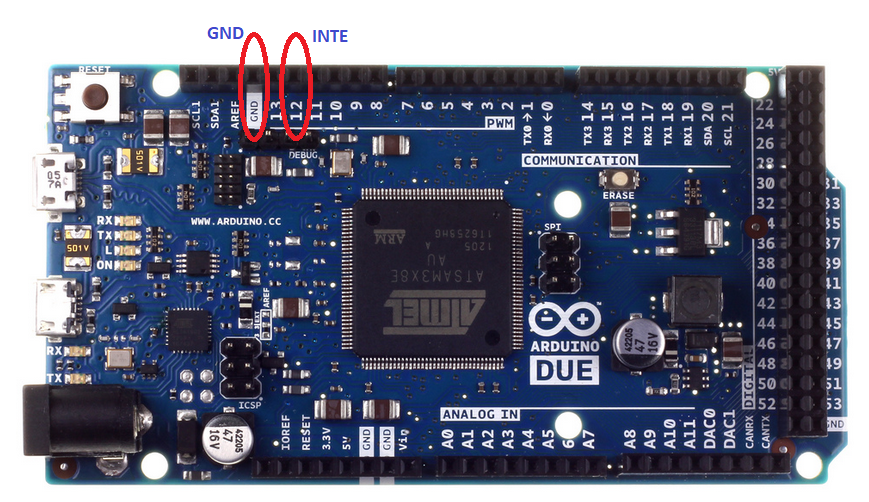
Obviously, after installing the Arduino in the Altair-Duino you will be looking at it from the back side.
It will probably be easier to solder the wires not to the Due directly but to some other points on the PCB
that are connected to them. Maybe Chris can weigh in with a good suggestion.
following pins on the Arduino Due:
Obviously, after installing the Arduino in the Altair-Duino you will be looking at it from the back side.
It will probably be easier to solder the wires not to the Due directly but to some other points on the PCB
that are connected to them. Maybe Chris can weigh in with a good suggestion.

Jim McClanahan
Sep 27, 2017, 10:05:33 AM9/27/17
to Altair-Duino
This is a ways down my to do list, but I was thinking about just using some light-gauge, solid conductor wire, wrapping it around the right pins on the clone, and then connecting it to a small piece of perf board with the components and a 1/8" jack. (Kind of like two or three wire wrap turns on the header.) If I decide to leave it in, I'll probably solder it in somehow but also bring the jack to the back of the case. Meantime I'll probably just do a lashup and use the same kind of strain relief I used for my USB cable.
Thanks,
Jim
David Hansel
Oct 8, 2017, 9:51:32 AM10/8/17
to Altair-Duino
Here are some videos showing the Music System in action.
I think it's pretty neat given that this is very early technology being emulated on an Arduino!
As always - many thanks to Mike (Douglas) for collecting all this and making it available!
I think it's pretty neat given that this is very early technology being emulated on an Arduino!
As always - many thanks to Mike (Douglas) for collecting all this and making it available!

Chris Davis
Oct 20, 2017, 11:58:59 AM10/20/17
to Altair-Duino
I'm going to get another order of PC boards soon and will be adding the resistor and two capacitors to the new board, plus a couple solder pads to connect the audio jack.
Tom Lake
Oct 20, 2017, 2:21:52 PM10/20/17
to Altair-Duino
So the new AltairDuino will have the music hardware built-in? If so, looks like I'll be ordering another one! :)

Randy
Oct 20, 2017, 5:51:38 PM10/20/17
to Altair-Duino
With 21 kits showing in stock at this time, I hope we don't see a new example of the "Osborne Effect"...
PS, I want another one as well.
Chris Davis
Oct 20, 2017, 5:59:24 PM10/20/17
to Altair-Duino
It’s really not that big of a deal, just a resistor and two capacitors.
Tom Lake
Oct 20, 2017, 8:59:50 PM10/20/17
to Altair-Duino
To me, it's magic! :)
Jim McClanahan
Oct 21, 2017, 3:46:49 PM10/21/17
to Altair-Duino
I'm thinking I'll get one of the proto shield boards to put between the Arduino and the front panel. With that I could easily hook up the audio and also wire in a switch to let me pull the two lines out for another serial port.
Jim
Chris Davis
Dec 10, 2017, 5:39:59 PM12/10/17
to Altair-Duino
I finally got around to playing with the music system. Pretty amazing for 1977 stuff!

Frank P.
May 15, 2018, 3:11:33 PM5/15/18
to Altair-Duino
I just hooked up my audio jack (the kit-provided jack is a mono jack, by the way, so left channel only if you plug a stereo plug into it) and tried out the Altair Music System (loaded via switch settings 1101.) I am really impressed... Back in my Commodore 64 days, I was pretty impressed by Commodore's SID chip and the various software packages designed to tickle it in ingenious ways; but here, five years earlier, the Altair Music System's ability to wring so much sound out of a single digital bit is totally mind-blowing. I'm wondering if the source code for the Music System is around anywhere, to see how they performed this magic.
I found that using TeraTerm and setting its "Paste delay per line" (found in Additional settings/Copy and Paste) to 150ms, I can reliably paste a .MUS file at 9600 bps without incurring the slowdown introduced by a per-character delay (which never really goes down anywhere near 1ms). Plus, by pasting the .MUS files directly, it's not necessary to ever leave the Music System via RET to paste a hex encoded music file, and then go back into it via EX 0 to score and play the tune. You can just go:
NEW
<paste a .MUS file>
SCORE
PLAY
And thanks to Chris for adding the audio tap to the 1.4 board. Instead of soldering wires from the jack to the board, I used a pair of left-over header pins and a pair of Raspberry Pi prototyping wires to improvise a plug/socket so the board wouldn't be permanently tethered to the case.

martin baker
May 22, 2018, 12:02:44 PM5/22/18
to Altair-Duino
Okay now. Well, I guess I can just quit working on the Dynakit amplifier kit I'm working on. 😛😛😛
Reply all
Reply to author
Forward
0 new messages