
Programming Real Arduino DUE for the Altair-Duino ???
257 views
Skip to first unread message

Walt Perko
Nov 15, 2021, 4:06:42 PM11/15/21
to Altair-Duino
Hi,
I bought a real Arduino Due from the Arduino Store ... decent sale price now;
When I goto run the programming for the Altair-Duino this is what I get;
G:\UploadBinaryDue>upload altair8800.bin COM53
Erasing flash and entering upload mode...
Uploading altair8800.bin...
Atmel SMART device 0x285e0a60 found
SAM-BA operation failed
G:\UploadBinaryDue>

da...@hansels.net
Nov 15, 2021, 6:43:35 PM11/15/21
to Altair-Duino
I have never experienced this error before so I don't think I can help with that.
I would suggest you try to upload a program to the Due via the Arduino IDE and
if that doesn't work then try googling the error message and ask on the Arduino forums.
People there are much more likely to have seen this before and have an idea of what could be causing it.
if that doesn't work then try googling the error message and ask on the Arduino forums.
People there are much more likely to have seen this before and have an idea of what could be causing it.
Message has been deleted
Message has been deleted
Walt Perko
Nov 15, 2021, 10:27:42 PM11/15/21
to Altair-Duino
Hi,
I tried the "hard way" too and get this error;
Arduino: 1.8.16 (Windows 10), Board: "Arduino Uno"
Warning: Board breadboard:avr:atmega328bb doesn't define a 'build.board' preference. Auto-set to: AVR_ATMEGA328BB
In file included from C:\Users\wperk\Documents\Arduino\Altair8800\Altair8800.ino:24:0:
host.h:21:2: error: #error requires Arduino Mega2560, Arduino Due or Windows/Linux PC
#error requires Arduino Mega2560, Arduino Due or Windows/Linux PC
^~~~~
exit status 1
#error requires Arduino Mega2560, Arduino Due or Windows/Linux PC
This report would have more information with
"Show verbose output during compilation"
option enabled in File -> Preferences.
On Monday, November 15, 2021 at 6:27:38 PM UTC-8 furba...@gmail.com wrote:
also make sure your due is disconnected from anything on any TX/RX line if you keep getting the error. pull the DUE out of the altair board if you have it plugged into the front panel.On Monday, November 15, 2021 at 9:25:15 PM UTC-5 John Galt wrote:SAM-BA operation failed
one cause of this can be your connected to the native usb port and not the programming port, swap the usb connection and see if that solves it.
Walt Perko
Nov 15, 2021, 10:36:47 PM11/15/21
to Altair-Duino
Hi,
Also, in my "Device Manager" the real Arduino DUE shows up as a "Bossa Program Port (COM53)" ... not an Arduino anything ???
That's the same as the "clone" I bought from China.

wils...@gmail.com
Nov 15, 2021, 11:07:22 PM11/15/21
to Altair-Duino
To ask a dumb question... did you install the board definition using the Library manager (Tools -> Manage Libraries)?
Walt Perko
Nov 15, 2021, 11:18:53 PM11/15/21
to Altair-Duino
Hi,
I installed all the SparkFun SDxxx libraries and other other libraries in the instructions as I could find them in the giant list of libraries.
Seems to me the Arduino IDE should see the Arduino DUE, the .INO file and find the libraries online if they're not on my computer anyway.

Chris Davis
Nov 16, 2021, 10:58:02 AM11/16/21
to Altair-Duino
Since you're getting this error with the command line programmer, it has nothing to do with your Arduino IDE installation. If I were having this problem I would try it on another computer.
I think the fact you're seeing the port identified as "Bossa Program Port" means something. I have always seen it identified as "Arduino Due Programming Port". Maybe you have a different driver installed?
Walt Perko
Nov 16, 2021, 8:25:10 PM11/16/21
to Altair-Duino
Hi,
I actually did try doing both types of programming the Arduino DUE board and got the same errors.
I looked around for a solution to the Bossa Program Port problem, but the last thing I saw said use a different USB port and I've tried it on four different ports on both computers.

Terry Fox
Nov 16, 2021, 11:00:36 PM11/16/21
to Altair-Duino
My guess is that you have installed a different USB device that is using the same PID/VID identity as the Due, so the driver for THAT device is being loaded instead of the one for the DUE. A quick Google search for "Bossa program port driver" shows several potential devices, including a Lego something. You should do that Google search, and see if any of the devices listed there have been installed on your computers.
This may not be absolutely precise, but in general: When you plug a device into a USB port, the computer requests information from that device. Included is a Vendor ID (VID) and Product ID (PID). windows then uses that VID/PID combo to identify which driver to use with that device. Occasionally, the same VID/PID is used by different programmers (a mistake), so the wrong driver is activated. I believe this is your problem. There are programs that allow you to see the VID/PID of connected devices, but you can also see the VID/PID in Device Manager for that device. This will tell you what the VID/PID of the plugged in device is, but it NOT tell you about any conflicts.
I have had to fix this type of issue in the past when working with Digilent/Xylinx FPGA boards. I ended up changing the PID on the FPGA board and driver. That was about ten years ago, so I'm a little hazy about the details.
Another possible idea might be to use a program called "Zadig", which allows one to select which drivers to load for which device. I have used it some for running different Software Defined Radio hardware/software, but I have no idea if it will help you.
I hope that helps.
Terry, N4TLF
Walt Perko
Nov 18, 2021, 2:04:32 PM11/18/21
to Altair-Duino
Hi,
I agree since I have special MIDI software, 3D CAD software and several different programming environments for robotics even though I don't use Arduino for anything but the Altair-Duino Pro I built and that came pre-programmed.
So far the Arduino IDE hasn't clobbered any of my work software I feel I need to give up on trying to fix the problem in fear of screwing something I need almost daily.
Message has been deleted
Walt Perko
Nov 18, 2021, 9:38:13 PM11/18/21
to Altair-Duino
Hi,
I did try this on two different PCs with the same errors since both PCs have pretty much the same software installed.
I did a new install of the Arduino IDE on both computers since I don't use Arduino for anything but the Altair-Duino Pro.
On Thursday, November 18, 2021 at 1:58:01 PM UTC-8 furba...@gmail.com wrote:
if you have another computer i would recommend a separate start with it.to rule out what the issue is.
Message has been deleted
Tom Wilson
Nov 19, 2021, 2:18:35 AM11/19/21
to John Galt, Altair-Duino
Have you just selected the correct driver in Device Manager?
Right click on the serial port device and select Update Driver. From there, you can manually select the driver used for that specific instance (that device plugged into that port.)
On Thu, Nov 18, 2021 at 9:30 PM John Galt <furba...@gmail.com> wrote:
you would have to clean out the other machine so the Arduino has clean usb access.i had a few issues when i installed the sketch software so i could recompile the Altair code.i know i just had to make sure after all the library installs that the tools-> board mapped to the DUE and selected the programming port and not native.so that i could communicate and upload the new sketch to the DUE.you get errors if the Tools-> board is set wrong or defaults to something else.
--
You received this message because you are subscribed to the Google Groups "Altair-Duino" group.
To unsubscribe from this group and stop receiving emails from it, send an email to altair-duino...@googlegroups.com.
To view this discussion on the web visit https://groups.google.com/d/msgid/altair-duino/5596f3be-f9e2-44a5-a690-a12ca7847cc9n%40googlegroups.com.
Walt Perko
Nov 19, 2021, 6:46:32 AM11/19/21
to Altair-Duino
Hi,
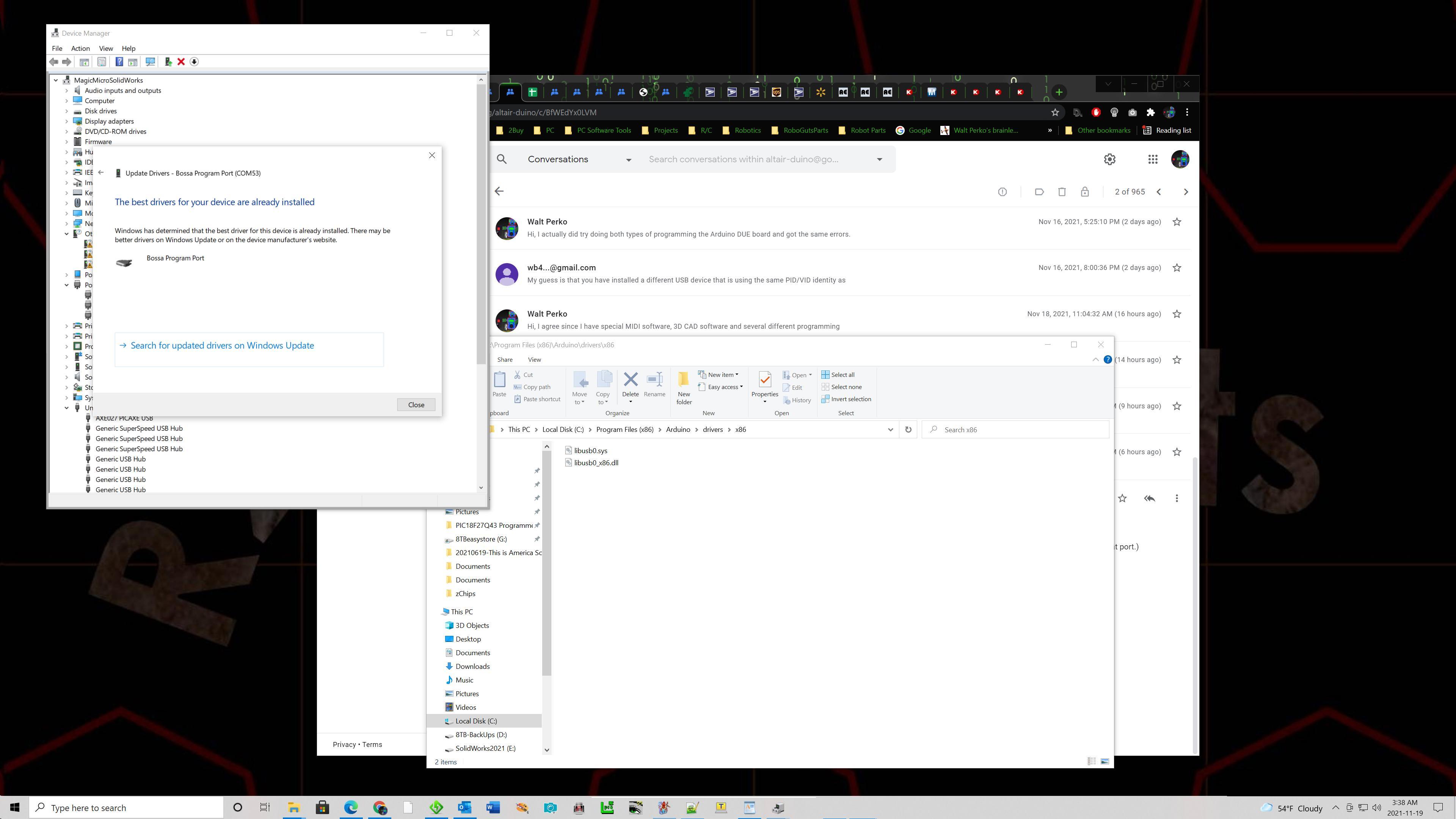
Yes, I have been trying to point the computer to the Arduino drivers ... but it always comes up with the Bossa Program Port as the best.
I can't seem to get it to use anything else.


Richard Deane
Nov 19, 2021, 6:57:14 AM11/19/21
to Walt Perko, Altair-Duino
Please can confirm which board your ARDUINO ide configured for.
Richard
To view this discussion on the web visit https://groups.google.com/d/msgid/altair-duino/0aa54986-a501-4df7-bc73-e2953812932an%40googlegroups.com.
Walt Perko
Nov 19, 2021, 7:26:50 AM11/19/21
to Altair-Duino
Hi,
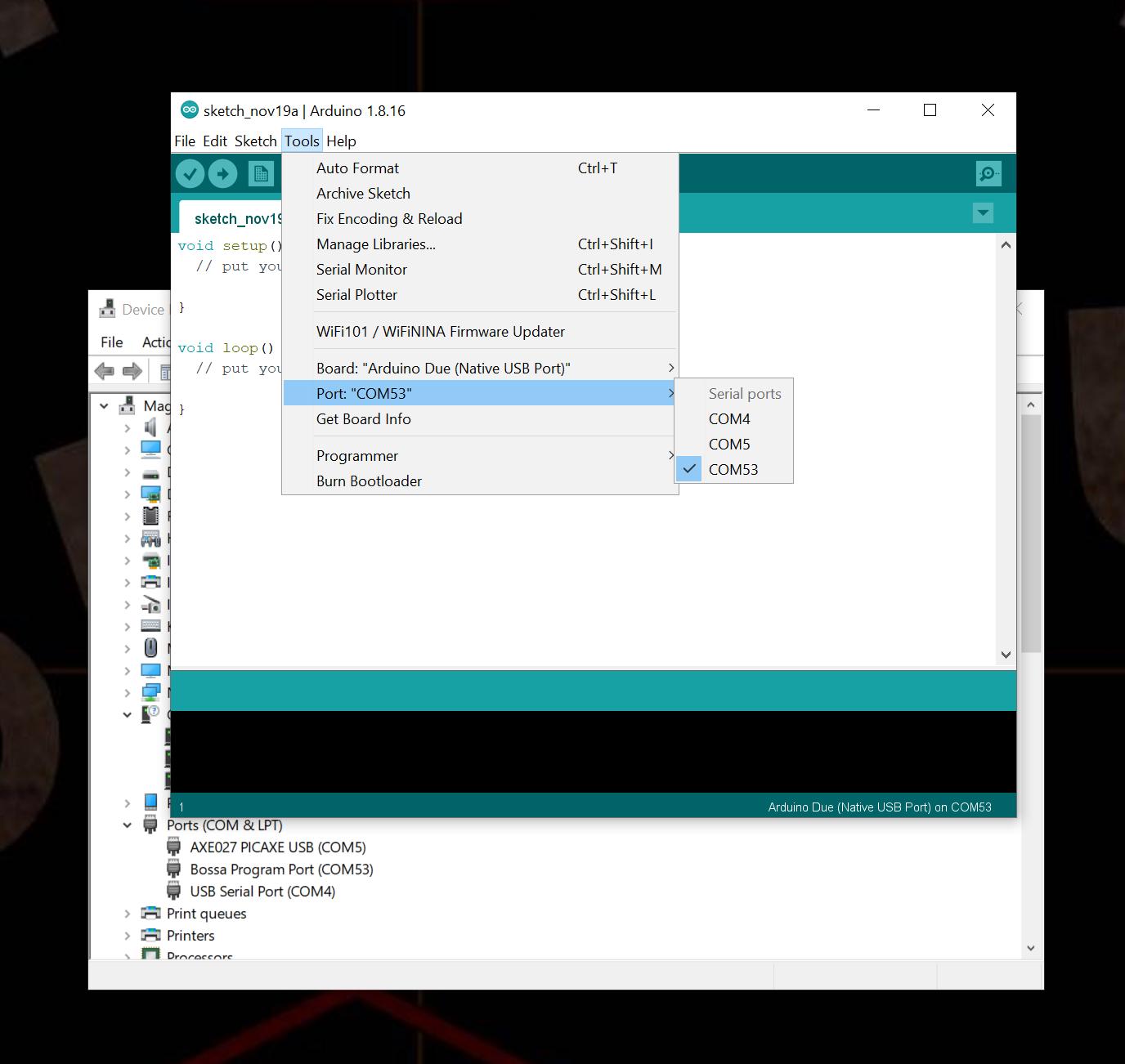
I was trying to program using the command window in Windows 10 that fails, then I switched to the Arduino IDE setting it up for the DUE;
Message has been deleted
Terry Fox
Nov 19, 2021, 11:56:27 AM11/19/21
to Altair-Duino
If I am correct about the VID/PID issue, it does not matter whether you are using the Arduino IDE or command line programming, or anything else. The VID/PID issue is within the basic Windows USB driver selection. The fact that you still see the Bossa driver instead of the Arduino driver points to this.
You need to use a different computer than the ones with the Bossa driver, or change the VID/PID info for both the Arduino board and its driver, or completely remove the Bossa driver from that computer.
I think that you can kill the Bossa driver loading by plugging in the Due, then got to Windows Device Manager, then delete the Bossa driver COMPLETELY from that computer. Unplug the Due and maybe reboot. Then plug the Due back in, and point Windows to the Arduino driver.
The above is not the exact procedure, but an overview of what you need to do. If you are not comfortable with the above, you probably should not do it.
And, note that this will remove the Bossa driver, so any hardware that relied on THAT driver will no longer function with that computer, as that USB driver is no longer there for Windows to load.
Someone more experienced with USB VID/PID conflicts can probably provide more details, or a better procedure.
And yes, you should also use the proper USB port on the Due.
Terry
On Friday, November 19, 2021 at 11:19:51 AM UTC-5 furba...@gmail.com wrote:
switch board to programming port instead of native port.
Walt Perko
Nov 19, 2021, 7:19:05 PM11/19/21
to Altair-Duino
Hi,
I've done both Programming Port and Native Port and get the same errors.
I'm not going to screw with my PC as I need the other programs functional on a daily basis.
I need to find somebody that uses Arduino regularly to install the Altair-Duino software for me ... and maybe get it on the "clone" DUE too just to see if it really is a clone.
Tom Wilson
Nov 19, 2021, 7:32:46 PM11/19/21
to Walt Perko, Altair-Duino
Where are you located? Maybe someone who lives close by can help.
To view this discussion on the web visit https://groups.google.com/d/msgid/altair-duino/bbcff4f6-ed8d-47cd-9380-f2431ed46538n%40googlegroups.com.
Walt Perko
Nov 19, 2021, 9:03:25 PM11/19/21
to Altair-Duino
Hi,
I live in Las Vegas, NV. Although there is individual tech here, a few high-tech companies even, I've never found a tech group other than webpage developers and the Pololu robot club.
I don't attend the Pololu robot club because they meet in the evenings and this town has too many drunk drivers to go the 10-miles from home to Pololu.
Terry Fox
Nov 19, 2021, 11:41:19 PM11/19/21
to Altair-Duino
Walt,
Can you look at what VID/PID your Arduino Due shows up as when you connect it to one of your computers? Do this:
1. Plug in the Due using the Programming port.
2. Right click on the Windows icon on the bottom-left of the screen, and select Device Manager.
3. Under Ports (COM & LPT), select the Due board. I'm not sure, it will either show up as an Arduino or Bossa device.
3. Under Ports (COM & LPT), select the Due board. I'm not sure, it will either show up as an Arduino or Bossa device.
4. Right click on that device, and click on Properties selection menu.
5. Click on the Details tab. Under Property drop down menu, select hardware IDs.
6. Let us know what the VID and PID is displayed. Due programming port should be: VID=2341 and PID=003D&REV_0001
Due Native port should be VID=2341, but PID should be 003e
(my "official" DUEs (all four) show these values. I'm looking for an ebay DUE that I have somewhere)
7. Note that the Bossa default VID/PID for most non-Arduino Atmel SAMx devices should be VID=03eb PID=6124
It could be that your Due has the wrong VID/PID combination, and therefore loading a Bossa driver instead of the Arduino one. I believe there is also an old Windows USB tool that showed VID/PID of connected USB devices, but I can't remember the name. Changing the Due's VID/PID will need to be researched some.
Please let us know the results of the above test.
Terry, N4TLF
Walt Perko
Nov 20, 2021, 10:53:41 AM11/20/21
to Altair-Duino
Hi,
Info from the real Arduino DUE I bought from the Arduino store https://store-usa.arduino.cc/products/arduino-due Connected on the Programming USB Port;
Device Manager - Ports (COM & LPT) - Bossa Program Port (COM53) - Properties - Details = Value - Bossa Program Port
Property = Hardware Ids
USB\VID_03EB&PID_6124&REV_0110
USB\VID_03EB&PID_6124
Property = Compatible Ids
USB\Class_02&SubClass_02&Prot_00
USB\Class_02&SubClass_02
USB\Class_02
Property = Driver version
1.4.3.0
Info from the CLONE Arduino DUE I bought from AliExpress.com Connected on the Programming USB Port;
Property = Manufacturer
Arduino AG (www.arduino.cc)
Device Manager - Ports (COM & LPT) - Bossa Program Port (COM53) - Properties - Details = Value - Bossa Program Port
Property = Hardware Ids
USB\VID_03EB&PID_6124&REV_0110
USB\VID_03EB&PID_6124
Property = Compatible Ids
USB\Class_02&SubClass_02&Prot_00
USB\Class_02&SubClass_02
USB\Class_02
Property = Driver version
1.4.3.0
Terry Fox
Nov 20, 2021, 12:00:15 PM11/20/21
to Altair-Duino
OK, thanks for this info Walt. It shows why the Bossa USB driver is being loaded, the VID/PID on your boards are reporting as a Bossa board. As to why this is, I'm not sure ATM. Most of my Dues are from a couple years ago, maybe when the Arduino store split in two the US VID/PIDs changed?
Can anyone else help?
Terry, N4tlF
Message has been deleted
Tom Wilson
Nov 20, 2021, 8:01:32 PM11/20/21
to John Galt, Altair-Duino
Maybe the answer here is to buy a Rasbperry Pi. Set that up in a nice little Argon One case, and use that for programming the Due.
On Sat, Nov 20, 2021 at 3:53 PM John Galt <furba...@gmail.com> wrote:
at this point uninstall all the BOSSA stuff get what you need out of the Due then reinstall and just eliminate the Bossa stuff
To view this discussion on the web visit https://groups.google.com/d/msgid/altair-duino/b22a9e95-9077-4753-9bf6-4f79ec4a28b7n%40googlegroups.com.
Walt Perko
Nov 20, 2021, 8:39:47 PM11/20/21
to Altair-Duino
Hi,
The Bossa stuff in inside the c:\Program files x86\Arduino folder. I'm not sure how to delete that when I had already tried a full uninstall of the Arduino software, then deleted everything left behind to reinstall the newest Arduino IDE and the Bossa stuff was again installed before I even plugged in the Arduino DUE.
Reply all
Reply to author
Forward
0 new messages