
Pre-Installed Packages upgraded -> no fan control anymore
249 views
Skip to first unread message

Rafal B
Oct 5, 2016, 3:39:41 PM10/5/16
to Alt-F
Yestarday I logged to my D-Link DNS-320 running ALT-F RC4.1 and found out that there are Packages new versions available so I upgraded them by pressing UpdateAll button.
Now I see in System Services\sysctrl in section "System Temperature / Fan Speed relationship" the following message: Unknown board DNS-320L-A1. As far as I remember before the upgrade it were in that section input places to set low and high temperatures for controling fan speed.
Also on Status page I see:
* sysctrl: can't open /etc/misc.conf
* Hardware board DNS-320L-A1 not supported, exiting.
Next discovery:
/tmp/sys/fan1_input and /tmp/sys/pwm are not updated (as far as I remember that files should be updated every 10 minutes?) while /tmp/sys/temp1_input is updated
What happened? How to solve the issue?
Now I see in System Services\sysctrl in section "System Temperature / Fan Speed relationship" the following message: Unknown board DNS-320L-A1. As far as I remember before the upgrade it were in that section input places to set low and high temperatures for controling fan speed.
Also on Status page I see:
* sysctrl: can't open /etc/misc.conf
* Hardware board DNS-320L-A1 not supported, exiting.
Next discovery:
/tmp/sys/fan1_input and /tmp/sys/pwm are not updated (as far as I remember that files should be updated every 10 minutes?) while /tmp/sys/temp1_input is updated
What happened? How to solve the issue?

João Cardoso
Oct 5, 2016, 5:23:27 PM10/5/16
to Alt-F
On Wednesday, 5 October 2016 20:39:41 UTC+1, Rafal B wrote:
Yestarday I logged to my D-Link DNS-320 running ALT-F RC4.1 and found out that there are Packages new versions available so I upgraded them by pressing UpdateAll button.
You should have upgraded to RC5 before updating packages. (this is a 'a posterior' conclusion)
Now I see in System Services\sysctrl in section "System Temperature / Fan Speed relationship" the following message: Unknown board DNS-320L-A1.
Yes, sysctrl (and other webUI pages) now use a different name for boards, DNS-320L-Ax in your case.
As far as I remember before the upgrade it were in that section input places to set low and high temperatures for controling fan speed.
Also on Status page I see:
* sysctrl: can't open /etc/misc.conf
* Hardware board DNS-320L-A1 not supported, exiting.
Same issue.
You have to upgrade to RC5 (and ***READ*** read the top-posted topic about network data corruption on RC5).
If you find that the Firmware Upgrade page also displays the unknown board message, or some similar message before pressing the FlashIt button, you have to poweroff the box and remove the disks, then reboot and try upgrade the firmware again.
After rebooting into RC5 you should have no problem and can replug the disks without further action.
There was another similar report, but without enough details to diagnose. The keywords are: in RC4.1, upgraded packages, unknown board <model> afterwards.
Please report back, so I can add this to the know issues (and fixes)
Thanks!
Rafal B
Oct 6, 2016, 12:32:19 PM10/6/16
to Alt-F
Thanks for information. I was not aware that packages upgrade can lead to this result.
I have read what are the known issues after RC5 installation and what fixes have to be installed afterwords.
I'm a kind of noob in linux so I think I will wait for RC5.1 version which I assume will address all those issues and will have those fixes included.
What is the estimated date when we might expect RC5.1 to be released?
/Rafal
I have read what are the known issues after RC5 installation and what fixes have to be installed afterwords.
I'm a kind of noob in linux so I think I will wait for RC5.1 version which I assume will address all those issues and will have those fixes included.
What is the estimated date when we might expect RC5.1 to be released?
/Rafal
João Cardoso
Oct 6, 2016, 1:05:52 PM10/6/16
to Alt-F
On Thursday, 6 October 2016 17:32:19 UTC+1, Rafal B wrote:
Thanks for information. I was not aware that packages upgrade can lead to this result.
It is the 'sysctrl' program, from the 'alt-f-utils' package. It is important to have that fixed, because fan/temperature control is done through 'sysctrl', and you are now without it.
You can try to "Remove" the 'alt-f-utils' updated package, resurrecting the RC4.1 pre-installed package (the Remove button becomes grayed afterwards).
Please report back your results.
I have read what are the known issues after RC5 installation and what fixes have to be installed afterwords.
The really important one (for you) is the network data corruption problem, and the fix is easy to apply using the webUI, no linux expertise or command line using is needed.
I'm a kind of noob in linux so I think I will wait for RC5.1 version which I assume will address all those issues and will have those fixes included.
What is the estimated date when we might expect RC5.1 to be released?
I'm working on it, but there is no estimated time.
Rafal B
Oct 6, 2016, 1:28:07 PM10/6/16
to Alt-F
Ops, seems to be I'm affected by "corrupted files when downloading from NAS" - my RaspberryPI can't read files from NAS.
So I think I have no choice and have to perform the upgrade to RC5 and even I have to remove disks first as Firmware Update GUI is screwed up:
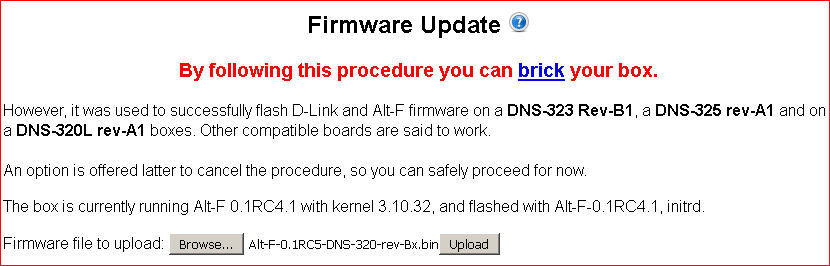
Am I right with this procedure?
What is worrying me the most: once I will remove all 3 disks which are configured in RAID 5 (2 inside + 1 attached on USB) will the RAID 5 configuration persist?
/Rafal
So I think I have no choice and have to perform the upgrade to RC5 and even I have to remove disks first as Firmware Update GUI is screwed up:
Am I right with this procedure?
What is worrying me the most: once I will remove all 3 disks which are configured in RAID 5 (2 inside + 1 attached on USB) will the RAID 5 configuration persist?
/Rafal
Rafal B
Oct 6, 2016, 2:02:11 PM10/6/16
to Alt-F
I have removed alt-f-utils package successfully so now it is back 0.1.7 version installed and in System Services \ sysctrl configuration GUI shows "System Temperature / Fan Speed relationship" section properly.
QUESTION: as I did the packages upgrade without flashing RC5 first, is it possible to downgrade all those packages to previous versions? I really would like to avoid RC5 flashing in current stage of my D-Link.
QUESTION: as I did the packages upgrade without flashing RC5 first, is it possible to downgrade all those packages to previous versions? I really would like to avoid RC5 flashing in current stage of my D-Link.
João Cardoso
Oct 6, 2016, 2:11:30 PM10/6/16
to Alt-F
On Thursday, 6 October 2016 18:28:07 UTC+1, Rafal B wrote:
Ops, seems to be I'm affected by "corrupted files when downloading from NAS" - my RaspberryPI can't read files from NAS.
Nothing related. The network corruption on reading is transparent to the user, there is no symptom until you view/play/examine the file.
So I think I have no choice and have to perform the upgrade to RC5 and even I have to remove disks first as Firmware Update GUI is screwed up:
There is nothing wrong with that, all that's accurate (ah, and the DNS-320-rev-B1 is identical to a DNS-320L-rev-A1, except that has half of RAM memory)
Am I right with this procedure?
What is worrying me the most: once I will remove all 3 disks which are configured in RAID 5 (2 inside + 1 attached on USB) will the RAID 5 configuration persist?
Have you never suffered from a power loss? It can happens... and RAID5 is not the better world for a newbie.
I don't foresee any problems. But if you are renitent, try first to remove the alt-f-utils package, reverting it to the RC4.1 shipped version.
That's all I can say...
Rafal B
Oct 6, 2016, 2:31:06 PM10/6/16
to Alt-F
So if it is not related then why I'm getting: "error opening [nfs://192.168.1.100/mnt/MyNAS/Pictures/picture1011.jpg]" when trying to open file from D-Link by nfs?
I can open all files via samba on my windows machine.
I did removal of alt-f-utils so I'm back to 0.1.7 but still firmware update GUI is not fixed (is the same as in attached previously screenshot)
Is it possible to flash again RC4.1 in another way than via Firmware Update GUI? Maybe in putty? I hope flashing again RC4.1 will revert all upgraded packages to original versions.
I really need a help to get back to the stage before I did packages upgraded... Please help
/Rafal
I can open all files via samba on my windows machine.
I did removal of alt-f-utils so I'm back to 0.1.7 but still firmware update GUI is not fixed (is the same as in attached previously screenshot)
Is it possible to flash again RC4.1 in another way than via Firmware Update GUI? Maybe in putty? I hope flashing again RC4.1 will revert all upgraded packages to original versions.
I really need a help to get back to the stage before I did packages upgraded... Please help
/Rafal
Rafal B
Oct 6, 2016, 3:16:01 PM10/6/16
to Alt-F
OK, I'm a little bit upset that I can't open files via nfs so I was wrong writing I can't flash the RC4.1 firmware again - Browse and Upload buttons are there and do their job so I did flashing again RC4.1 but it doesn't caused that packages are reverted to previous versions and still I can' open files via nfs :-(
Time to flash RC5 and apply the fix for "Network data corruption" ...
/Rafal
Time to flash RC5 and apply the fix for "Network data corruption" ...
/Rafal
Rafal B
Oct 6, 2016, 4:34:28 PM10/6/16
to Alt-F
OK, RC5 flashed successfully.
RaspberryPi read files from NAS on D-Link via nfs :-)
Two issues:
- Status page is empty
- Copying and then activating Alt-F from mnt/MyNAS to mnt/sda3 or mnt/sdb3 (using new feature available in Alt-F Package Manager) causing that MySQL database is not found by RaspberryPi/KODI - so I have to keep Alt-F installed originally in mnt/MyNAS and therefore can't apply fix for "Network data corruption" as it require to be launched from sda or sdb...but fortunately I have no issues with downloading files from NAS....
The reason why I can't copy ALT-F to sda3 nor sdb3 is that ALT-F is 77MB but size of sda3 and sdb3 is only 25MB.
/Rafal
RaspberryPi read files from NAS on D-Link via nfs :-)
Two issues:
- Status page is empty
- Copying and then activating Alt-F from mnt/MyNAS to mnt/sda3 or mnt/sdb3 (using new feature available in Alt-F Package Manager) causing that MySQL database is not found by RaspberryPi/KODI - so I have to keep Alt-F installed originally in mnt/MyNAS and therefore can't apply fix for "Network data corruption" as it require to be launched from sda or sdb...but fortunately I have no issues with downloading files from NAS....
The reason why I can't copy ALT-F to sda3 nor sdb3 is that ALT-F is 77MB but size of sda3 and sdb3 is only 25MB.
/Rafal
João Cardoso
Oct 7, 2016, 10:21:16 AM10/7/16
to al...@googlegroups.com
On Thursday, 6 October 2016 21:34:28 UTC+1, Rafal B wrote:
OK, RC5 flashed successfully.
RaspberryPi read files from NAS on D-Link via nfs :-)
Two issues:
- Status page is empty
*Read* this forum top-posted messages and the RC5 announcement post followup, it contains instructions about it.
- Copying and then activating Alt-F from mnt/MyNAS to mnt/sda3 or mnt/sdb3 (using new feature available in Alt-F Package Manager) causing that MySQL database is not found by RaspberryPi/KODI
That's probably due to the path change. It can be that MySQL itself doesn't find it.
- so I have to keep Alt-F installed originally in mnt/MyNAS and therefore can't apply fix for "Network data corruption" as it require to be launched from sda or sdb...
That shouldn't happen, all filesystems should be possible.
What is /mnt/MyNas? an external USB with a label in the filesystem? an internal disk filesystem with a label on it?
What does the 'mount' command displays?
but fortunately I have no issues with downloading files from NAS....
The corruption (which happens when reading files from the NAS) deploys *no* errors or warnings, you can't rely on an apparently successful operation.
The reason
Wasn't it because of MySQL?
why I can't copy ALT-F to sda3 nor sdb3 is that ALT-F is 77MB but size of sda3 and sdb3 is only 25MB.
sda3/sdb3 only have 25MB? why are they so small? leftovers from the d-link firmware? If that is the case, you would better use sda4/sdb4, which uses to be 512MB.
Reply all
Reply to author
Forward
0 new messages