alt-f noob needing help

2,086 views
Skip to first unread message

Eric Jeffery

unread,
Oct 23, 2021, 5:58:25 PM10/23/21
to Alt-F
H all, i just got my hands on a DNS-325 that is running ALT-F and I am trying to install packages on it, specifically minidlna_1.3.0_arm and I just cant figure it out.

using the web GUI 
packages, alt-f gives me the error Installing Alt-F in /mnt/sda2 Installing ipkg Trying downloads.sourceforge.net... fail, no Packages file. Trying downloads.sourceforge.net... fail, no Packages file. You don't seem to have enabled feeds, a name server configured, or a working internet connection, and no /tmp/ipkg_*_arm.ipk file found. Exiting

An error occurred 

Please help I know nothing about using telnet.

Jeremy Laidman

unread,
Oct 23, 2021, 6:16:55 PM10/23/21
to Alt-F
Have you correctly added it to your network? The error message suggests not. Check the status page show an IP address? Check the settings under Setup>>Host.

Cheers
Jeremy


--
You received this message because you are subscribed to the Google Groups "Alt-F" group.
To unsubscribe from this group and stop receiving emails from it, send an email to alt-f+un...@googlegroups.com.
To view this discussion on the web visit https://groups.google.com/d/msgid/alt-f/6857b601-641a-46de-8903-3bdc92a78575n%40googlegroups.com.

Eric Jeffery

unread,
Oct 23, 2021, 7:18:57 PM10/23/21
to Alt-F
I figured it out using a usb drive and manually moving the file into the ALT-F folder

Eric Jeffery

unread,
Oct 23, 2021, 7:24:21 PM10/23/21
to Alt-F
All the settings are correct as far as I can tell.

I do have  minidlna_1.3.0_arm working now but the web GUI is still not functioning correctly.

now I get This error - This is a frontend to ipkg. Use it always! Usage: ipkg -install [] ipkg -clean ipkg -update ipkg -help ipkg standard ipkg command ipkg is not installed, install using the webUI.

An error occurred 


Joao Cardoso

unread,
Oct 23, 2021, 8:16:39 PM10/23/21
to Alt-F

The SSL certificates of sourceforge, as well as many others, have changed. You have to update the Alt-F CA bundle certificates, by executing the command

wget --no-check-certificate https://curl.se/ca/cacert.pem -O /etc/ssl/ca-bundle.crt

After that the ‘ipkg’ command and the webui should work normally.

Use the webUI to install Alt-F packages.

You can follow the discussion at https://sourceforge.net/p/alt-f/tickets/424/#a811 but the above command is all that is needed.


Those who were able to install the openssl package update have a cron job installed and running (if "settings" were saved after the update) that runs ‘update_ca.sh’ weekly (which is more than enough!) to do the ca-bundle update. Check by using Services->System, cron Configure.

Joao Cardoso

unread,
Oct 23, 2021, 8:33:01 PM10/23/21
to Alt-F
On Sunday, October 24, 2021 at 1:16:39 AM UTC+1 Joao Cardoso wrote:

The SSL certificates of sourceforge, as well as many others, have changed. You have to update the Alt-F CA bundle certificates, by executing the command

wget --no-check-certificate https://curl.se/ca/cacert.pem -O /etc/ssl/ca-bundle.crt

After that the ‘ipkg’ command and the webui should work normally.

Use the webUI to install Alt-F packages.


Ah, I forget to say that the above command updates the CA bundle only in memory, so you have to install one Alt-F package on disk (ipkg itself is enough) from the webUI before the next reboot. After installing Alt-F on-disk packages on disk, updated CA bundles will also be saved on disk.
If you have possibly  messed up the on-disk Alt-F pkg system, it's better to delete it (also using the webUI), and start fresh. And please read the README.txt under the /Alt-F folder. Really!

Eric Jeffery

unread,
Oct 23, 2021, 8:33:38 PM10/23/21
to Alt-F
I don't understand execute command in what, how, who? I'm a total noob here.

I guess I'm asking for a step by step process.

Thanks

Eric Jeffery

unread,
Oct 23, 2021, 8:47:11 PM10/23/21
to Alt-F
I have read through the discussion you mentioned and understand none of it.

how are these commands being sent?

I have the web GUI and windows that's it, that is as far as my knowledge goes.

I did read the README.txt and I know I took a chance of bricking the box but i have no knowledge of linux programing, telnet or anything other than windows... 

Joao Cardoso

unread,
Oct 23, 2021, 10:57:13 PM10/23/21
to Alt-F
On Sunday, October 24, 2021 at 1:47:11 AM UTC+1 kapta...@gmail.com wrote:
I have read through the discussion you mentioned and understand none of it.

how are these commands being sent?

I have the web GUI and windows that's it, that is as far as my knowledge goes.

OK, if you have access to the webUI, your box has a name or a IP and you have assigned a password.
You need to telnet or ssh the box. Both telnet and ssh are shipped with windows 10, but you have to turn them on. I recommend turning on openssh, a ssh client, search for it. An example:

Enable the OpenSSH Server in Windows 10
  1. Open the Settings app and go to Apps -> Apps & features.
  2. On the right, click Manage optional features.
  3. On the next page, click the button Add a feature.
  4. In the list of features, select OpenSSH Server and click on the Install button.
  5. Restart Windows 10
You now have to run the "command prompt" (command line on a black text windows) on Win10, use the magnifying glass icon next to the lower left windows icon and search for 'cmd' and open it.
A new text window appears (the command prompt) 
Type there 'ssh root@your_nas_name_or_IP'.
You might be told that the identity of your nas is unknown, accept.
You will be prompted for a password, use the one you use in the Alt-F webUI.
From now on you are typing commands on the NAS as the 'root' user. You can easily loose all your data if you type the wrong command. No "are you sure" questions will be made, your commands will just be executed, so be very careful.
Now type the command 'wget ...' in the previous post. It shouldn't print any errors or warnings.
You are done, type 'exit' and you are back to the win10 prompt. type 'exit' to close the text window.
That's all.
Go to the Alt-F webUI and use Packages->Alt-F to install on-disk packages. At first you have to specify where you want to install them, such as /mnt/sda2 or /mnt/md2. You have to do that before a reboot, as I said in the previous post.

If anything goes wrong, post a screen shoot or the entire command sequence and error messages, don't just say "I did it and it didn't work".


I did read the README.txt
I meant the README.txt in the box under the /Alt-F folder that was created when you installed the Alt-F on-disk package.

Joao Cardoso

unread,
Oct 23, 2021, 11:04:25 PM10/23/21
to Alt-F
On Sunday, October 24, 2021 at 3:57:13 AM UTC+1 Joao Cardoso wrote:
On Sunday, October 24, 2021 at 1:47:11 AM UTC+1 kapta...@gmail.com wrote:
I have read through the discussion you mentioned and understand none of it.

how are these commands being sent?

I have the web GUI and windows that's it, that is as far as my knowledge goes.

OK, if you have access to the webUI, your box has a name or a IP and you have assigned a password.
You need to telnet or ssh the box. Both telnet and ssh are shipped with windows 10, but you have to turn them on. I recommend turning on openssh, a ssh client, search for it. An example:

Enable the OpenSSH Server in Windows 10
  1. Open the Settings app and go to Apps -> Apps & features.
  2. On the right, click Manage optional features.
  3. On the next page, click the button Add a feature.
  4. In the list of features, select OpenSSH Server and click on the Install button.
  5. Restart Windows 10

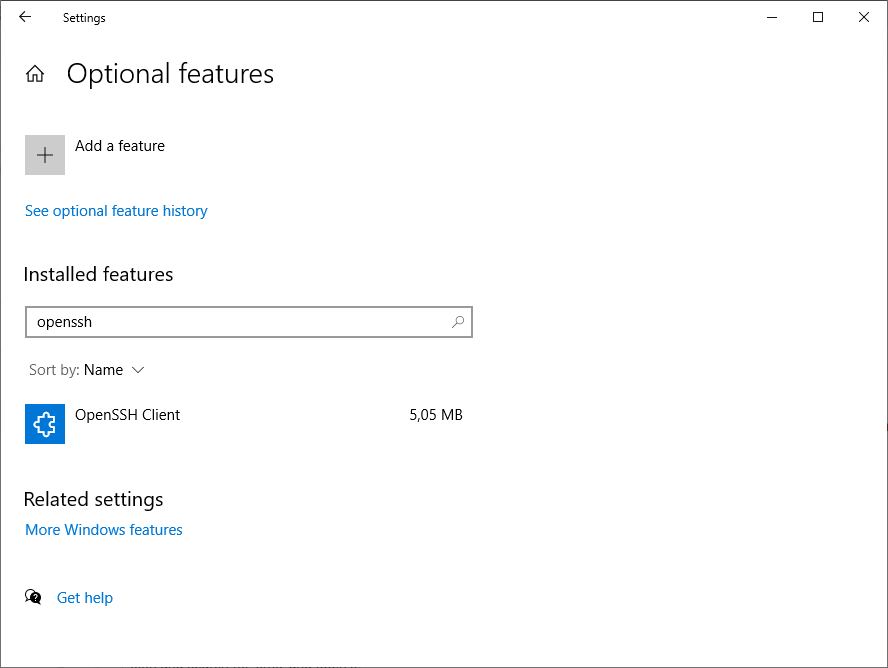
Damn, I meant openssh client, not openssh server:

Screenshot 2021-10-24 035933.png

Eric Jeffery

unread,
Oct 24, 2021, 1:31:30 AM10/24/21
to Alt-F
ok thank you I appreciate this info, this I can work with, I think I can get it done.

and yes I know that you meant the README.txt in the ALT-F folder which I did read and then chose to take the chance of making a brick because I have to work with what I know and have as well as confusing documentation, this explanation is more within my limits of knowledge and is very useable to a non programmer like me I would like suggest making all of your instructions like this.

Thanks again

Eric Jeffery

unread,
Nov 11, 2021, 10:37:07 AM11/11/21
to Alt-F

I just got around to doing this and it worked like a charm. all is working now.

Thank you again Joao Cardoso for all the help.

Ps. an updated release with this in it might be nice.

Eric Jeffery

unread,
Nov 11, 2021, 10:46:04 AM11/11/21
to Alt-F
looks like I spoke too soon now I am getting this error when I try to update the packages

Upgrading minidlna on /Alt-F from 1.2.1 to 1.3.0... Nothing to be done An error ocurred, return value: 28. Collected errors: Only have -450414684 available blocks on filesystem /Alt-F/, pkg minidlna needs 1

An error occurred 


Eric Jeffery

unread,
Nov 11, 2021, 11:52:26 AM11/11/21
to Alt-F
I attempted using  1.0-004-packages_install_upgrade_error.fix through the webUI, system utilities, fixes as per bug ticket #421. doing this completely broke the system and had to remove the alt-f packages also with webUI and start all over again at the beginning.

I then tried the fix again after reinstalling the packages and it worked. Yay so happy everything updated.
I will get the hang of this eventually I think.

Thanks
Eric

Bert K

unread,
Dec 28, 2021, 3:08:34 PM12/28/21
to Alt-F
Thank you Joao for this vital information.  I updated the Wiki so others might find it faster (update to the sourceforge filepaths and summarized the wget above).

--Bert

Carlos Queiroz

unread,
Jan 25, 2022, 7:57:46 AM1/25/22
to Alt-F
Thank you very much man! You've been done great work and helped so much! 

Valeu meu caro! Muito grato! (I'm writing in Portuguese a thank you message because I imagine that you are Brazilian, like me.  If you are...please share your pix so I can buy you a beer. ) 

fru...@gmail.com

unread,
Jan 25, 2022, 9:54:29 AM1/25/22
to Alt-F
I recently installed Ver 1 of Alt-F on my 323. The OS is working ok but all I see on the Alt-F packages page are options to remove packages.
The Available Packages section says "None"
I updated the SSL certificate as described above.
I refreshed the package feeds section. I do not see Minidlna as an option. Nor do I see any packages I can DL.
Any ideas?

Tom Schmidt

unread,
Jan 25, 2022, 10:22:36 AM1/25/22
to al...@googlegroups.com
Check the Packages -> Alt-F Package Feed paths.  It should have these paths:


--
You received this message because you are subscribed to the Google Groups "Alt-F" group.
To unsubscribe from this group and stop receiving emails from it, send an email to alt-f+un...@googlegroups.com.

fru...@gmail.com

unread,
Jan 25, 2022, 10:32:03 AM1/25/22
to Alt-F
Yep. That's what I have. Still nothing. I did download the minidlna ipk file but I don't have any idea how to install it

fru...@gmail.com

unread,
Jan 25, 2022, 11:09:42 AM1/25/22
to Alt-F
Nevermind. I did a DUH!!! I had the disabled checkbox in front of the Feed on the packages page.
Seems to work much better if I actually let the box get the files :-)

Tom Schmidt

unread,
Jan 25, 2022, 4:29:01 PM1/25/22
to al...@googlegroups.com
Glad to hear it was a simple fix.

Tom

decrepIT

unread,
Aug 16, 2023, 4:16:55 PM8/16/23
to Alt-F
Mr. Cardoso! You are the man! Thanx for dumbing it down for all of us fledgling and struggling linux newbies. 
Reply all
Reply to author
Forward
0 new messages