Getting this to work.

672 views
Skip to first unread message

Dallas Urban

unread,
Jun 3, 2018, 7:49:57 AM6/3/18
to AliceVision

So I get this out of CMake. Does this look right?
If so, I will show errors I'm getting in VS2017


I'm fairly new at this whole compiling thing but I want to understand it particularly when it comes to this system. I own a Scanning company and a modeling company and want to actively contribute to this project in anyway possible. Even if it's just making tutorials once I understand it better. 
 

Dallas Urban

unread,
Jun 3, 2018, 7:53:01 AM6/3/18
to AliceVision
Should I find and install 2015 and use it through there?

Fabien Castan

unread,
Jun 3, 2018, 8:13:07 AM6/3/18
to AliceVision
Hi Dallas,
Thanks for your message. It would be a great contribution to have tutorials!

You should not have "ALICEVISION_BUILD_DEPENDENCIES: ON", this option has been created and tested only on linux. On Windows, it's much easier to use VCPKG.


On Windows, you should run vcpkg to install dependencies (and not rely on ALICEVISION_BUILD_DEPENDENCIES):
# 1/ As you use Visual Studio 2017, you need to force the use of an older version of the compiler (to get compatibility with cuda):
"C:\Program Files (x86)\Microsoft Visual Studio\2017\Community\VC\Auxiliary\Build\vcvarsall.bat" x64 -vcvars_ver=14.0
nmake /version
# should print Version 14.00.xxx
# 2/ Install dependencies
vcpkg install zlib boost openimageio openexr alembic geogram eigen3 ceres

# Create AliceVision project
md build
cd build
cmake .. -DCMAKE_TOOLCHAIN_FILE=%VCPKG_ROOT%\scripts\buildsystems\vcpkg.cmake -DVCPKG_TARGET_TRIPLET=x64-windows -G "Visual Studio 15 2017" -A x64 -T v140,host=x64

Now, you can open "build/aliceVision.sln" in visual studio and build it.

Be careful that cmake has a caching mechanism, so you should remove the build folder before doing it again to avoid mixing problems.


Dallas Urban

unread,
Jun 3, 2018, 8:37:19 AM6/3/18
to AliceVision
Okay. I had tried this originally but got an error. I'll try again and share what happens in a little bit.

Dallas Urban

unread,
Jun 3, 2018, 8:46:17 AM6/3/18
to AliceVision
I get an Nmake Error. It looks like the issue is contextual. 

Am I missing what /version should be?


Dallas Urban

unread,
Jun 3, 2018, 9:02:52 AM6/3/18
to AliceVision

Should I move the CMakeLists.txt from AliceVision folder into the root directory so it recognizes it or am I misunderstand the context?


Dallas Urban

unread,
Jun 3, 2018, 9:26:55 AM6/3/18
to AliceVision

I read through the Cmake help so I tried adding the source at the end but then it gives this. Error looks more related to how cmake is setup maybe?


Fabien Castan

unread,
Jun 3, 2018, 9:53:25 AM6/3/18
to AliceVision
Open the VS Command Prompt and launch:
vcpkg install zlib boost openimageio openexr alembic geogram eigen3 ceres 
  
Then, when all dependencies have been successfully installed, you can go into AliceVision repository and:
cd ALICEVISION_REPOSITORY_FOLDER

Dallas Urban

unread,
Jun 3, 2018, 10:01:00 AM6/3/18
to AliceVision
K. I apologize for the confusion on the small stuff but I want to make sure I understand what kind of mistakes people might be making.

Dallas Urban

unread,
Jun 3, 2018, 4:16:02 PM6/3/18
to AliceVision
Okay. I finally got it to output the .sln.

I'll let you guys know how Build went.

Dallas Urban

unread,
Jun 3, 2018, 4:19:07 PM6/3/18
to AliceVision


Are these "Could NOT find" writes an issue?


Fabien Castan

unread,
Jun 3, 2018, 4:20:20 PM6/3/18
to AliceVision
Great!

Fabien Castan

unread,
Jun 3, 2018, 4:21:37 PM6/3/18
to AliceVision
No, you should ignore them.

Dallas Urban

unread,
Jun 3, 2018, 4:43:07 PM6/3/18
to AliceVision

Please Advise on what I should do from here.

I'm also a little confused on intergrating with meshroom and launching that GUI.

I'm excited to get it going. If all goes smooth from here I will play with it a little then get working on compiling and usage tutorials.


Dallas Urban

unread,
Jun 3, 2018, 4:46:50 PM6/3/18
to AliceVision

Which PATH and LD_LIBRARY_PATH are these referring to?


Fabien Castan

unread,
Jun 3, 2018, 5:45:47 PM6/3/18
to AliceVision
Perfect, so now you have AliceVision compiled! Congrats ;)

Now for the user interface, you need to install Meshroom as explained here: https://github.com/alicevision/meshroom/blob/develop/INSTALL.md.

pip install --index-url=http://download.qt.io/snapshots/ci/pyside/5.11/latest/ pyside2 --trusted-host download.qt.io

Add Meshroom repository to your PYTHONPATH and you should be able to launch Meshroom:
cd MESHROOM_REPOSITORY_FOLDER
set PYTHONPATH=%CD%;%PYTHONPATH%
python meshroom/ui

Meshroom also relies on 2 external files:
- sensor database: a text database of sensor width per camera model. Provided in AliceVision source tree: {ALICEVISION_ROOT}/src/aliceVision/sensorDB/sensor_width_camera_database.txt
- voctree (optional): for larger datasets (>200 images), greatly improves image matching performances. It can be downloaded here: https://gitlab.com/alicevision/trainedVocabularyTreeData/raw/master/vlfeat_K80L3.SIFT.tree.
Environment variables must be set for Meshroom to find those files:
set ALICEVISION_SENSOR_DB=/path/to/database
set ALICEVISION_VOCTREE=/path/to/voctree

Then you should be able to use Meshroom and create reconstructions.

But you can also install 2 plugins to have a better visualization and interaction:

Dallas Urban

unread,
Jun 3, 2018, 9:14:05 PM6/3/18
to AliceVision
It's not letting me drag and drop pictures. Can you think of why that would be happening? 

Dallas Urban

unread,
Jun 3, 2018, 9:18:52 PM6/3/18
to AliceVision

Not sure if this helps or not with images not being able to be dropped in problem.


On Sunday, June 3, 2018 at 3:45:47 PM UTC-6, Fabien Castan wrote:

Dallas Urban

unread,
Jun 3, 2018, 10:01:14 PM6/3/18
to AliceVision

What's the correct procedure for installing these?


Dallas Urban

unread,
Jun 4, 2018, 7:50:15 AM6/4/18
to AliceVision

Do I need to follow these steps before trying to Cmake the plugin on your hub?


Fabien Castan

unread,
Jun 4, 2018, 9:15:44 AM6/4/18
to Dallas Urban, AliceVision
Before installing the visualization plugins, did you manage to launch a reconstruction with Meshroom?
The plugins are not a requirement to use the software.

Dallas Urban

unread,
Jun 4, 2018, 10:51:55 AM6/4/18
to AliceVision


I can launch the program but I can't drag and drop or load in any pictures.

I've tried restarting and double checking what details I can think of. Let me know what you need to know what might be going wrong.


Fabien Castan

unread,
Jun 4, 2018, 11:06:59 AM6/4/18
to AliceVision
I need to see the log of your console when you drop images to see the error message.
But there is probably one of the 3 following lines missing:
set PATH=%PATH%;YOUR_ALICEVISION_INSTALL_DIR/bin
set PATH=%PATH%;YOUR_ALICEVISION_INSTALL_DIR/lib
set ALICEVISION_SENSOR_DB=/path/to/database

And for the next steps of the pipeline it is also important to set:
set ALICEVISION_VOCTREE=/path/to/voctree


Dallas Urban

unread,
Jun 4, 2018, 11:23:54 AM6/4/18
to AliceVision
Do I set those lines in command console or in a config file somewhere?

Fabien Castan

unread,
Jun 4, 2018, 11:29:32 AM6/4/18
to Dallas Urban, AliceVision
You can create a Meshroom.bat script file like that:
set PATH=C:\dev\pyenvs\meshroom_5.10\Lib\site-packages\PySide2;C:\dev\AliceVision\build\Windows-AMD64-Release\Release
set ALICEVISION_SENSOR_DB=C:/AliceVision/data/cameraGenerated.txt
set ALICEVISION_VOCTREE=C:/AliceVision/data/vlfeat_K80L3.tree
set PYTHONPATH=C:\dev\meshroom\
set QML2_IMPORT_PATH=C:\AliceVision\plugins\qml
cd C:\dev\meshroom\
C:\dev\pyenvs\meshroom_5.10\Scripts\python.exe meshroom\ui\__main__.py


--
You received this message because you are subscribed to the Google Groups "AliceVision" group.
To unsubscribe from this group and stop receiving emails from it, send an email to alicevision+unsubscribe@googlegroups.com.
Visit this group at https://groups.google.com/group/alicevision.
To view this discussion on the web visit https://groups.google.com/d/msgid/alicevision/388d6d65-45ad-484f-abea-a99af8788178%40googlegroups.com.

For more options, visit https://groups.google.com/d/optout.

Dallas Urban

unread,
Jun 4, 2018, 11:51:01 AM6/4/18
to AliceVision
It doesn't appear that I have a "cameraGenerated.txt" file anywhere on my computer.

Otherwise this is the directory updates for my computer. Do you see any obvious complications?


Dallas Urban

unread,
Jun 4, 2018, 11:54:56 AM6/4/18
to AliceVision

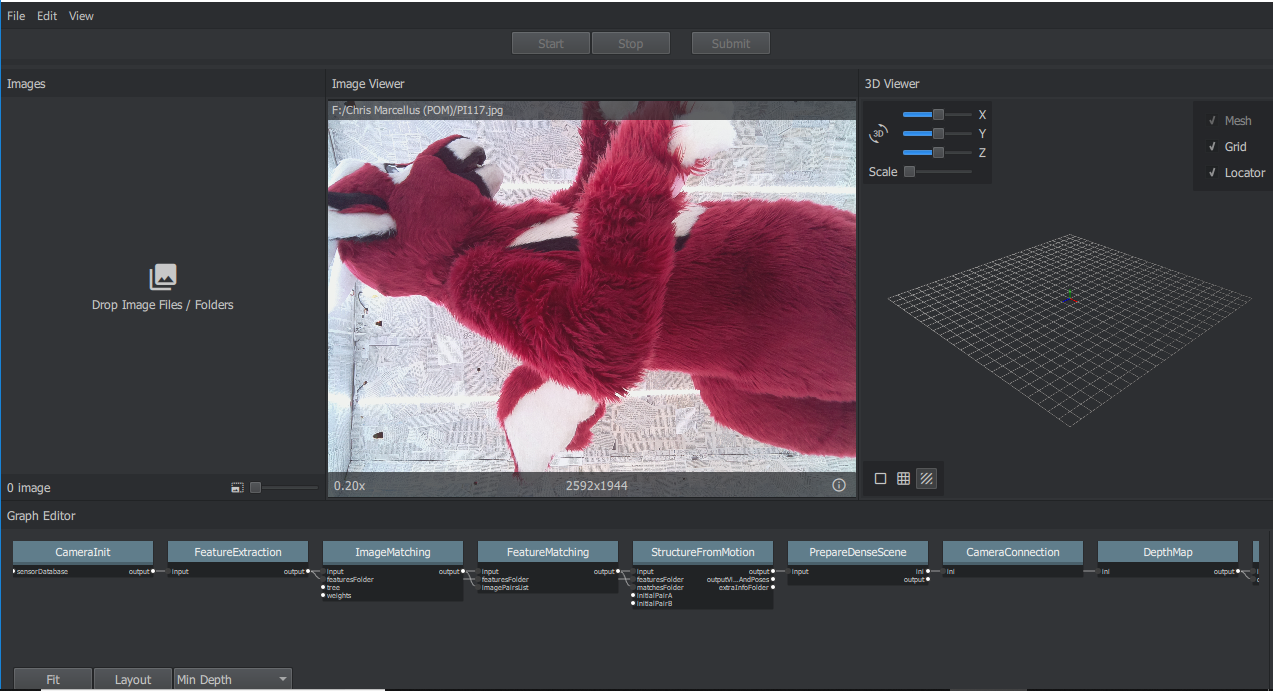
If I drag and drop picture to the viewer it shows up but they won't show up if I drag and drop them under Images.
Dallas Urban

unread,
Jun 4, 2018, 11:56:38 AM6/4/18
to AliceVision

Here is console end for above image. 


Fabien Castan

unread,
Jun 4, 2018, 12:27:24 PM6/4/18
to Dallas Urban, AliceVision
Ah yes, sorry I renamed the file as cameraGenerated.txt on my computer.
As explained in the documentation https://github.com/alicevision/meshroom/blob/develop/INSTALL.md
It's here: {ALICEVISION_ROOT}/src/aliceVision/sensorDB/sensor_width_camera_database.txt

If you don't get the images when you drag&drop them on the "Drop Images Files", it means that you don't have the path to AliceVision builded files (or there is an error in the path).

Before launching meshroom, can you try to launch: "aliceVision_cameraInit.exe -h"
to check if it's correctly available in your PATH.

Dallas Urban

unread,
Jun 4, 2018, 1:41:54 PM6/4/18
to AliceVision
I'm not finding that .exe anywhere on my computer. Could be the problem. Could that be related to the errors that showed up when I built from inside VS?

Fabien Castan

unread,
Jun 4, 2018, 2:18:59 PM6/4/18
to Dallas Urban, AliceVision
Ah yes, you are not supposed to have an error in visual studio.

Can you copy/paste the build log ?

Dallas Urban

unread,
Jun 4, 2018, 2:54:43 PM6/4/18
to AliceVision

Dallas Urban

unread,
Jun 4, 2018, 2:58:07 PM6/4/18
to AliceVision

Not sure why it did it that way in the previous post but the build log is the first one.

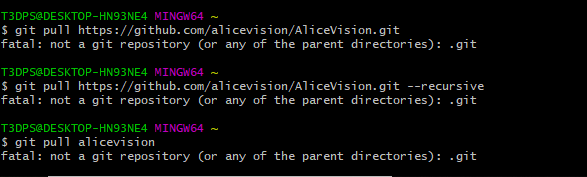
Also when I try and drag and drop this shows up in the command window


Fabien Castan

unread,
Jun 4, 2018, 3:13:26 PM6/4/18
to Dallas Urban, AliceVision

Dallas Urban

unread,
Jun 4, 2018, 3:22:00 PM6/4/18
to AliceVision

What am I doing wrong?


Fabien Castan

unread,
Jun 4, 2018, 3:31:11 PM6/4/18
to Dallas Urban, AliceVision
cd ALICEVISION_REPOSITORY_FOLDER
git pull

Dallas Urban

unread,
Jun 4, 2018, 3:40:16 PM6/4/18
to AliceVision
Got it. Trying a new build on it now.

On Monday, June 4, 2018 at 1:31:11 PM UTC-6, Fabien Castan wrote:
cd ALICEVISION_REPOSITORY_FOLDER
git pull

Dallas Urban

unread,
Jun 4, 2018, 3:59:27 PM6/4/18
to AliceVision
It works now! I'm curious what you changed to get it working. Mind sharing a brief explanation? 

Dallas Urban

unread,
Jun 4, 2018, 4:08:17 PM6/4/18
to AliceVision
How do I go about installing the optional plugins?

Fabien Castan

unread,
Jun 4, 2018, 4:19:31 PM6/4/18
to Dallas Urban, AliceVision
It is 2 fixes I made few days ago when making the setup for appveyor. It was just an ambiguous namespace (just need to make it explicit) and also a problem of include path.

Can you try to make a reconstruction?

For the plugins, Yann has started to updated the build instructions:


Dallas Urban

unread,
Jun 4, 2018, 4:22:37 PM6/4/18
to AliceVision
I've got a reconstruction going. I'll update when I have more info. It's confirmed to work in RC so I'll let you know.

Side Question: Have you guys considered a way for us to setup an auto reconstruction. It would help us fulfill client orders if we don't have to manually start each reconstruction each time. Not a huge priority but my business partner did bring the question up.

Fabien Castan

unread,
Jun 4, 2018, 4:30:18 PM6/4/18
to Dallas Urban, AliceVision
Side Question: Have you guys considered a way for us to setup an auto reconstruction. It would help us fulfill client orders if we don't have to manually start each reconstruction each time. Not a huge priority but my business partner did bring the question up.

You can use the command line to make a reconstruction:

meshroom_photogrammetry -i INPUTFOLDER -o OUTPUTFOLDER

The command line itself is written in python, so you can use it a a starting point to write custom scripts to automatically launch many reconstructions.

We also have the ambition to make a multi-project view in meshroom which would be more efficient to launch many data sets.

Reply all
Reply to author
Forward
0 new messages