Meshroom Tutorial

1,651 views
Skip to first unread message

Alban-Brice Pimpaud

unread,
Mar 23, 2021, 9:40:18 AM3/23/21
to AliceVision

Hello,
Just a quick notice to let you know i wrote a tutorial (only in french, but you'd probably get a translated version from google tools) about my workflow to scale a model in Meshroom from CCTag coded target. One could probably make it more straightforward, but that's it for now... Hope this can help and let me know if there are ways to improve it... Thanks

Alban

Philmore971

unread,
Mar 25, 2021, 8:40:14 PM3/25/21
to AliceVision
Voilà une bonne nouvelle.
Merci par avance, même si je n'ai pas encore lu.

This is good news.
Thanks in advance, even though I haven't read it yet.

Fabien Castan

unread,
Mar 26, 2021, 4:35:01 AM3/26/21
to AliceVision, Alban-Brice Pimpaud
Hi Alban,

Thank you for sharing your experience! I just read it, it is clear and precise.
It could be great to include a concise version in the manual. Would it be possible to use your images in the manual while respecting the copyrights?

There is some documentation about the scaling with CCTag here (but quite technical and not yet ported to the manual):

@natowi: What do you think?


De : alice...@googlegroups.com <alice...@googlegroups.com> de la part de Philmore971 <philippe....@gmail.com>
Envoyé : vendredi 26 mars 2021 01:40
À : AliceVision <alice...@googlegroups.com>
Objet : Re: Meshroom Tutorial
 
⚠️ Do not click or open unknown attachments ⚠️ **

--
You received this message because you are subscribed to the Google Groups "AliceVision" group.
To unsubscribe from this group and stop receiving emails from it, send an email to alicevision...@googlegroups.com.
To view this discussion on the web visit https://groups.google.com/d/msgid/alicevision/b1189b4c-424d-4a9e-8c11-199112bc6bfdn%40googlegroups.com.

Alban-Brice Pimpaud

unread,
Mar 26, 2021, 3:09:26 PM3/26/21
to AliceVision

Hello,

Thanks for the link, I have seen a similar post in the issues tab on the Github (https://github.com/alicevision/meshroom/issues/1223), but I found one of the pic possibly misleading, especially when you branch in parallel SfMTransform and PrepareDenseScene from the StructureFromMotion box. In my case, although performing a correct SfMTransform on the sparse cloud, the whole process ended trying to produce the mesh from the untransformed alignement...

Steven Lancaster

unread,
Apr 6, 2021, 9:45:27 AM4/6/21
to AliceVision
Hi, I have been trying this workflow for a few days now, but have not yet completed it successfully. My problem is that after SfMAlignment it is always the plane containing the CCTag targets that is aligned, so I end up with a double image of the object, completely opposite to your example. I still have a few things I want to try to improve my set-up and photo set, but I was thinking it would be really useful to have your photo set to pass through my workflow. I could then see if I can reproduce your results, and hopefully help me solve my problems. I realize this is a big ask, but it would be a very valuable addition to your tutorial. Would that be possible ? Thanks

Alban-Brice Pimpaud

unread,
Apr 6, 2021, 6:29:52 PM4/6/21
to alice...@googlegroups.com

Hello,

I am sorry to hear that you get stuck following this workflow, and unfortunately I am not going to be allowed to share the photoset used, since this material doesn't belong to me...

Anyhow, if you don't mind, and if your photo set isn't too huge, maybe can I, or someone else here, have a look to check what's wrong with your set or with my method (that possibly does not work for all use cases... lack of testing).  Or maybe some screen captures may help to understand what's wrong. Please let me know.

You received this message because you are subscribed to a topic in the Google Groups "AliceVision" group.
To unsubscribe from this topic, visit https://groups.google.com/d/topic/alicevision/J_uzEE0OeQk/unsubscribe.
To unsubscribe from this group and all its topics, send an email to alicevision...@googlegroups.com.
To view this discussion on the web visit https://groups.google.com/d/msgid/alicevision/5d5087d5-4ee5-4817-80fd-abdd19edc3e3n%40googlegroups.com.

Steven Lancaster

unread,
Apr 7, 2021, 11:16:52 AM4/7/21
to AliceVision
Hi Alban, thanks for the reply. I thought it was worth asking just in case, but quite understand the situation. I may well take you up on your offer thank you, there are a couple of things I want to eliminate first though so as not to waste your time. I need to re-take the pictures with another camera to get  better aperture control, and also improve the quality of the reference plane to make it as featureless as I can. Will keep you posted ...

Steven Lancaster

unread,
Apr 8, 2021, 3:24:55 PM4/8/21
to AliceVision
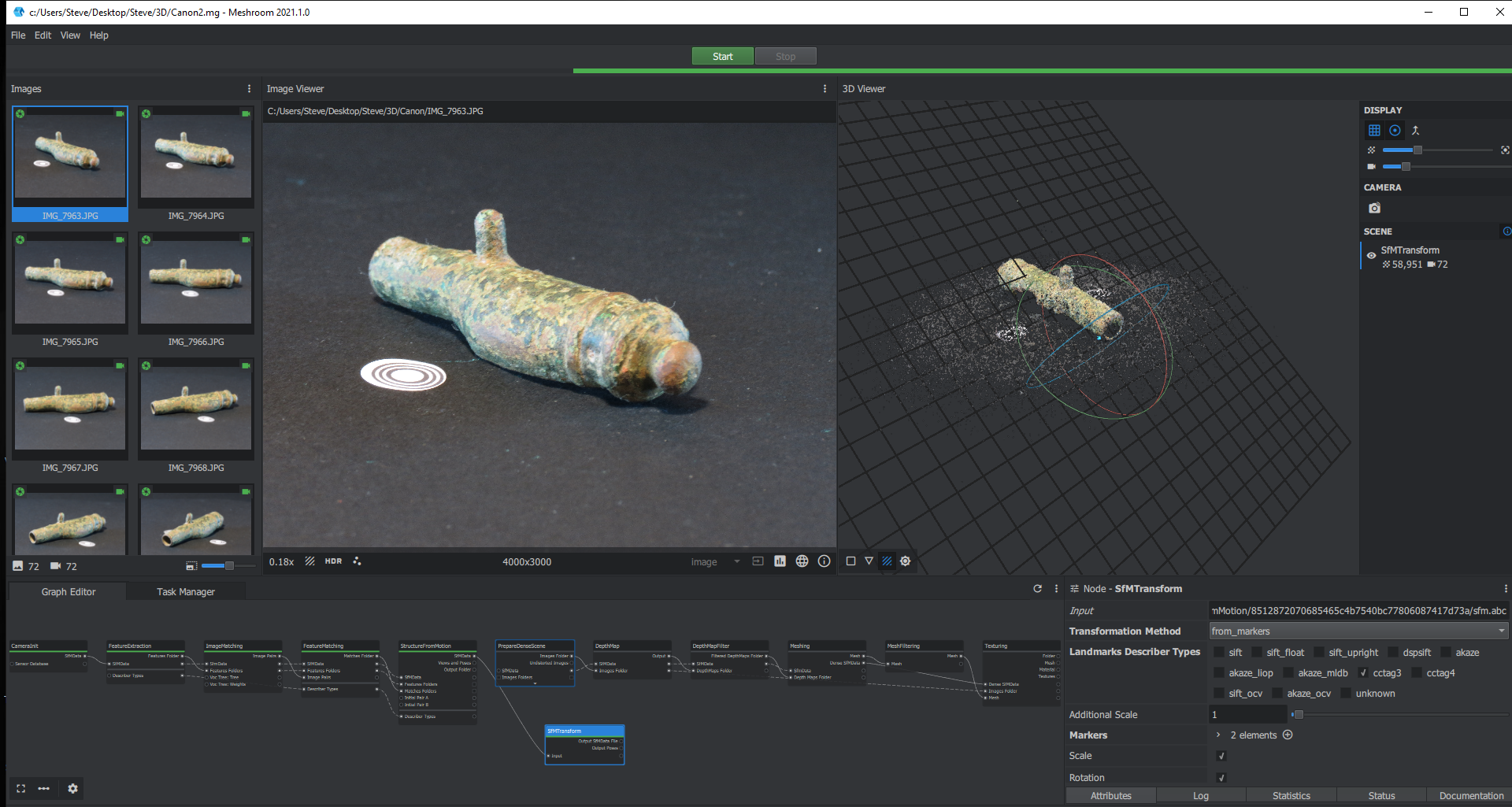
Here are some screenshots from my latest run, scanning a small metal toy canon. I took 24 photos per circuit at three levels, for each orientation of the canon, making 144 photos in total. I am still having the same problem trying to get a composite solution. Meshroom seems to be happy with my photos, although there is certainly room for quality improvement. The two markers are 4.6cm apart, so I set one as the origin and the other as x=4.6, y=0, z=0. As you can see I am getting a double image from the SfMAlignment. If anyone has any ideas what I am doing wrong, or needs further information or screenshots please do let me know. Despite reading the available documentation I confess I am still not clear on the mechanics of how the two sets of images are meant to merge, so any further explanation would be very welcome. 
Canon-ref-scene.pngCanon-full-run.png


Fabien Castan

unread,
Apr 8, 2021, 5:06:18 PM4/8/21
to Steven Lancaster, AliceVision
Hi Steven,
You need to enable CCTag3 on the FeatureExtraction node. If it is enabled, it should be listed in the Viewer (here we see only SIFT in the viewer). And I do not understand how you can have 0 sift features listed in the Viewer!
You should print CCTag markers on a flat & rigid surface and you need white margins around the CCTags.
Best,


De : alice...@googlegroups.com <alice...@googlegroups.com> de la part de Steven Lancaster <stev...@gmail.com>
Envoyé : jeudi 8 avril 2021 21:24

À : AliceVision <alice...@googlegroups.com>
Objet : Re: Meshroom Tutorial
⚠️ Do not click or open unknown attachments ⚠️ **

Here are some screenshots from my latest run, scanning a small metal toy canon. I took 24 photos per circuit at three levels, for each orientation of the canon, making 144 photos in total. I am still having the same problem trying to get a composite solution. Meshroom seems to be happy with my photos, although there is certainly room for quality improvement. The two markers are 4.6cm apart, so I set one as the origin and the other as x=4.6, y=0, z=0. As you can see I am getting a double image from the SfMAlignment. If anyone has any ideas what I am doing wrong, or needs further information or screenshots please do let me know. Despite reading the available documentation I confess I am still not clear on the mechanics of how the two sets of images are meant to merge, so any further explanation would be very welcome. 
Canon-ref-scene.pngCanon-full-run.png


--
You received this message because you are subscribed to the Google Groups "AliceVision" group.
To unsubscribe from this group and stop receiving emails from it, send an email to alicevision...@googlegroups.com.

Alban-Brice Pimpaud

unread,
Apr 8, 2021, 7:28:01 PM4/8/21
to alice...@googlegroups.com

Hello,

Some other comments that work in photogrammetric processing in general :


- even if you don't use all of them for the scaling, it would be a good idea to add more markers (or other features that add some textures to your picture) ; it helps at creating feature points during alignement and reconstruction processes ; at the very least, try to have 3 coordinates  (then you'll get your object horizontally aligned, and your plate will match the scene grid in the end). Even if CCTags are circular, crop and print them as squares with a confortable margin. Regarding you object, I would have print a CCTag grid on kind of a A4 sheet.

- you should try to increase your depth of field ; here, the usable field of your pics is quite low (blurred in both fore- and background, therefore no way to anchor some robust key points out of the object, which doesn't populate enough room in each photo).

- metallic objects have a high specularity , you can decrease it with the help of a polarized filter (and optionnally complemented with a cross-polarized lightsource, but it might be a bit advanced for now) ;

- lights are a bit to sharp... a screen attached in front of your light sources will help at getting a more diffuse light ; or you can try to bounce them with white reflectors (i.e. white sheets of A0 paper, not to be seen, just to contribute in the overall illumination)

- you are a little bit over exposed : if you shot in RAWs, you could try to lesser this quickly...


Good luck!

You received this message because you are subscribed to a topic in the Google Groups "AliceVision" group.
To unsubscribe from this topic, visit https://groups.google.com/d/topic/alicevision/J_uzEE0OeQk/unsubscribe.
To unsubscribe from this group and all its topics, send an email to alicevision...@googlegroups.com.
To view this discussion on the web visit https://groups.google.com/d/msgid/alicevision/CY4PR02MB2215CED8D622504FD9378FE8F0749%40CY4PR02MB2215.namprd02.prod.outlook.com.

Steven Lancaster

unread,
Apr 9, 2021, 4:19:59 AM4/9/21
to AliceVision
Hi Fabien
Thanks for that. I did enable CCTag3 in Feature Extraction, but the screen shot was taken after re-loading the .mg file, and I should have clicked on the three dots to the right of HDR to bring up the features, see below. The process does seem to be able to find the tags OK.
Canon-ref-scene2.png

Steven Lancaster

unread,
Apr 9, 2021, 4:27:36 AM4/9/21
to AliceVision
Many thanks Alban, some good advice there. I think I am at the limit of my camera's abilities for these close-up shots, and I am using fairly low-tech lighting at present. Despite that none of my photos was rejected by Meshroom, so I was hoping to at least prove the concept and get the workflow working before investing in better kit. I will certainly try again with more tags as you suggest, and do what I can to improve the lighting.
Steve 

Steven Lancaster

unread,
Apr 9, 2021, 5:02:02 AM4/9/21
to AliceVision
Thanks for all the help and pointers guys, much appreciated. Can I just confirm I have understood the Meshroom workflow correctly please :

1. Load photos for one orientation only.
2. Set CCTag3 and sift in Feature Extraction
3. Add in SfMTransform module after StructureFromMotion. 
4. Set Transformation Method to from_markers, only enable cctag3 in the Landmark Types, and specify cctag locations.
5. Compute SfMTransform and save Output Poses path.
6. Start new Meshroom session, load all photos for both object orientations
7. Leave all modules up to and including Structure from Motion with default values.
8. Add in SfMAlignment module between SfM and PrepareDenseScene
9. For SfMAlignment set Reference to saved Poses path, set Alignment Method to from_cameras_viewid

Is that basically it, have I missed something out or mis-interpreted something ?
Thanks
Steve

Alban-Brice Pimpaud

unread,
Apr 9, 2021, 9:15:58 AM4/9/21
to alice...@googlegroups.com

Yes, I think that's. it. Now you have to  connect your SfMAlignement 'Output SFM File' to both PrepareDenseScene and DepthMap, and your PrepareDenseScene 'Image Folder' output to DepthMap 'Image Folder' Input...

I am not sure but it seems there's only 1 CCTag extracted...

If you were to add 2 other markers (let's say at the mouth and the bottom of your cannon), you could easily find their coordinates by triangulate their relative distances, since they are rigourously on the same plane.

Steven Lancaster

unread,
Apr 9, 2021, 10:09:18 AM4/9/21
to AliceVision
Thanks Alban, that is indeed how I have the subsequent modules set up, so all good hopefully. I did have 2 markers, but as per your and others advice I am going to try again with more. If I am successful I will be sure to post it here
Steve

Steven Lancaster

unread,
Apr 19, 2021, 5:27:21 AM4/19/21
to AliceVision
Just an update to let you know that I now have the workflow running as it should, so thanks again for all your help guys.
Reply all
Reply to author
Forward
0 new messages