
Maya Alembic No Shader on Import
4,874 views
Skip to first unread message

Scott Taylor
Feb 13, 2013, 2:02:43 PM2/13/13
to alembic-d...@googlegroups.com
Hi All,
I'm have a project to use Maya Alembic, but the shader/texture/color
doesn't show up when import. Help.
Scott
I'm have a project to use Maya Alembic, but the shader/texture/color
doesn't show up when import. Help.
Scott

Lucas Miller
Feb 13, 2013, 2:06:31 PM2/13/13
to alembic-d...@googlegroups.com
Do you mean the default shader isn't assigned?
Do you have an example file?
Lucas
Scott
--
You received this message because you are subscribed to the Google Groups "alembic-discussion" group.
To unsubscribe from this group and stop receiving emails from it, send an email to alembic-discuss...@googlegroups.com.
For more options, visit https://groups.google.com/groups/opt_out.
Scott Taylor
Feb 13, 2013, 2:24:59 PM2/13/13
to alembic-d...@googlegroups.com
Hi Lucas,
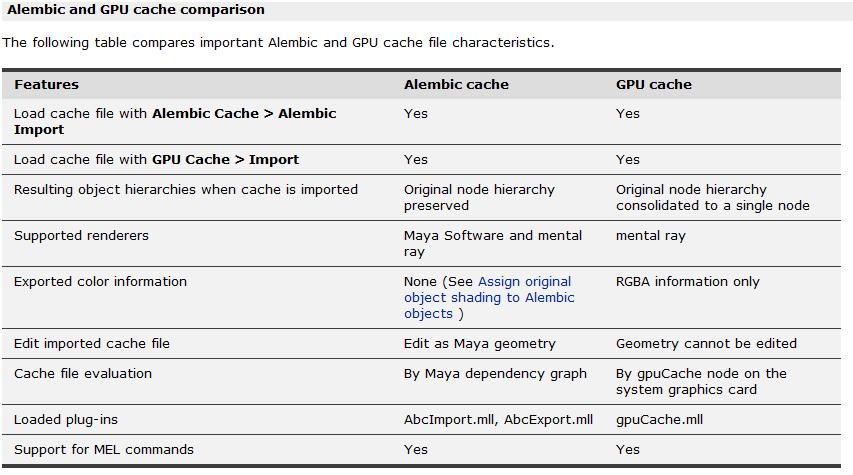
yes, when I export a GPU cache file and then import it into a new maya
scene, a default shader (lambert) is applied to the object, but no
texture map that I had applied to the object before I exported it. I'm
assuming from what Maya says in its documents(see attached) that the
"Exported color information" for "GPU cache" is the "RGBA information
only". So I'm assuming the colors(RGBA) from my texture would import
with the object. Is this not correct?
Scott
yes, when I export a GPU cache file and then import it into a new maya
scene, a default shader (lambert) is applied to the object, but no
texture map that I had applied to the object before I exported it. I'm
assuming from what Maya says in its documents(see attached) that the
"Exported color information" for "GPU cache" is the "RGBA information
only". So I'm assuming the colors(RGBA) from my texture would import
with the object. Is this not correct?
Scott
Lucas Miller
Feb 13, 2013, 2:31:55 PM2/13/13
to alembic-d...@googlegroups.com
I'm not familiar with how the GPU cache is exporting RGBA data.
If it is written out as a face varying geom param under the arbitrary geometry parameter you should be able to load this data by doing:
AbcImport -rcs fileName;
Lucas
Scott Taylor
Feb 13, 2013, 2:52:40 PM2/13/13
to alembic-d...@googlegroups.com
Thanks Lucas, I'll give that a try.
Question:
Should I be using the Alembic cache instead?
Also, I understand that converting maya objects to Alembic cache
objects will help in my systems performance, but will it render the
same quality?
Thx,
Question:
Should I be using the Alembic cache instead?
Also, I understand that converting maya objects to Alembic cache
objects will help in my systems performance, but will it render the
same quality?
Thx,

Francois Chardavoine
Feb 13, 2013, 4:38:47 PM2/13/13
to alembic-d...@googlegroups.com
Alembic is only meant as a geometry cache (similar to OBJ or maya's geometry cache): it does not preserve ANY information related to shading assignments or textures, which is why you just get a default shader on import. It does have the ability to store per-vertex colors (which would be an approximation of your textures and shading networks), and I believe the gpuCache code takes advantage of that. It's also possible to store arbitrary parameters on shapes that can be preserved in the alembic file, such as string parameters that would point to texture files (that could be used to rebuild shaders and File nodes), but that would be up to you to script on top of alembic: it won't handle any of that for you.
Specifically with respect to using gpuCache files: yes, they are alembic files, but they're not an exact representation of your scene. When exporting gpuCache data, meshes get consolidated into single shapes (and I believe triangulated), and generally optimized to display fast within the gpuCache node. Bringing those files back into maya (with "Import Alembic") likely won't give you the result you want.
Finally, from a "render quality" point of view: yes, the geometric quality is fully preserved and should be exactly the same as rendering your initial maya shapes. Again, though, none of the shader assignments are preserved in the alembic file, so you are expected to "connect" an alembic cache to a file that already has the proper shading assignments (or else rebuild them somehow on newly imported geometry).
Francois.
Specifically with respect to using gpuCache files: yes, they are alembic files, but they're not an exact representation of your scene. When exporting gpuCache data, meshes get consolidated into single shapes (and I believe triangulated), and generally optimized to display fast within the gpuCache node. Bringing those files back into maya (with "Import Alembic") likely won't give you the result you want.
Finally, from a "render quality" point of view: yes, the geometric quality is fully preserved and should be exactly the same as rendering your initial maya shapes. Again, though, none of the shader assignments are preserved in the alembic file, so you are expected to "connect" an alembic cache to a file that already has the proper shading assignments (or else rebuild them somehow on newly imported geometry).
Francois.
Scott Taylor
Feb 13, 2013, 5:01:10 PM2/13/13
to alembic-d...@googlegroups.com
ok, good information,
When you say:
"connect" an alembic cache to a file that already has the proper
shading assignments (or else rebuild them somehow on newly imported
geometry).
How would one do that in Maya?
Scott
When you say:
"connect" an alembic cache to a file that already has the proper
shading assignments (or else rebuild them somehow on newly imported
geometry).
Scott

Diego Garces
Feb 13, 2013, 5:17:29 PM2/13/13
to alembic-discussion
Basically when you import an alembic file to your scene you are creating some shapes, maya regular shapes, that get their geometry from the alembic file through a node if it's animated geometry or just on import if it's static.
You can just assign shaders to these shapes normally, as a post process after import. However, the shader assignment lives in the maya scene, not in the alembic file.
If later on, you have to change the geometry, you can reexport the alembic file and use the connect parameter of the Abcimport command to bring the new geometry to your scene, while preserving the shader assignment you did previously.
Cheers,
Diego
Scott Taylor
Feb 13, 2013, 5:38:25 PM2/13/13
to alembic-d...@googlegroups.com
Thanks Diego,
It is getting clearer.
"If later on, you have to change the geometry, you can reexport the alembic
file and use the connect parameter of the Abcimport command to bring the
new geometry to your scene, while preserving the shader assignment you did
previously."
Do you have some examples of these Abcimport -command
Scott
It is getting clearer.
"If later on, you have to change the geometry, you can reexport the alembic
file and use the connect parameter of the Abcimport command to bring the
new geometry to your scene, while preserving the shader assignment you did
previously."
Scott


Ravi Jagannadhan
Feb 13, 2013, 8:34:57 PM2/13/13
to alembic-d...@googlegroups.com
Hi there, this should be in the Maya documentation:
Scott
--
You received this message because you are subscribed to the Google Groups "alembic-discussion" group.
To unsubscribe from this group and stop receiving emails from it, send an email to alembic-discuss...@googlegroups.com.
For more options, visit https://groups.google.com/groups/opt_out.
--
Where we have strong emotions, we're liable to fool ourselves - Carl Sagan
Reply all
Reply to author
Forward
0 new messages