
Script for max bids
266 views
Skip to first unread message

OneStop Marketing
Mar 27, 2017, 3:32:20 AM3/27/17
to AdWords Scripts Forum
Hello,

I am new to scripts and struggling to find an example that set the max cpc for my text campaigns.
The script I need is to place the max cpc for all the adgroups in my MCC account.
What i've done is:
- the adgroup name begins with the max cpc (see attach #1)
The script needs to place the max cpc for all the test ads looking ad the four first figures of the name of the adgroup. With a max of € 1.50 and a minimum of € 0.03
For example:
Adgroup: 5.48 | Inductiefornuis 4-branders, oo | B296319
Max CPC: € 1.00
Adgroup: 0.00 | Neonbuis uv-a 15 w | B300325
Max CPC: € 0.03
Adgroup: 0.15 | Friteuse 650, b400, 10l | B115204
Max CPC: € 0.15
We want to have the opportunity to set a max an minimum bid in the script for all the campaigns and adgroups in my MCC account.
Our text ads starts with the following campaign names:
A)
E)
F)
G)
H)
Any advice and help is much appreciated :)
Thank you.
Attach #1
Vincent Racaza (AdWords Scripts Team)
Mar 27, 2017, 5:10:08 AM3/27/17
to AdWords Scripts Forum
Hi,
To set the maxCPC, you need to call the setCpc() of the AdGroupBidding.
Based on my understanding on your scenario, you want to update the maxCPC of ad groups in all accounts based on the first 4 digits of the ad group name. If my understanding is correct, your MCC script will be something like this:
function main() {
  var accountSelector = MccApp.accounts();
  accountSelector.executeInParallel('processAccount', 'allFinished');
}

function processAccount() {
  var adGroupIterator = AdWordsApp.adGroups()
  .get();

  while(adGroupIterator.hasNext()) {
    var adGroup = adGroupIterator.next()
    //Get maxCpc from first 4 characters of adgroup name
    var maxCpcToSet = adGroup.getName().substring(0, 4);
    adGroup.bidding().setCpc(maxCpcToSet);
    Logger.log('Setting maxCPC for this ad group id ' + adGroup.getId() + ' is done.')
  }
  adGroupIterator.totalNumEntities().toFixed(0);
}


function allFinished(results) {
  for (var i = 0; i < results.length; i++) {
    var result = results[i]
    Logger.log('Customer ID: %s; status = %s.', result.getCustomerId(),
               result.getStatus());
  }
}
Let me know if this is correct. Also, I recommend you to preview the script first instead of running to check on possible results.
Thanks,
Vincent Racaza
AdWords Scripts Team
OneStop Marketing
Mar 28, 2017, 1:18:15 AM3/28/17
to AdWords Scripts Forum
Hello Vincent,
thanks a lot for the fast reply. I think it works fine!
Is it also possible to set a minimum bid and a maximum bid?
Our minimum bid is: € 0,03
Our maximum bid is € 1,50
So when the group name begins with 0.01 it must be return to a max CPC of € 0,03
And when the group name begins with 1.84 it must be return to a max CPC of € 1,50
Best regards,
Thijs
Vincent Racaza (AdWords Scripts Team)
Mar 28, 2017, 2:08:52 AM3/28/17
to AdWords Scripts Forum
Hi Thijs,
Yes, it is possible to set the maxCPC with your conditions. Based on your case, below is the updated script:
function main() {
  var accountSelector = MccApp.accounts();
  accountSelector.executeInParallel('processAccount', 'allFinished');
}


function processAccount() {
  var adGroupIterator = AdWordsApp.adGroups()
  .get();

  while(adGroupIterator.hasNext()) {
    var adGroup = adGroupIterator.next()
    //Get maxCpc from first 4 characters of adgroup name
    var maxCpcToSet = adGroup.getName().substring(0, 4);
//If the first 4 characters is 0.01, then set the CPC to 0.03
if (maxCpcToSet == '0.01') {
adGroup.bidding().setCpc(0.03); //If the first 4 characters is 1.84, then set the CPC to 1.50
} else if (maxCpcToSet == '1.84') {
adGroup.bidding().setCpc(1.50); //Else, just set the first the cpc based on the first 4 characters
} else {
      adGroup.bidding().setCpc(maxCpcToSet);
    }
    Logger.log('Setting maxCPC for this ad group id ' + adGroup.getId() + ' is done.')
  }
  adGroupIterator.totalNumEntities().toFixed(0);
}


function allFinished(results) {
  for (var i = 0; i < results.length; i++) {
    var result = results[i]
    Logger.log('Customer ID: %s; status = %s.', result.getCustomerId(),
               result.getStatus());
  }
}
In the script above, I just added the if-else statements inside the while loop for your conditions. You can also add more if-else statements if you have more conditions that you want to apply.
Let me know if this helps.
OneStop Marketing
Mar 28, 2017, 2:44:03 AM3/28/17
to AdWords Scripts Forum
Hello Vincent,
thanks a lot for your fast reply.
I think i was not totally clear :). Sorry about that.
You set a min bid for 0.01 and a max bid for 1.84. That is correct but I was meaning:
- Every value below 0.03 have to be a maxCPC of € 0,03
- And every value above 1.50 have to be a maxCPC of € 1,50
The 0.01 and 1.84 values where just an example :)
Best Regards,
Thijs
Vincent Racaza (AdWords Scripts Team)
Mar 28, 2017, 3:12:57 AM3/28/17
to AdWords Scripts Forum
Hi Thijs,
Thanks for the clarification.
With your use case above, you just need to change your conditions in your if-else statements. Below will be the updated script:
function main() {
  var accountSelector = MccApp.accounts();
  accountSelector.executeInParallel('processAccount', 'allFinished');
}


function processAccount() {
  var adGroupIterator = AdWordsApp.adGroups()
  .get();

  while(adGroupIterator.hasNext()) {
    var adGroup = adGroupIterator.next()
    //Get maxCpc from first 4 characters of adgroup name
    var maxCpcToSet = adGroup.getName().substring(0, 4);
    //If the first 4 characters is less than 0.03, then set the CPC to 0.03
    if (maxCpcToSet < 0.03) {
      adGroup.bidding().setCpc(0.03);
    //If the first 4 characters is greater than 1.50, then set the CPC to 1.50
    } else if (maxCpcToSet > 1.50) {
      adGroup.bidding().setCpc(1.50);
    //Else, just set the first the cpc based on the first 4 characters
    } else {
      adGroup.bidding().setCpc(maxCpcToSet);
    }
    Logger.log('Setting maxCPC for this ad group id ' + adGroup.getId() + ' is done.')
  }
  adGroupIterator.totalNumEntities().toFixed(0);
}


function allFinished(results) {
  for (var i = 0; i < results.length; i++) {
    var result = results[i]
    Logger.log('Customer ID: %s; status = %s.', result.getCustomerId(),
               result.getStatus());
  }
}
Let me know if you have further clarifications.
OneStop Marketing
Mar 30, 2017, 9:44:13 AM3/30/17
to AdWords Scripts Forum
Hello Vincent,
thanks a lot again :)
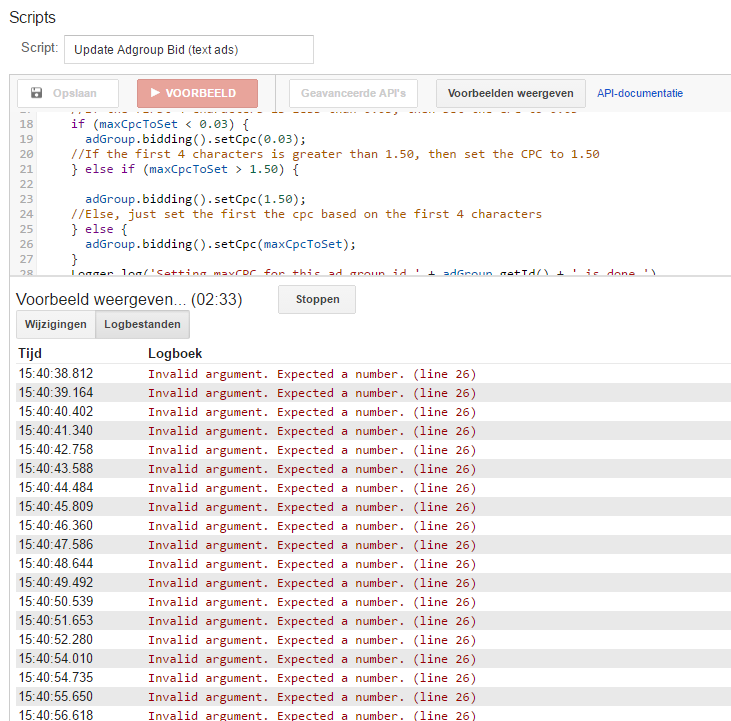
I think there is a little bug in your script in line 26
| 15:40:41.340 | Invalid argument. Expected a number. (line 26) |
And see preview below:
Best regards,
Thijs
Vincent Racaza (AdWords Scripts Team)
Mar 30, 2017, 11:21:58 PM3/30/17
to AdWords Scripts Forum
Hi Thijs,
Apologies for the error your received in the script I provided. The line 26 works perfectly in my test account. However, to make sure it won't generate an error in your end, you can parse it to number:
adGroup.bidding().setCpc(Number(maxCpcToSet));If the issue still persists, please provide to me your CID (Reply privately to author) so I could check.
Thanks
Message has been deleted
OneStop Marketing
Jan 26, 2018, 5:40:37 AM1/26/18
to AdWords Scripts Forum
Hello Vincent,
we have a question about our script:
function main() {  var accountSelector = MccApp.accounts();  accountSelector.executeInParallel('processAccount', 'allFinished');}
function processAccount() {  var adGroupIterator = AdWordsApp.adGroups()
.withCondition("AdGroupName CONTAINS '.'") .withCondition("CampaignStatus != REMOVED") .withCondition("AdGroupStatus != REMOVED") .get(); while(adGroupIterator.hasNext()) { var adGroup = adGroupIterator.next() //Get maxCpc from first 4 characters of adgroup name var maxCpcToSet = adGroup.getName().substring(0, 4); var reg = /[0-9]\.[0-9]{2}/; //Check if maxCpcToSet is a format of [number dot number number] if (reg.test(maxCpcToSet)) { Logger.log("Hey " + maxCpcToSet); //If the first 4 characters is less than 0.03, then set the CPC to 0.03 if (maxCpcToSet < 0.03) { adGroup.bidding().setCpc(0.03); //If the first 4 characters is greater than 1.00, then set the CPC to 1.00 } else if (maxCpcToSet > 1.00) { adGroup.bidding().setCpc(1.00); //Else, just set the first the cpc based on the first 4 characters } else { adGroup.bidding().setCpc(maxCpcToSet); } Logger.log('Setting maxCPC for this ad group id ' + adGroup.getId() + ' ' + adGroup.getName() + ' is done.') } //You can add the else statement here to set the bid to 0.50 if weekend, else, 1.2 if not weekend. function getDayofWeek(){ var today = new Date(); //Returns a number 0-6. Sunday is 0, Monday is 1, etc. var dayOfWeek = today.getDay(); var maxBid = 0; var time = today; //Checks if it is a weekend if(dayOfWeek == 0 || dayOfWeek == 6){ maxBid = 0.11; } else maxBid = 1.00; return maxBid;} } adGroupIterator.totalNumEntities().toFixed(0);}
function allFinished(results) { for (var i = 0; i < results.length; i++) { var result = results[i] Logger.log('Customer ID: %s; status = %s.', result.getCustomerId(), result.getStatus()); }}Our script looks at all active campaigns and groups.
But I have the feeling that (when the script is running) it looks at ALL active accounts, campaigns and groups.
Is it possible to say (for example with 1 extra rule) that the script only looks at the modified accounts, campaigns and groups?
This would make the scipt much faster and reduce the chance of errors (such as time-out).
Hope to hear from you.
Best regards,
Thijs
Sravani Yelamarthi (AdWords Scripts Team)
Jan 26, 2018, 4:02:07 PM1/26/18
to AdWords Scripts Forum
Hello,
It is not possible via AdWords Scripts. However, you can use CustomerSyncService from AdWords API which returns entities that were modified.
If you have additional questions about this service, you can reach out to the API team on their forum.
Thanks,
Sravani Yelamarthi
AdWords Scripts Team
It is not possible via AdWords Scripts. However, you can use CustomerSyncService from AdWords API which returns entities that were modified.
If you have additional questions about this service, you can reach out to the API team on their forum.
Thanks,
Sravani Yelamarthi
AdWords Scripts Team
OneStop Marketing
Jan 30, 2018, 3:47:34 AM1/30/18
to AdWords Scripts Forum
Hello Sravani,
Op vrijdag 26 januari 2018 22:02:07 UTC+1 schreef Sravani Yelamarthi (AdWords Scripts Team):
thanks for your reply!
Can you only tell me what rule I need to use?
I'm not that familar with google script.
Thanks for your help!
Best regards,
Op vrijdag 26 januari 2018 22:02:07 UTC+1 schreef Sravani Yelamarthi (AdWords Scripts Team):
Sravani Yelamarthi (AdWords Scripts Team)
Jan 30, 2018, 11:33:23 AM1/30/18
to AdWords Scripts Forum
Hi,
I am afraid It is not possible to use CustomerSyncService via AdWords Scripts. Please reach out to the AdWords API team on their forum who can help you with any questions on this API service.
Thanks,
Sravani Yelamarthi
AdWords Scripts Team
On Monday, March 27, 2017 at 3:32:20 AM UTC-4, OneStop Marketing wrote:
OneStop Marketing
Jan 31, 2018, 9:31:46 AM1/31/18
to AdWords Scripts Forum
Hello Sravani,
thanks for your reply.
I've tried:
.withCondition("CampaignStatus != PAUSED")
.withCondition("AdGroupStatus != PAUSED")
(see also attach)

I think it works fine, but can you confirm this works correct?
Hope to hear from you.
Best regards,
Thijs
Op dinsdag 30 januari 2018 17:33:23 UTC+1 schreef Sravani Yelamarthi (AdWords Scripts Team):
Sravani Yelamarthi (AdWords Scripts Team)
Jan 31, 2018, 3:36:01 PM1/31/18
to AdWords Scripts Forum
Hi Thijs,
Instead of using REMOVED/PAUSED you could just use ENABLED as follows:
Instead of using REMOVED/PAUSED you could just use ENABLED as follows:
var adGroupIterator = AdWordsApp.adGroups()
                                   .withCondition("AdGroupName CONTAINS '.'")
                                   .withCondition("CampaignStatus = ENABLED")
                                   .withCondition("AdGroupStatus = ENABLED")
                                   .get();
Please note that if you want to get the 'modified' entities you would still need to use CustomerSyncService of AdWords API and can reach to their team in this forum.
Thanks,
Sravani Yealmarthi
AdWords Scripts Team
On Monday, March 27, 2017 at 3:32:20 AM UTC-4, OneStop Marketing wrote:
Reply all
Reply to author
Forward
0 new messages