
Indian drive cycle
1,983 views
Skip to first unread message

Swagata Borthakur
Dec 3, 2014, 12:26:40 AM12/3/14
to adv-veh...@googlegroups.com
Hello,
I have ADVISOR 2003-00-r0116 installed in my system. I wanted to work on Indian drive cycle. The drop down menu contains indian urban sample cycle and indian highway cycle. Do we have modified indian drive cycle in any versions of ADVISOR? If so, will you be able to send me the link of it
Thank you
Swagata Borthakur
I have ADVISOR 2003-00-r0116 installed in my system. I wanted to work on Indian drive cycle. The drop down menu contains indian urban sample cycle and indian highway cycle. Do we have modified indian drive cycle in any versions of ADVISOR? If so, will you be able to send me the link of it
Thank you
Swagata Borthakur

Michael P O'Keefe
Dec 3, 2014, 12:41:06 AM12/3/14
to adv-veh...@googlegroups.com
The only drive cycles available in ADVISOR are in ADVISOR right now. However, you can add your own if you have the data. Please search this forum or read the documentation for instructions on how to add your own driving cycle.
Sincerely,
Michael O'Keefe
Swagata Borthakur
Dec 3, 2014, 1:21:52 AM12/3/14
to adv-veh...@googlegroups.com
Hello,
I have the data for modified indian drive cycle. I created .mat file and saved in drive cycle folder of advisor. But the drop down menu in simulation parameters shows only .m file. How to create the .m file for the same? Or can I just modify the data given in CYC_INDIA_URBAN_SAMPLE with my own values of modified Indian drive cycle and load it?
I have the data for modified indian drive cycle. I created .mat file and saved in drive cycle folder of advisor. But the drop down menu in simulation parameters shows only .m file. How to create the .m file for the same? Or can I just modify the data given in CYC_INDIA_URBAN_SAMPLE with my own values of modified Indian drive cycle and load it?
Swagata Borthakur
Dec 3, 2014, 1:26:46 AM12/3/14
to adv-veh...@googlegroups.com
The following error is coming when m trying to load my own file:
Data loaded: CYC_MODIFIED_IDC - Modified Indian Drive Cycle
[SimSetupFig:cycles_Callback] Error!
Error using ==> load
Unable to read file CYC_MODIFIED_IDC.mat: No such file or directory.
> In SimSetupFig>cycles_Callback at 579
In SimSetupFig at 385
Data loaded: CYC_MODIFIED_IDC - Modified Indian Drive Cycle
[SimSetupFig:cycles_Callback] Error!
Error using ==> load
Unable to read file CYC_MODIFIED_IDC.mat: No such file or directory.
> In SimSetupFig>cycles_Callback at 579
In SimSetupFig at 385
Michael P O'Keefe
Dec 3, 2014, 2:24:53 AM12/3/14
to adv-veh...@googlegroups.com
Please look into the CYC_*.m data files for examples. You can see examples of how a mat file is loaded.
Also, as I mentioned previously, please search this forum -- this question has already been answered ;-)
Regards,
Michael

Dennis
Mar 3, 2015, 9:01:11 AM3/3/15
to
Dear Michael and all others,
Undefined function or variable 'CYC_203_Generic'.
I have a similar problem as Swagata, but the link from Michael does not answer this question.
I am working with Matlab R2014b and ADVISOR version 2003-00-r0116 and created a copy of the driving cycle "CYC_HWFET_MTN.m" and "CYC_HWFET.mat". I have only changed the values in CYC_HWFET.mat. Then, I renamed both files to CYC_203_Generic.m and CYC_203_Generic_speed_time.mat and updated the file names in CYC_203_Generic_time.m so that the data from CYC_203_Generic_speed_time.mat can be loaded.
Then, I clicked on "drive cycle" --> "add to list" and chose the new driving cycle to import. But then a similar error as Swagata's error occured:
First a window opened (see attached screenshot please)
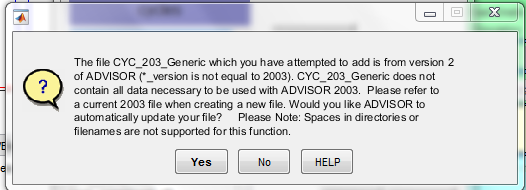
and after clicking on "yes", the following lines were shown in Matlab:
[SimSetupFig:cycles_Callback] Error!
Error using evalinUndefined function or variable 'CYC_203_Generic'.
> In SimSetupFig>cycles_Callback at 579
In SimSetupFig at 385
In OptionListFigControl at 225
Does somebody know how to solve this problem(s)?
Best regards,
Dennis
Michael P O'Keefe
Mar 4, 2015, 12:03:45 AM3/4/15
to adv-veh...@googlegroups.com
Just a quick thought -- the cyc_version is what causes the version update to trigger if my memory serves me correctly -- was the value of cyc_version defined and set to 2003?
Regards,
Michael O'Keefe
Dennis
Mar 4, 2015, 6:04:10 AM3/4/15
to adv-veh...@googlegroups.com
Yes, it was set to 2003.
Michael P O'Keefe
Mar 4, 2015, 9:37:12 PM3/4/15
to adv-veh...@googlegroups.com
Dennis,
Just recreated your scenario as I understood it and it adds to the cycle list fine. Here are the steps I took:
cd <advisor root directory>
cd data/drive_cycle/
!cp CYC_HWFET_MTN.m CYC_203_Generic.m
!cp CYC_HWFET.mat CYC_203_Generic_speed_time.mat
% at this point I edited CYC_203_Generic.m -- see the diff of CYC_203_Generic.m vs CYC_HWFET_MTN.m below
cd ../..
advisor
% in advisor, I add the cycle to the list on the simulation parameters screen by clicking the "Drive Cycle" button and then "Add to List"
------- Diff of the two files
--- data/drive_cycle/CYC_203_Generic.m 2015-03-04 19:27:19.000000000 -0700
+++ data/drive_cycle/CYC_HWFET_MTN.m 2014-02-24 08:27:16.000000000 -0700
@@ -20,19 +20,19 @@
%%%%%%%%%%%%%%%%%%%%%%%%%%%%%%%%%%%%%%%%
% FILE ID INFO
%%%%%%%%%%%%%%%%%%%%%%%%%%%%%%%%%%%%%%%%
-cyc_description='User file Example';
+cyc_description='US EPA HWFET cycle w/grade profile';
cyc_version=2003; % version of ADVISOR for which the file was generated
cyc_proprietary=0; % 0=> non-proprietary, 1=> proprietary, do not distribute
cyc_validation=0; % 0=> no validation, 1=> data agrees with source data,
% 2=> data matches source data and data collection methods have been verified
-disp(['Data loaded: CYC_203_Generic - ',cyc_description])
+disp(['Data loaded: CYC_HWFET_MTN - ',cyc_description])
%%%%%%%%%%%%%%%%%%%%%%%%%%%%%%%%%%%%%%%%
% SPEED AND KEY POSITION vs. time
%%%%%%%%%%%%%%%%%%%%%%%%%%%%%%%%%%%%%%%%
% load variable 'cyc_mph', 2 column matrix with time in the first column
-load CYC_203_Generic_speed_time.mat
+load CYC_HWFET.mat
% keep key in 'on' position throughout cycle ('1' in the 2nd column => 'on')
vc_key_on=[cyc_mph(:,1) ones(size(cyc_mph,1),1)];
Make sure that the file names match exactly especially case.
Hope that helps,
Michael
Dennis
Mar 5, 2015, 6:19:51 AM3/5/15
to adv-veh...@googlegroups.com
Hello Michael,
thank you for your help. Now it is working.
Best regards,
Dennis

Sharanga Bora
Jun 3, 2015, 4:48:56 AM6/3/15
to adv-veh...@googlegroups.com
Can you please provide me the data for the Indian drive Cycle?
Thanks
Michael P O'Keefe
Jun 3, 2015, 7:54:50 AM6/3/15
to adv-veh...@googlegroups.com
The data is in the ADVISOR download itself. Look inside the data/drive_cycle folder. This cycle was donated by an end-user. All we know about it is what is written in the m-file header.
Michael

M Gul
Jun 5, 2015, 5:30:40 AM6/5/15
to adv-veh...@googlegroups.com
hello Michael and others,
i have a question about fuel cell. in my project max power has to be 250W, but this system doesnt show this value because, this value is under 1kW. how can i solve this problem?
thanks
Michael P O'Keefe
Jun 5, 2015, 8:22:23 AM6/5/15
to adv-veh...@googlegroups.com
250 W is rather small -- is may be possible that the UI is just not showing such a low number. Where are you seeing the 1 kW? The actual power may be 250 W if you set it to be that.
Regards,
Michael
M Gul
Jun 5, 2015, 10:43:07 AM6/5/15
to adv-veh...@googlegroups.com

"Derivative input -10 of 'BD_FUELCELL/exhaust sys <ex>/Tm'"
why doesnt this show my value in picture and how can i solve this error.
Thanks, please help
Michael P O'Keefe
Jun 6, 2015, 12:42:40 AM6/6/15
to adv-veh...@googlegroups.com
The only way I could help would be to know exactly the steps taken to reproduce the model you have from a pristine download of ADVISOR.
However, if I understand you correctly, the image in bottom left is in sync with the data at top right. Note that the value at top right is in kW (not watts) and it is probably rounded to the closest integer which would be zero in this case. Also, the efficiency numbers match. I don't think anyone has ever tested an ADVISOR fuel cell vehicle with such a low power so that could be why you are getting an error. You might have to go to the Simulink block mentioned in the error message to debug it.
Hope that helps,
Michael
Reply all
Reply to author
Forward
0 new messages