
Access Macros 1 : Adding Marquee on Access Form

ashish koul
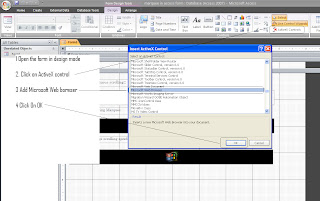
Step 1 Follow below steps to add the web browser on the form
Example 1 Continuous scrolling
Add below code to form
Option Compare Database
Private Sub Command9_Click()
Dim mbody As String
' add the text of amrquee and creat a html webpage
mbody = "<p style=""font-size:18px;""><marquee behavior=""scroll"" direction=""left"">www.excelvbamacros.com</marquee>"
Open CurrentProject.Path & "\marquee_sample1.htm" For Output As #1
Print #1, mbody
Close #1
' add the webpage to webbrowser
Me.WebBrowser1.Navigate CurrentProject.Path & "\marquee_sample1.htm"
End Sub
Private Sub WebBrowser1_DocumentComplete(ByVal pDisp As Object, URL As Variant)
On Error Resume Next
Me.WebBrowser1.Document.body.scroll = "no"
End Sub
Example 2 Bouncing Marquee
Add below code to form
Option Compare Database
Private Sub Command9_Click()
Dim mbody As String
' add the text of amrquee and creat a html webpage
mbody = "<p style=""font-size:18px;""><marquee behavior=""alternate"" direction=""left"">www.excelvbamacros.com</marquee>"
Open CurrentProject.Path & "\marquee_sample2.htm" For Output As #1
Print #1, mbody
Close #1
' add the webpage to webbrowser
Me.WebBrowser1.Navigate CurrentProject.Path & "\marquee_sample2.htm"
End Sub
Private Sub WebBrowser1_DocumentComplete(ByVal pDisp As Object, URL As Variant)
On Error Resume Next
Me.WebBrowser1.Document.body.scroll = "no"
End Sub
Example 3 Control speed of Marquee
Add below code to form
Option Compare Database
Private Sub Command9_Click()
Dim mbody As String
' add the text of amrquee and creat a html webpage
mbody = "<p style=""font-size:18px;""><marquee behavior=""scroll"" direction=""left"" scrollamount=""10""> www.accessvbamacros.com</marquee>"
Open CurrentProject.Path & "\marquee_sample3.htm" For Output As #1
Print #1, mbody
Close #1
' add the webpage to webbrowser
Me.WebBrowser1.Navigate CurrentProject.Path & "\marquee_sample3.htm"
End Sub
Private Sub WebBrowser1_DocumentComplete(ByVal pDisp As Object, URL As Variant)
On Error Resume Next
Me.WebBrowser1.Document.body.scroll = "no"
End Sub
Example 4 : Display Image
Add below code to form
Option Compare Database
Private Sub Command9_Click()
Dim mbody As String
' add the text of amrquee and creat a html webpage
mbody = "<marquee behavior=""scroll"" direction=""left""><img src=""http://www.azalea.com/imgs/logos/Microsoft-Access.png"" width=""80"" /></marquee>"
Open CurrentProject.Path & "\marquee_sample4.htm" For Output As #1
Print #1, mbody
Close #1
' add the webpage to webbrowser
Me.WebBrowser1.Navigate CurrentProject.Path & "\marquee_sample4.htm"
End Sub
Private Sub WebBrowser1_DocumentComplete(ByVal pDisp As Object, URL As Variant)
On Error Resume Next
Me.WebBrowser1.Document.body.scroll = "no"
End Sub
Example 5 - Add mouse over effect and hyperlink
Option Compare Database
Private Sub Command9_Click()
Dim mbody As String
' add the text of amrquee and creat a html webpage
mbody = "<p style=""font-size:18px;""><marquee behavior=""scroll"" align=""middle"" direction=""left"" scrollamount=""4"" onmouseover=""this.stop()"" onmouseout=""this.start()""> " & _
"<a href=""http://www.excelvbamacros.com/2012/01/my-menu-functions-and-help.html"" target=""_blank"">Download Free Excel Addin</a></marquee>"
Open CurrentProject.Path & "\marquee_sample5.htm" For Output As #1
Print #1, mbody
Close #1
' add the webpage to webbrowser
Me.WebBrowser1.Navigate CurrentProject.Path & "\marquee_sample5.htm"
End Sub
Private Sub WebBrowser1_DocumentComplete(ByVal pDisp As Object, URL As Variant)
On Error Resume Next
Me.WebBrowser1.Document.body.scroll = "no"
End Sub
Example 6 : Remove border from browser and show colored text, etc. in marquee
Option Compare Database
Private Sub Command9_Click()
Dim mbody As String
' add the text of amrquee and creat a html webpage
mbody = "<html><head><script language=""javascript"">function noScroll(){document.body.scroll=""no"";}" & _
"</script><STYLE>BODY { border-style:none;}</STYLE></head><body onload=javascript:noScroll(); topmargin=""0"" leftmargin=""0"">" & _
"<body bgcolor=""#FFFAFA""><p style=""font-size:17px;color:#FF0000;font-family: courier new"" ><marquee behavior=""scroll"" direction=""left"">" & _
"www.acessvbamacros.com" & _
"</marquee></body></html>"
Open CurrentProject.Path & "\marquee_sample6.htm" For Output As #1
Print #1, mbody
Close #1
' add the webpage to webbrowser
Me.WebBrowser1.Navigate CurrentProject.Path & "\marquee_sample6.htm"
End Sub
Private Sub WebBrowser1_DocumentComplete(ByVal pDisp As Object, URL As Variant)
On Error Resume Next
Me.WebBrowser1.Document.body.scroll = "no"
End Sub