
Access Macro - Display Image on Mouse Over on Command Button in Access Form
330 views
Skip to first unread message

ashish koul
Jul 4, 2012, 11:17:30 AM7/4/12
to accessv...@googlegroups.com
If you want to display image on mouse over on "Command Button " in access form.
Step 1 . Open the form in design mode
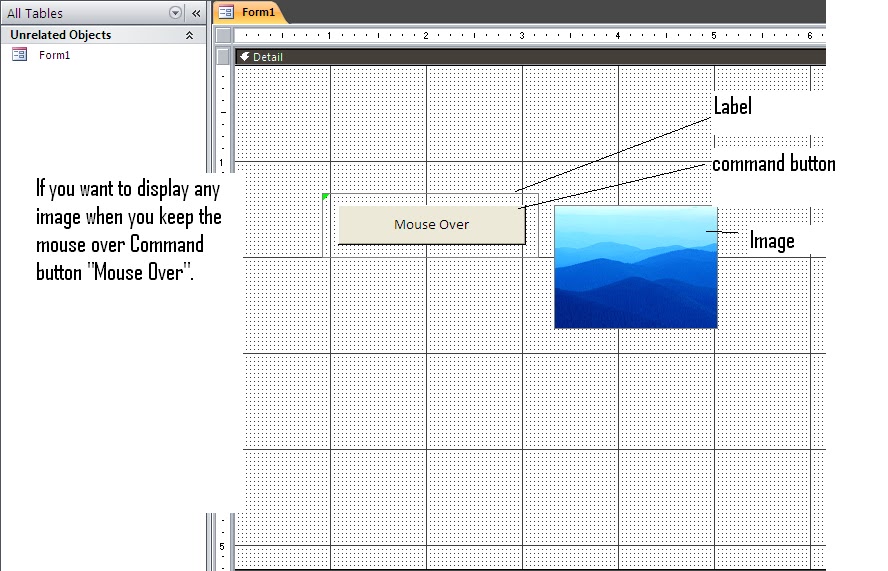
Step 2. Add a label to it and keep the caption blank( Note Label size should be bigger than Command button and command button should be added/moved on/above the label . Snapshot below)
Step 3 Add a command button above the label and image which you want to display.
Check the snapshot below in design mode
Step 1 . Open the form in design mode
Step 2. Add a label to it and keep the caption blank( Note Label size should be bigger than Command button and command button should be added/moved on/above the label . Snapshot below)
Step 3 Add a command button above the label and image which you want to display.
Check the snapshot below in design mode
Add below code to form on which you have added all the label.button and image.
Option Compare Database
Private Sub Command0_MouseMove(Button As Integer, Shift As Integer, X As Single, Y As Single)
If Image1.Visible = True Then Exit Sub
Image1.Visible = True
End Sub
Private Sub Form_Load()
Image1.Visible = False
End Sub
Private Sub Label4_MouseMove(Button As Integer, Shift As Integer, X As Single, Y As Single)
Image1.Visible = False
End Sub
Option Compare Database
Private Sub Command0_MouseMove(Button As Integer, Shift As Integer, X As Single, Y As Single)
If Image1.Visible = True Then Exit Sub
Image1.Visible = True
End Sub
Private Sub Form_Load()
Image1.Visible = False
End Sub
Private Sub Label4_MouseMove(Button As Integer, Shift As Integer, X As Single, Y As Single)
Image1.Visible = False
End Sub
Reply all
Reply to author
Forward
0 new messages