
Potentiometer and Map() function question
301 views
Skip to first unread message

Mark Lewanski
Feb 2, 2023, 6:01:52 PM2/2/23
to accelstepper
Hello Group, I'm a rank amateur to coding in Arduino IDE. Slogging my way through a project though, and I wonder: I can use a potentiometer to control motor speed from a range of about 100 to 1023, but below 100, a different function would be called? I guess perhaps the Map() function may be applicable in some way? So essentially, I want my stepper motor to perform a pre-programmed function when the pot is turned down low, but become a simple speed controller at the higher ranges. Make sense? I was going to just use a button to switch between states, but my set up requires no very low speed motion, and I thought It'd be cool to control everything with just one POT :-) . Thanks for any ideas on this!

Jim Larson
Feb 2, 2023, 7:04:15 PM2/2/23
to accelstepper
Hello Mark, and welcome!
You might do something like this:
potVal = analogRead(POT); // read the pot
if (lowLimit >= potVal) { // if less than or equal to lowLimit
lowFunction(); // then call the pre-programmed function
} else{
runMotor(potVal); // otherwise, run the motor
}
I'm assuming that you are using AccelStepper to drive your stepper.
HTH
-jim
Mark Lewanski
Feb 3, 2023, 5:14:08 PM2/3/23
to accelstepper
Jim, thanks for that, looks like just what I need! Yes, I plan to use Accelstepper library because my application includes a nema34 stepper that has to make rapid directional changes, and I'm assuming instantaneous reversals might not be good idea, right? I'm enjoying learning about coding and arduino, but I really need some help writing the whole code. Could yourself provide this, or recommend a resource where I could provide a flow chart and receive some help? Thanks so much. Mark
Jim Larson
Feb 3, 2023, 6:03:14 PM2/3/23
to accelstepper
To understand the AccelStepper Library and how to use it, have a look here: https://hackaday.io/project/183279-accelstepper-the-missing-manual/details
To see some examples and explanations,, see here: https://hackaday.io/project/183713/instructions
If you still have problems, please post your code so others can help you. And, yes, instantaneous reversals are NOT good! ;)}}
-jim
Mark Lewanski
Feb 10, 2023, 4:19:19 PM2/10/23
to accelstepper
OK thanks, I used some of your ideas. Tthis is all very new to me, some is hard to grasp. I am writing code for two motors, one NEMA 34 and one NEMA 11. I'm using an external driver for the big one, and a REV 3 motor shield for the small. My goal is to control everything with only two POTs. POT1 will control large motor, POT2 for the small. POT1 will cause the large motor to oscillate (Re: "bounce" sketch) if the analog input is less that 100, otherwise is will act as simple speed control. It works in general, but some weird glitches occur. Sometimes at A2 < 100, motor 1 just stops and nothing happens. then sometimes it starts to oscillate, but does one "double" cycle when it should have "flipped". Other times it just keeps going in one direction with no oscillations. Further, certain positions of POT1 >100 make the large motor shake and vibrate violently, it also appears that when I adjust POT2, slight variations are perceptible in motor 1. Also, my Arduino Uno is getting hot near USB port and sometimes shuts down, so I suspect some wiring issue. I'm a bit confused by all this. Thanks for any input, Below is my code...any comments appreciated.
Mark
#include <AccelStepper.h>
//pins
int Stepper1Pulse = 5;
int Stepper1Direction = 6;
int speed1pot = A2;
int speed2pot = A3;
#define pwmA 3
#define pwmB 11
#define brakeA 9
#define brakeB 8
#define dirA 12
#define dirB 13
//terms
int low1Limit = 100;
int pot1Val = 0;
int Speed1 = 0;
int speed1min = 0;
int speed1max = 2000;
int pot2Val = 0;
int Speed2 = 0;
int speed2min = 100;
int speed2max = 800;
// Define the AccelStepper interface type:
#define MotorInterfaceType 2
AccelStepper stepper1(1, Stepper1Pulse, Stepper1Direction);
AccelStepper stepper2(MotorInterfaceType, dirA, dirB);
void setup() {
pinMode(Stepper1Pulse, OUTPUT);
pinMode(Stepper1Direction, OUTPUT);
digitalWrite(Stepper1Pulse, LOW);
digitalWrite(Stepper1Direction, LOW);
// Set the PWM and brake pins so that the direction pins can be used to control the motor:
pinMode(pwmA, OUTPUT);
pinMode(pwmB, OUTPUT);
pinMode(brakeA, OUTPUT);
pinMode(brakeB, OUTPUT);
digitalWrite(pwmA, HIGH);
digitalWrite(pwmB, HIGH);
digitalWrite(brakeA, LOW);
digitalWrite(brakeB, LOW);
stepper1.setMaxSpeed(speed1max);
stepper1.setSpeed(0);
stepper1.setAcceleration(2000);
stepper1.moveTo(2000);
stepper2.setSpeed(0);
stepper2.setMaxSpeed(speed2max);
stepper2.setAcceleration(20);
}
void loop() {
pot1Val = analogRead(speed1pot); // read the pot
pot2Val = analogRead(speed2pot); // read the pot
if (low1Limit >= pot1Val) { // if less than or equal to lowLimit
if (stepper1.distanceToGo() == 0) { // If at the end of travel go to the other end
stepper1.moveTo(-stepper1.currentPosition());
} else stepper1.run();
} else {
Speed2 = map(pot2Val, 0, 1023, speed2min, speed2max);
stepper2.setSpeed(Speed2);
stepper2.run();
Speed1 = map(pot1Val, 0, 1023, speed1min, speed1max);
stepper1.setSpeed(Speed1);
stepper1.run();
}
}
Jim Larson
Feb 11, 2023, 12:56:38 AM2/11/23
to accelstepper
I'm curious as to what drivers you are using. Could you share that info?
That said, I don't think the drivers have anything to do with your current problems. I suggest you read the Missing Manual again carefully . The basic problem is that when you switch from oscillating behavior to speed control for stepper1, things won't happen as you expect them to. Using setSpeed() is not compatible with using run(). The value set by setSpeed() will be ignored and run will simply try to accelerate the stepper to maxSpeed. Once the motor approaches the target position, it will slow down and stop.
Is stepper2 moving at all? I don't see where a target position is set for it. Am I missing it?
My basic question is, Will a target position be specified when stepper1 and stepper2 are running? (Stepper1 not in the oscillating mode)?
I'm still trying to understand your intent correctly.
-jim
Mark Lewanski
Sep 1, 2023, 10:36:18 PM9/1/23
to accelstepper
Hello again Jim!


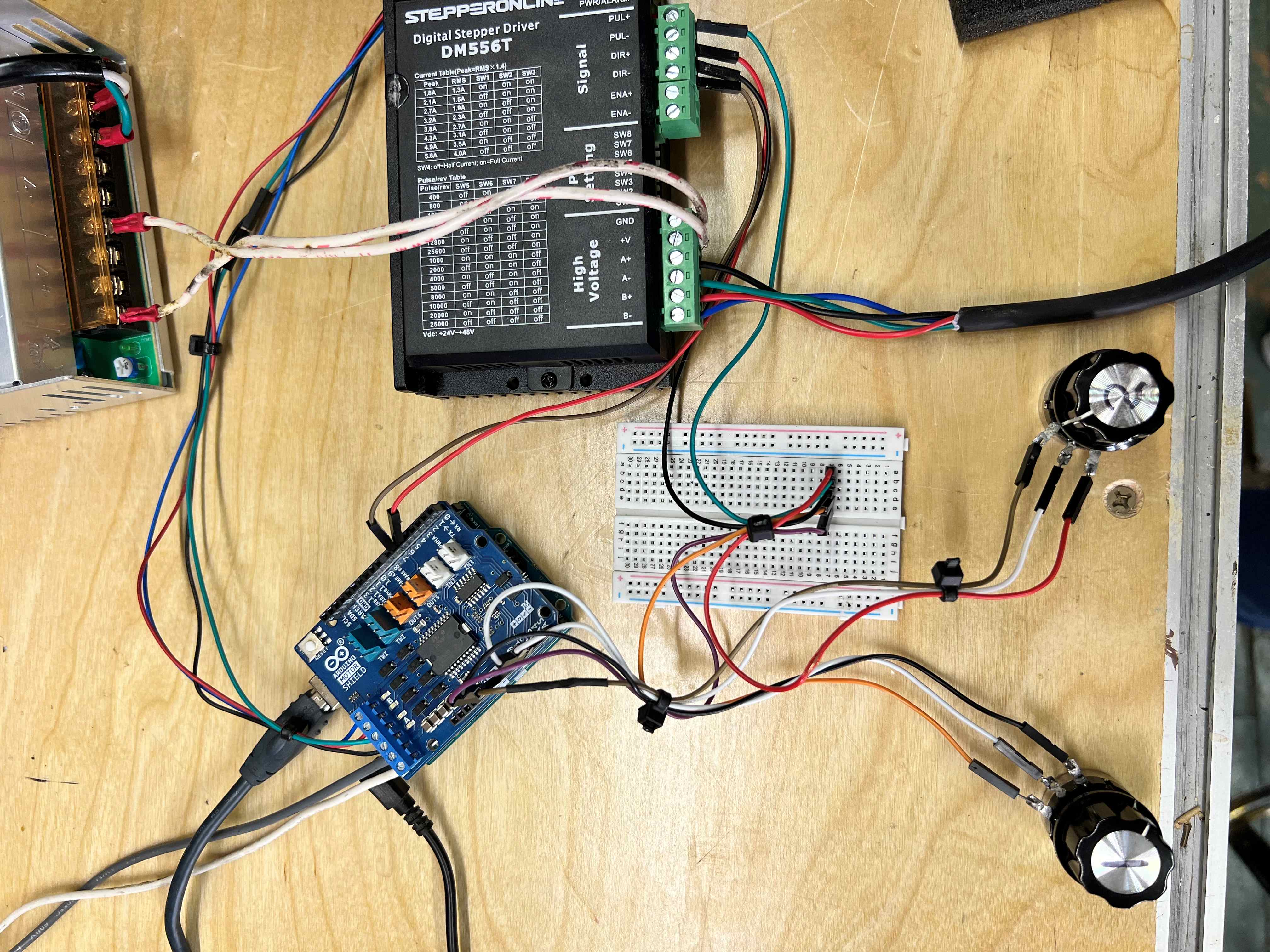


I had to pause my project, but now it's back on and how! Using my ever improving Frankencoding skills, I patched together some code that is finally doing what I want. Kinda. Please see following:
#include <AccelStepper.h>
//pins
int Stepper1Pulse = 5;
int Stepper1Direction = 6;
int pot1position = A2;
int pot2position = A3;
#define pwmA 3
#define pwmB 11
#define brakeA 9
#define brakeB 8
#define dirA 12
#define dirB 13
//terms
int low1Limit = 100;
int pot1Val = 0;
int Speed1 = 0;
int speed1min = 0;
int speed1max = 3000;
int pot2Val = 0;
int Speed2 = 0;
int speed2min = 0;
int speed2max = 2000;
long new2position = 1000;
// Define the AccelStepper interface type:
#define MotorInterfaceType 2
AccelStepper stepper1(1, Stepper1Pulse, Stepper1Direction);
AccelStepper stepper2(MotorInterfaceType, dirA, dirB);
void setup() {
Serial.begin(9600); // open the serial port at 9600 bps:
pinMode(Stepper1Pulse, OUTPUT);
pinMode(Stepper1Direction, OUTPUT);
digitalWrite(Stepper1Pulse, LOW);
digitalWrite(Stepper1Direction, LOW);
// Set the PWM and brake pins so that the direction pins can be used to control the motor:
pinMode(pwmA, OUTPUT);
pinMode(pwmB, OUTPUT);
pinMode(brakeA, OUTPUT);
pinMode(brakeB, OUTPUT);
digitalWrite(pwmA, HIGH);
digitalWrite(pwmB, HIGH);
digitalWrite(brakeA, LOW);
digitalWrite(brakeB, LOW);
stepper1.setMaxSpeed(speed1max);
stepper1.setSpeed(0);
stepper1.setAcceleration(5000);
stepper1.moveTo(2000);
stepper2.setSpeed(0);
stepper2.setMaxSpeed(speed2max);
stepper2.setAcceleration(2000);
stepper2.moveTo(new2position);
}
void loop() {
pot1Val = analogRead(pot1position); // read the pot
pot2Val = analogRead(pot2position); // read the pot
if (low1Limit >= pot1Val) { // if less than or equal to lowLimit
if (stepper1.distanceToGo() == 0) { // If at the end of travel go to the other end
if (stepper2.distanceToGo() == 0) {
new2position = new2position + 1000;
Serial.print((new2position));
Serial.println();
stepper2.moveTo(new2position);
stepper1.moveTo(-stepper1.currentPosition());
} else stepper2.run();
} else stepper1.run();
} else {
Speed1 = map(pot1Val, 0, 1023, speed1min, speed1max);
stepper1.setSpeed(Speed1);
stepper1.run();
Speed2 = map(pot2Val, 0, 1023, speed2min, speed2max);
stepper2.setSpeed(Speed2);
stepper2.run();
}
}
The only way I could get motor 2 to turn was to give it an ever increasing position to go to (re: new2position = new2position + 1000;) . Maybe this is wrong, but it works for now. The problem is when I want to return to oscillation mode after a long run of constant movement by both motor1 and motor2, apparently the motor position accumulates and is stored and the first thing that happens is motor1 "rewinds" back to 1000 before motor2 "rewinds" back to the last value of new2position and finally the oscillations start. I read there is really not a way to reset motor position short of restarting everything. Is this true? It would be disappointing if I had to use this with the computer connected. Another issue: My POT2 seems to influence both motor1 and motor2 speeds, when one goes up, the other goes down. I'm sure this is a wiring issue. Yet another glitch, the POTs don't seem to give any kind of smooth speed transitions, especially at the higher speeds. I can only discern about 3 speed changes. Also, at certain speeds, the big motor sounds "chunky" and runs very roughly. Sometimes it goes plain crazy out of nowhere during oscillation. Following are photos of equipment specs and wiring and links to video of this setup running with various glitches:
Link to videos:
How it's working now: https://clipchamp.com/watch/jYwuNSPHMZT
Motor Glitch: https://clipchamp.com/watch/Zt1YPhIPRDA
LARGE MOTOR SPECS
NEMA34 bipolar 2 phase stepper motor, 200 steps, rated current 4A, the resistance per phase 0.5Ohms+-10%, inductance per phase 4mH+-20%, holding torque 2N.m
SMALL MOTOR SPECS:
LARGE MOTOR CONTROLLER
LARGE MOTOR SPECS
MOTOR SHIELD FOR ARDUNINO UNO
WIRING
POWER FOR LARGE MOTOR
POWER FOR SMALL MOTOR
That's about it. I'd really appreciate any further feedback. Thanks!
MARK
Jim Larson
Sep 2, 2023, 1:07:19 PM9/2/23
to accelstepper
Hi Mark-
Glad you're back on your project!
First question: Is your big (NEMA 34) motor stepper1 or stepper2?
Next, I'm not familiar with two-wire steppers. Could you provide a link to the product you're using so I can learn about it?
Now a comment: I said this before in my last response, but I guess I wasn't clear. You can't use setSpeed() when you're using run(). They ARE NOT compatible. setSpeed() will be ignored. If you want to control speed during operation, you must use runSpeed(). You can use both run() and runSpeed() in your program as long as you don't use them both at the same time. That is, you can use runSpeed() when you want manual speed control, then use run when you want oscillating motion. Be careful when switching between modes.
Note that you can use move() instead of moveTo() for relative moves.
To reset the motor position, use setCurrentPosition(0). This will make the current position 0 and all moves will now be relative to that.
HTH.
-jim
Jim Larson
Sep 6, 2023, 1:00:40 AM9/6/23
to accelstepper
OK, Mark - I've got some time to look at this. I like your idea of using the low end of the pot as a signal to switch motions. Doing that also means that your motor is slowed before switching motions also. Nice!
But that leads to a question: Is motor 2 supposed to switch motions when the motor 1's pot is turned down? If so, do you need to automatically slow motor 2 before switching modes? If so, what speed will motor 2 resume at? Here's what I mean: Suppose motor 1 is running at 50% (pot 1 is turned about half way up). Assume pot 2 is also at 50% and motor 2 is running at the appropriate speed. Now let's turn pot 1 way down - into the range where oscillating behavior begins. Motor 1 slows down as pot 1 is turned down, stops, and oscillation begins. But what about motor 2? Pot 2 has not moved and motor 2 is still running at 50% speed. If motor 2 is stopped and automatically put into oscillation mode, then what should it do when the other mode is entered again? Should motor 2 start at 50% speed, because that's what pot 2 is set for. Is that the behavior you intend?
I'm planning to implement this with a couple of steppers so I can send you some working code. But I need to know what to do about stepper 2.
-jim
Mark Lewanski
Sep 6, 2023, 2:39:46 AM9/6/23
to accelstepper
Big motor is stepper one. All motors have four wires, bipolar. I'm reading the Missing Manual now, trying to get up to speed. (haha!)
I changed the run() to runSpeed() That helped! I'm also using move() to do relative motion as you suggested. My problem is now that right at the point where I turn on oscillation, the small motor runs in reverse for a while. Why ,why why? I think it Also, a big headache is still how to keep pot2 from affecting motor1 and vice versa. It shouldn't be happening. It's frustrating. Here is the relevant part of the code with latest changes.
I changed the run() to runSpeed() That helped! I'm also using move() to do relative motion as you suggested. My problem is now that right at the point where I turn on oscillation, the small motor runs in reverse for a while. Why ,why why? I think it Also, a big headache is still how to keep pot2 from affecting motor1 and vice versa. It shouldn't be happening. It's frustrating. Here is the relevant part of the code with latest changes.
Thanks, mark
stepper1.setMaxSpeed(speed1max);
stepper1.setSpeed(0);
stepper1.setAcceleration(4000);
stepper1.move(new1position);
stepper2.setSpeed(0);
stepper2.setMaxSpeed(speed2max);
stepper2.setAcceleration(4000);
stepper2.move(-3000);
}
void loop() {
pot1Val = analogRead(pot1position); // read the pot
pot2Val = analogRead(pot2position); // read the pot
if (low1Limit >= pot1Val) { // if less than or equal to lowLimit
if (stepper1.distanceToGo() == 0) { // If at the end of travel go to the other end
if (stepper2.distanceToGo() == 0) {
stepper2.setCurrentPosition(0);
stepper2.move(-3000);
stepper1.setCurrentPosition(0);
new1position = -new1position;
stepper1.move((new1position));
Serial.print((stepper1.currentPosition()));
Serial.println();
} else stepper2.run();
} else stepper1.run();
} else {
Speed1 = map(pot1Val, 101, 1023, speed1min, speed1max);
stepper1.setSpeed(Speed1);
stepper1.runSpeed();
stepper1.setCurrentPosition(0);
Speed2 = map(pot2Val, 0, 1023, speed2min, speed2max);
stepper2.setSpeed(-Speed2);
stepper2.runSpeed();
}
}
Mark Lewanski
Sep 6, 2023, 2:57:48 AM9/6/23
to accelstepper
Jim, thanks again, I got your last response while still typing my answers to your questions.
So that's right where I'm at...Motor2 (small) is doing this funky reversal right at the point where oscillation starts. Ideally it just stops while motor1 oscillates, then it turns on only when motor1 is at rest. So they are supposed to just go back and forth. Can't figure out the reversal. Is there some kind of absolute value function I can use for motor direction? I never ever want motor2 to reverse, I don't even want the possibility. Also there is the mixed up signals on the pots. Turning up pot2 while motor1 is running at higher speed causes it to skip violently. I suspect it's wired wrong, but I don't know how to fix. Thanks
So that's right where I'm at...Motor2 (small) is doing this funky reversal right at the point where oscillation starts. Ideally it just stops while motor1 oscillates, then it turns on only when motor1 is at rest. So they are supposed to just go back and forth. Can't figure out the reversal. Is there some kind of absolute value function I can use for motor direction? I never ever want motor2 to reverse, I don't even want the possibility. Also there is the mixed up signals on the pots. Turning up pot2 while motor1 is running at higher speed causes it to skip violently. I suspect it's wired wrong, but I don't know how to fix. Thanks
Mark Lewanski
Sep 6, 2023, 2:22:53 PM9/6/23
to accelstepper
It's like motor2 is accumulating steps and then regurgitating them in reverse before it will let oscillation begin. I just had constant motion running for about twenty minutes and it took about 3 minutes of reversing before oscillating kicked in.
Mark Lewanski
Sep 6, 2023, 9:19:00 PM9/6/23
to accelstepper
Okay, I found a fix! I just used runSpeed() for Motor2 during oscillation [instead of moveTo() or move()] inside an if/then loop with an increasing counter to limit time of run. Works! I still am mystified by the pots affecting both of my motors at the same time though... Have you set up your circuit yet? Please let me know if you run into the same problem. thanks, Mark
Jim Larson
Sep 6, 2023, 11:58:33 PM9/6/23
to accelstepper
You're quicker than I am, Mark. I'll get there, but give me a day or so.
One possible reason for your pot "interaction" is that the speeds you are running are close to the limit for an Uno. Note also that you're doing a lot of reading the pots and calculating speeds, etc. inside your loop. It seems likely that as you increase the speed of your pots, your Uno will not be able to keep up at the desired step rates. So steps will be missed which will seem to be slowing of the motors. You might try limiting the maximum speeds of your motors to something less than a thousand steps per second and see if the response improves. If so, I may be able to help you make your loop cleaner.
--jim
Jim Larson
Sep 7, 2023, 1:00:22 AM9/7/23
to accelstepper
Mark -
I just realized that I'm unclear about how the motors are supposed to go. As I understand it, in one mode (let's call it Mode A), both motors run in the same direction with their speeds controlled by their respective pots. Clear enough.
The other mode (call it Mode B) is where I'm confused. I THINK motor one runs one way (call it CW) for some distance. Motor 1 accelerates , then slows to a stop. When it stops, motor 2 runs one way (maybe CCW, I'm not sure) accelerating and then slowing to a stop. Motor 1 then reverses and runs again; accelerating, slowing and stopping. Motor 2 then starts again in the CW direction, etc.etc.
Switching between modes occurs as follows: If the motors are in Mode B and pot 1 is turned down into a low range., Mode 2 is entered. ( In this case, I assume Motor 2 is to slow to a stop before starting to oscillate, right?)
If the system is in Mode B and pot 1 is turned up out of its low range, then Motor 1 ad 2 start running in the same direction again with speeds controlled by the pots. I assume that motor 2 will start rnning at the speed it was at when in Mode A last.
Please correct my understanding, Mark. I want this to work, but I probably won't use your exact code. There might be a clearer way to get the same action and allow better control.
-jim
Mark Lewanski
Sep 7, 2023, 1:38:58 AM9/7/23
to accels...@googlegroups.com
Jim, You have the exact gist. Everything you described is as I intend. (Did you see the video of the set up at work? Here is the link again:
At least I've got a working code now, which is a milestone! But as you suggest, it's probably far from efficient. I'd like to be able to run some speeds over 3000, but it's so unstable. I didn't realize I was maxing out the Arduino. I set everything to maxspeed 2000 and it functions reliably so far. I bet my code is super clunky though. I remember writing some programs in college and the CS guys could do what took me 20 lines in six or seven! That was humbling! 😂
--
You received this message because you are subscribed to the Google Groups "accelstepper" group.
To unsubscribe from this group and stop receiving emails from it, send an email to accelstepper...@googlegroups.com.
To view this discussion on the web visit https://groups.google.com/d/msgid/accelstepper/ecb58c05-477d-4580-af1a-18112728f67an%40googlegroups.com.
Jim Larson
Sep 8, 2023, 3:45:53 PM9/8/23
to accelstepper
The code is moving along, Mark. But I just noticed one detail. In the last code you posted, Motor2 never reverses. It alternates operation with Motor1 (this is in the oscillatory mode), but always runs the same direction. Is that correct, or shuold it oscillate directions also?
Sorry to keep bugging you.
-jim
Mark Lewanski
Sep 11, 2023, 4:50:34 PM9/11/23
to accelstepper
Jim, motor2 never changes direction.
Jim Larson
Sep 11, 2023, 5:08:30 PM9/11/23
to accelstepper
Thanks, Mark. Happily, that's what I assumed. I should have some code for you in a few hours. I'll send you the basic version I stated with, then the version that include the acceleration and deceleration when switching modes. Funny how much messier the code is when you handle the little details!
-jim
Jim Larson
Sep 12, 2023, 1:00:26 AM9/12/23
to accelstepper
OK Mark, here's the simple version that just handles one motor. It shows my basic state-machine approach.
You should also be able to see what changes you'll need to make to use your uno and stepper drivers. Please let me know if you're good with this and are able to make it work with your steppers. If not, we'll figure out how I can make things clearer. If you're ok, then I'll send the next version. I think I have it all working properly now.
-jim
Mark Lewanski
Sep 12, 2023, 2:59:47 PM9/12/23
to accelstepper
Jim, I can't find library any HardwareSerial.h library. Any ideas?
Mark
Mark Lewanski
Sep 12, 2023, 3:21:17 PM9/12/23
to accelstepper
I get this error:
C:\Users\m_lew\OneDrive\Documents\Arduino\G431_AccelStepper_Forum_MarkL\G431_AccelStepper_Forum_MarkL.ino:39:31: error: no matching function for call to 'HardwareSerial::HardwareSerial(int, int)'
HardwareSerial mySerial(23, 24); // Usart 1
^
In file included from C:\Users\m_lew\AppData\Local\Arduino15\packages\arduino\hardware\avr\1.8.6\cores\arduino/Arduino.h:233:0,
from C:\Users\m_lew\AppData\Local\Temp\arduino-sketch-39885FE91F6492A49C191E82FF8D34D5\sketch\G431_AccelStepper_Forum_MarkL.ino.cpp:1:
C:\Users\m_lew\AppData\Local\Arduino15\packages\arduino\hardware\avr\1.8.6\cores\arduino/HardwareSerial.h:117:12: note: candidate: HardwareSerial::HardwareSerial(volatile uint8_t*, volatile uint8_t*, volatile uint8_t*, volatile uint8_t*, volatile uint8_t*, volatile uint8_t*)
inline HardwareSerial(
^~~~~~~~~~~~~~
C:\Users\m_lew\AppData\Local\Arduino15\packages\arduino\hardware\avr\1.8.6\cores\arduino/HardwareSerial.h:117:12: note: candidate expects 6 arguments, 2 provided
C:\Users\m_lew\AppData\Local\Arduino15\packages\arduino\hardware\avr\1.8.6\cores\arduino/HardwareSerial.h:93:7: note: candidate: constexpr HardwareSerial::HardwareSerial(const HardwareSerial&)
class HardwareSerial : public Stream
^~~~~~~~~~~~~~
C:\Users\m_lew\AppData\Local\Arduino15\packages\arduino\hardware\avr\1.8.6\cores\arduino/HardwareSerial.h:93:7: note: candidate expects 1 argument, 2 provided
C:\Users\m_lew\AppData\Local\Arduino15\packages\arduino\hardware\avr\1.8.6\cores\arduino/HardwareSerial.h:93:7: note: candidate: constexpr HardwareSerial::HardwareSerial(HardwareSerial&&)
C:\Users\m_lew\AppData\Local\Arduino15\packages\arduino\hardware\avr\1.8.6\cores\arduino/HardwareSerial.h:93:7: note: candidate expects 1 argument, 2 provided
exit status 1
Compilation error: no matching function for call to 'HardwareSerial::HardwareSerial(int, int)'
C:\Users\m_lew\OneDrive\Documents\Arduino\G431_AccelStepper_Forum_MarkL\G431_AccelStepper_Forum_MarkL.ino:39:31: error: no matching function for call to 'HardwareSerial::HardwareSerial(int, int)'
HardwareSerial mySerial(23, 24); // Usart 1
^
In file included from C:\Users\m_lew\AppData\Local\Arduino15\packages\arduino\hardware\avr\1.8.6\cores\arduino/Arduino.h:233:0,
from C:\Users\m_lew\AppData\Local\Temp\arduino-sketch-39885FE91F6492A49C191E82FF8D34D5\sketch\G431_AccelStepper_Forum_MarkL.ino.cpp:1:
C:\Users\m_lew\AppData\Local\Arduino15\packages\arduino\hardware\avr\1.8.6\cores\arduino/HardwareSerial.h:117:12: note: candidate: HardwareSerial::HardwareSerial(volatile uint8_t*, volatile uint8_t*, volatile uint8_t*, volatile uint8_t*, volatile uint8_t*, volatile uint8_t*)
inline HardwareSerial(
^~~~~~~~~~~~~~
C:\Users\m_lew\AppData\Local\Arduino15\packages\arduino\hardware\avr\1.8.6\cores\arduino/HardwareSerial.h:117:12: note: candidate expects 6 arguments, 2 provided
C:\Users\m_lew\AppData\Local\Arduino15\packages\arduino\hardware\avr\1.8.6\cores\arduino/HardwareSerial.h:93:7: note: candidate: constexpr HardwareSerial::HardwareSerial(const HardwareSerial&)
class HardwareSerial : public Stream
^~~~~~~~~~~~~~
C:\Users\m_lew\AppData\Local\Arduino15\packages\arduino\hardware\avr\1.8.6\cores\arduino/HardwareSerial.h:93:7: note: candidate expects 1 argument, 2 provided
C:\Users\m_lew\AppData\Local\Arduino15\packages\arduino\hardware\avr\1.8.6\cores\arduino/HardwareSerial.h:93:7: note: candidate: constexpr HardwareSerial::HardwareSerial(HardwareSerial&&)
C:\Users\m_lew\AppData\Local\Arduino15\packages\arduino\hardware\avr\1.8.6\cores\arduino/HardwareSerial.h:93:7: note: candidate expects 1 argument, 2 provided
exit status 1
Compilation error: no matching function for call to 'HardwareSerial::HardwareSerial(int, int)'
Jim Larson
Sep 12, 2023, 4:18:29 PM9/12/23
to accelstepper
Mark -
You don't need Hardware Serial. Just change mySerial to Serial. I'm sorry I didn't mention that.
-jim
Reply all
Reply to author
Forward
0 new messages