
[Inside AdSense] Get inline
1 view
Skip to first unread message

Inside AdSense Team
Aug 21, 2007, 1:31:48 PM8/21/07
to inside-...@googlegroups.com
We've heard your feedback about wanting to insert Google ads between your blog posts, and we're happy to let you know that Blogger now supports this implementation through the AdSense widget.
Here's all you need to do:
For more detailed instructions, please visit Blogger's Help Center . Lastly, don't forget to check out our blog optimization tips for ways to improve your ad performance.
Posted by Cathleen Jia - AdSense Publisher Support
--
Posted By Inside AdSense Team to Inside AdSense at 8/21/2007 10:28:00 AM
Here's all you need to do:
- Log into your Blogger account at http://www.blogger.com .
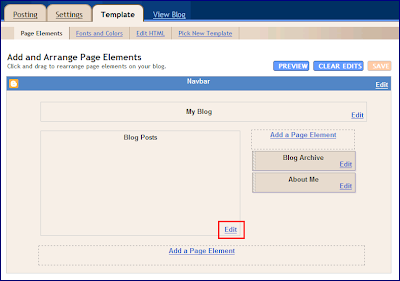
- Visit your blog's Template tab and click on the Page Elements link.
- Click Edit in the Blog Posts section.
- Check the box next to Show Ads Between Posts. You can then select how often you'd like your ads to appear, such as once after every post or once after every other post.
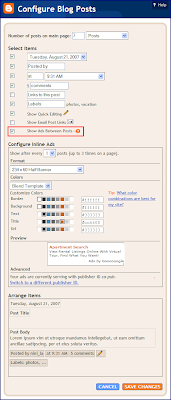
- Customize the ads and click on Save Changes when you're done.


For more detailed instructions, please visit Blogger's Help Center . Lastly, don't forget to check out our blog optimization tips for ways to improve your ad performance.
Posted by Cathleen Jia - AdSense Publisher Support
--
Posted By Inside AdSense Team to Inside AdSense at 8/21/2007 10:28:00 AM
Reply all
Reply to author
Forward
0 new messages