
[Inside AdSense] When AdSense met Blogger (in beta)
4 views
Skip to first unread message

Inside AdSense Team
Oct 24, 2006, 7:41:00 PM10/24/06
to inside-...@googlegroups.com
If you have a blog on the new version of Blogger in beta, we're happy to introduce you to the drag-and-drop AdSense widget! Using this new feature, you can easily add AdSense to your blog by following these instructions.
1. First, log into the new version of Blogger with your Google Account. Click on the Layout link next to the blog where you’d like to feature Google ads.
(If you don’t see the Layout option, it’s possible that your beta blog is still in the classic template -- visit your blog’s Template page and click Customize Design. You can then upgrade your blog to the new template in minutes.)

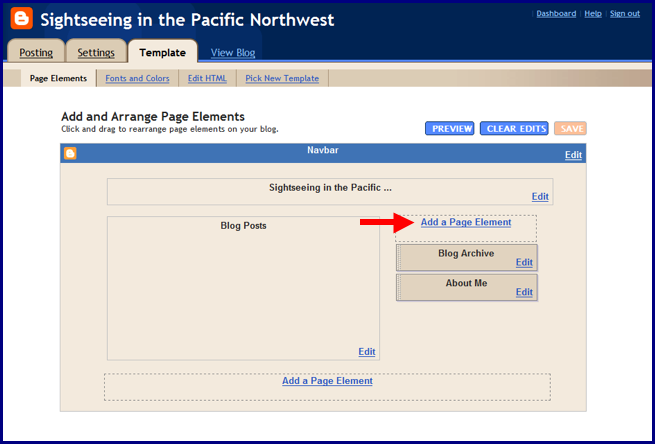
2. Next you should be taken to your Template – Page Elements page. Click on one of the Add a Page Element links shown below.

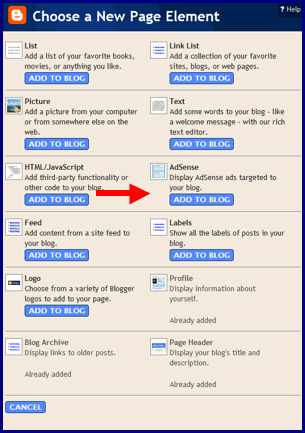
3. In the pop-up window, click the blue Add to Blog button underneath the AdSense option.

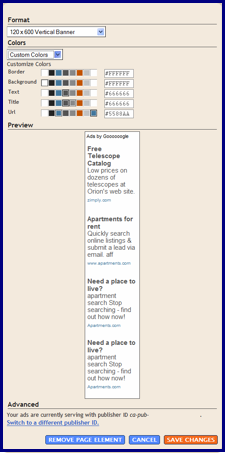
4. If you already have an AdSense account, simply sign in with your AdSense login; if not, you can create an account directly on this page. After signing in, you can select your preferred color template and ad format. When you're finished, click on the orange Save Changes button.

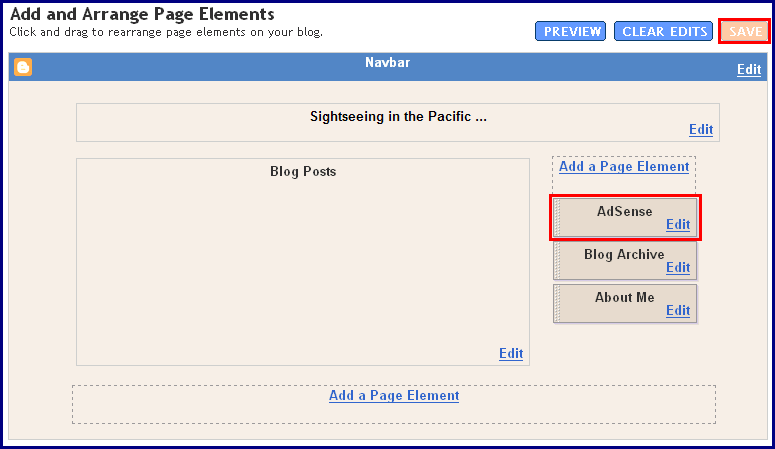
5. Now you can easily drag and drop your AdSense ad unit anywhere on your blog's template -- or delete it if you need to make changes. When you're all done, click the orange 'Save' button on the upper right corner and go view your new blog!

We hope you find this new feature helpful when implementing your ads. Let us know if you have any comments or suggestions.
Posted by Cathleen Jia - AdSense Publisher Support
--
Posted by Inside AdSense Team to Inside AdSense at 10/24/2006 04:32:00 PM
1. First, log into the new version of Blogger with your Google Account. Click on the Layout link next to the blog where you’d like to feature Google ads.
(If you don’t see the Layout option, it’s possible that your beta blog is still in the classic template -- visit your blog’s Template page and click Customize Design. You can then upgrade your blog to the new template in minutes.)

2. Next you should be taken to your Template – Page Elements page. Click on one of the Add a Page Element links shown below.
3. In the pop-up window, click the blue Add to Blog button underneath the AdSense option.
4. If you already have an AdSense account, simply sign in with your AdSense login; if not, you can create an account directly on this page. After signing in, you can select your preferred color template and ad format. When you're finished, click on the orange Save Changes button.
5. Now you can easily drag and drop your AdSense ad unit anywhere on your blog's template -- or delete it if you need to make changes. When you're all done, click the orange 'Save' button on the upper right corner and go view your new blog!
We hope you find this new feature helpful when implementing your ads. Let us know if you have any comments or suggestions.
Posted by Cathleen Jia - AdSense Publisher Support
--
Posted by Inside AdSense Team to Inside AdSense at 10/24/2006 04:32:00 PM
Reply all
Reply to author
Forward
0 new messages