
CPRS not connecting to OSEHRA VistA with most recent build 03/15
361 views
Skip to first unread message

Ryan Schulteis
Mar 18, 2015, 1:15:36 AM3/18/15
to hard...@googlegroups.com

CRPS, however, will not connect and I keep getting the error "Not a valid ACCESS CODE/VERIFY CODE par" (see screenshot above). Thinking it might be a problem with capitalization, I logged into the VistA roll&scroll and changed the VERIFY CODE for that account to something with all lowercase. No dice. I'm certain it's on the right port, if I change the port I can't even attempt to login. Similarly, I'm sure that I have the right host IP. I've tried every configuration that I can find including both with and without "CCOW=disable".
If anyone has any advice, it would be much appreciated! I'm a VA physician trying to learn a bit more about VistA and CRPS, and I'm very appreciative of this community and its collective intelligence.

Nancy Anthracite
Mar 18, 2015, 10:13:56 AM3/18/15
to hard...@googlegroups.com, Ryan Schulteis
Is your null device set up correctly?
--
Nancy Anthracite
On Tuesday, March 17, 2015 10:15:36 PM Ryan Schulteis wrote:
> <https://lh6.googleusercontent.com/-14xLXIoes9I/VQkI1yZtvkI/AAAAAAAAAIA/3bLh
> Q41-5T4/s1600/error3.png>
--
Nancy Anthracite
On Tuesday, March 17, 2015 10:15:36 PM Ryan Schulteis wrote:
> <https://lh6.googleusercontent.com/-14xLXIoes9I/VQkI1yZtvkI/AAAAAAAAAIA/3bLh
> Q41-5T4/s1600/error3.png>
Ryan Schulteis
Mar 18, 2015, 10:41:51 AM3/18/15
to hard...@googlegroups.com, ryandsc...@gmail.com, nanth...@earthlink.net
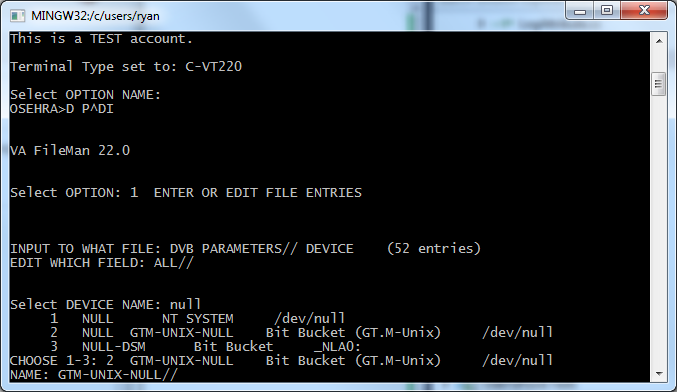
Sounds like a good question ... I have to admit I don't truly understand the term "null device". Is this something I can check by logging into VistA and reaching a programmer prompt? At my current level, I can log into the roll & scroll UI or I can ssh into the ubuntu terminal and type "mumps -dir" to get a programmer prompt. Once I have that, I don't know much M code other than D ^ZU, honestly. Anyway, if you could tell me more about configuring a null device, that would be great!
Thanks,
Ryan
Thanks,
Ryan
Nancy Anthracite
Mar 18, 2015, 10:51:34 AM3/18/15
to hard...@googlegroups.com, Ryan Schulteis
Here is an example of getting into Fileman to edit my null device on a Debian
installation. Ubuntu is derived from Debian so it should be similar.
Can you get to Fileman from your menu when you use D ^ZU
$ mumps -dir <=== would go here on your installation and you GTM prompt may be
just GTM>, certainly not nancyGTM>
nancyGTM>S DUZ=1 D ^XUP
Setting up programmer environment
This is a TEST account.
Terminal Type set to: C-VT100
You have 360 new messages.
Select OPTION NAME:
nancyGTM>D P^DI
VA FileMan 22.0
Select OPTION: 1 ENTER OR EDIT FILE ENTRIES
INPUT TO WHAT FILE: BUILD// DEVICE (52 entries)
EDIT WHICH FIELD: ALL//
Select DEVICE NAME: null Bit Bucket (GT.M-Unix) /dev/null
NAME: NULL//
LOCATION OF TERMINAL: Bit Bucket (GT.M-Unix) Replace
Select MNEMONIC: NULL//
LOCAL SYNONYM:
$I: /dev/null//
VOLUME SET(CPU):
SIGN-ON/SYSTEM DEVICE: NO//
TYPE: TERMINAL//
SUBTYPE: P-OTHER//
ASK DEVICE:
ASK PARAMETERS:
ASK HOST FILE: ^
--
Nancy Anthracite
installation. Ubuntu is derived from Debian so it should be similar.
Can you get to Fileman from your menu when you use D ^ZU
$ mumps -dir <=== would go here on your installation and you GTM prompt may be
just GTM>, certainly not nancyGTM>
nancyGTM>S DUZ=1 D ^XUP
Setting up programmer environment
This is a TEST account.
Terminal Type set to: C-VT100
You have 360 new messages.
Select OPTION NAME:
nancyGTM>D P^DI
VA FileMan 22.0
Select OPTION: 1 ENTER OR EDIT FILE ENTRIES
INPUT TO WHAT FILE: BUILD// DEVICE (52 entries)
EDIT WHICH FIELD: ALL//
Select DEVICE NAME: null Bit Bucket (GT.M-Unix) /dev/null
NAME: NULL//
LOCATION OF TERMINAL: Bit Bucket (GT.M-Unix) Replace
Select MNEMONIC: NULL//
LOCAL SYNONYM:
$I: /dev/null//
VOLUME SET(CPU):
SIGN-ON/SYSTEM DEVICE: NO//
TYPE: TERMINAL//
SUBTYPE: P-OTHER//
ASK DEVICE:
ASK PARAMETERS:
ASK HOST FILE: ^
--
Nancy Anthracite
Ryan Schulteis
Mar 18, 2015, 11:18:38 AM3/18/15
to hard...@googlegroups.com, ryandsc...@gmail.com, nanth...@earthlink.net


Kevin Toppenberg
Mar 18, 2015, 11:19:21 AM3/18/15
to hard...@googlegroups.com, ryandsc...@gmail.com, nanth...@earthlink.net
If this turns out the be the problem, I am appalled. I have been in the VistA world almost 10 yrs now, and we still can't get a distro to be ready to go after download? Yes such a distro exists, but it is not in the main stream, so stuff from upstream keeps coming that has the same bugs and gotcha's year after year.
Kevin
Kevin Toppenberg
Mar 18, 2015, 11:26:38 AM3/18/15
to hard...@googlegroups.com, ryandsc...@gmail.com, nanth...@earthlink.net
Ryan,
I have some time today. If you email me directly with your phone number, I'll try to call you in about an hour and I'll see if I can help you.
Kevin Toppenberg
Nancy Anthracite
Mar 18, 2015, 11:29:59 AM3/18/15
to Ryan Schulteis, hard...@googlegroups.com
that NULL for the NT system is wrong, but that is not a concern for you.
SInce all three have /dev/null, that is probably not your problem.
--
Nancy Anthracite
On Wednesday, March 18, 2015 08:18:38 AM Ryan Schulteis wrote:
> <https://lh5.googleusercontent.com/-_ZmTsWw6Jic/VQmXFKGH8fI/AAAAAAAAAIs/vBGQ
> Y7hcuKg/s1600/nulldev1.png>
>
> <https://lh5.googleusercontent.com/-uodQB27A11w/VQmXCY6uTqI/AAAAAAAAAIk/zgf2
> Tpz5lDY/s1600/nulldev2.png> I was able to execute those commands and enter
SInce all three have /dev/null, that is probably not your problem.
--
Nancy Anthracite
On Wednesday, March 18, 2015 08:18:38 AM Ryan Schulteis wrote:
> <https://lh5.googleusercontent.com/-_ZmTsWw6Jic/VQmXFKGH8fI/AAAAAAAAAIs/vBGQ
> Y7hcuKg/s1600/nulldev1.png>
>
> <https://lh5.googleusercontent.com/-uodQB27A11w/VQmXCY6uTqI/AAAAAAAAAIk/zgf2
> Tpz5lDY/s1600/nulldev2.png> I was able to execute those commands and enter
Nancy Anthracite
Mar 18, 2015, 11:34:14 AM3/18/15
to Kevin Toppenberg, hard...@googlegroups.com, ryandsc...@gmail.com
Likewise for me if you and Kevin can't connect. Also, tTat the debugging
output to make sure you are using the New Broker. Do this and then try to
connect CPRS and look at the log. You should be seeing only [XWB things and
no {XWB things if the New Broker is being used.
nancyGTM>D ^XUP
Setting up programmer environment
This is a TEST account.
Terminal Type set to: C-VT100
You have 360 new messages.
Select OPTION NAME: eve
1 EVE Systems Manager Menu
2 EVENT CAPTURE ECX ECS MAINTENANCE Event Capture
3 EVENT CAPTURE (ECS) EXTRACT AU ECX ECS SOURCE AUDIT Event
Capture
(ECS) Extract Audit
4 EVENT CAPTURE DATA ENTRY ECENTER Event Capture Data Entry
5 EVENT CAPTURE EXTRACT ECXEC Event Capture Extract
Press <RETURN> to see more, '^' to exit this list, OR
CHOOSE 1-5: 1 EVE Systems Manager Menu
WARNING -- TASK MANAGER DOESN'T SEEM TO BE RUNNING!!!!
Core Applications ...
Device Management ...
Menu Management ...
Programmer Options ...
Operations Management ...
Spool Management ...
Information Security Officer Menu ...
Taskman Management ...
User Management ...
FM VA FileMan ...
Application Utilities ...
Capacity Planning ...
HL7 Main Menu ...
Manage Mailman ...
MAS Parameter Entry/Edit
You have PENDING ALERTS
Enter "VA to jump to VIEW ALERTS option
You've got PRIORITY mail!
Select Systems Manager Menu <TEST ACCOUNT> Option: operations Management
System Status
Introductory text edit
CPU/Service/User/Device Stats
RJD Kill off a users' job
Alert Management ...
Alpha/Beta Test Option Usage Menu ...
Clean old Job Nodes in XUTL
Delete Old (>14 d) Alerts
Foundations Management
Kernel Management Menu ...
Post sign-in Text Edit
RPC Broker Management Menu ...
User Management Menu ...
You have PENDING ALERTS
Enter "VA to jump to VIEW ALERTS option
You've got PRIORITY mail!
Select Operations Management <TEST ACCOUNT> Option: rpc Broker Management Menu
RPC Listener Edit
Start All RPC Broker Listeners
Stop All RPC Broker Listeners
Clear XWB Log Files
Debug Parameter Edit
View XWB Log
You have PENDING ALERTS
Enter "VA to jump to VIEW ALERTS option
You've got PRIORITY mail!
Select RPC Broker Management Menu <TEST ACCOUNT> Option: debug Parameter Edit
----- Setting RPCBroker debug logging for System: BETA.VISTA-OFFICE.ORG -----
Enable Broker Logging: No// 3 very Verbose
RPC Listener Edit
Start All RPC Broker Listeners
Stop All RPC Broker Listeners
Clear XWB Log Files
Debug Parameter Edit
View XWB Log
You have PENDING ALERTS
Enter "VA to jump to VIEW ALERTS option
You've got PRIORITY mail!
Select RPC Broker Management Menu <TEST ACCOUNT> Option: clear XWB Log Files
Remove all XWB log entries? No// yes YES
Done
RPC Listener Edit
Start All RPC Broker Listeners
Stop All RPC Broker Listeners
Clear XWB Log Files
Debug Parameter Edit
View XWB Log
You have PENDING ALERTS
Enter "VA to jump to VIEW ALERTS option
You've got PRIORITY mail!
Select RPC Broker Management Menu <TEST ACCOUNT> Option:
--
Nancy Anthracite
On Wednesday, March 18, 2015 08:26:38 AM Kevin Toppenberg wrote:
> Ryan,
>
> I have some time today. If you email me directly with your phone number,
> I'll try to call you in about an hour and I'll see if I can help you.
>
> Kevin Toppenberg
>
> On Wednesday, March 18, 2015 at 9:18:38 AM UTC-6, Ryan Schulteis wrote:
output to make sure you are using the New Broker. Do this and then try to
connect CPRS and look at the log. You should be seeing only [XWB things and
no {XWB things if the New Broker is being used.
nancyGTM>D ^XUP
Setting up programmer environment
This is a TEST account.
Terminal Type set to: C-VT100
You have 360 new messages.
1 EVE Systems Manager Menu
2 EVENT CAPTURE ECX ECS MAINTENANCE Event Capture
3 EVENT CAPTURE (ECS) EXTRACT AU ECX ECS SOURCE AUDIT Event
Capture
(ECS) Extract Audit
4 EVENT CAPTURE DATA ENTRY ECENTER Event Capture Data Entry
5 EVENT CAPTURE EXTRACT ECXEC Event Capture Extract
Press <RETURN> to see more, '^' to exit this list, OR
CHOOSE 1-5: 1 EVE Systems Manager Menu
WARNING -- TASK MANAGER DOESN'T SEEM TO BE RUNNING!!!!
Core Applications ...
Device Management ...
Menu Management ...
Programmer Options ...
Operations Management ...
Spool Management ...
Information Security Officer Menu ...
Taskman Management ...
User Management ...
FM VA FileMan ...
Application Utilities ...
Capacity Planning ...
HL7 Main Menu ...
Manage Mailman ...
MAS Parameter Entry/Edit
You have PENDING ALERTS
Enter "VA to jump to VIEW ALERTS option
You've got PRIORITY mail!
Select Systems Manager Menu <TEST ACCOUNT> Option: operations Management
System Status
Introductory text edit
CPU/Service/User/Device Stats
RJD Kill off a users' job
Alert Management ...
Alpha/Beta Test Option Usage Menu ...
Clean old Job Nodes in XUTL
Delete Old (>14 d) Alerts
Foundations Management
Kernel Management Menu ...
Post sign-in Text Edit
RPC Broker Management Menu ...
User Management Menu ...
You have PENDING ALERTS
Enter "VA to jump to VIEW ALERTS option
You've got PRIORITY mail!
Select Operations Management <TEST ACCOUNT> Option: rpc Broker Management Menu
RPC Listener Edit
Start All RPC Broker Listeners
Stop All RPC Broker Listeners
Clear XWB Log Files
Debug Parameter Edit
View XWB Log
You have PENDING ALERTS
Enter "VA to jump to VIEW ALERTS option
You've got PRIORITY mail!
Select RPC Broker Management Menu <TEST ACCOUNT> Option: debug Parameter Edit
----- Setting RPCBroker debug logging for System: BETA.VISTA-OFFICE.ORG -----
Enable Broker Logging: No// 3 very Verbose
RPC Listener Edit
Start All RPC Broker Listeners
Stop All RPC Broker Listeners
Clear XWB Log Files
Debug Parameter Edit
View XWB Log
You have PENDING ALERTS
Enter "VA to jump to VIEW ALERTS option
You've got PRIORITY mail!
Select RPC Broker Management Menu <TEST ACCOUNT> Option: clear XWB Log Files
Remove all XWB log entries? No// yes YES
Done
RPC Listener Edit
Start All RPC Broker Listeners
Stop All RPC Broker Listeners
Clear XWB Log Files
Debug Parameter Edit
View XWB Log
You have PENDING ALERTS
Enter "VA to jump to VIEW ALERTS option
You've got PRIORITY mail!
Select RPC Broker Management Menu <TEST ACCOUNT> Option:
--
Nancy Anthracite
On Wednesday, March 18, 2015 08:26:38 AM Kevin Toppenberg wrote:
> Ryan,
>
> I have some time today. If you email me directly with your phone number,
> I'll try to call you in about an hour and I'll see if I can help you.
>
> Kevin Toppenberg
>
> On Wednesday, March 18, 2015 at 9:18:38 AM UTC-6, Ryan Schulteis wrote:
> > <https://lh5.googleusercontent.com/-_ZmTsWw6Jic/VQmXFKGH8fI/AAAAAAAAAIs/vB
> > GQY7hcuKg/s1600/nulldev1.png>
> >
> >
> > <https://lh5.googleusercontent.com/-uodQB27A11w/VQmXCY6uTqI/AAAAAAAAAIk/zg
> > f2Tpz5lDY/s1600/nulldev2.png> I was able to execute those commands and
> > GQY7hcuKg/s1600/nulldev1.png>
> >
> >
> > <https://lh5.googleusercontent.com/-uodQB27A11w/VQmXCY6uTqI/AAAAAAAAAIk/zg

Joe Snyder
Mar 18, 2015, 11:36:29 AM3/18/15
to hard...@googlegroups.com, ryandsc...@gmail.com, nanth...@earthlink.net
Hi Dr. Schulteis,
There is another avenue for this problem to show itself and it deals with the cipher hash that CPRS and the other GUIs use when sending Access/Verify code information to VistA, which is found in XUSRB1.m (https://github.com/OSEHRA/VistA-M/blob/master/Packages/Kernel/Routines/XUSRB1.m). The hash is what encrypts and de-crypts the information on either side. If the ciphers don't match, then the submitted codes will never be verified as correct.
There is another avenue for this problem to show itself and it deals with the cipher hash that CPRS and the other GUIs use when sending Access/Verify code information to VistA, which is found in XUSRB1.m (https://github.com/OSEHRA/VistA-M/blob/master/Packages/Kernel/Routines/XUSRB1.m). The hash is what encrypts and de-crypts the information on either side. If the ciphers don't match, then the submitted codes will never be verified as correct.
This is a problem that the OSEHRA repository code has dealt with in the past by attempting keeping a single hash. But when we merged one of the more recent FOIA releases (Nov 2014), It was necessary to update the hash which broke some connections to the Delphi GUIs. I've compiled a version of CPRS 30.15 for you to try which uses the same hash as what is found in the VistA-M repository master branch. It can be found at
http://code.osehra.org/files/CPRS/CPRSChart.exe
The file has a SHA1 sum of "5dac623bcb253f3e065aa9a0050bb2f151dd448d" if you are interested in verifying the file after downloading it. Please try this new executable file with the same login information.
Thanks,
Joseph
Ryan Schulteis
Mar 18, 2015, 12:05:50 PM3/18/15
to hard...@googlegroups.com, ryandsc...@gmail.com, nanth...@earthlink.net

Joseph: I am about to try your version of CPRS 30. That makes sense to me. And maybe the RPC view log that I generated by following Nancy's recent instructions will give you a hint as to whether or not this is the problem.
Nancy: Thanks again. I followed those directions (after using the system manger account to log-in following the D ^XUP command) and the output is posted above ... looks like [XWB rather than {XWB so I take this to mean I am using the new broker.
Ryan Schulteis
Mar 18, 2015, 12:17:34 PM3/18/15
to hard...@googlegroups.com, ryandsc...@gmail.com, nanth...@earthlink.net
Success! Thank you everyone. I've attached a screenshot above to show that Dr. Robert Alexander is able to finally take proper care of Patient D. Four !!
Replacing my version of CPRSChart.exe (from OSEHRA http://files.osehra.org/CPRS_Demo_0613.zip) with the one linked above from Joseph's response (http://code.osehra.org/files/CPRS/CPRSChart.exe) allowed entry with the usual fakedoc1 + 1Doc!@#$ access/verify codes.
I definitely learned a little bit along this journey. Nancy, do you have a link to some literature where I could learn more about what all those M commands you had me enter actually mean?
Replacing my version of CPRSChart.exe (from OSEHRA http://files.osehra.org/CPRS_Demo_0613.zip) with the one linked above from Joseph's response (http://code.osehra.org/files/CPRS/CPRSChart.exe) allowed entry with the usual fakedoc1 + 1Doc!@#$ access/verify codes.
I definitely learned a little bit along this journey. Nancy, do you have a link to some literature where I could learn more about what all those M commands you had me enter actually mean?
Ryan Schulteis
Mar 18, 2015, 12:18:13 PM3/18/15
to hard...@googlegroups.com, ryandsc...@gmail.com, nanth...@earthlink.net

Joe Snyder
Mar 18, 2015, 12:35:57 PM3/18/15
to hard...@googlegroups.com, ryandsc...@gmail.com, nanth...@earthlink.net
Glad to hear it!
Unfortunately, I cannot help with the Vitals Manager GUI or Vitals GUI as OSEHRA doesn't have the source code to build and update the cipher within them. But the Vitals Lite functionality, within the CPRS main screen, should continue to be available if set up correctly.
OSEHRA does have some tutorials on FileMan, if that is what you are interested in. Sam Habiel worked with OSEHRA to generate a programming-focused Fileman Tutorial. As for the MUMPS commands, I'll defer to Nancy for the best source of information.
- Joe

Sam Habiel
Mar 18, 2015, 12:39:59 PM3/18/15
to hardhats, ryandsc...@gmail.com, Nancy Anthracite
Joe,
Thank you! I didn't know where that ended up on the net. Glad it's still there. I still have a copy on my repo. I plan on expanding it soon for my class.
--Sam
--
--
http://groups.google.com/group/Hardhats
To unsubscribe, send email to Hardhats+u...@googlegroups.com
---
You received this message because you are subscribed to the Google Groups "Hardhats" group.
To unsubscribe from this group and stop receiving emails from it, send an email to hardhats+u...@googlegroups.com.
For more options, visit https://groups.google.com/d/optout.
--
Sam Habiel, Pharm.D.
VISTA Expertise Network
PS: If you find anything open source that I do useful to you, consider
buying me a present from my wish list as a token of thanks:
http://www.amazon.com/gp/registry/wishlist/?ie=UTF8&cid=A198EOA15E5N5B
VISTA Expertise Network
PS: If you find anything open source that I do useful to you, consider
buying me a present from my wish list as a token of thanks:
http://www.amazon.com/gp/registry/wishlist/?ie=UTF8&cid=A198EOA15E5N5B

Puran Ticku
Oct 31, 2015, 11:34:40 PM10/31/15
to Hardhats, ryandsc...@gmail.com, nanth...@earthlink.net
Hi all
I am new to Vista and found this group extremely helpful. I am also facing the issue of connecting to OSEHRA Vista via CPRS Gui. I tried to download the CPRS 30.15 as suggested but the link is not working for me. Could you please help?
Thanks
Puran

Christopher Edwards
Nov 2, 2015, 7:54:08 AM11/2/15
to hard...@googlegroups.com, ryandsc...@gmail.com, Nancy Anthracite
The CPRS version for the FOIA release Puran is referring to is located at: https://www.osehra.org/comment/2026#comment-2026
Reply all
Reply to author
Forward
0 new messages