
Sketchup Bug!!!
462 views
Skip to first unread message

Keshan Perera
Jun 19, 2012, 4:00:36 AM6/19/12
to 3d...@googlegroups.com
 Click the image to see the large one :)
Hans mend cam
Jun 19, 2012, 9:31:11 AM6/19/12
to 3d...@googlegroups.com
I have this problem also when I add a geolocation, I get sketchup bug
help me
matthiasbasler
Jun 19, 2012, 1:16:01 PM6/19/12
to 3D Modeling for Google Earth & Maps
Hi Keshan,
this list is not optimal for your question, since there is a dedicated
SketchUp list. You should post it there.
Also make sure you are more specific:
- When exactly does this error occur
- Does it occur at random times or always (reproducably) when doing a
certain action?
- What is your Operating system, graphics card etc.
- What is your Version of SketchUp?
- ANy other information that can help.
And of course, use the dialog depicted above to send the BugSplat to
Google/Trimble so they can have their programmers look into it.
> These days my computer restarts suddenly. Is this the reason for that? Now I always use my PC on Safe Mode.
Maybe SketchUp indeed is in trouble because your PC is instable? Maybe
it is overheating or some hardware is damaged? I can just guess ...
Matthias Basler
this list is not optimal for your question, since there is a dedicated
SketchUp list. You should post it there.
Also make sure you are more specific:
- When exactly does this error occur
- Does it occur at random times or always (reproducably) when doing a
certain action?
- What is your Operating system, graphics card etc.
- What is your Version of SketchUp?
- ANy other information that can help.
And of course, use the dialog depicted above to send the BugSplat to
Google/Trimble so they can have their programmers look into it.
> These days my computer restarts suddenly. Is this the reason for that? Now I always use my PC on Safe Mode.
it is overheating or some hardware is damaged? I can just guess ...
Matthias Basler
CraigD - Google
Jun 19, 2012, 1:24:48 PM6/19/12
to 3d...@googlegroups.com
Keshan and Hans, Matthias is correct and there can be many reasons for SketchUp to crash. Always type in what you did just previous to seeing the BugSplat screen, in the dialog's entry field and send in the report. It will be reviewed by a member of the SketchUp team.
Kechan, as far as your computer restarting suddenly/randomly, this is most likely not caused by SketchUp (I've never heard of a SU bug causing a system wide issue like that, so I very much doubt it's because of SketchUp). However, there have been graphics card issues that can cause your system to restart, and can cause SketchUp to crash, so that's where I would start to look. You'll want to make sure that your graphics card has the latest drivers by going to the graphics card manufacturer's website and following the instructions to check/update the drivers.
I hope that helps!
Cheers,
- CraigD
catamountain
Jun 19, 2012, 3:02:43 PM6/19/12
to 3d...@googlegroups.com
In the SketchUp forum, start with How do I fix display issues? That thread revolves around all the lovely problems the graphics card and its driver can cause.
When you run SU in safe mode, you have greatly limited the number of running processes that can cause problems (one of the disabled items happens to be the manufacturer's graphics driver.) So through a process of elimination, you can often figure out which process is causing SU problem. Before you go through that, follow the basic troubleshooting steps in the link I gave here - ie, go to Window > Preferences > OpenGL and disable Use hardware acceleration. Restart SU. If that helps, update the driver before enabling hardware acceleration again.
If there is still a problem, more info about your system would be handy.
Keshan Perera
Jun 20, 2012, 7:15:26 AM6/20/12
to 3d...@googlegroups.com
Hello!!!

@ Matthias - This is the first time I experienced this message. This error appeared when I was doing some funny things with SandBox :) My operating system is Windows Vista, speed - 3.00GHz , RAM(memory) - 1.00GB , System type - 32-bit Operating system. Processor - Intel Core 2 Duo. It doesn't show the Graphic card memory in the safe mode. I will give you that information later :) . Sketchup Version 8.0.14346 . And yes it can be because OVERHEATED. Because I live in Sri Lanka it's pretty hot here. You can see today's weather forcast of my town below.

@Craig - What can I do if it's a over heated problem. Back of my CPU his covered by the wall. Should I turn it to get more air? I will tell my father to look for new versions of our graphic card. I don't know about those.
@Catamountain - Oh good point know I think it cannot be a overheated problem. Because in Safe mode my PC does not restart. It could be a graphic card problem. And I have already disabled the option called "Use hardware acceleration" . Thank you for your great point :)
THANK YOU ALL OF YOU FOR GIVING ME SOME VERY GOOD ADVICE.
Cheers,
Keshan.
Keshan.
catamountain
Jun 20, 2012, 11:49:44 PM6/20/12
to 3d...@googlegroups.com
With hardware acceleration disabled, all calculations are done with the CPU. If the graphics card and/or driver were problematic, SU should now run in normal mode - although slower than with hardware acceleration enabled.
Do you have a graphics card or an Intel integrated graphics chipset?
Having a tool cause a crash often indicated incomplete OpenGL support. There are 2 pages to go through under SketchUp Problems - Graphics Card and Windows Issues. Find out why many people obsess about their graphics card on the first page. And since you're comfortable booting in testing mode, you can also try tracking down the process that may be interfering with SU - that's somewhat covered on the Windows Issue page.
Boot into safe mode, clean boot and normal mode. After the start up processes load, save a log file of running processes (I've used an option in HijackThis in the past to save such files,) You already know SU runs in safe mode, but does it run in clean boot (loads more processes and drivers than safe mode - including the installed manufacturer's graphics driver.) Compare the log files. If SU crashes in clean boot, focus on comparing the logs from clean boot and safe mode. If SU works in clean boot, compare the normal mode log with clean boot log.
Keep an open mind on the crash cause. Things like bad printer drivers and other apps have been know to mess up SU performance - and those things the affected computer user added to their system and trusted.
Keshan Perera
Jun 21, 2012, 8:04:44 AM6/21/12
to 3d...@googlegroups.com
Hello!!
Sorry. My English is not good so I cannot understand you clearly. This is too complex. I'm not good at these computer work :( I don't know anything about these things.
Do you have a graphics card or an Intel integrated graphics chipset?
I Don't know about that. :(
THANK YOU FOR YOUR REPLY :)
Thank you!!
Keshan.
CraigD - Google
Jun 21, 2012, 3:53:45 PM6/21/12
to 3d...@googlegroups.com
Hi Keshan, to answer your question about heat, yes, freeing up space near the vents on your computer (whether on the back, bottom or side) is a good start. You can also make sure to clean any dust from the vents, using a vacuum cleaner.
It looks like you've gotten some good advice here!
Good luck, and please update us.
Cheers,
- CraigD
Randy
Jun 21, 2012, 9:25:18 PM6/21/12
to 3d...@googlegroups.com
Keshan,
This might help...
System Requirements for Windows Vista
- Only Windows Vista Business, Ultimate, and Enterprise can support dual processors, but not Windows Home Basic.
- DirectX 9 graphics with WDDM and 128 MB of graphics memory (32 MB for Home Basic)
To find the DirectX version and memory:
- click "Start > Run"
- In the Run window, type dxdiag , and click OK.
- Version number and memory are listed on the "System" tab.
PC keeps restarting
- PC doesn't meet minimum system requirements.
- Check the power cable (both ends). If it is loose or wiggles, it could cause the PC to restart.
- You might need more RAM
- Check the website of your pc's manufacturer and download any updates they have (for your system).
- Update the graphics driver
- on the desktop, right-click on "My Computer" and select "Manage"
- on the left side, click "Device Manager"
- on the right side look under "Display Adapter" for the graphics card and right click on it and select "Update Driver..."
- cross your fingers and hope for the best..
A problem with the graphics card usually makes the screen go black and the pc stops working. If it's restarting then it's probably one of the other issues above that is eating up your system resources.
PC Overheating
- If your pc overheats, you should hear the fan running constantly.
- If it gets hot, I think it would probably shut down, not restart (at least until it cools a little)
Hope this helps
Randy
catamountain
Jun 21, 2012, 10:37:41 PM6/21/12
to 3d...@googlegroups.com
For information on updating graphics driver - and finding what type of graphics hardware you have - just follow the links in SketchUp support http://support.google.com/sketchup/bin/answer.py?hl=en&answer=36254.
Some good, easy to follow articles on general computer health and maintenance http://aumha.org/articles.htm. Start with the section on optimizing your computer. This is some of the stuff to do to troubleshoot computer problems, and make sure your computer is healthy. On the positive side of this SU performance problem, you will learn a lot about your computer.
Windows has a lovely testing utility called msconfig. It help people isolate problem processes by temporarily disabling them. It's easy to use and set up while in normal mode. With just a few clicks, you can set up your system to boot into safe mode and set up the options for a clean boot. The best place to find instructions for that is to navigate over to Microsoft Support. Microsoft has several articles written to accomidate people at different computer skill levels. The articles also may be offered in your native language.
Keshan Perera
Jun 22, 2012, 1:13:07 PM6/22/12
to 3d...@googlegroups.com
@Craig - I turned my cpu a little bit. Now it gets some more air. :) But now I think the overheating is not the problem because in the Safe Mode this computer doesn't restart. I will clean the dust on it later. There isn't much of dust. :). I cannot reply you quickly because I'm in the +5 1/2 time zone(your day is my knight) Now it's 10.23pm here. I'm awake because I don't have school tomorrow. Yes, I'm getting some GREAT advice . Thank you Craig !!!
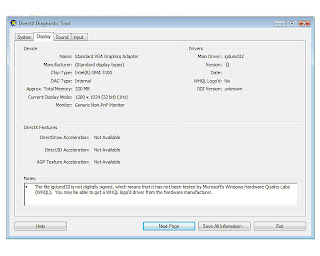
@Randy - My OS is Windows Vista Business. DirectX 11.
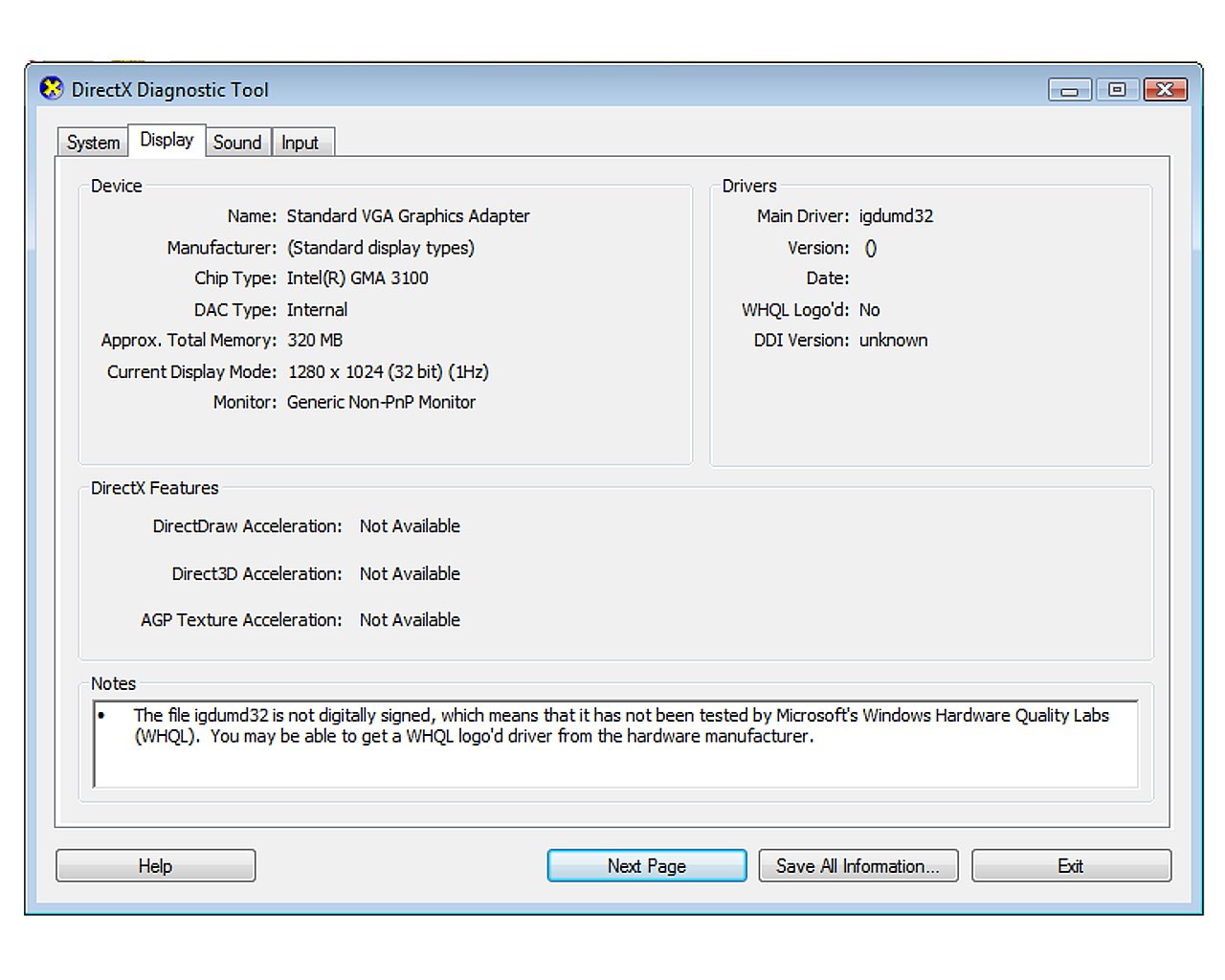
You can see the information here. I will look for the Driver Updates tomorrow maybe. It cannot be overheating :D Thank you very much for your help!!! Randy.
@Catamountain - Thank you for your great links. I will update my graphic card later. One of my brother's friends came and uninstalled some graphic something (I don't know. even my brother don't know :D) I cannot wait till I solve this problem. Currently I'm using the Normal mode. Hope this does not restart. Thank you!!
THANK YOU GUYS!!!
CHEERS,
KESHAN.
Randy
Jun 23, 2012, 3:33:38 AM6/23/12
to 3d...@googlegroups.com
Keshan,
The problem you're having, and the fix, are both explained, and very well I might say, on this page: http://www.iexploreexeerrorfix.com/igdumd32-dll.php
It's sort of spooky, It's like they're talking about you. Oooooooooo
Don't do anything until you read that entire page.
You'll be fine.
Reply all
Reply to author
Forward
0 new messages