
How to Install Powerline on windows
2,452 views
Skip to first unread message

kk
Apr 28, 2013, 2:33:37 AM4/28/13
to vim...@googlegroups.com
Hi all
I'm a noob of vim.
I tried to install powerline (Lokaltog/powerline) these days, but still failed.
There is no doc about intallation on windows,so I want to know the steps of install it on windows.
Thanks for your sight and appriciate for any anyhelp.
For now, I download the git zip. Use "setup.py install" or "setup.py install"
add vimrc"set rtp+=C:\Python33\Lib\site-
I'm a noob of vim.
I tried to install powerline (Lokaltog/powerline) these days, but still failed.
There is no doc about intallation on windows,so I want to know the steps of install it on windows.
Thanks for your sight and appriciate for any anyhelp.
For now, I download the git zip. Use "setup.py install" or "setup.py install"
add vimrc"set rtp+=C:\Python33\Lib\site-
packages\Powerline-beta-py3.3.egg\powerline\bindings\vim"
or "set
rtp+=~/.vim/bundle/powerline/powerline/bindings/vim"
both get error message when run vim.
Error detected while processing function Powerline:
line 3:
Traceback (most recent call last):
File "<string>",line 1,in <module>
Error detected while processing function Powerline:
File"c:\Python33\lib\site-packages\poerline\beta\py3.3 XXXXX" line 371,in render
My vim is 7.7.905 with python3 and vundle
both get error message when run vim.
Error detected while processing function Powerline:
line 3:
Traceback (most recent call last):
File "<string>",line 1,in <module>
Error detected while processing function Powerline:
File"c:\Python33\lib\site-packages\poerline\beta\py3.3 XXXXX" line 371,in render
My vim is 7.7.905 with python3 and vundle

jia sun
May 12, 2013, 2:25:25 PM5/12/13
to vim...@googlegroups.com
Hi friend ,
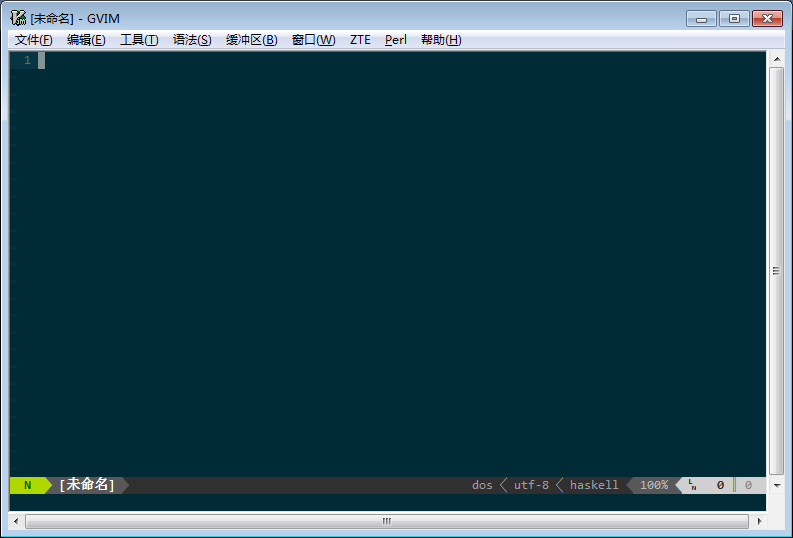
I use GVIM&Powerline on win7 , but without Python . Here is my steps .
1.Find tar.gz attachment , extract files under "Lokaltog-vim-powerline-d885f90" to your "vimfiles" folder.
2.Install powerline fonts , they are also provided to you.
3. add configuration in vimrc . The last two lines is for my poor Chinese menu , it would become garbled without them,I don't know why:(
you can discard them when use pure English environment.
"Powerline configuration
set encoding=utf-8
set laststatus=2
set guifont=Consolas\ for\ Powerline\ FixedD:h10:cANSI
set t_Co=256
let g:Powerline_symbols = "fancy"
"anti menu garbled
source $VIMRUNTIME/delmenu.vim
source $VIMRUNTIME/menu.vim
--
--
You received this message from the "vim_use" maillist.
Do not top-post! Type your reply below the text you are replying to.
For more information, visit http://www.vim.org/maillist.php
---
You received this message because you are subscribed to the Google Groups "vim_use" group.
To unsubscribe from this group and stop receiving emails from it, send an email to vim_use+u...@googlegroups.com.
For more options, visit https://groups.google.com/groups/opt_out.
Hunger
May 22, 2013, 11:42:00 AM5/22/13
to vim...@googlegroups.com
在 2013年4月28日星期日UTC+8下午2时33分37秒,Hunger写道:
Thanks for your reply, but the plugin I want to install is the "new" powerline, not "vim-powerline".(Though I don't know the features of the new one. ^_^)

ZyX
May 22, 2013, 10:50:15 PM5/22/13
to vim...@googlegroups.com
> both get error message when run vim.
> Error detected while processing function Powerline:
> line 3:
> Traceback (most recent call last):
> File "<string>",line 1,in <module>
> Error detected while processing function Powerline:
> File"c:\Python33\lib\site-packages\poerline\beta\py3.3
> XXXXX" line 371,in render
> My vim is 7.7.905 with python3 and vundle
This is definitely not the full error message it gives you, neither it is a most relevant part. I also do not think XXXXX is really present in the message, and there must be spaces after “File” and comma after line number. Don’t retype messages, there exists :redir.> Error detected while processing function Powerline:
> line 3:
> Traceback (most recent call last):
> File "<string>",line 1,in <module>
> Error detected while processing function Powerline:
> File"c:\Python33\lib\site-packages\poerline\beta\py3.3
> XXXXX" line 371,in render
> My vim is 7.7.905 with python3 and vundle

Ben Fritz
May 23, 2013, 7:30:45 AM5/23/13
to vim...@googlegroups.com
Ben Fritz
May 23, 2013, 7:33:37 AM5/23/13
to vim...@googlegroups.com
To copy error messages for pasting into another application (like email) you can usually:
:set nomore
:redir @+
:messages
:redir END
Then paste and trim away the unrelated stuff.
Hunger
May 29, 2013, 11:49:05 PM5/29/13
to vim...@googlegroups.com
在 2013年4月28日星期日UTC+8下午2时33分37秒,Hunger写道:
Thanks for your help, I don't know how to got the full message before...
It has been so long after this post.
I can't reappear the previous error.
Now all the things I did with powerline is
1.add "NeoBundle 'Lokaltog/powerline',{'rtp':'powerline/bindings/vim'}" in vimrc
2.NeoBundleInstall
This is the new whole error:
Error detected while processing VimEnter Auto commands for "*":
File "C:\Users\kk\.vim\bundle\powerline\powerline\lib\config.py", line 107, in load
Error detected while processing VimEnter Auto commands for "*":
return deepcopy(self.loaded[path])
Error detected while processing VimEnter Auto commands for "*":
KeyError: 'C:\\Users\\kk\\.vim\\bundle\\powerline\\powerline\\config_files\\config.json'
Error detected while processing VimEnter Auto commands for "*":
Error detected while processing VimEnter Auto commands for "*":
During handling of the above exception, another exception occurred:
Error detected while processing VimEnter Auto commands for "*":
Error detected while processing VimEnter Auto commands for "*":
File "C:\Users\kk\.vim\bundle\powerline\powerline\__init__.py", line 361, in update_renderer
Error detected while processing VimEnter Auto commands for "*":
self.create_renderer(**create_renderer_kwargs)
Error detected while processing VimEnter Auto commands for "*":
File "C:\Users\kk\.vim\bundle\powerline\powerline\__init__.py", line 156, in create_renderer
Error detected while processing VimEnter Auto commands for "*":
config = self.load_main_config()
Error detected while processing VimEnter Auto commands for "*":
File "C:\Users\kk\.vim\bundle\powerline\powerline\vim.py", line 60, in load_main_config
Error detected while processing VimEnter Auto commands for "*":
return _override_from(super(VimPowerline, self).load_main_config(), 'powerline_config_overrides')
Error detected while processing VimEnter Auto commands for "*":
File "C:\Users\kk\.vim\bundle\powerline\powerline\__init__.py", line 316, in load_main_config
Error detected while processing VimEnter Auto commands for "*":
return self._load_config('config', 'main')
Error detected while processing VimEnter Auto commands for "*":
File "C:\Users\kk\.vim\bundle\powerline\powerline\__init__.py", line 294, in _load_config
Error detected while processing VimEnter Auto commands for "*":
return self.config_loader.load(path)
Error detected while processing VimEnter Auto commands for "*":
File "C:\Users\kk\.vim\bundle\powerline\powerline\lib\config.py", line 109, in load
Error detected while processing VimEnter Auto commands for "*":
r = self._load(path)
Error detected while processing VimEnter Auto commands for "*":
File "C:\Users\kk\.vim\bundle\powerline\powerline\lib\config.py", line 19, in load_json_config
Error detected while processing VimEnter Auto commands for "*":
return load(config_file_fp)
Error detected while processing VimEnter Auto commands for "*":
File "C:\Python33\Lib\json\__init__.py", line 271, in load
Error detected while processing VimEnter Auto commands for "*":
return loads(fp.read(),
Error detected while processing VimEnter Auto commands for "*":
UnicodeDecodeError: 'gbk' codec can't decode byte 0xb0 in position 91: illegal multibyte sequence
Error detected while processing VimEnter Auto commands for "*":
Error detected while processing VimEnter Auto commands for "*":
During handling of the above exception, another exception occurred:
Error detected while processing VimEnter Auto commands for "*":
Error detected while processing VimEnter Auto commands for "*":
File "<string>", line 1, in <module>
Error detected while processing VimEnter Auto commands for "*":
File "C:\Users\kk\.vim\bundle\powerline\powerline\vim.py", line 145, in new_window
Error detected while processing VimEnter Auto commands for "*":
return self.render(window, window_id, winnr)
Error detected while processing VimEnter Auto commands for "*":
File "C:\Users\kk\.vim\bundle\powerline\powerline\__init__.py", line 371, in render
Error detected while processing VimEnter Auto commands for "*":
self.update_renderer()
Error detected while processing VimEnter Auto commands for "*":
File "C:\Users\kk\.vim\bundle\powerline\powerline\__init__.py", line 363, in update_renderer
Error detected while processing VimEnter Auto commands for "*":
self.pl.exception('Failed to create renderer: {0}', str(e))
Error detected while processing VimEnter Auto commands for "*":
AttributeError: 'NoneType' object has no attribute 'exception'
Error detected while processing VimEnter Auto commands for "*":
E860: Eval did not return a valid python 3 object
E475: Invalid argument:
return self.render(window, window_id, winnr)
File "C:\Users\kk\.vim\bundle\powerline\powerline\__init__.py", line 372, in render
return self.renderer.render(*args, **kwargs)
AttributeError: 'VimPowerline' object has no attribute 'renderer'
E860: Eval did not return a valid python 3 object
return self.render(window, window_id, winnr)
File "C:\Users\kk\.vim\bundle\powerline\powerline\__init__.py", line 372, in render
return self.renderer.render(*args, **kwargs)
AttributeError: 'VimPowerline' object has no attribute 'renderer'
E860: Eval did not return a valid python 3 object
return self.render(window, window_id, winnr)
File "C:\Users\kk\.vim\bundle\powerline\powerline\__init__.py", line 372, in render
return self.renderer.render(*args, **kwargs)
AttributeError: 'VimPowerline' object has no attribute 'renderer'
E860: Eval did not return a valid python 3 object
It has been so long after this post.
I can't reappear the previous error.
Now all the things I did with powerline is
1.add "NeoBundle 'Lokaltog/powerline',{'rtp':'powerline/bindings/vim'}" in vimrc
2.NeoBundleInstall
This is the new whole error:
Error detected while processing VimEnter Auto commands for "*":
Traceback (most recent call last):
Error detected while processing VimEnter Auto commands for "*":
File "C:\Users\kk\.vim\bundle\powerline\powerline\lib\config.py", line 107, in load
Error detected while processing VimEnter Auto commands for "*":
return deepcopy(self.loaded[path])
Error detected while processing VimEnter Auto commands for "*":
KeyError: 'C:\\Users\\kk\\.vim\\bundle\\powerline\\powerline\\config_files\\config.json'
Error detected while processing VimEnter Auto commands for "*":
Error detected while processing VimEnter Auto commands for "*":
During handling of the above exception, another exception occurred:
Error detected while processing VimEnter Auto commands for "*":
Error detected while processing VimEnter Auto commands for "*":
Traceback (most recent call last):
Error detected while processing VimEnter Auto commands for "*":
File "C:\Users\kk\.vim\bundle\powerline\powerline\__init__.py", line 361, in update_renderer
Error detected while processing VimEnter Auto commands for "*":
self.create_renderer(**create_renderer_kwargs)
Error detected while processing VimEnter Auto commands for "*":
File "C:\Users\kk\.vim\bundle\powerline\powerline\__init__.py", line 156, in create_renderer
Error detected while processing VimEnter Auto commands for "*":
config = self.load_main_config()
Error detected while processing VimEnter Auto commands for "*":
File "C:\Users\kk\.vim\bundle\powerline\powerline\vim.py", line 60, in load_main_config
Error detected while processing VimEnter Auto commands for "*":
return _override_from(super(VimPowerline, self).load_main_config(), 'powerline_config_overrides')
Error detected while processing VimEnter Auto commands for "*":
File "C:\Users\kk\.vim\bundle\powerline\powerline\__init__.py", line 316, in load_main_config
Error detected while processing VimEnter Auto commands for "*":
return self._load_config('config', 'main')
Error detected while processing VimEnter Auto commands for "*":
File "C:\Users\kk\.vim\bundle\powerline\powerline\__init__.py", line 294, in _load_config
Error detected while processing VimEnter Auto commands for "*":
return self.config_loader.load(path)
Error detected while processing VimEnter Auto commands for "*":
File "C:\Users\kk\.vim\bundle\powerline\powerline\lib\config.py", line 109, in load
Error detected while processing VimEnter Auto commands for "*":
r = self._load(path)
Error detected while processing VimEnter Auto commands for "*":
File "C:\Users\kk\.vim\bundle\powerline\powerline\lib\config.py", line 19, in load_json_config
Error detected while processing VimEnter Auto commands for "*":
return load(config_file_fp)
Error detected while processing VimEnter Auto commands for "*":
File "C:\Python33\Lib\json\__init__.py", line 271, in load
Error detected while processing VimEnter Auto commands for "*":
return loads(fp.read(),
Error detected while processing VimEnter Auto commands for "*":
UnicodeDecodeError: 'gbk' codec can't decode byte 0xb0 in position 91: illegal multibyte sequence
Error detected while processing VimEnter Auto commands for "*":
Error detected while processing VimEnter Auto commands for "*":
During handling of the above exception, another exception occurred:
Error detected while processing VimEnter Auto commands for "*":
Error detected while processing VimEnter Auto commands for "*":
Traceback (most recent call last):
Error detected while processing VimEnter Auto commands for "*":
File "<string>", line 1, in <module>
Error detected while processing VimEnter Auto commands for "*":
File "C:\Users\kk\.vim\bundle\powerline\powerline\vim.py", line 145, in new_window
Error detected while processing VimEnter Auto commands for "*":
return self.render(window, window_id, winnr)
Error detected while processing VimEnter Auto commands for "*":
File "C:\Users\kk\.vim\bundle\powerline\powerline\__init__.py", line 371, in render
Error detected while processing VimEnter Auto commands for "*":
self.update_renderer()
Error detected while processing VimEnter Auto commands for "*":
File "C:\Users\kk\.vim\bundle\powerline\powerline\__init__.py", line 363, in update_renderer
Error detected while processing VimEnter Auto commands for "*":
self.pl.exception('Failed to create renderer: {0}', str(e))
Error detected while processing VimEnter Auto commands for "*":
AttributeError: 'NoneType' object has no attribute 'exception'
Error detected while processing VimEnter Auto commands for "*":
E860: Eval did not return a valid python 3 object
E475: Invalid argument:
Traceback (most recent call last):
File "<string>", line 1, in <module>
File "C:\Users\kk\.vim\bundle\powerline\powerline\vim.py", line 145, in new_window
File "<string>", line 1, in <module>
return self.render(window, window_id, winnr)
File "C:\Users\kk\.vim\bundle\powerline\powerline\__init__.py", line 372, in render
return self.renderer.render(*args, **kwargs)
AttributeError: 'VimPowerline' object has no attribute 'renderer'
E860: Eval did not return a valid python 3 object
Traceback (most recent call last):
File "<string>", line 1, in <module>
File "C:\Users\kk\.vim\bundle\powerline\powerline\vim.py", line 145, in new_window
File "<string>", line 1, in <module>
return self.render(window, window_id, winnr)
File "C:\Users\kk\.vim\bundle\powerline\powerline\__init__.py", line 372, in render
return self.renderer.render(*args, **kwargs)
AttributeError: 'VimPowerline' object has no attribute 'renderer'
E860: Eval did not return a valid python 3 object
Traceback (most recent call last):
File "<string>", line 1, in <module>
File "C:\Users\kk\.vim\bundle\powerline\powerline\vim.py", line 145, in new_window
File "<string>", line 1, in <module>
return self.render(window, window_id, winnr)
File "C:\Users\kk\.vim\bundle\powerline\powerline\__init__.py", line 372, in render
return self.renderer.render(*args, **kwargs)
AttributeError: 'VimPowerline' object has no attribute 'renderer'
E860: Eval did not return a valid python 3 object
Reply all
Reply to author
Forward
0 new messages