
using your own manifest in V1.4.6 and later
995 views
Skip to first unread message

Gary
Feb 16, 2013, 1:42:56 PM2/16/13
to ai...@googlegroups.com
Here is the post that tells how to edit the manifest.
more or less, follow the instructions here, the post has an edit error or two
It's set up so you can use the MIT server or the ai4a server to build. When you are ready to edit the manifest, you set up a file in the temp folder with the name of the project
C:\Users\<youruser>\AppData\Local\Temp\appinventor.ai_<yourEmail>.<theProject>.xml
That is an example for Windows 7. You can set it up for another OS by replacing C:\Users\<youruser>\AppData\Local\Temp with the folder your OS puts your tmp files into.
The file signals the buildserver to replace the file with a copy of the manifest it generates when it runs. Open the file and edit it. Then save it to another file named
C:\Users\<youruser>\AppData\Local\Temp\appinventor.ai_<yourEmail>.<theProject>.AndroidManifest.xml
and run the buildserver again. It will pick up the modified manifest and generate an .apk using the modified manifest.
Gary
Gary
Mar 6, 2013, 10:15:51 AM3/6/13
to ai...@googlegroups.com
updated instructions for Windows 7
If you have a project named 'test'
and your user name is 'j...@gmail.com
you open C:\Users\joe\AppData\Local\Temp\ai4a
create a file named appinventor.ai_joe.test.xml
and then with ai4a, 'Package for phone'
the file is updated with what App Inventor generates for the manifest
edit the file and save it as appinventor.ai_joe.test.AndroidManifestxml
and with ai4a 'Package for phone' again
and the ai4a buildserver will use the modified manifest.
You can see what the buildserver did in it's log
...
Mar 06, 2013 8:58:42 AM com.google.appinventor.buildserver.Compiler compile
INFO: current manifest file name:C:\Users\joe\AppData\Local\Temp\ai4a\appinventor.ai_joe.test.xml
Mar 06, 2013 8:58:42 AM com.google.appinventor.buildserver.Compiler compile
INFO: modified manifest file name:C:\Users\joe\AppData\Local\Temp\ai4a\appinventor.ai_joe.test.AndroidManifest.xml
Mar 06, 2013 8:58:42 AM com.google.appinventor.buildserver.Compiler setProgress
INFO: The current progress is 20%
...
It shows you what files it will use.
This is the log when I replaced the manifest
...
Mar 06, 2013 9:04:16 AM com.google.appinventor.buildserver.Compiler compile
INFO: current manifest file name:C:\Users\joe\AppData\Local\Temp\ai4a\appinventor.ai_joe.test.xml
Mar 06, 2013 9:04:16 AM com.google.appinventor.buildserver.Compiler compile
INFO: modified manifest file name:C:\Users\joe\AppData\Local\Temp\ai4a\appinventor.ai_joe.test.AndroidManifest.xml
Mar 06, 2013 9:04:16 AM com.google.appinventor.buildserver.Compiler compile
INFO: replacing with modified manifest file:C:\Users\joe\AppData\Local\Temp\ai4a\appinventor.ai_joe.test.AndroidManifest.xml
Mar 06, 2013 9:04:16 AM com.google.appinventor.buildserver.Compiler setProgress
INFO: The current progress is 20%
...
It gives you the useful INFO: replacing with modified manifest file: ...
You can get the project Java name in youngandroidproject/project.properties in the source zip
main=appinventor.ai_joe.test.Screen1
Once you have the modified manifest set up, the ai4a buildserver will use it each time.

Gareth Haylings
Mar 9, 2013, 2:06:08 AM3/9/13
to ai...@googlegroups.com
Hi Gary
Last night I managed to create a small bit of software that runs in the background on windows that allows people to modify the manifest at build time. Posted the it https://groups.google.com/forum/?fromgroups=#!topic/appinventor/MMRmpZuyvvk need to do testing on it before I release the software .
Without your help I wouldnt have realised there was a temp folder created when the apk is published so really greatful for all the help so far. Still not looked into the total capabilties of the manifest other than modifying app label, getting rid of titlebar and making apk graphics more compatible with larger displays. Need to do more research with the manifest
Last night I managed to create a small bit of software that runs in the background on windows that allows people to modify the manifest at build time. Posted the it https://groups.google.com/forum/?fromgroups=#!topic/appinventor/MMRmpZuyvvk need to do testing on it before I release the software .
Without your help I wouldnt have realised there was a temp folder created when the apk is published so really greatful for all the help so far. Still not looked into the total capabilties of the manifest other than modifying app label, getting rid of titlebar and making apk graphics more compatible with larger displays. Need to do more research with the manifest
Gareth Haylings
Mar 9, 2013, 10:18:45 AM3/9/13
to ai...@googlegroups.com
Hi Gary
Gary
Mar 9, 2013, 1:11:44 PM3/9/13
to ai...@googlegroups.com
It's in the same location in Linux/Mac and Windows
kinda
The buildserver sets up a temporary folder with a random unique number as the folder name and uses that.
We should talk about the design. I really like the idea of a program that makes updating the manifest easier. There are issues... :-)
Gary
Mar 9, 2013, 1:20:00 PM3/9/13
to ai...@googlegroups.com
How it finds the tmp dir is with this code
... System.getProperty("java.io.tmpdir") ...
That works everywhere, but points to different places depending on the OS.
Gary
Mar 9, 2013, 4:31:06 PM3/9/13
to ai...@googlegroups.com
And now that I think about it
The buildserver log I gave includes this line
INFO: current manifest file name:C:\Users\joe\AppData\Local\Temp\ai4a\appinventor.ai_joe.test.xml
If you run the buildserver on XP or some other version of Windows, it will report where it looking and you can use the front part to find the folder.
In fact it uses the same code as I gave above :-)
Hmmm
You can use the buildserver-apk.cmd file in the buildserver folder to get it to give you the log.
:-)
Gary
Mar 9, 2013, 4:43:39 PM3/9/13
to ai...@googlegroups.com
We are going to come up with useful modifications to the manifest for App Inventor.
If folks will comment here with their useful modification, we can get them in one place.
I plan on putting them here https://trello.com/card/access-to-the-manifest/5128d72ba211067e6300721a/13
after we have talked about them.
Gareth Haylings
Mar 10, 2013, 8:59:01 PM3/10/13
to ai...@googlegroups.com
Hi Gary
Made more good progress on the software today.
Spent a few hours on the software today tidying it up a bit and add some more settings. Also read up a bit more about the theme setting (Haven't tested these yet will test that tomorrow). Software works exactly the way I wanted it to. I just want to do a bit of more testing on it before I put it out for Alpha testing. If anyone would like to test it let me know.
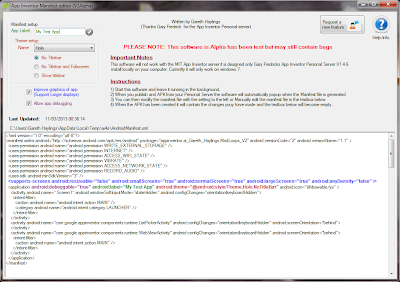
The software will only work with Gary's Personal Server and currently I've only tested it on Windows 7
Here's a screenshot of the software.
(Opps just noticed I spelt your name wrong on the software Gary.)
Gareth Haylings
Mar 11, 2013, 5:27:23 AM3/11/13
to ai...@googlegroups.com
Hi Gary
Cheers for the info about System.getProperty("java.io.tmpdir") . Only just read your post while at work this morning and only have access to my windows xp machine which I haven't set the personal server on yet.
Entered the code into VB.net on my XP machine at work to get the Java.io.tmp directory doesn't seem to exist as nothing is returned. (This maybe because I haven't run the personal server on my XP machine before).
This is the code in VB.net I used when testing at work on XP machine
Environment.GetEnvironmentVariable("Java.io.tmp")
Returns nothing
Environment.GetEnvironmentVariable("TMP")
Returns C:\DOCUME~1\garethh\LOCALS~1\Temp
Environment.GetEnvironmentVariable("JAVA_HOME")
Returns C:\Program Files\Java\jdk1.6.0_24
When I get home later I'll test the same thing on my windows 7 PC to see what the results are.
Cheers
Gareth
Gary
Mar 11, 2013, 7:29:08 AM3/11/13
to ai...@googlegroups.com
I spent most of my public school days with them speling my name wrong. I did not feel Frederick was that hard, but... ;-)
It's the ai4a Personal Server. If you put a pointer to
hmmm
the Sourceforge page or here or ?
folks can find the server.
Gary
Mar 11, 2013, 7:33:52 AM3/11/13
to ai...@googlegroups.com
System.getProperty("java.io.tmpdir") is Java.
I would guess the environment variable 'tmp' would work. I do not know if it works everywhere.
Gareth Haylings
Mar 11, 2013, 9:24:39 AM3/11/13
to ai...@googlegroups.com
"I would guess the environment variable 'tmp' would work. I do not know if it works everywhere."
I will do a few tests on a few computers but the really test will come when others use.
"It's the ai4a Personal Server. If you put a pointer to
hmmm
the Sourceforge page or here or ?
folks can find the server."
There is a help button on the software which open my website. On the website there will be a page with a pile of tutorials and instruction on how to use the software and a link to get the ai4a personal server.
Since January I've done a number of sample apps and at the moment they are spread among posts I've made and answer in different forums in the google groups. I intend to add a few pages on my site dedicated to App inventor with my sample AI projects along with a bunch of other AI related resource and links. The rest of the website will be to do with other projects I am working on such as Robotics, Software development Hardware development, Raspberry pi and future ideas I have for projects I plan to work on. (I already have a website but am revamping it with all the AI stuff. Hope to have this done in the next few weeks.)
Gary
Mar 11, 2013, 9:57:03 AM3/11/13
to ai...@googlegroups.com
On Monday, March 11, 2013 8:24:39 AM UTC-5, Gareth Haylings wrote:
"I would guess the environment variable 'tmp' would work. I do not know if it works everywhere."I will do a few tests on a few computers but the really test will come when others use.
Kinda sorta...
The java.io.tmpdir is part of Java. It works everywhere.
The environment variable JAVA_HOME is something a user has to set. It can be wrong. I was not happy that I used it, but picked it because it is a documented variable and we can get it set correctly.
I'm working on a small app that checks the various things that are needed. It checks if JAVA_HOME is set and then checks if the tools that we need are found starting at JAVA_HOME.
I do not know if the environment variable tmp is set by the os and if it can be wrong.
It's probably ok.
When I am writing software and counting on something that is probably ok, I get nervous ;-)
"It's the ai4a Personal Server. If you put a pointer tohmmmthe Sourceforge page or here or ?folks can find the server."There is a help button on the software which open my website. On the website there will be a page with a pile of tutorials and instruction on how to use the software and a link to get the ai4a personal server.
:-)
and
I need to go back and clean up the documentation. People are starting to use the ai4a Personal Server more and the uhhh
less that clear docs I put up are not good enough.
Since January I've done a number of sample apps and at the moment they are spread among posts I've made and answer in different forums in the google groups. I intend to add a few pages on my site dedicated to App inventor with my sample AI projects along with a bunch of other AI related resource and links. The rest of the website will be to do with other projects I am working on such as Robotics, Software development Hardware development, Raspberry pi and future ideas I have for projects I plan to work on. (I already have a website but am revamping it with all the AI stuff. Hope to have this done in the next few weeks.)
!!!
Let me know where I should add pointers to your stuff
and if others have stuff I should point at, LET ME KNOW!!!
Gareth Haylings
Mar 11, 2013, 10:40:54 AM3/11/13
to ai...@googlegroups.com
"The environment variable JAVA_HOME is something a user has to set. It can be wrong. I was not happy that I used it, but picked it because it is a documented variable and we can get it set correctly."
It maybe able possible to do within my Software quite easily. Saying that I never actually tried setting environment variables in VB.net but I thing the vbcode is something like Environment.SetEnvironmentVariable("JAVA_HOME","C:\Program Files\Java\jdk1.6.0_24") . What could happen is that when the software is started it checks the enviroment variable JAVA_HOME if it doesn't exist or is set incorrectly the software will display a message asking if the JAVA_HOME want to be ste automatically. What do you think?
"Let me know where I should add pointers to your stuff"
My current(old) site is www.themadrobot.talktalk.net which I started last January while trying to learn a bit of HTML and Javascript but never ended up completely finishing it. I will be merging that site into my new site over the next few weeks hopefully.
Gary
Mar 11, 2013, 12:11:41 PM3/11/13
to ai...@googlegroups.com
On Monday, March 11, 2013 9:40:54 AM UTC-5, Gareth Haylings wrote:
"The environment variable JAVA_HOME is something a user has to set. It can be wrong. I was not happy that I used it, but picked it because it is a documented variable and we can get it set correctly."It maybe able possible to do within my Software quite easily. Saying that I never actually tried setting environment variables in VB.net but I thing the vbcode is something like Environment.SetEnvironmentVariable("JAVA_HOME","C:\Program Files\Java\jdk1.6.0_24") . What could happen is that when the software is started it checks the enviroment variable JAVA_HOME if it doesn't exist or is set incorrectly the software will display a message asking if the JAVA_HOME want to be ste automatically. What do you think?
You could test if it is set and finds the jarsigner. If it does not, you could test if it would find a jarsigner if it is set how your software thinks it should be set.
but there are a lot of places it can be.
"Let me know where I should add pointers to your stuff"My current(old) site is www.themadrobot.talktalk.net which I started last January while trying to learn a bit of HTML and Javascript but never ended up completely finishing it. I will be merging that site into my new site over the next few weeks hopefully.
:-)
You need some SVG on your site ;-)
Gareth Haylings
Mar 11, 2013, 12:45:17 PM3/11/13
to ai...@googlegroups.com
"You need some SVG on your site ;-) "
Could do that but I'm taking the easy option as I can't remember much HTML since last year and have to many other projects to really spend the time learning it again. This is the website I use for my Mad Loops Soundboard app http://madrobots.wix.com/mad-loops-soundboard .I design it so it would fit on a phone and can be access by clicking a help button in the Mad Loops app (I know it's a lazy web design option but does the trick) Designing a website this way works the same sort of way App Inventor works, in that you can get some good effect without have to know what is going on under the hood. If I had of tried to code the Mad loops website myself it would have taken me weeks to learn the html css and javascript behind it, instead it only took me a few hours as it did. I'm going to port my www.themadrobot.talktalk.net site to www.wix.com This will make my life a lot easier.
Gary
Mar 11, 2013, 2:02:38 PM3/11/13
to ai...@googlegroups.com
My suggestion you add SVG was mostly tongue in cheek. That is why I put a ;-) in.
But it would be fun.
and... given we are wandering away from the topic of using the manifest
have you looked at Google Sites?
Gary
Mar 11, 2013, 2:04:43 PM3/11/13
to ai...@googlegroups.com
I would like to know who is using the ai4a buildserver to modify the manifest.
Say something if you are.
Say something if you would like to but the uhhh terse instructions need to be expanded.
and
Say what you are doing with the manifest regardless.

Sebastiano T.
Mar 15, 2013, 9:11:44 AM3/15/13
to ai...@googlegroups.com
Hi Gary,
i'm using the editing of the manifest in 1.4.6, excellent job and i really ask if you can please keep this "feature" in future versions of Ai4a
i've even put a post on my teaching blog with instruction for how to do the process (it's in italian language, my native language)
take a look if you want,
i find your instructions are pretty clear
If Gareth can produce a nice little software that runs on windows and provides an interface for editing the manifest even more easily it can be really useful for all of us (i guess)
I use to edit the manifest mainly for setting supported-screen tags in order for the app to be compatibile with most screen sizes of phones out there :)
Gareth Haylings
Mar 15, 2013, 10:38:01 AM3/15/13
to ai...@googlegroups.com
Hi Sebastiano
Your wish is my command.
I have been testing the software for the past week and it works really well. You can download the Alpha version of the software from my website at this link http://madrobots.wix.com/themadrobot#!app-inventor/c1dvd
Please note: I have thoroughly tested the software for the past we in Windows 7 but I'm releasing it as an Alpha version until I get enough feed back from people saying there are now bugs or issues. To report an issue in the software click on the contact me link in the software.
Suggestion for addition features to be add to the Manifest editor software
If you have any suggestion for thing you would like me to add to the software to do with manifest editing let me know and I will do my best to add them.(Please be aware the setting I have use in the manifest software is pretty much all I know about the manifest so if you are going to make a suggestion please supply as sample androidmanifest.xml with the changes and explain work they do.)
As soon as I get enough feedback I will do more work on the software
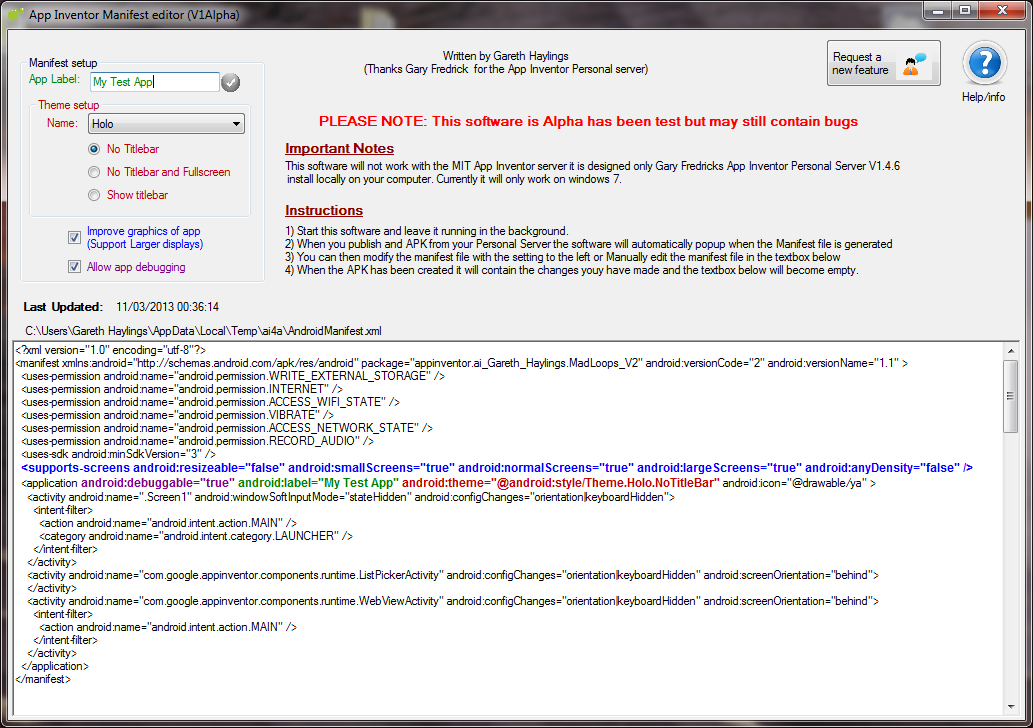
Currently the feature available in the Manifest editor are:
- Change the App Theme (Black, White Transulcent)
- Improve the App graphics for larger displays.
- Remove the Titlebar
- Switch on/off the Debbugable perameter in the manifest file
- Edit the Manifest file manually
I am planning to add the following
- theme change for the listpicker
- save your setting so the next time you publish the same APK the setting will be used in the manifest.
I'm not going to add the VersionName or VersionCode setting in the manifest editor as these can be set easily in App Inventor itself.
Here is a screen shot of the Manifest editor software I wrote.

Gary
Mar 15, 2013, 12:48:15 PM3/15/13
to ai...@googlegroups.com
Howdy Sebastiano and Gareth,
I plan on making sure you always have an easy way to work with the manifest Sebastiano. My goal is to have a version of App Inventor that is local and you can build it with Eclipse or from the command line. Eclipse has some good tools for working with the manifest. I plan (hope :-)) to get the tools working with both App Inventor and Android Java source.
I read your doc (translated with Google translate). You mention issues with the keystore. You should be able to get a keystore from MIT and replaces the one the ai4a version uses. Let me know if you get it working.
The keystore is another thing I will upgrade to developer level - some day.
Gareth,
The source code shows debug is not turned on any more. Are you seeing it turned on?
and
- save your setting so the next time you publish the same APK the setting will be used in the manifest.
That is how the manifest code works in ai4a? You do not have to do anything to get that, it's already there. Once you put a new manifest in, the buildserver uses it every time.
I suggest you tell people they do not need to use ai4a, they can use MIT's server and when they want an apk with the new manifest, just run the buildserver with the source zip for the project.
When I want my app to be available for Google TV, I add this line
<uses-feature android:name="android.hardware.touchscreen" android:required="false"/>
I have played with the <uses-sdk> element. App Inventor sets android:minSdkVersion=3 which is sorta ok. It is why you have to have the <supports-screens> element. I use android:targetSdkVersion=17 or whatever I have tested to. Setting it to 11 lets you use Holo and disables the screen compatibility tests. You may have to look at your resizeable and anyDensity if you do start messing with that.
Lot to do with the manifest!!!
Gareth Haylings
Mar 15, 2013, 2:24:06 PM3/15/13
to ai...@googlegroups.com
Hi Gary
- save your setting so the next time you publish the same APK the setting will be used in the manifest.
That is how the manifest code works in ai4a? You do not have to do anything to get that, it's already there. Once you put a new manifest in, the buildserver uses it every time.
The way I got my software working is so that it pops up when is not actually to use the ai4a folder in the temp folder it waits for the Androidmanifest.XML file to be generated then the software popups up on the screen. The reason I did it this way was it was a lot easier for me to control within my software. With the save feature, I know you can mod the ai4a manifest file but as I am not using that it's easier for me to just save the setting made in my software.
I suggest you tell people they do not need to use ai4a, they can use MIT's server and when they want an apk with the new manifest, just run the buildserver with the source zip for the project.
Absolutely. The way I have been using it is having my software running all the time while the ai4a personal server is running then I publish the APK file from the App Inventor interface. Maybe something I could do is package the buildserver with my software that way it would be a one click install build server and my software all in one. The way this would work in my software is you download the source zip file from MIT then in a pull down menu would all you to select the file and would automatically build the APK file.
To do this what files would I need?
Would I need to just package the BuildServer directory on the ai4a personal server as shown below?
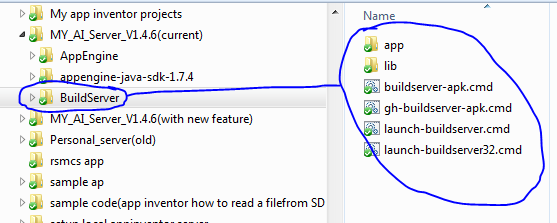
Would I need to also package the appengine-java-sdk-1.7.4 directory aswell?
Would I need to check the JAVA_HOME is set in the enviroment variable or is this just needed for the AppEngine directory?
Would I need to check that Java is installed on the computer?
So many question and I don't know the answers (Hee hee. I just drive the car don't know how the engine works)
I would like to do this as it will open up the software to people who don't necessarily want to have App inventor running locally.
When I want my app to be available for Google TV, I add this line
<uses-feature android:name="android.hardware.touchscreen" android:required="false"/>
I have played with the <uses-sdk> element. App Inventor sets android:minSdkVersion=3 which is sorta ok. It is why you have to have the <supports-screens> element. I use android:targetSdkVersion=17 or whatever I have tested to. Setting it to 11 lets you use Holo and disables the screen compatibility tests. You may have to look at your resizeable and anyDensity if you do start messing with that.
Things I didn't know. Will look ito these thanks for the info.
Cheers
Gareth
Gary
Mar 15, 2013, 3:39:21 PM3/15/13
to ai...@googlegroups.com
On Friday, March 15, 2013 1:24:06 PM UTC-5, Gareth Haylings wrote:
Hi Gary
- save your setting so the next time you publish the same APK the setting will be used in the manifest.
That is how the manifest code works in ai4a? You do not have to do anything to get that, it's already there. Once you put a new manifest in, the buildserver uses it every time.The way I got my software working is so that it pops up when is not actually to use the ai4a folder in the temp folder it waits for the Androidmanifest.XML file to be generated then the software popups up on the screen. The reason I did it this way was it was a lot easier for me to control within my software. With the save feature, I know you can mod the ai4a manifest file but as I am not using that it's easier for me to just save the setting made in my software.
What will it do if someone is using the built in way to modify the manifest and your software is running?
Why is it a lot easier?
I suggest you tell people they do not need to use ai4a, they can use MIT's server and when they want an apk with the new manifest, just run the buildserver with the source zip for the project.Absolutely. The way I have been using it is having my software running all the time while the ai4a personal server is running then I publish the APK file from the App Inventor interface. Maybe something I could do is package the buildserver with my software that way it would be a one click install build server and my software all in one. The way this would work in my software is you download the source zip file from MIT then in a pull down menu would all you to select the file and would automatically build the APK file.To do this what files would I need?Would I need to just package the BuildServer directory on the ai4a personal server as shown below?
Would I need to also package the appengine-java-sdk-1.7.4 directory aswell?Would I need to check the JAVA_HOME is set in the enviroment variable or is this just needed for the AppEngine directory?Would I need to check that Java is installed on the computer?So many question and I don't know the answers (Hee hee. I just drive the car don't know how the engine works)
:-P
The buildserver uses the jarsigner from the Java JDK. It also uses zipalign that you can get from the Android SDK.
The buildserver uses JAVA_HOME to find the jarsigner. You would not need it if you had the jarsigner in a known place. (I would need to modify the engine but no problems with that)
The buildserver is Java, so they need Java installed. And they need the Java JDK to get the jarsigner.
The app engine stuff is for the Designer part. The buildserver does not need that.
I can package BuildServer/lib so it is one Java file that they can run.
I would like to do this as it will open up the software to people who don't necessarily want to have App inventor running locally.
That is why I said something about it.
Grate minds ;-)
When I want my app to be available for Google TV, I add this line<uses-feature android:name="android.hardware.touchscreen" android:required="false"/>I have played with the <uses-sdk> element. App Inventor sets android:minSdkVersion=3 which is sorta ok. It is why you have to have the <supports-screens> element. I use android:targetSdkVersion=17 or whatever I have tested to. Setting it to 11 lets you use Holo and disables the screen compatibility tests. You may have to look at your resizeable and anyDensity if you do start messing with that.Things I didn't know. Will look ito these thanks for the info.
:-)
I may be able to come up with other things.
We are collecting what would be useful in the manifest to pass on to MIT. More input, more input!!!
Gary
Gareth Haylings
Mar 15, 2013, 4:47:15 PM3/15/13
to ai...@googlegroups.com
"Why is it a lot easier?"
The way my software works is it search for with the name AndroidManifest.xml anywhere in the Temp directory. When it is detect it automatically reads this into the software and does any changes to it direct into the file. If I try to use the file in the ai4a folder I will need to pick the correct one which would be quite a bit more coding.
"What will it do if someone is using the built in way to modify the manifest and your software is running?"
I haven't used the built in way other than just once when you first added but if I am right in my think it should still work as the one in the ai4a folder get copied in the the build folder as AndroidManifest.XML so this should work just fine.
"I can package BuildServer/lib so it is one Java file that they can run."
Amazing stuff if you can do this. :-)
If you can do this I can package the file/files with my software so that everything work and install seemlessly.
Would the user still need to install the Java SDK or would this all be part of the BuildServer/lib file you are talking about.
"I may be able to come up with other things.
We are collecting what would be useful in the manifest to pass on to MIT. More input, more input!!!"
Absolutely. The more that can be done may convince MIT to add some of the Manifest feature to the next version of App inventor.
Gareth Haylings
Mar 15, 2013, 4:49:55 PM3/15/13
to ai...@googlegroups.com
One thing I forgot to answer from your previous post
"The source code shows debug is not turned on any more"
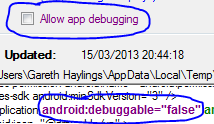
There is a feature in the software to turn debugging on and off as shown below
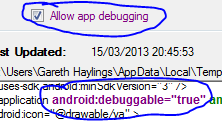
Gary
Mar 15, 2013, 6:43:40 PM3/15/13
to ai...@googlegroups.com
On Friday, March 15, 2013 3:49:55 PM UTC-5, Gareth Haylings wrote:
One thing I forgot to answer from your previous post"The source code shows debug is not turned on any more"There is a feature in the software to turn debugging on and off as shown below
ok
from the source
// TODO(markf): The preparing to publish doc at
// http://developer.android.com/guide/publishing/preparing.html suggests removing the
// 'debuggable=true' but I'm not sure that our users would want that while they're still
// testing their packaged apps. Maybe we should make that an option, somehow.
// TODONE(jis): Turned off debuggable. No one really uses it and it represents a security
// risk for App Inventor App end-users.
out.write("android:debuggable=\"false\" ");
and
On Friday, 15 March 2013 20:47:15 UTC, Gareth Haylings wrote:"Why is it a lot easier?"The way my software works is it search for with the name AndroidManifest.xml anywhere in the Temp directory. When it is detect it automatically reads this into the software and does any changes to it direct into the file. If I try to use the file in the ai4a folder I will need to pick the correct one which would be quite a bit more coding.
I associate a modified manifest with a project. That way you can have several different manifests.
"What will it do if someone is using the built in way to modify the manifest and your software is running?"I haven't used the built in way other than just once when you first added but if I am right in my think it should still work as the one in the ai4a folder get copied in the the build folder as AndroidManifest.XML so this should work just fine.
Probably. But I do not know.
I'll pass them on to you if it breaks :-)
"I can package BuildServer/lib so it is one Java file that they can run."Amazing stuff if you can do this. :-)If you can do this I can package the file/files with my software so that everything work and install seemlessly.Would the user still need to install the Java SDK or would this all be part of the BuildServer/lib file you are talking about.
They still have to have the Java SDK and the zipalign tool.
"I may be able to come up with other things.We are collecting what would be useful in the manifest to pass on to MIT. More input, more input!!!"Absolutely. The more that can be done may convince MIT to add some of the Manifest feature to the next version of App inventor.
We need to collect what we can do
AND
what is useful. Jeff said he would think about putting useful mods into the manifest.
Gary
Gareth Haylings
Mar 16, 2013, 7:29:58 AM3/16/13
to ai...@googlegroups.com
from the source
// TODO(markf): The preparing to publish doc at
// http://developer.android.com/guide/publishing/preparing.html suggests removing the
// 'debuggable=true' but I'm not sure that our users would want that while they're still
// testing their packaged apps. Maybe we should make that an option, somehow.
// TODONE(jis): Turned off debuggable. No one really uses it and it represents a security
// risk for App Inventor App end-users.
out.write("android:debuggable=\"false\" ");
Good point.
The reason I added the ability to turn on and of debugging was because I needed to see what was going on when using Log Cat. This is really an advanced feature and most people only want to change the App label, Get rid of the titlebar and improve the graphics to support larger screens and a few other things. They don't really want to see or know how the manifest works.
What I am going do is add an advance tickbox which will toggle between displaying and hiding advance options. (As default the tickbox won't be ticked) When the tickbox is ticked the a panel will come into view showing the manifest file so it can be edited manually and other advanced option like the debug tickbox option in the software.
"What will it do if someone is using the built in way to modify the manifest and your software is running?"
I haven't used the built in way other than just once when you first added but if I am right in my think it should still work as the one in the ai4a folder get copied in the the build folder as AndroidManifest.XML so this should work just fine.
Probably. But I do not know.
If someone reports it doesn't work I will look into away of adding an option in my software to override and use the ai4a manifest instead. There lots of ways I could do this and making the user can pick the manifest file they would like to use. I would add this to the advance options panel if we find its needed.
"I can package BuildServer/lib so it is one Java file that they can run."Amazing stuff if you can do this. :-)If you can do this I can package the file/files with my software so that everything work and install seemlessly.Would the user still need to install the Java SDK or would this all be part of the BuildServer/lib file you are talking about.
They still have to have the Java SDK and the zipalign tool.
Would it be possible if the user didn't need to have Java SDK installed? Maybe just have the necessary files like zipalign and javasign (and any other files) included with the Buildserver package? If this is possible am I correct in saying that the JAVA_HOME would not to be set?
What I would like be able to do have is make one click install process, instead of the user having to install my software then having to downloading the Java SDK and install that seperately and then the user needs to set the environment variable JAVA_HOME. I'd really like to make the installation process as simple and smooth as possible, that way it's less of a support nightmare with people asking the same question over and over again Such as: "Where do I get Java SDK from?" and "How do I set the JAVA_HOME?". Hopefully questions like that would be eradicated.
Gary
Mar 16, 2013, 12:11:37 PM3/16/13
to ai...@googlegroups.com
On Saturday, March 16, 2013 6:29:58 AM UTC-5, Gareth Haylings wrote:
from the source// TODO(markf): The preparing to publish doc at// http://developer.android.com/guide/publishing/preparing.html suggests removing the// 'debuggable=true' but I'm not sure that our users would want that while they're still// testing their packaged apps. Maybe we should make that an option, somehow.// TODONE(jis): Turned off debuggable. No one really uses it and it represents a security// risk for App Inventor App end-users.out.write("android:debuggable=\"false\" ");Good point.The reason I added the ability to turn on and of debugging was because I needed to see what was going on when using Log Cat. This is really an advanced feature and most people only want to change the App label, Get rid of the titlebar and improve the graphics to support larger screens and a few other things. They don't really want to see or know how the manifest works.
You can not see what is going on with LogCat without turning on debugging?
What I am going do is add an advance tickbox which will toggle between displaying and hiding advance options. (As default the tickbox won't be ticked) When the tickbox is ticked the a panel will come into view showing the manifest file so it can be edited manually and other advanced option like the debug tickbox option in the software."What will it do if someone is using the built in way to modify the manifest and your software is running?"I haven't used the built in way other than just once when you first added but if I am right in my think it should still work as the one in the ai4a folder get copied in the the build folder as AndroidManifest.XML so this should work just fine.Probably. But I do not know.If someone reports it doesn't work I will look into away of adding an option in my software to override and use the ai4a manifest instead. There lots of ways I could do this and making the user can pick the manifest file they would like to use. I would add this to the advance options panel if we find its needed.
I like picking the way that is less likely to cause problems. One of the reason I release sooooo slow :-)
"I can package BuildServer/lib so it is one Java file that they can run."Amazing stuff if you can do this. :-)If you can do this I can package the file/files with my software so that everything work and install seemlessly.Would the user still need to install the Java SDK or would this all be part of the BuildServer/lib file you are talking about.They still have to have the Java SDK and the zipalign tool.
Would it be possible if the user didn't need to have Java SDK installed?
I spent a lot of time looking at ways to have the jarsigner standalone. There may be a way and I was blind but as far as I could tell you need the Java JDK to get the jarsigner to run.
Maybe just have the necessary files like zipalign and javasign (and any other files) included with the Buildserver package? If this is possible am I correct in saying that the JAVA_HOME would not to be set?
The only thing JAVA_HOME is used for in the server is to find the jarsigner.
What I would like be able to do have is make one click install process, instead of the user having to install my software then having to downloading the Java SDK and install that seperately and then the user needs to set the environment variable JAVA_HOME. I'd really like to make the installation process as simple and smooth as possible, that way it's less of a support nightmare with people asking the same question over and over again Such as: "Where do I get Java SDK from?" and "How do I set the JAVA_HOME?". Hopefully questions like that would be eradicated.
I agree. I would have made it easier if I could have found a way to do so.
The only (as far as I know) reason for installing the Java JDK is to get the jarsigner. If they install the Java JDK correctly, that includes installing JAVA_HOME correctly. Not everyone gets it right.
Gareth Haylings
Mar 16, 2013, 3:18:28 PM3/16/13
to ai...@googlegroups.com
You can not see what is going on with LogCat without turning on debugging?
My point exactly that is why the I have the option in the software, so I can debug the app with logcat. When I upload an App to google play I make sure debugging is set to false.
I like picking the way that is less likely to cause problems. One of the reason I release sooooo slow :-)
Thats why I release the software as Alpha so people can use it and to try for themselves and can give me feedback about features they would like changed, then I can say I am not change it. hee hee:-)
I spent a lot of time looking at ways to have the jarsigner standalone. There may be a way and I was blind but as far as I could tell you need the Java JDK to get the jarsigner to run.
There must be a way to do it as apptomarket seems to be able to sign the app and you don't need to install anything with it. I looked in the directory with Apptomarket and zipalign.exe and Javasign.exe is include. It might worth looking how this works.
Gary
Mar 16, 2013, 4:03:46 PM3/16/13
to ai...@googlegroups.com
On Saturday, March 16, 2013 2:18:28 PM UTC-5, Gareth Haylings wrote:
...
I spent a lot of time looking at ways to have the jarsigner standalone. There may be a way and I was blind but as far as I could tell you need the Java JDK to get the jarsigner to run.There must be a way to do it as apptomarket seems to be able to sign the app and you don't need to install anything with it. I looked in the directory with Apptomarket and zipalign.exe and Javasign.exe is include. It might worth looking how this works.
Be sure to let us know what you find.
Sebastiano T.
Mar 18, 2013, 10:48:40 AM3/18/13
to ai...@googlegroups.com
Il giorno venerdì 15 marzo 2013 17:48:15 UTC+1, Gary ha scritto:
......
I read your doc (translated with Google translate). You mention issues with the keystore. You should be able to get a keystore from MIT and replaces the one the ai4a version uses. Let me know if you get it working.The keystore is another thing I will upgrade to developer level - some day.
Gary, what i've noticed (but maybe i'm wrong) is that in the build process the keystore must have the alias recorded as android and the password as AndroidKey (you can see the pwd in clear in the buildserver dos windows when it's packaging the application)
I tried to delete the existing keystore and upload mine which has an alias set to "seblog" and a different password and the buildprocess always failed at the jarsigner stage
this is why i believe we've to compile the app with the provided key and if i've uploaded in the past an app in the play store with a different key,i cannot use the same key to sign the app in v.1.4.6
nevermind, not a very big problem but something to consider if using ai4a also to publish app to play store
Gary
Mar 18, 2013, 2:37:49 PM3/18/13
to ai...@googlegroups.com
I do not think someone that is developing apps with App Inventor would want to use the built in keystore.
We have the technology to change how the buildserver signs the apk.
But it is not high on my list of priorities :-)
Gareth Haylings
Mar 28, 2013, 10:19:50 AM3/28/13
to ai...@googlegroups.com
Hi
I've added a few extra features to the software such as:
- Sound Notification when APK is being built and complete (This can be disabled in the option menu)
- Added a basic mode (Doesn't show the manifest file)
- Added an advanced editing mode (Give access to editing the androidmanifest.xml manually)
- Setting are now automatically saved
- And a few other things.
I have tested this software on windows 7.
Here is the link to the new version of the software (Click here to download)

J Martin Grännsjö
Jul 23, 2013, 5:20:34 PM7/23/13
to ai...@googlegroups.com
Hi
I'm trying to find the manifest file but it does not create any in C: \ Users \ name \ AppData \ Local \ Temp.
I Use Gary's personal server 1.4.7, and I was thinking of using Gareth H "Manifest editor." It worked fine with 1.4.6, but not with AI4A 1.4.7?
Knows where I can find the manifest file?
Sincerely
Martin (Sweden)
Den lördagen den 16:e februari 2013 kl. 19:42:56 UTC+1 skrev Gary:
I'm trying to find the manifest file but it does not create any in C: \ Users \ name \ AppData \ Local \ Temp.
I Use Gary's personal server 1.4.7, and I was thinking of using Gareth H "Manifest editor." It worked fine with 1.4.6, but not with AI4A 1.4.7?
Knows where I can find the manifest file?
Sincerely
Martin (Sweden)
Den lördagen den 16:e februari 2013 kl. 19:42:56 UTC+1 skrev Gary:
Here is the post that tells how to edit the manifest.more or less, follow the instructions here, the post has an edit error or twoIt's set up so you can use the MIT server or the ai4a server to build. When you are ready to edit the manifest, you set up a file in the temp folder with the name of the projectC:\Users\<youruser>\AppData\Local\Temp\appinventor.ai_<yourEmail>.<theProject>.xmlThat is an example for Windows 7. You can set it up for another OS by replacing C:\Users\<youruser>\AppData\Local\Temp with the folder your OS puts your tmp files into.The file signals the buildserver to replace the file with a copy of the manifest it generates when it runs. Open the file and edit it. Then save it to another file namedC:\Users\<youruser>\AppData\Local\Temp\appinventor.ai_<yourEmail>.<theProject>.AndroidManifest.xmland run the buildserver again. It will pick up the modified manifest and generate an .apk using the modified manifest.Gary
J Martin Grännsjö
Apr 14, 2014, 10:27:25 AM4/14/14
to ai...@googlegroups.com
Hi, I have a BIG problem with my manifest file. I made an app in App Inventor (Gary V1.47) and I have put into android: xlargeScreens = "true" for tablets in the manifest file. BUT Google Play does not accept my app until I fix the following errors ... How do I do this in App Inventor '. I suspect there are one or more lines I have to add in AndroidManifest? My app is designed so that all images are scalable? Please, is there anyone who encountered the same problem? And can help me?
4th Use Icons and other assets That are designed for tablet screens
To ENSURE your app looks its best, providesprofessional icons and other bitmap assets for each density in the range Commonly supported by tablets. Specifically, You should design your icons for the action bar, notifications, and launcher According To the Iconography guidelines and providesprofessional them in multiple densities, so They Appear at the Appropriate size on all the screens without blurring or other scaling artifacts.
4th Use Icons and other assets That are designed for tablet screens
To ENSURE your app looks its best, providesprofessional icons and other bitmap assets for each density in the range Commonly supported by tablets. Specifically, You should design your icons for the action bar, notifications, and launcher According To the Iconography guidelines and providesprofessional them in multiple densities, so They Appear at the Appropriate size on all the screens without blurring or other scaling artifacts.

RobNCD
May 8, 2014, 4:44:41 PM5/8/14
to ai...@googlegroups.com
You dont need to do all that. Just exclude the functions in your manifest that tablets might not use.
Here is an example.
<uses-feature android:name="android.hardware.wifi" android:required="false" />
<uses-feature android:name="android.hardware.location" android:required="false" />
<uses-feature android:name="android.hardware.location.network" android:required="false" />
<uses-feature android:name="android.hardware.location.gps" android:required="false" />
<uses-feature android:name="android.hardware.touchscreen" android:required="false"/>
<uses-sdk android:minSdkVersion="9" />
<supports-screens android:smallScreens="true" android:normalScreens="true" android:largeScreens="true" android:xlargeScreens="true" android:anyDensity="false" />
<application android:debuggable="false"
This took care of all my tablet submission needs.
Reply all
Reply to author
Forward
0 new messages