LaTex questions and changing variables

285 views
Skip to first unread message

Loni

unread,
Jun 24, 2021, 11:04:05 AM6/24/21
to yWriter
I'm once again looking at LaTex and using the output from yWriter to format my books. I started out using the Memoir document class, but I came across another class called Novel. According to that documentation, it ignores things like \chapter and \section, instead using \clearpage, \cleartorecto, and \scenebreakline (among other scene break options). 

If I was to try out Novel, is there a way to set up yWriter to use \clearpage instead of \chapter and \scenebreakline instead of \section? Would that be through the global variables? If so, how would I do that?

Also, if I wanted to do drop caps for each chapter, would I set it up like this?

<TEX \lettrine[lines=2,lraise=-0.2,loversize=0.5,nindent=-0.01em]{T}{he} /TEX><html><span class="dropcap">T</span><span class="smallcap">he</span></html> mate debate had gone on for far too long. 

The sentence is "The mate debate had gone on for far too long." But I want the T to be a drop cap and the he to be small caps before heading into the rest of the sentence. Are they supposed to be mashed together like they are to get the proper flow? Or should I be manually editing the tex and html files to do the drop caps like I want? If I do the above, is it going to skip the word "The" altogether if I do an RTF export?

Simon Haynes

unread,
Jun 24, 2021, 11:24:29 AM6/24/21
to ywr...@googlegroups.com
There's a util on my site called TextReplace, I think.  With that you can run a commandline/batch file to search/replace on any file, so that would be one way to make post-export changes.

Re the export, just put <rtf The /rtf> after your HTML/Tex-specific code, and that will be used for RTF instead. (I don't think you have to paste actual RTF code - plain text should work.)


--
You received this message because you are subscribed to the Google Groups "yWriter" group.
To unsubscribe from this group and stop receiving emails from it, send an email to ywriter+u...@googlegroups.com.
To view this discussion on the web visit https://groups.google.com/d/msgid/ywriter/f5a20ed7-0988-43dc-90e5-f941331fd3fbn%40googlegroups.com.


--

--
Visit Spacejock Software, the home of yWriter, FCharts and more
Visit spacejock.com.au for my articles on writing and publishing novels.

Loni

unread,
Jun 24, 2021, 11:26:45 AM6/24/21
to yWriter
Thanks! 

Peter T.

unread,
Jun 24, 2021, 11:37:06 AM6/24/21
to yWriter
Loni, 

As far as I can tell, yWriter's export filter is tuned to the memoir package. So you can't solve all the problems with global variables and inline code.

A better approach might be to redefine the memoir commands in the latex header, for example like this: 
\renewcommand*{chapter}{clearpage}

A few years ago, I was faced with the choice between memoir and a specifically German-language document package, but decided to adapt the memoir package. 
In general, at that time, I avoided spoiling my novel text with latex code. Instead, I wrote a postprocessor with Python that adapted the LaTex code generated by yWriter to my needs. 

You may have to solve other problems, e.g. insert typographical quotation marks. If you don't do this very carefully and professionally, it's not worth the effort. 
A basic problem with LaTeX is that it does not have a line grid, i.e. the lines on the front and back of a sheet do not always fit together, which looks bad on thin book printing paper. 

After the experience with several test-printed paperbacks, I gave up LaTeX. 

Regards, 
Peter

Loni

unread,
Jun 24, 2021, 12:07:15 PM6/24/21
to yWriter
Peter, 

If not LaTex for your print formatting, what do you use? Do you do it all manually in a separate text editor? Or do you use some other typesetting application? 

I'm trying to minimize the amount of formatting effort while obtaining a certain style I like. For instance, I don't number my chapters in yWriter because I prefer using the whole word for the chapter number, I also use chapter titles, I keep moving chapters around, and I got tired of redoing all the numbers if I add a chapter in the middle of my epic fantasy tome. When I go to compile the book, I want to do auto-numbering using words like ONE, TWO, FIFTY-THREE, but also have PROLOGUE and EPILOGUE. I found I can do that with LaTex, which is why I'm fiddling with it. Unfortunately, it's not as easy with HTML, but that's another thing I'll tackle later. 

How do you do your formatting, Peter? Is it all through scripts in the text editor? Does yWriter help you out in any way there?

Peter T.

unread,
Jun 24, 2021, 1:50:06 PM6/24/21
to yWriter
Loni, 

The typesetting is done with OpenOffice. I have a plugin for this that turns the yWriter project into a cleanly formatted text file whose appearance I can completely control via style sheets. I add frontmatter and backmatter after the import.
 For typographical quotation marks, apostrophes etc. I made my own extensions, which I also published as OpenSource. 

I have created book style sheets with frontmatter, textbody and backmatter, and have some professional book fonts like Adobe Garamond. The important thing here is to set a line grid with the text body as reference. This is also possible in MS Word. Enlarged initials at the beginning of chapters are no problem with Openoffice, I even used an ornate decorative font for a High Fantasy book, which by the way is not possible with Latex, at least I did not manage to mix different fonts in one Latex document.

In yWriter I only use bold and italic as text markup. Bold automatically becomes "strong" when converted to OpenOffice, and italic becomes "emphasize", for which I have character styles set to small caps and italics in word processor. 

If I want numbered chapters, I use yWriter's "Chapter x" preferences and autonumbering, even though I write in German. Later I can replace the "Chapter" with any string or have it deleted altogether. If I wanted to have the chapter numbers written out as words, I would automate that with a macro. To do this, I would create a sorted list of spelled out numbers and use the existing chapter numbers as the list index when replacing them. This is very easy to program. Preface, epilogue, dedication etc. do not interfere. 

The result is respectable, but not really professional, but it will not be with LateX. So it is a matter of taste. 

I once had the opportunity to get an outdated version of QuarkXpress as a supplement of a computer magazine. When I want to typeset a really professional book, I import my document typeset with Office into QuarkXpress, taking over many styles. Then the manual work begins, spreading the text nice and evenly across the pages. In any case, this requires typographic expertise, for which there is now also good specialist literature. The result of this effort is very satisfying for me, but is usually not appreciated by the readers of light fiction. 

Desktop publishing software like QuarkXpress looks similar to Office at first, but has a different operating concept and needs to be learned. Compared to LaTeX, a non-professional has the problem that there is almost no support on the web. 

For the book cover, the free Scribus has proven itself. There are also people who claim you can use it for book typesetting, but I can't confirm that in any case.

Cheers, 
Peter

Peter T.

unread,
Jun 25, 2021, 6:31:30 AM6/25/21
to yWriter
On Thursday, June 24, 2021 at 6:07:15 PM UTC+2 Loni wrote:
For instance, I don't number my chapters in yWriter because I prefer using the whole word for the chapter number, I also use chapter titles, I keep moving chapters around, and I got tired of redoing all the numbers if I add a chapter in the middle of my epic fantasy tome. 
You made me think of writing a small program to renumber the chapters of a yWriter project. This gives you the freedom to choose how you want to export your projects, because it also works for ebooks etc. I'll introduce it in a separate forum post.  

Simon Haynes

unread,
Jun 25, 2021, 6:39:38 AM6/25/21
to ywr...@googlegroups.com
Newer versions of yWriter will renumber chapters using the first number found in the title, rather than expecting 'Chapter X'


--
You received this message because you are subscribed to the Google Groups "yWriter" group.
To unsubscribe from this group and stop receiving emails from it, send an email to ywriter+u...@googlegroups.com.

Peter T.

unread,
Jun 25, 2021, 6:43:20 AM6/25/21
to yWriter
On Friday, June 25, 2021 at 12:39:38 PM UTC+2 Simon Haynes wrote:
Newer versions of yWriter will renumber chapters using the first number found in the title, rather than expecting 'Chapter X'

This is very convenient, but you still have to change the default chapter name manually, for example, if you are not writing in English. 

Simon Haynes

unread,
Jun 25, 2021, 6:48:21 AM6/25/21
to ywr...@googlegroups.com
I thought I'd included a setting somewhere in the project dialog where you could define the word for 'Chapter' in the local language? (Unless I'm mis-remembering.)


--
You received this message because you are subscribed to the Google Groups "yWriter" group.
To unsubscribe from this group and stop receiving emails from it, send an email to ywriter+u...@googlegroups.com.

Simon Haynes

unread,
Jun 25, 2021, 6:49:51 AM6/25/21
to ywr...@googlegroups.com
Regardless of the word for chapter, though, the new renumber just looks for an actual number, and doesn't care what comes before. So...

Capitulo 2
Capitulo 5
Capitulo 7
Capitulo 8 (probando 999)

Would become

Capitulo 1
Capitulo 2
Capitulo 3
Capitulo 4 (probando 999)


Peter T.

unread,
Jun 25, 2021, 6:58:26 AM6/25/21
to yWriter
Yes, I have appreciated that so far. But as a programmer, you can always get a little more comfortable, can't you? 
The individual chapter name preset is a good idea, but not yet implemented. 

Cheers, 
Peter

Simon Haynes

unread,
Jun 25, 2021, 7:10:57 AM6/25/21
to ywr...@googlegroups.com
Okay, I searched the code and found what I was remembering.

The old system (Look for 'Chapter X') actually looked for cLang.GetTranslation("Chapter") & " " & X as well

In other words, if the user was running yWriter with a french translation, it would look for Chapitre X (I don't have the caret symbol for the a on this keyboard)

Not sure, but I think it also used the translation when creating new chapters?

Now the former is no longer used, as it just seeks the number and doesn't care what the text says. (I'm using a regex search/replace)


--
You received this message because you are subscribed to the Google Groups "yWriter" group.
To unsubscribe from this group and stop receiving emails from it, send an email to ywriter+u...@googlegroups.com.

Peter T.

unread,
Jun 25, 2021, 7:23:07 AM6/25/21
to yWriter
On Friday, June 25, 2021 at 1:10:57 PM UTC+2 Simon Haynes wrote:
The old system (Look for 'Chapter X') actually looked for cLang.GetTranslation("Chapter") & " " & X as well

In other words, if the user was running yWriter with a french translation, it would look for Chapitre X (I don't have the caret symbol for the a on this keyboard)

Not sure, but I think it also used the translation when creating new chapters?

Not a bad idea. However, I use the English user interface because it is easier when it comes to bug reports, for example, or I need a quick screenshot for the forum to explain something. 
And this, although I have contributed a German translation myself once upon a time. That was funny by the way, there were several German versions, something for every taste. 

Cheers, 
Peter

Simon Haynes

unread,
Jun 25, 2021, 7:30:41 AM6/25/21
to ywr...@googlegroups.com
Yep, every time someone sends me a new translation I add it to the existing ones.  At least that way there's a choice.


--
You received this message because you are subscribed to the Google Groups "yWriter" group.
To unsubscribe from this group and stop receiving emails from it, send an email to ywriter+u...@googlegroups.com.

Peter T.

unread,
Jun 25, 2021, 7:41:26 AM6/25/21
to yWriter
On Friday, June 25, 2021 at 1:30:41 PM UTC+2 Simon Haynes wrote:
Yep, every time someone sends me a new translation I add it to the existing ones.  At least that way there's a choice.

In German discussion forums, this was sometimes seen as irritating. 
But the real problem seems to me that apparently not everything can be translated, and that e.g. the floating thumbnails are still English. 

However, earlier with Microsoft Word, for example, it seemed to me that the user interface itself and the help texts had been translated in different places, so that for many German search terms, especially for the very special functions, you had no hit in the help. And the other way around, the menu items and options described in the help text often didn't exist. That was nasty.  

Loni

unread,
Jun 25, 2021, 7:57:45 AM6/25/21
to yWriter
When it came to formatting my previous book, I wanted the whole word, like this:
scenelist.png
I ended up doing all the formatting in MS Word by hand for all the chapters. Well, I have been encountering a lot of issues with my current work, so I've rewritten it five times. During that process, I've rearranged chapters to get a better flow because I write in multiple POVs and my writing never sticks to my plan. So my current WIP looks like this: (ignore the *, those are there to tell me I need to revise those):
currentWIP.png
Thus why I was looking at something that applies chapter numbering after the fact, and why I was looking at LaTex. I have found with LaTex, I can set a counter and add the chapter number like this:
chapterhead.png

I totally accept that yWriter can't accommodate all the individual preferences. I was just seeing what options were available to make my life easier. :)

Simon Haynes

unread,
Jun 25, 2021, 8:00:45 AM6/25/21
to ywr...@googlegroups.com
I have an issue where there might be a popup message like '3 chapters checked' - currently you'd have to provide translations for '1 chapter checked', '2 chapters checked' and so on, all the way up to X.

I started using a different system where the variable was kept separate from the string, but that meant the translator would have to know to put 'chapter checked' and 'chapters checked' in the file.

I've also replaced the internal msgbox routine with my own (transmsgbox) but (a) I have to go through the program converting them all, and (b) there's still the huge issue of strings containing variables.
 
All the strings you see on regular forms are converted automatically. It's just the text in messageboxes and things like status strings which aren't.


--
You received this message because you are subscribed to the Google Groups "yWriter" group.
To unsubscribe from this group and stop receiving emails from it, send an email to ywriter+u...@googlegroups.com.

Peter T.

unread,
Jun 25, 2021, 9:14:22 AM6/25/21
to yWriter
Loni, 

your LaTeX example looks great. Maybe you should really stick with it. The font is probably the EB Garamond?
As for the yWriter export, try \renewcommand; Latex can be very flexible in that regard, because everything is made of macros. 

So far, I have managed multi-line headings in Office only by hand. 
You don't really need the combination of written out chapter numbers and chapter text in yWriter; however, such a thing is quite feasible. I can extend my yw-renumber script to optionally recognize placeholders for chapter numbers. Or that you bracket parts of the chapter heading that should remain unchanged when renumbering.  

Cheers, 
Peter

Trevor Prinn

unread,
Jun 25, 2021, 9:27:12 AM6/25/21
to ywr...@googlegroups.com

That takes me back. Back in VB6 days I had to make an app able to handle translations and came up with a neat way of doing it using a sprintf (or string.format) routine and a list of translated strings, indexed on the English version of the string. Numbers, names etc got substituted in at run time. I had already written container controls that managed resizing, including captions, so that I didn't need to worry about the length of translated strings. It meant you could take a large, existing app written in English and quickly change it to use other languages without losing the English in the source code. Also handy for customer specific customisation within languages, which was very useful for the app I wrote it for.

One of the first things I did with .net 1 when I first got it about 17/18 years ago was to write a full translation system for Windows Forms that used reflection to walk through all the controls on a form and translate them (also handled putting Accelerators on controls, captions and menus automatically), either automatically or using an optional ITranslatable interface. String.format calls were replaced with Translate.format calls that handled translating and adding parameterised values into strings. There was a utility that went through the code populating a database with English string literals and then a simple website that translators could use to populate the database with translations. At release time, each language's data would get dumped into XML so it could be loaded in at run time.

I probably still have the code somewhere, but I suspect that getting it to work on modern versions of .net would be quite a job, and I can't see any way of handling syntax like $"There are {lightCount} lights".

Trevor

OpenPGP_signature

Peter T.

unread,
Jun 25, 2021, 10:44:55 AM6/25/21
to yWriter
Loni, 

that gives me a new thought on how to get your design from yWriter into Office: If the chapter headings consist of written out chapter numbers, the descriptive part of the heading could be entered as Chapter description.  
With the template-based HTML exporter, both could then be placed under each other with different styles. 

I have created an example on the fly.
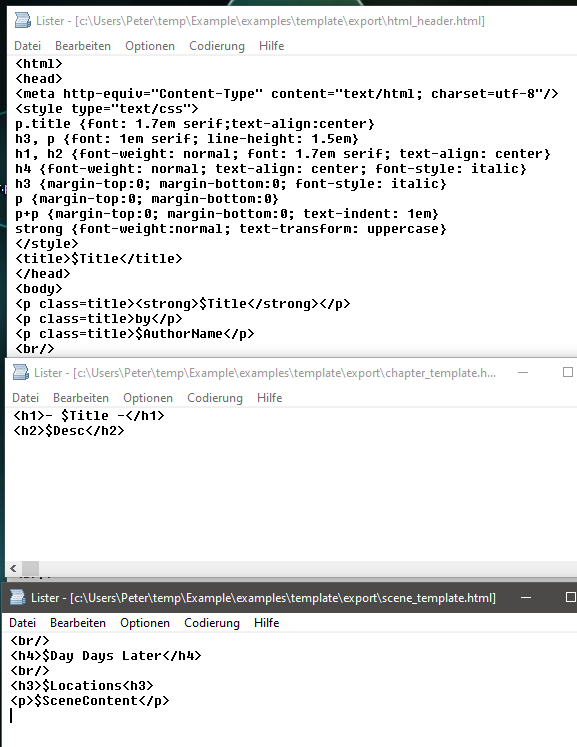
This is what the HTML templates look like (header, chapter template, scene template):

template-screenshot.png
The dollar signs indicate the placeholders for yWriter content and metadata.

And this is the result (you might open the image in a separate browser widow to get the full size):

screenshot.png


Note that this is based on conventions how to use the scene descriptions, the scene locations, and the scene time.  
As already said, only a quickly made "proof of concept". But it shows the potential that lies in scripting. 

Cheers, 
Peter

Loni

unread,
Jun 25, 2021, 11:42:58 AM6/25/21
to yWriter
That looks promising, Peter! I haven't used the locations yet because I haven't felt the need to run reports on it, but if it'll buy me ease, I'm happy to adjust. I think the only thing I might struggle with is moving the chapter titles into the description. My brain associates chapters based on title, so if I have to click on all the different chapter numbers to see the title, it'll likely frustrate me. Unless there's a way to show the description on the green line next to the number?

Peter T.

unread,
Jun 25, 2021, 6:27:56 PM6/25/21
to yWriter
I see. I have come to the conclusion to add one or more numbering placeholders to the template-based HTML exporter. Then the chapter template could look like this, for example: 

<p class="chNumber">- $ChNumEnglish -</p>
<h2>$Title</h2>

This may be similar to the way your LaTeX package works internally. 

In general, does the concept of template-based exporting make sense to you?
The generated HTML documents can be imported into an Office word processor and designed using the style sheets. In doing so, you can then also set whether the chapter number and heading appear in uppercase or not. The css styles in the HTML header are actually only important for the preview in the web browser.

Cheers, 
Peter

Peter T.

unread,
Jun 25, 2021, 6:49:19 PM6/25/21
to yWriter
On Friday, June 25, 2021 at 5:42:58 PM UTC+2 Loni wrote:
My brain associates chapters based on title, so if I have to click on all the different chapter numbers to see the title, it'll likely frustrate me. Unless there's a way to show the description on the green line next to the number?

I forgot to answer your question, sorry. Of course, the description is displayed in the scene list. It was just shifted to the right in my compressed screenshot.
Why not just try it yourself?

screenshot.png


Loni

unread,
Jun 26, 2021, 9:51:37 AM6/26/21
to yWriter
Doh! I have my description column completely scrunched to the side too. I'll copy my current project and give the renumbering and templating a try this weekend when I have a moment. I think I have a general idea of how templating works. I haven't had the chance to download the tools yet, so I don't know if I'd be configuring the chapter number inside yWriter or in the outside tool, and how that'd work with a prologue and epilogue, but some playing around might lead me to figuring it out. 

Peter T.

unread,
Jun 26, 2021, 11:11:51 AM6/26/21
to yWriter
Well then. But before you change your whole yWriter project, better familiarize yourself with the template-based export to see if it is something for you at all. Above all, I advise you to first organize the way from HTML to the final formatted print result. Without good document templates for your office program, whichever one you use, the whole effort is pointless. If you haven't yet used your word processor's character and paragraph styles (almost no one does), this would be the place to start. 

The design possibilities of the export from yWriter are almost infinite if you can program yourself. But if I publish software for general use, which should also be reasonably well documented, I have to limit the options in some meaningful way. 

With the HTML exporter, chapter numbering can take place both inside and outside the yWriter project. A third option is to number the headings in Office using a special paragraph style sheet option. However, not with written out numbers, as far as I know.
The numbering within yWriter has the advantage that it is also valid for other export formats, e.g. for ebooks, if you want to create them with Simon's system (I use an ebook) export plugin for OpenOffice, so this point does not matter).

What you have shown with your nice LaTeX example can now already be achieved with my tools, i.e. the yw-renumber and the yw2html script. If the numbering is to be done outside yWriter by the exporter, this is currently only possible with Arabic numerals (the placeholder for this is called $ChapterNumber; a list of all placeholders is here). I plan to add roman and in english written numbers in the near future. 

Finally, a tip for all self-publishers: The beautiful font from your LaTeX example is also available for free for Windows. Here is the website of the designer : 

In my experience, this font is best rendered by LibreOffice. There you can also (somewhat trickily) set options for particularly ornate decorative variants of individual letters. 

Cheers, 
Peter
Message has been deleted

Peter T.

unread,
Jun 27, 2021, 8:28:39 AM6/27/21
to yWriter
Loni, 

now I wanted to know if I promised you too much, so before lunch I tinkered together some HTML templates and applied them to a sample project using the latest version of my HTML export script. 
The result required only minor editing in LibreOffice; the PDF finally generated looks like this: 

page.png

I packed the Python script, the exporter templates and the sample files into a ZIP, also the needed fonts and a LibreOffice document template:


All you need to install additionally (if not already) is LibreOffice (version 6 or 7), and Python 3.Then you can study the example and continue on that basis to find the right layout for your novel.

Have fun with it, 
Peter


Loni

unread,
Jun 27, 2021, 8:49:22 AM6/27/21
to yWriter
Wow Peter! You've been extremely helpful and far exceeding the aspirations I had when I came here. Thank you. Really thank you! 

I did tinker a bit yesterday, playing with the different template files, seeing if I could compile something with them before pursuing styles in my word processor. Unfortunately, I didn't get far before life interrupted me, but the templating system made sense and I was quickly able to adapt. I see this version of yw2html has the $ChNumberEnglish. The version I downloaded yesterday didn't have that, so I'm excited to try that out. I'm downloading LibreOffice now. I've been working with a copy of MS Word 2013, so it might take an adjustment period before learning the styles in LibreOffice, but I'm hoping to pick it up quick. Your example looks like where I'm aiming. 

Thank you again, and I'm sorry for being such a hassle and pain in the butt. I really was trying to work with the system as it's built. 

Peter T.

unread,
Jun 27, 2021, 12:52:58 PM6/27/21
to yWriter
The big difference to MS Word is that LibreOffice also has a category for page styles. In Word, on the other hand, You would define new sections via the Files menu, which I always found painful. 

In my template, the frontmatter is built on the fact that different page styles follow each other, until finally in the mainmatter the right-left page numbering begins. That should essentially do the special features. 

I think you can see how it works from my example: You create a main document from the style sheet with front matter and table of contents. Then you load the exported HTML file into a second LibreOffice window. You select everything and paste the content into the main document via the clipboard. 

To render the quotation marks, apostrophes etc. correctly, I have already suggested the "curly" extension above. You should download and install it in any case.

The only point in my example where rework is needed is the first paragraphs of each chapter and scene. When LibreOffice imports an HTML page, it creates its own paragraph styles for the non-standard css styles, whose names are unfortunately localized. That's why they might have different names in my example than when you export them at your end. You can try to rename them somehow in the overall document, like "text body.ChStart". You will think of something. 

One more detail: LibreOffice consists of different modules; the word processor is called "Writer". There is also a web design module called "Web", which is called when you want to open an HTML file from Explorer in LibreOffice. This does not help us. You should either open the HTML file directly from Writer, or drag/drop it onto the "Writer" icon (if you have a shortcut on the desktop). 

Regarding the workspace: F5 opens the Navigator, F11 the Styles list. Both windows can be docked for more convenience, as I do:

page.png


Good luck, 
Peter

Loni

unread,
Jun 27, 2021, 3:39:40 PM6/27/21
to yWriter
Peter, 

Your curly quote extension works like a charm. But I confess that I don't actually know how to start a new document from the .ott and then add a page so that I can copy and paste like you suggested. I started by just double-clicking the .ott, and it opened an Untitled 1, which I'm assuming is the new document. But now, I'm staring at the page that says CONTENTS, knowing in my head that's where the table of contents goes, but I'm not sure how to add a page so I can paste the content of the generated HTML. I'm normally not this incompetent, but I'm really feeling it right now. Sorry. We seem to have gone waaaaayyyy beyond the realm of yWriter at this point. I feel bad pestering you.

Peter T.

unread,
Jun 28, 2021, 12:39:48 AM6/28/21
to yWriter
Loni, 

I don't see it as off the yWriter topic. After all, the point is to develop a print layout from the yWriter project.

You can either reuse my sample document, or create a new document (just like you did) and paste the novel contents in the line right above the "contents" heading. Then you can update the table of contents by right-clicking on the "Contents" heading. 
The novel title in the frontmatter is a so-called field, i.e. the title you enter in the document's property form is displayed here. Anyway, you can remove the fields and enter your own text in-place. 

A few remarks about the document template:
  • The HTML converter creates capitalized written out numbers. For the final upper or lower case the style template is responsible. In the example I set "lowercase" and chose a small caps font.
  • You have probably noticed that the first level heading is displayed in white in the target document, i.e. it is not printed. This is a trick to control the display in the table of contents. 
  • The initials in the target document are set by the ***.ChStart paragraph style. You may also have to post-process the ***.ScStart paragraph style so that the first line of the scenes is not indented. (If I create an ODT document directly with my converter, I can use the "Text body" and "First line indent" paragraph styles; however, HTML does not know this distinction and makes each paragraph a "Text body". Hence the two extra styles.)
It is best to place the document template in the designated folder <username>\AppData\Roaming\LibreOffice\4\user\template. There you can edit and modify it from within LibreOffice. Also, it is very worthwhile to look at the topic in the help text. In the help menu there is also a link to the user manuals, which you can download for free. Read there as much as you can find about the style sheet theme. I find this feature is much better implemented in OpenOffice and LibreOffice than in Word. Once you understand how the inheritance works with the styles, you can do some real magic with it. 

Finally, for specific questions you can find a lot of answers on the web. In the search engine you can also enter OpenOffice, which is very similar in operation and has a history that goes back longer into the past. And in my experience, the OpenOffice user forum is actually a bit more "open". 

Cheers, 
Peter

Peter T.

unread,
Jun 28, 2021, 3:36:21 AM6/28/21
to yWriter
In the meantime, I have revised my template document. For English-localized LibreOffice, the chapter beginnings with initials should now work out of the box.

Perhaps it's redundant to say, but if you have a new or modified LibreOffice document template, you don't need to create a new document; you apply the styles of the new template to your existing document. 
This can be done very comfortably with my StyleSwitcher extension: 


In your case, click the Cardfile icon and select the Paperback template in the file selection dialog. 

The pre-made templates that come with StyleSwitcher are, of course, not adapted to the conventions of your particular HTML export. They work best with the default formatting you get when importing with the yw-cnv plugin. Feel free to try this out, nothing can really go wrong. 

Cheers, 
Peter

Loni

unread,
Jun 28, 2021, 8:44:41 AM6/28/21
to yWriter
Woot! I might just be getting there, thanks to you, Peter. My screen caps aren't level with each other or the same size, but they're there to show I'm taking what you gave me and I'm on the right track. I made use of the Tags instead of the Days, and I'm having to fiddle with the first paragraphs since Drop Caps in LibreOffice don't work when there's only one line. But this is definitely the direction I'd hoped for. Thank you for your help, Peter. I would still be banging my head against my desk without you. From the templates, the auto numbering, the smartening punctuation... You have managed to tackle everything I have struggled with. THANK YOU!

prologue.pngOne.png

Peter T.

unread,
Jun 28, 2021, 1:07:47 PM6/28/21
to yWriter
Looks pretty, Loni. Well, I've spent about fifteen years teasing a decent print layout out of OpenOffice, so I'm glad someone else is still getting some use out of it, too. And as you can see, the journey goes still a bit further. 
So good luck with your books!

Peter

Peter T.

unread,
Jun 28, 2021, 1:53:51 PM6/28/21
to yWriter
One more thing about drop caps, because this is such an interesting topic.
Basically, it makes sense not to decorate single-line paragraphs with them. I think when a scene starts with one line, it's supposed to have a certain pop, and the drop caps that connect the text block counteract that effect. To be unrestricted here, I generally don't use them. 
Anyway, if you still want to use the initials in such a situation, you can replace the paragraph break with a simple line break that you insert with Shift-Enter. Perhaps you have already thought of this yourself: 

screen.png

You have probably also looked at the tab in the paragraph style settings dialog where you set the initials. Height and distance to the text can be changed. In your case, it wouldn't be a bad idea to increase the spacing a little bit. Here is an extreme:

screen1.png

You can also assign a different character style to the initial, i.e. you can change the font. I did this for a friend of mine, it looks like this:

screen2.png

Cheers, 
Peter

On Monday, June 28, 2021 at 2:44:41 PM UTC+2 Loni wrote:

Peter T.

unread,
Jun 29, 2021, 2:48:43 AM6/29/21
to yWriter
Finally, I want to return to the original topic of this thread. The LaTeX export from yWriter requires the "memoir" package for book design. Therefore, if you want to design your chapter headings in a special way, you don't have to switch to an alternative package right away. There is a supplement to "memoir", which I have found again in the meantime. For confirmed LaTeX users it is definitely worth downloading the document showing the examples: 

Cheers, 
Peter

On Thursday, June 24, 2021 at 5:04:05 PM UTC+2 Loni wrote:
I'm once again looking at LaTex and using the output from yWriter to format my books. I started out using the Memoir document class, but I came across another class called Novel. According to that documentation, it ignores things like \chapter and \section, instead using \clearpage, \cleartorecto, and \scenebreakline (among other scene break options). 

If I was to try out Novel, is there a way to set up yWriter to use \clearpage instead of \chapter and \scenebreakline instead of \section? Would that be through the global variables? If so, how would I do that?

Also, if I wanted to do drop caps for each chapter, would I set it up like this?

<TEX \lettrine[lines=2,lraise=-0.2,loversize=0.5,nindent=-0.01em]{T}{he} /TEX><html><span class="dropcap">T</span><span class="smallcap">he</span></html> mate debate had gone on for far too long. 

The sentence is "The mate debate had gone on for far too long." But I want the T to be a drop cap and the he to be small caps before heading into the rest of the sentence. Are they supposed to be mashed together like they are to get the proper flow? Or should I be manually editing the tex and html files to do the drop caps like I want? If I do the above, is it going to skip the word "The" altogether if I do an RTF export?

Reply all
Reply to author
Forward
0 new messages