Shards failed

1,125 views
Skip to first unread message

Felipe Andres Concha Sepúlveda

unread,
Nov 29, 2018, 9:19:38 AM11/29/18
to Wazuh mailing list
Hello everyone I hope you are very well.

I'm having a problem with kibana, I can not see the alerts, I get this message "5 of 425 shares failed, I do not know what is due (SEE IMAGE1)

recently we had two problems: the first disk space, to solve that we changed the address pointing to another disk in Elasticsearch.yml and the second problem we had was that someone from our team created some indexes in ElasticSearch and blocked our elasticsearch, to solve this we execute the following script:
  PUT * / _ settings
{
  "index.blocks.read_only_allow_delete": null
}


After this the system was working well, but now we have this problem in kibana, will it be related?

I see my cluster indicators and everything looks good.

but I have a log in Logstash with some errors (SEE PICTURE 2)

Do you have any idea of this problem?

IMAGEN 1


IMAGEN 2

[2018-11-26T12:53:00,578][WARN ][logstash.outputs.elasticsearch] UNEXPECTED POOL ERROR {:e=>#<LogStash::Outputs::ElasticSearch::HttpClient::Pool::NoConnectionAvailableError: No Available connections>}
[2018-11-26T12:53:00,578][ERROR][logstash.outputs.elasticsearch] Attempted to send a bulk request to elasticsearch, but no there are no living connections in the connection pool. Perhaps Elasticsearch is unreachable or down? {:error_message=>"No Available connections", :class=>"LogStash::Outputs::ElasticSearch::HttpClient::Pool::NoConnectionAvailableError", :will_retry_in_seconds=>8}
[2018-11-26T12:53:04,794][WARN ][logstash.outputs.elasticsearch] UNEXPECTED POOL ERROR {:e=>#<LogStash::Outputs::ElasticSearch::HttpClient::Pool::NoConnectionAvailableError: No Available connections>}
[2018-11-26T12:53:04,796][ERROR][logstash.outputs.elasticsearch] Attempted to send a bulk request to elasticsearch, but no there are no living connections in the connection pool. Perhaps Elasticsearch is unreachable or down? {:error_message=>"No Available connections", :class=>"LogStash::Outputs::ElasticSearch::HttpClient::Pool::NoConnectionAvailableError", :will_retry_in_seconds=>16}
[2018-11-26T12:53:05,324][INFO ][logstash.outputs.elasticsearch] Running health check to see if an Elasticsearch connection is working {:healthcheck_url=>http://10.151.0.113:9200/, :path=>"/"}
[2018-11-26T12:53:05,332][WARN ][logstash.outputs.elasticsearch] Attempted to resurrect connection to dead ES instance, but got an error. {:url=>"http://10.151.0.113:9200/", :error_type=>LogStash::Outputs::ElasticSearch::HttpClient::Pool::HostUnreachableError, :error=>"Elasticsearch Unreachable: [http://10.151.0.113:9200/][Manticore::SocketException] Connection refused (Connection refused)"}
[2018-11-26T12:53:06,626][WARN ][logstash.outputs.elasticsearch] UNEXPECTED POOL ERROR {:e=>#<LogStash::Outputs::ElasticSearch::HttpClient::Pool::NoConnectionAvailableError: No Available connections>}
[2018-11-26T12:53:06,629][WARN ][logstash.outputs.elasticsearch] UNEXPECTED POOL ERROR {:e=>#<LogStash::Outputs::ElasticSearch::HttpClient::Pool::NoConnectionAvailableError: No Available connections>}
[2018-11-26T12:53:06,631][ERROR][logstash.outputs.elasticsearch] Attempted to send a bulk request to elasticsearch, but no there are no living connections in the connection pool. Perhaps Elasticsearch is unreachable or down? {:error_message=>"No Available connections", :class=>"LogStash::Outputs::ElasticSearch::HttpClient::Pool::NoConnectionAvailableError", :will_retry_in_seconds=>16}
[2018-11-26T12:53:06,630][ERROR][logstash.outputs.elasticsearch] Attempted to send a bulk request to elasticsearch, but no there are no living connections in the connection pool. Perhaps Elasticsearch is unreachable or down? {:error_message=>"No Available connections", :class=>"LogStash::Outputs::ElasticSearch::HttpClient::Pool::NoConnectionAvailableError", :will_retry_in_seconds=>16}
[2018-11-26T12:53:08,580][WARN ][logstash.outputs.elasticsearch] UNEXPECTED POOL ERROR {:e=>#<LogStash::Outputs::ElasticSearch::HttpClient::Pool::NoConnectionAvailableError: No Available connections>}
[2018-11-26T12:53:08,580][ERROR][logstash.outputs.elasticsearch] Attempted to send a bulk request to elasticsearch, but no there are no living connections in the connection pool. Perhaps Elasticsearch is unreachable or down? {:error_message=>"No Available connections", :class=>"LogStash::Outputs::ElasticSearch::HttpClient::Pool::NoConnectionAvailableError", :will_retry_in_seconds=>16}
[2018-11-26T12:53:10,343][INFO ][logstash.outputs.elasticsearch] Running health check to see if an Elasticsearch connection is working {:healthcheck_url=>http://10.151.0.113:9200/, :path=>"/"}
[2018-11-26T12:53:10,480][WARN ][logstash.outputs.elasticsearch] Restored connection to ES instance {:url=>"http://10.151.0.113:9200/"}

Felipe Andres Concha Sepúlveda

unread,
Nov 29, 2018, 11:11:26 AM11/29/18
to Wazuh mailing list
The problem now does not exist anymore :)
And we did not do anything, do you know what can happen?


Regards

El 29-11-2018, a las 15:19, Felipe Andres Concha Sepúlveda <felipeandresc...@gmail.com> escribió:

Hello everyone I hope you are very well.

I'm having a problem with kibana, I can not see the alerts, I get this message "5 of 425 shares failed, I do not know what is due (SEE IMAGE1)

recently we had two problems: the first disk space, to solve that we changed the address pointing to another disk in Elasticsearch.yml and the second problem we had was that someone from our team created some indexes in ElasticSearch and blocked our elasticsearch, to solve this we execute the following script:
  PUT * / _ settings
{
  "index.blocks.read_only_allow_delete": null
}


After this the system was working well, but now we have this problem in kibana, will it be related?

I see my cluster indicators and everything looks good.

but I have a log in Logstash with some errors (SEE PICTURE 2)

Do you have any idea of this problem?

IMAGEN 1

<PastedGraphic-7.png>

Nicholai Tailor

unread,
Nov 29, 2018, 2:50:12 PM11/29/18
to Felipe Andres Concha Sepúlveda, wa...@googlegroups.com
Hi Felipe,

The same thing happened to me when I upgraded.

It was there for awhile and then disappears.

I'm guessing it has to do with the indicies, new ones are created and the problem seems to resolve itself.

Cheers

--
You received this message because you are subscribed to the Google Groups "Wazuh mailing list" group.
To unsubscribe from this group and stop receiving emails from it, send an email to wazuh+un...@googlegroups.com.
To post to this group, send email to wa...@googlegroups.com.
Visit this group at https://groups.google.com/group/wazuh.
To view this discussion on the web visit https://groups.google.com/d/msgid/wazuh/A42A3CFE-DE0F-4CC2-9ECD-F0F1078A1278%40gmail.com.
For more options, visit https://groups.google.com/d/optout.

Felipe Andres Concha Sepúlveda

unread,
Nov 30, 2018, 3:27:34 AM11/30/18
to Wazuh mailing list, Nicholai Tailor
Yes, I thought it was not going to be very frequent but today I have it again ...

Another thing that I have done this last time is to enable the option "monitoring", when I activated it told me that I would enable xpack and before when I configured my cluster, there was an option to enable the cluster with or without xpack ... I do not know if this It may be the problem, although the habilitation was done by kibana ... there should be no problem, I think.


Well, if you have any ideas please let me know

jesus.g...@wazuh.com

unread,
Nov 30, 2018, 3:37:49 AM11/30/18
to Wazuh mailing list

Hi Felipe,

First of all, I can see a huge amount of data in your disk, you should review this because Elasticsearch applies
a “watermark” and it prevents from indexing more data. Increase your disk or delete old indices.

Delete an index:

curl -XDELETE elastic:9200/<index>

Regarding the shards allocation, you may want to use the next curl command:

curl elastic:9200/_cluster/health

This provides you a useful information about your cluster. Even better:

watch -n0 'curl elastic:9200/_cluster/health -s'

Once the cluster is upgraded or modified, it could fall into a recovery status, and depending on the amount of data it may take a bit long.

Best regards,
Jesús

El viernes, 30 de noviembre de 2018, 9:27:34 (UTC+1), Felipe Andres Concha Sepúlveda escribió:

Yes, I thought it was not going to be very frequent but today I have it again ...

Another thing that I have done this last time is to enable the option "monitoring", when I activated it told me that I would enable xpack and before when I configured my cluster, there was an option to enable the cluster with or without xpack ... I do not know if this It may be the problem, although the habilitation was done by kibana ... there should be no problem, I think.


Well, if you have any ideas please let me know

El 29-11-2018, a las 20:49, Nicholai Tailor <nichola...@gmail.com> escribió:

Hi Felipe,

The same thing happened to me when I upgraded.

It was there for awhile and then disappears.

I'm guessing it has to do with the indicies, new ones are created and the problem seems to resolve itself.

Cheers

On Thu, Nov 29, 2018 at 4:11 PM Felipe Andres Concha Sepúlveda <felipeandresconchasepulveda@gmail.com> wrote:
The problem now does not exist anymore :)
And we did not do anything, do you know what can happen?


Regards
To unsubscribe from this group and stop receiving emails from it, send an email to wazuh+unsubscribe@googlegroups.com.

Felipe Andres Concha Sepúlveda

unread,
Nov 30, 2018, 4:29:20 AM11/30/18
to jesus.g...@wazuh.com, Wazuh mailing list
Hello Jesus, thanks for answering.
Last week there was a problem with the disk space, but I made a change of information to a new disk with more space

I made the change with the following command, I did not copy the information, but I moved the information (SEE IMAGE1)
Then I verified the permissions, I did not need to give permissions, because when I moved the user was already with permissions (see image 2)
# mv / var / lib / elasticsearch / siem / data /

With these changes made I see that there is no space problem see image 3.
the problem was solved and everything was fine, until now I can not see alerts in kibana

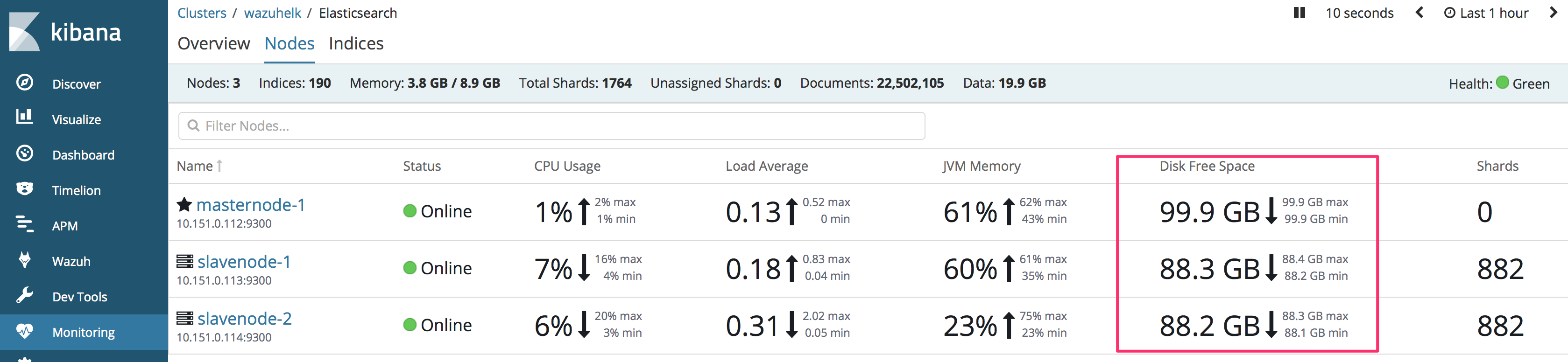
Then now to see the status of my cluster I see that it is green and shows no problems (see images 4 and 5)


These messages in the logs
Logstash 2 (see image 6)
Lohstash 1 see image 10
Elasticsearch node data 1 image 7
Elasticsearch node data 2 image 8
Elasticsearch node MASTER image 9


The issue is that I have not updated, the only changes that were made last week were the changes to a new disk and someone created some indexes that blocked the application and I had to execute the following script, but those indexes were eliminated,
PUT */_settings
{
 
"index.blocks.read_only_allow_delete": null
}


IMAGEN 1


IMAGEN2


Imagen 3


IMAGEN 4

{"cluster_name":"wazuhelk","status":"green","timed_out":false,"number_of_nodes":3,"number_of_data_nodes":2,"active_primary_shards":882,"active_shards":1764,"relocating
_shards":0,"initializing_shards":0,"unassigned_shards":0,"delayed_unassigned_shards":0,"number_of_pending_tasks":0,"number_of_in_flight_fetch":0,"task_max_waiting_in_q
ueue_millis":0,"active_shards_percent_as_number":100.0}


IMAGEN 5

{
  "cluster_name" : "wazuhelk",
  "status" : "green",
  "timed_out" : false,
  "number_of_nodes" : 3,
  "number_of_data_nodes" : 2,
  "active_primary_shards" : 882,
  "active_shards" : 1764,
  "relocating_shards" : 0,
  "initializing_shards" : 0,
  "unassigned_shards" : 0,
  "delayed_unassigned_shards" : 0,
  "number_of_pending_tasks" : 0,
  "number_of_in_flight_fetch" : 0,
  "task_max_waiting_in_queue_millis" : 0,
  "active_shards_percent_as_number" : 100.0


IMAGEN 6
[2018-11-29T15:38:07,690][WARN ][logstash.outputs.elasticsearch] UNEXPECTED POOL ERROR {:e=>#<LogStash::Outputs::ElasticSearch::HttpClient::Pool::NoConnectionAvailableError: No Available connections>}
[2018-11-29T15:38:07,690][WARN ][logstash.outputs.elasticsearch] UNEXPECTED POOL ERROR {:e=>#<LogStash::Outputs::ElasticSearch::HttpClient::Pool::NoConnectionAvailableError: No Available connections>}
[2018-11-29T15:38:07,690][ERROR][logstash.outputs.elasticsearch] Attempted to send a bulk request to elasticsearch, but no there are no living connections in the connection pool. Perhaps Elasticsearch is unreachable or down? {:error_message=>"No Available connections", :class=>"LogStash::Outputs::ElasticSearch::HttpClient::Pool::NoConnectionAvailableError", :will_retry_in_seconds=>8}
[2018-11-29T15:38:07,690][ERROR][logstash.outputs.elasticsearch] Attempted to send a bulk request to elasticsearch, but no there are no living connections in the connection pool. Perhaps Elasticsearch is unreachable or down? {:error_message=>"No Available connections", :class=>"LogStash::Outputs::ElasticSearch::HttpClient::Pool::NoConnectionAvailableError", :will_retry_in_seconds=>8}
[2018-11-29T15:38:09,037][INFO ][logstash.outputs.elasticsearch] Running health check to see if an Elasticsearch connection is working {:healthcheck_url=>http://10.151.0.114:9200/, :path=>"/"}
[2018-11-29T15:38:09,044][WARN ][logstash.outputs.elasticsearch] Attempted to resurrect connection to dead ES instance, but got an error. {:url=>"http://10.151.0.114:9200/", :error_type=>LogStash::Outputs::ElasticSearch::HttpClient::Pool::HostUnreachableError, :error=>"Elasticsearch Unreachable: [http://10.151.0.114:9200/][Manticore::SocketException] Connection refused (Connection refused)"}
[2018-11-29T15:38:14,048][INFO ][logstash.outputs.elasticsearch] Running health check to see if an Elasticsearch connection is working {:healthcheck_url=>http://10.151.0.114:9200/, :path=>"/"}
[2018-11-29T15:38:14,052][WARN ][logstash.outputs.elasticsearch] Attempted to resurrect connection to dead ES instance, but got an error. {:url=>"http://10.151.0.114:9200/", :error_type=>LogStash::Outputs::ElasticSearch::HttpClient::Pool::HostUnreachableError, :error=>"Elasticsearch Unreachable: [http://10.151.0.114:9200/][Manticore::SocketException] Connection refused (Connection refused)"}
[2018-11-29T15:38:15,692][WARN ][logstash.outputs.elasticsearch] UNEXPECTED POOL ERROR {:e=>#<LogStash::Outputs::ElasticSearch::HttpClient::Pool::NoConnectionAvailableError: No Available connections>}
[2018-11-29T15:38:15,692][ERROR][logstash.outputs.elasticsearch] Attempted to send a bulk request to elasticsearch, but no there are no living connections in the connection pool. Perhaps Elasticsearch is unreachable or down? {:error_message=>"No Available connections", :class=>"LogStash::Outputs::ElasticSearch::HttpClient::Pool::NoConnectionAvailableError", :will_retry_in_seconds=>16}
[2018-11-29T15:38:15,697][WARN ][logstash.outputs.elasticsearch] UNEXPECTED POOL ERROR {:e=>#<LogStash::Outputs::ElasticSearch::HttpClient::Pool::NoConnectionAvailableError: No Available connections>}
[2018-11-29T15:38:15,698][ERROR][logstash.outputs.elasticsearch] Attempted to send a bulk request to elasticsearch, but no there are no living connections in the connection pool. Perhaps Elasticsearch is unreachable or down? {:error_message=>"No Available connections", :class=>"LogStash::Outputs::ElasticSearch::HttpClient::Pool::NoConnectionAvailableError", :will_retry_in_seconds=>16}
[2018-11-29T15:38:15,699][WARN ][logstash.outputs.elasticsearch] UNEXPECTED POOL ERROR {:e=>#<LogStash::Outputs::ElasticSearch::HttpClient::Pool::NoConnectionAvailableError: No Available connections>}
[2018-11-29T15:38:15,700][ERROR][logstash.outputs.elasticsearch] Attempted to send a bulk request to elasticsearch, but no there are no living connections in the connection pool. Perhaps Elasticsearch is unreachable or down? {:error_message=>"No Available connections", :class=>"LogStash::Outputs::ElasticSearch::HttpClient::Pool::NoConnectionAvailableError", :will_retry_in_seconds=>16}
[2018-11-29T15:38:15,702][WARN ][logstash.outputs.elasticsearch] UNEXPECTED POOL ERROR {:e=>#<LogStash::Outputs::ElasticSearch::HttpClient::Pool::NoConnectionAvailableError: No Available connections>}
[2018-11-29T15:38:15,710][ERROR][logstash.outputs.elasticsearch] Attempted to send a bulk request to elasticsearch, but no there are no living connections in the connection pool. Perhaps Elasticsearch is unreachable or down? {:error_message=>"No Available connections", :class=>"LogStash::Outputs::ElasticSearch::HttpClient::Pool::NoConnectionAvailableError", :will_retry_in_seconds=>16}
[2018-11-29T15:38:19,067][INFO ][logstash.outputs.elasticsearch] Running health check to see if an Elasticsearch connection is working {:healthcheck_url=>http://10.151.0.114:9200/, :path=>"/"}
[2018-11-29T15:38:19,072][WARN ][logstash.outputs.elasticsearch] Attempted to resurrect connection to dead ES instance, but got an error. {:url=>"http://10.151.0.114:9200/", :error_type=>LogStash::Outputs::ElasticSearch::HttpClient::Pool::HostUnreachableError, :error=>"Elasticsearch Unreachable: [http://10.151.0.114:9200/][Manticore::SocketException] Connection refused (Connection refused)"}
[2018-11-29T15:38:24,074][INFO ][logstash.outputs.elasticsearch] Running health check to see if an Elasticsearch connection is working {:healthcheck_url=>http://10.151.0.114:9200/, :path=>"/"}
[2018-11-29T15:38:24,078][WARN ][logstash.outputs.elasticsearch] Attempted to resurrect connection to dead ES instance, but got an error. {:url=>"http://10.151.0.114:9200/", :error_type=>LogStash::Outputs::ElasticSearch::HttpClient::Pool::HostUnreachableError, :error=>"Elasticsearch Unreachable: [http://10.151.0.114:9200/][Manticore::SocketException] Connection refused (Connection refused)"}
[2018-11-29T15:38:29,092][INFO ][logstash.outputs.elasticsearch] Running health check to see if an Elasticsearch connection is working {:healthcheck_url=>http://10.151.0.114:9200/, :path=>"/"}
[2018-11-29T15:38:29,163][WARN ][logstash.outputs.elasticsearch] Restored connection to ES instance {:url=>"http://10.151.0.114:9200/"}


Imagen 7


Imagen 8


IMAGEN 9
[root@wazuh-elk01 ~]# tail -100 /var/log/elasticsearch/wazuhelk.log 
at org.elasticsearch.transport.RequestHandlerRegistry.processMessageReceived(RequestHandlerRegistry.java:66) ~[elasticsearch-6.4.1.jar:6.4.1]
at org.elasticsearch.transport.TcpTransport$RequestHandler.doRun(TcpTransport.java:1605) ~[elasticsearch-6.4.1.jar:6.4.1]
at org.elasticsearch.common.util.concurrent.ThreadContext$ContextPreservingAbstractRunnable.doRun(ThreadContext.java:723) ~[elasticsearch-6.4.1.jar:6.4.1]
at org.elasticsearch.common.util.concurrent.AbstractRunnable.run(AbstractRunnable.java:37) ~[elasticsearch-6.4.1.jar:6.4.1]
at org.elasticsearch.common.util.concurrent.TimedRunnable.doRun(TimedRunnable.java:41) ~[elasticsearch-6.4.1.jar:6.4.1]
at org.elasticsearch.common.util.concurrent.AbstractRunnable.run(AbstractRunnable.java:37) ~[elasticsearch-6.4.1.jar:6.4.1]
at java.util.concurrent.ThreadPoolExecutor.runWorker(Unknown Source) ~[?:1.8.0_181]
at java.util.concurrent.ThreadPoolExecutor$Worker.run(Unknown Source) ~[?:1.8.0_181]
at java.lang.Thread.run(Unknown Source) ~[?:1.8.0_181]
[2018-11-30T09:46:20,681][DEBUG][o.e.a.s.TransportSearchAction] [masternode-1] [134861] Failed to execute fetch phase
org.elasticsearch.transport.RemoteTransportException: [slavenode-1][10.151.0.113:9300][indices:data/read/search[phase/fetch/id]]
Caused by: org.elasticsearch.script.ScriptException: runtime error
at org.elasticsearch.painless.PainlessScript.convertToScriptException(PainlessScript.java:94) ~[?:?]
at org.elasticsearch.painless.PainlessScript$Script.execute(def cvss3 = doc['data.vulnerability.package.cvss3'].value; ...:110) ~[?:?]
at org.elasticsearch.painless.ScriptImpl.run(ScriptImpl.java:105) ~[?:?]
at org.elasticsearch.search.fetch.subphase.ScriptFieldsFetchSubPhase.hitsExecute(ScriptFieldsFetchSubPhase.java:67) ~[elasticsearch-6.4.1.jar:6.4.1]
at org.elasticsearch.search.fetch.FetchPhase.execute(FetchPhase.java:165) ~[elasticsearch-6.4.1.jar:6.4.1]
at org.elasticsearch.search.SearchService.executeFetchPhase(SearchService.java:516) ~[elasticsearch-6.4.1.jar:6.4.1]
at org.elasticsearch.action.search.SearchTransportService$11.messageReceived(SearchTransportService.java:439) ~[elasticsearch-6.4.1.jar:6.4.1]
at org.elasticsearch.action.search.SearchTransportService$11.messageReceived(SearchTransportService.java:436) ~[elasticsearch-6.4.1.jar:6.4.1]
at org.elasticsearch.xpack.security.transport.SecurityServerTransportInterceptor$ProfileSecuredRequestHandler$1.doRun(SecurityServerTransportInterceptor.java:251) ~[?:?]
at org.elasticsearch.common.util.concurrent.AbstractRunnable.run(AbstractRunnable.java:37) ~[elasticsearch-6.4.1.jar:6.4.1]
at org.elasticsearch.xpack.security.transport.SecurityServerTransportInterceptor$ProfileSecuredRequestHandler.messageReceived(SecurityServerTransportInterceptor.java:309) ~[?:?]
at org.elasticsearch.transport.RequestHandlerRegistry.processMessageReceived(RequestHandlerRegistry.java:66) ~[elasticsearch-6.4.1.jar:6.4.1]
at org.elasticsearch.transport.TcpTransport$RequestHandler.doRun(TcpTransport.java:1605) ~[elasticsearch-6.4.1.jar:6.4.1]
at org.elasticsearch.common.util.concurrent.ThreadContext$ContextPreservingAbstractRunnable.doRun(ThreadContext.java:723) ~[elasticsearch-6.4.1.jar:6.4.1]
at org.elasticsearch.common.util.concurrent.AbstractRunnable.run(AbstractRunnable.java:37) ~[elasticsearch-6.4.1.jar:6.4.1]
at org.elasticsearch.common.util.concurrent.TimedRunnable.doRun(TimedRunnable.java:41) ~[elasticsearch-6.4.1.jar:6.4.1]
at org.elasticsearch.common.util.concurrent.AbstractRunnable.run(AbstractRunnable.java:37) ~[elasticsearch-6.4.1.jar:6.4.1]
at java.util.concurrent.ThreadPoolExecutor.runWorker(Unknown Source) ~[?:1.8.0_181]
at java.util.concurrent.ThreadPoolExecutor$Worker.run(Unknown Source) ~[?:1.8.0_181]
at java.lang.Thread.run(Unknown Source) [?:1.8.0_181]
Caused by: java.lang.IllegalArgumentException: No field found for [data.vulnerability.package.cvss3] in mapping with types []
at org.elasticsearch.search.lookup.LeafDocLookup.get(LeafDocLookup.java:81) ~[elasticsearch-6.4.1.jar:6.4.1]
at org.elasticsearch.search.lookup.LeafDocLookup.get(LeafDocLookup.java:39) ~[elasticsearch-6.4.1.jar:6.4.1]
at org.elasticsearch.painless.PainlessScript$Script.execute(def cvss3 = doc['data.vulnerability.package.cvss3'].value; ...:17) ~[?:?]
at org.elasticsearch.painless.ScriptImpl.run(ScriptImpl.java:105) ~[?:?]
at org.elasticsearch.search.fetch.subphase.ScriptFieldsFetchSubPhase.hitsExecute(ScriptFieldsFetchSubPhase.java:67) ~[elasticsearch-6.4.1.jar:6.4.1]
at org.elasticsearch.search.fetch.FetchPhase.execute(FetchPhase.java:165) ~[elasticsearch-6.4.1.jar:6.4.1]
at org.elasticsearch.search.SearchService.executeFetchPhase(SearchService.java:516) ~[elasticsearch-6.4.1.jar:6.4.1]
at org.elasticsearch.action.search.SearchTransportService$11.messageReceived(SearchTransportService.java:439) ~[elasticsearch-6.4.1.jar:6.4.1]
at org.elasticsearch.action.search.SearchTransportService$11.messageReceived(SearchTransportService.java:436) ~[elasticsearch-6.4.1.jar:6.4.1]
at org.elasticsearch.xpack.security.transport.SecurityServerTransportInterceptor$ProfileSecuredRequestHandler$1.doRun(SecurityServerTransportInterceptor.java:251) ~[?:?]
at org.elasticsearch.common.util.concurrent.AbstractRunnable.run(AbstractRunnable.java:37) ~[elasticsearch-6.4.1.jar:6.4.1]
at org.elasticsearch.xpack.security.transport.SecurityServerTransportInterceptor$ProfileSecuredRequestHandler.messageReceived(SecurityServerTransportInterceptor.java:309) ~[?:?]
at org.elasticsearch.transport.RequestHandlerRegistry.processMessageReceived(RequestHandlerRegistry.java:66) ~[elasticsearch-6.4.1.jar:6.4.1]
at org.elasticsearch.transport.TcpTransport$RequestHandler.doRun(TcpTransport.java:1605) ~[elasticsearch-6.4.1.jar:6.4.1]
at org.elasticsearch.common.util.concurrent.ThreadContext$ContextPreservingAbstractRunnable.doRun(ThreadContext.java:723) ~[elasticsearch-6.4.1.jar:6.4.1]
at org.elasticsearch.common.util.concurrent.AbstractRunnable.run(AbstractRunnable.java:37) ~[elasticsearch-6.4.1.jar:6.4.1]
at org.elasticsearch.common.util.concurrent.TimedRunnable.doRun(TimedRunnable.java:41) ~[elasticsearch-6.4.1.jar:6.4.1]
at org.elasticsearch.common.util.concurrent.AbstractRunnable.run(AbstractRunnable.java:37) ~[elasticsearch-6.4.1.jar:6.4.1]
at java.util.concurrent.ThreadPoolExecutor.runWorker(Unknown Source) ~[?:1.8.0_181]
at java.util.concurrent.ThreadPoolExecutor$Worker.run(Unknown Source) ~[?:1.8.0_181]
at java.lang.Thread.run(Unknown Source) ~[?:1.8.0_181]
[2018-11-30T09:46:20,684][DEBUG][o.e.a.s.TransportSearchAction] [masternode-1] [134862] Failed to execute fetch phase
org.elasticsearch.transport.RemoteTransportException: [slavenode-1][10.151.0.113:9300][indices:data/read/search[phase/fetch/id]]
Caused by: org.elasticsearch.script.ScriptException: runtime error
at org.elasticsearch.painless.PainlessScript.convertToScriptException(PainlessScript.java:94) ~[?:?]
at org.elasticsearch.painless.PainlessScript$Script.execute(def cvss3 = doc['data.vulnerability.package.cvss3'].value; ...:110) ~[?:?]
at org.elasticsearch.painless.ScriptImpl.run(ScriptImpl.java:105) ~[?:?]
at org.elasticsearch.search.fetch.subphase.ScriptFieldsFetchSubPhase.hitsExecute(ScriptFieldsFetchSubPhase.java:67) ~[elasticsearch-6.4.1.jar:6.4.1]
at org.elasticsearch.search.fetch.FetchPhase.execute(FetchPhase.java:165) ~[elasticsearch-6.4.1.jar:6.4.1]
at org.elasticsearch.search.SearchService.executeFetchPhase(SearchService.java:516) ~[elasticsearch-6.4.1.jar:6.4.1]
at org.elasticsearch.action.search.SearchTransportService$11.messageReceived(SearchTransportService.java:439) ~[elasticsearch-6.4.1.jar:6.4.1]
at org.elasticsearch.action.search.SearchTransportService$11.messageReceived(SearchTransportService.java:436) ~[elasticsearch-6.4.1.jar:6.4.1]
at org.elasticsearch.xpack.security.transport.SecurityServerTransportInterceptor$ProfileSecuredRequestHandler$1.doRun(SecurityServerTransportInterceptor.java:251) ~[?:?]
at org.elasticsearch.common.util.concurrent.AbstractRunnable.run(AbstractRunnable.java:37) ~[elasticsearch-6.4.1.jar:6.4.1]
at org.elasticsearch.xpack.security.transport.SecurityServerTransportInterceptor$ProfileSecuredRequestHandler.messageReceived(SecurityServerTransportInterceptor.java:309) ~[?:?]
at org.elasticsearch.transport.RequestHandlerRegistry.processMessageReceived(RequestHandlerRegistry.java:66) ~[elasticsearch-6.4.1.jar:6.4.1]
at org.elasticsearch.transport.TcpTransport$RequestHandler.doRun(TcpTransport.java:1605) ~[elasticsearch-6.4.1.jar:6.4.1]
at org.elasticsearch.common.util.concurrent.ThreadContext$ContextPreservingAbstractRunnable.doRun(ThreadContext.java:723) ~[elasticsearch-6.4.1.jar:6.4.1]
at org.elasticsearch.common.util.concurrent.AbstractRunnable.run(AbstractRunnable.java:37) ~[elasticsearch-6.4.1.jar:6.4.1]
at org.elasticsearch.common.util.concurrent.TimedRunnable.doRun(TimedRunnable.java:41) ~[elasticsearch-6.4.1.jar:6.4.1]
at org.elasticsearch.common.util.concurrent.AbstractRunnable.run(AbstractRunnable.java:37) ~[elasticsearch-6.4.1.jar:6.4.1]
at java.util.concurrent.ThreadPoolExecutor.runWorker(Unknown Source) ~[?:1.8.0_181]
at java.util.concurrent.ThreadPoolExecutor$Worker.run(Unknown Source) ~[?:1.8.0_181]
at java.lang.Thread.run(Unknown Source) [?:1.8.0_181]
Caused by: java.lang.IllegalArgumentException: No field found for [data.vulnerability.package.cvss3] in mapping with types []
at org.elasticsearch.search.lookup.LeafDocLookup.get(LeafDocLookup.java:81) ~[elasticsearch-6.4.1.jar:6.4.1]
at org.elasticsearch.search.lookup.LeafDocLookup.get(LeafDocLookup.java:39) ~[elasticsearch-6.4.1.jar:6.4.1]
at org.elasticsearch.painless.PainlessScript$Script.execute(def cvss3 = doc['data.vulnerability.package.cvss3'].value; ...:17) ~[?:?]
at org.elasticsearch.painless.ScriptImpl.run(ScriptImpl.java:105) ~[?:?]
at org.elasticsearch.search.fetch.subphase.ScriptFieldsFetchSubPhase.hitsExecute(ScriptFieldsFetchSubPhase.java:67) ~[elasticsearch-6.4.1.jar:6.4.1]
at org.elasticsearch.search.fetch.FetchPhase.execute(FetchPhase.java:165) ~[elasticsearch-6.4.1.jar:6.4.1]
at org.elasticsearch.search.SearchService.executeFetchPhase(SearchService.java:516) ~[elasticsearch-6.4.1.jar:6.4.1]
at org.elasticsearch.action.search.SearchTransportService$11.messageReceived(SearchTransportService.java:439) ~[elasticsearch-6.4.1.jar:6.4.1]
at org.elasticsearch.action.search.SearchTransportService$11.messageReceived(SearchTransportService.java:436) ~[elasticsearch-6.4.1.jar:6.4.1]
at org.elasticsearch.xpack.security.transport.SecurityServerTransportInterceptor$ProfileSecuredRequestHandler$1.doRun(SecurityServerTransportInterceptor.java:251) ~[?:?]
at org.elasticsearch.common.util.concurrent.AbstractRunnable.run(AbstractRunnable.java:37) ~[elasticsearch-6.4.1.jar:6.4.1]
at org.elasticsearch.xpack.security.transport.SecurityServerTransportInterceptor$ProfileSecuredRequestHandler.messageReceived(SecurityServerTransportInterceptor.java:309) ~[?:?]
at org.elasticsearch.transport.RequestHandlerRegistry.processMessageReceived(RequestHandlerRegistry.java:66) ~[elasticsearch-6.4.1.jar:6.4.1]
at org.elasticsearch.transport.TcpTransport$RequestHandler.doRun(TcpTransport.java:1605) ~[elasticsearch-6.4.1.jar:6.4.1]
at org.elasticsearch.common.util.concurrent.ThreadContext$ContextPreservingAbstractRunnable.doRun(ThreadContext.java:723) ~[elasticsearch-6.4.1.jar:6.4.1]
at org.elasticsearch.common.util.concurrent.AbstractRunnable.run(AbstractRunnable.java:37) ~[elasticsearch-6.4.1.jar:6.4.1]
at org.elasticsearch.common.util.concurrent.TimedRunnable.doRun(TimedRunnable.java:41) ~[elasticsearch-6.4.1.jar:6.4.1]
at org.elasticsearch.common.util.concurrent.AbstractRunnable.run(AbstractRunnable.java:37) ~[elasticsearch-6.4.1.jar:6.4.1]
at java.util.concurrent.ThreadPoolExecutor.runWorker(Unknown Source) ~[?:1.8.0_181]
at java.util.concurrent.ThreadPoolExecutor$Worker.run(Unknown Source) ~[?:1.8.0_181]
at java.lang.Thread.run(Unknown Source) ~[?:1.8.0_181]
[2018-11-30T10:00:01,702][INFO ][o.e.c.m.MetaDataUpdateSettingsService] [masternode-1] updating number_of_replicas to [1] for indices [wazuh-monitoring-3.x-2018.11.30]
[root@wazuh-elk01 ~]# 


IMAGEN 10


To unsubscribe from this group and stop receiving emails from it, send an email to wazuh+un...@googlegroups.com.

To post to this group, send email to wa...@googlegroups.com.
Visit this group at https://groups.google.com/group/wazuh.

jesus.g...@wazuh.com

unread,
Nov 30, 2018, 6:16:53 AM11/30/18
to Wazuh mailing list

Hi Felipe,

Sounds good, Elasticsearch is a bit complicated but day by day we are trying to make life easier for our community.

I understand that your environment is working just fine but you want to share with us some logs and screenshots just for knowledge
sharing, right?

In any case, I’m going to review all your posted images to provide a technical comment and I hope it helps you and everyone reading this thread:

Picture #1 / #2

Picture #3

  • It’s fine but keep in mind that not all the people have the monitoring features available, that’s why I always suggest checking some useful curl commands directly to the Elasticsearch API:
GET _cluster/health?pretty
{
  "cluster_name": "wazuh-cluster",
  
"status": "green",
  "timed_out": false,
  "number_of_nodes": 3
,
  "number_of_data_nodes": 3,
  "active_primary_shards": 667,
  "active_shards": 1330,
  
"relocating_shards": 0,
  "initializing_shards": 0,
  "unassigned_shards": 0,
  "delayed_unassigned_shards": 0,
  "number_of_pending_tasks": 0,
  "number_of_in_flight_fetch": 0,
  "task_max_waiting_in_queue_millis": 0,
  "active_shards_percent_as_number": 100
}

Picture #4 / #5

Same as we were talking in Picture #3

Picture #6

Messages like Perhaps Elasticsearch is unreachable or down? means that Elasticsearch is mostly unreachable for any reason: network problem, unfinished recovery, still restarting…

Picture #7 / #8

This is mostly related to Picture #6, Elasticsearch was not fully ready yet, other components (including Elasticsearch nodes) were trying to perform some requests/actions without success, but if it’s now working you don’t need to take care about those warning messages. All your nodes were not ready yet.

Picture #9

I love that kind of messages from Elasticsearch, Java exceptions are brilliant… Failed to execute fetch phase org.elasticsearch.transport.RemoteTransportException: [slavenode-1][10.151.0.113:9300][indices:data/read/search[phase/fetch/id]], it’s saying that it failed trying to fetch data but the target node was not available.

Picture #10

This is an important message (document_type message I meant), that you are going to see at every new version until Elasticsearch 7.0.0 is published and our integration works with that version. We are not planning to remove the document_type upto 7.0.0 but it’s in our roadmap removing al document types (alerts, monitoring, etc..)

The Restored connection message is just fine, it tells us that Logstash is connected again. Think about Logstash like a data sender who always wants to send data, it’s trying and trying because the node may be down but restored after a while.

The Detected a 6.x message is related to the document_type description that I commented above.

Best regards,
Jesús


Felipe Andres Concha Sepúlveda

unread,
Nov 30, 2018, 6:25:36 AM11/30/18
to jesus.g...@wazuh.com, Wazuh mailing list
Thanks for the answer Jesus.
Our system is not working :(
we have an error, we can not see the alerts in kibana


you can see the error in the image: 5 of 425 shards failed
Bottom right


To unsubscribe from this group and stop receiving emails from it, send an email to wazuh+un...@googlegroups.com.

To post to this group, send email to wa...@googlegroups.com.
Visit this group at https://groups.google.com/group/wazuh.

Aneesh Dogra

unread,
Nov 30, 2018, 6:26:37 AM11/30/18
to felipeandresc...@gmail.com, jesus.g...@wazuh.com, wa...@googlegroups.com
Have you enabled monitoring on ES? Can you share whats on that page. Thanks!


To unsubscribe from this group and stop receiving emails from it, send an email to wazuh+un...@googlegroups.com.
To post to this group, send email to wa...@googlegroups.com.
Visit this group at https://groups.google.com/group/wazuh.


--
You received this message because you are subscribed to the Google Groups "Wazuh mailing list" group.
To unsubscribe from this group and stop receiving emails from it, send an email to wazuh+un...@googlegroups.com.
To post to this group, send email to wa...@googlegroups.com.
Visit this group at https://groups.google.com/group/wazuh.
To view this discussion on the web visit https://groups.google.com/d/msgid/wazuh/3ed5aa78-367a-4664-9637-8bc3235d639d%40googlegroups.com.
For more options, visit https://groups.google.com/d/optout.


--
You received this message because you are subscribed to the Google Groups "Wazuh mailing list" group.
To unsubscribe from this group and stop receiving emails from it, send an email to wazuh+un...@googlegroups.com.
To post to this group, send email to wa...@googlegroups.com.
Visit this group at https://groups.google.com/group/wazuh.
To view this discussion on the web visit https://groups.google.com/d/msgid/wazuh/e0a33a31-77c4-454a-8a91-abf422935dd1%40googlegroups.com.
For more options, visit https://groups.google.com/d/optout.

--
You received this message because you are subscribed to the Google Groups "Wazuh mailing list" group.
To unsubscribe from this group and stop receiving emails from it, send an email to wazuh+un...@googlegroups.com.
To post to this group, send email to wa...@googlegroups.com.
Visit this group at https://groups.google.com/group/wazuh.

For more options, visit https://groups.google.com/d/optout.


--
Regardless, I hope you're well and happy -
Aneesh
PastedGraphic-16.png

Felipe Andres Concha Sepúlveda

unread,
Nov 30, 2018, 6:30:51 AM11/30/18
to Aneesh Dogra, Wazuh mailing list, jesus.g...@wazuh.com
Yes there is the screen


<PastedGraphic-16.png><PastedGraphic-16.png>

jesus.g...@wazuh.com

unread,
Nov 30, 2018, 7:03:03 AM11/30/18
to Wazuh mailing list

Hi Felipe,

I misunderstood you then. If your nodes are now working as I can see in the monitoring table I think we can check the data flow from the alerts.json file to
Elasticsearch.

List only the wazuh-alerts indices for this month as follow:

curl localhost:9200/_cat/indices/wazuh-alerts-3.x-2018.11*

Example output:

green open wazuh-alerts-3.x-2018.11.30 jYmbKP4SQXeIjxU5jVLOPg 1 0   20 0 128.8kb 128.8kb
green open wazuh-alerts-3.x-2018.11.28 KtCRB93AQXeS8HVxEPDdcA 1 0 1102 0 592.5kb 592.5kb
green open wazuh-alerts-3.x-2018.11.29 yAaM8x1HTAe-rtdaHEtZ5w 1 0 4593 0   2.1mb   2.1mb

Also, try to verify if Logstash or FIlebeat (don’t know what you are using) is reading the alerts.json file:

// SSH manager instance
lsof /var/ossec/logs/alerts/alerts.json

Also, it would be nice if you paste here the content from /etc/kibana/kibana.yml and /etc/elasticsearch/elasticsearch.yml files. Remove sensible information such as credentials

That’s all for now Felipe.

Regards,
Jesús

El viernes, 30 de noviembre de 2018, 12:30:51 (UTC+1), Felipe Andres Concha Sepúlveda escribió:

Yes there is the screen


El 30-11-2018, a las 12:24, Aneesh Dogra <liona...@gmail.com> escribió:

Have you enabled monitoring on ES? Can you share whats on that page. Thanks!


To unsubscribe from this group and stop receiving emails from it, send an email to wazuh+unsubscribe@googlegroups.com.

To post to this group, send email to wa...@googlegroups.com.
Visit this group at https://groups.google.com/group/wazuh.
To view this discussion on the web visit https://groups.google.com/d/msgid/wazuh/A42A3CFE-DE0F-4CC2-9ECD-F0F1078A1278%40gmail.com.
For more options, visit https://groups.google.com/d/optout.


--
You received this message because you are subscribed to the Google Groups "Wazuh mailing list" group.
To unsubscribe from this group and stop receiving emails from it, send an email to wazuh+unsubscribe@googlegroups.com.

To post to this group, send email to wa...@googlegroups.com.
Visit this group at https://groups.google.com/group/wazuh.
To view this discussion on the web visit https://groups.google.com/d/msgid/wazuh/3ed5aa78-367a-4664-9637-8bc3235d639d%40googlegroups.com.
For more options, visit https://groups.google.com/d/optout.


--
You received this message because you are subscribed to the Google Groups "Wazuh mailing list" group.
To unsubscribe from this group and stop receiving emails from it, send an email to wazuh+unsubscribe@googlegroups.com.

To post to this group, send email to wa...@googlegroups.com.
Visit this group at https://groups.google.com/group/wazuh.
To view this discussion on the web visit https://groups.google.com/d/msgid/wazuh/e0a33a31-77c4-454a-8a91-abf422935dd1%40googlegroups.com.
For more options, visit https://groups.google.com/d/optout.

--
You received this message because you are subscribed to the Google Groups "Wazuh mailing list" group.
To unsubscribe from this group and stop receiving emails from it, send an email to wazuh+unsubscribe@googlegroups.com.

To post to this group, send email to wa...@googlegroups.com.
Visit this group at https://groups.google.com/group/wazuh.
To view this discussion on the web visit https://groups.google.com/d/msgid/wazuh/B339C419-3960-4167-8F7D-1BD7CD9ACAC9%40gmail.com.
For more options, visit https://groups.google.com/d/optout.

Felipe Andres Concha Sepúlveda

unread,
Nov 30, 2018, 8:02:03 AM11/30/18
to jesus.g...@wazuh.com, Wazuh mailing list, Wazuh mailing list
Hello Jesus,
Last week related to the problem of the creation of these new indexes that blocked the system we had to go back and therefore they lost some days
In this case we see that for this month we do not have 2 indexes, the day 20-11 and the 21-11 are not in elasticsearch
This would be a problem? 


Kibana.yml
# Kibana is served by a back end server. This setting specifies the port to use.
#server.port: 5601

# Specifies the address to which the Kibana server will bind. IP addresses and host names are both valid values.
# The default is 'localhost', which usually means remote machines will not be able to connect.
# To allow connections from remote users, set this parameter to a non-loopback address.
server.host: "127.0.0.1"

# Enables you to specify a path to mount Kibana at if you are running behind a proxy.
# Use the `server.rewriteBasePath` setting to tell Kibana if it should remove the basePath
# from requests it receives, and to prevent a deprecation warning at startup.
# This setting cannot end in a slash.
#server.basePath: ""

# Specifies whether Kibana should rewrite requests that are prefixed with
# `server.basePath` or require that they are rewritten by your reverse proxy.
# This setting was effectively always `false` before Kibana 6.3 and will
# default to `true` starting in Kibana 7.0.
#server.rewriteBasePath: false

# The maximum payload size in bytes for incoming server requests.
#server.maxPayloadBytes: 1048576

# The Kibana server's name.  This is used for display purposes.
#server.name: "your-hostname"

# The URL of the Elasticsearch instance to use for all your queries.
elasticsearch.url: "http://10.151.0.112:9200"

# When this setting's value is true Kibana uses the hostname specified in the server.host
# setting. When the value of this setting is false, Kibana uses the hostname of the host
# that connects to this Kibana instance.
#elasticsearch.preserveHost: true

# Kibana uses an index in Elasticsearch to store saved searches, visualizations and
# dashboards. Kibana creates a new index if the index doesn't already exist.
#kibana.index: ".kibana"

# The default application to load.
#kibana.defaultAppId: "home"

# If your Elasticsearch is protected with basic authentication, these settings provide
# the username and password that the Kibana server uses to perform maintenance on the Kibana
# index at startup. Your Kibana users still need to authenticate with Elasticsearch, which
# is proxied through the Kibana server.
#elasticsearch.username: "user"
#elasticsearch.password: "pass"

# Enables SSL and paths to the PEM-format SSL certificate and SSL key files, respectively.
# These settings enable SSL for outgoing requests from the Kibana server to the browser.
#server.ssl.enabled: false
#server.ssl.certificate: /path/to/your/server.crt
#server.ssl.key: /path/to/your/server.key

# Optional settings that provide the paths to the PEM-format SSL certificate and key files.
# These files validate that your Elasticsearch backend uses the same key files.
#elasticsearch.ssl.certificate: /path/to/your/client.crt
#elasticsearch.ssl.key: /path/to/your/client.key

# Optional setting that enables you to specify a path to the PEM file for the certificate
# authority for your Elasticsearch instance.
#elasticsearch.ssl.certificateAuthorities: [ "/path/to/your/CA.pem" ]

# To disregard the validity of SSL certificates, change this setting's value to 'none'.
#elasticsearch.ssl.verificationMode: full

# Time in milliseconds to wait for Elasticsearch to respond to pings. Defaults to the value of
# the elasticsearch.requestTimeout setting.
#elasticsearch.pingTimeout: 1500

# Time in milliseconds to wait for responses from the back end or Elasticsearch. This value
# must be a positive integer.
#elasticsearch.requestTimeout: 30000

# List of Kibana client-side headers to send to Elasticsearch. To send *no* client-side
# headers, set this value to [] (an empty list).
#elasticsearch.requestHeadersWhitelist: [ authorization ]

# Header names and values that are sent to Elasticsearch. Any custom headers cannot be overwritten
# by client-side headers, regardless of the elasticsearch.requestHeadersWhitelist configuration.
#elasticsearch.customHeaders: {}

# Time in milliseconds for Elasticsearch to wait for responses from shards. Set to 0 to disable.
#elasticsearch.shardTimeout: 30000

# Time in milliseconds to wait for Elasticsearch at Kibana startup before retrying.
#elasticsearch.startupTimeout: 5000

# Logs queries sent to Elasticsearch. Requires logging.verbose set to true.
#elasticsearch.logQueries: false

# Specifies the path where Kibana creates the process ID file.
#pid.file: /var/run/kibana.pid

# Enables you specify a file where Kibana stores log output.
#logging.dest: stdout

# Set the value of this setting to true to suppress all logging output.
#logging.silent: false

# Set the value of this setting to true to suppress all logging output other than error messages.
#logging.quiet: false

# Set the value of this setting to true to log all events, including system usage information
# and all requests.
#logging.verbose: false

# Set the interval in milliseconds to sample system and process performance
# metrics. Minimum is 100ms. Defaults to 5000.
#ops.interval: 5000

# The default locale. This locale can be used in certain circumstances to substitute any missing
# translations.
#i18n.defaultLocale: "en"


Nodo master
# ======================== Elasticsearch Configuration =========================
#
# NOTE: Elasticsearch comes with reasonable defaults for most settings.
#       Before you set out to tweak and tune the configuration, make sure you
#       understand what are you trying to accomplish and the consequences.
#
# The primary way of configuring a node is via this file. This template lists
# the most important settings you may want to configure for a production cluster.
#
# Please consult the documentation for further information on configuration options:
#
# ---------------------------------- Cluster -----------------------------------
#
# Use a descriptive name for your cluster:
#
cluster.name: wazuhelk
#
# ------------------------------------ Node ------------------------------------
#
# Use a descriptive name for the node:
#
node.name: masternode-1
#
# Add custom attributes to the node:
#
#node.attr.rack: r1
#
node.master: true
node.data: false
node.ingest: false
search.remote.connect: false  
# ----------------------------------- Paths ------------------------------------
#
# Path to directory where to store the data (separate multiple locations by comma):
#
path.data: /siem/data/elasticsearch
#
# Path to log files:
#
path.logs: /var/log/elasticsearch
#
# ----------------------------------- Memory -----------------------------------
#
# Lock the memory on startup:
#
#bootstrap.memory_lock: true
#
# Make sure that the heap size is set to about half the memory available
# on the system and that the owner of the process is allowed to use this
# limit.
#
# Elasticsearch performs poorly when the system is swapping the memory.
#
# ---------------------------------- Network -----------------------------------
#
# Set the bind address to a specific IP (IPv4 or IPv6):
#
network.host: 10.151.0.112
#
# Set a custom port for HTTP:
#
#http.port: 9200
#
# For more information, consult the network module documentation.
#
# --------------------------------- Discovery ----------------------------------
#
# Pass an initial list of hosts to perform discovery when new node is started:
# The default list of hosts is ["127.0.0.1", "[::1]"]
#
discovery.zen.ping.unicast.hosts: ["10.151.0.114", "10.151.0.113", "10.151.0.112"]
#
# Prevent the "split brain" by configuring the majority of nodes (total number of master-eligible nodes / 2 + 1):
#
#discovery.zen.minimum_master_nodes: 
#
# For more information, consult the zen discovery module documentation.
#
# ---------------------------------- Gateway -----------------------------------
#
# Block initial recovery after a full cluster restart until N nodes are started:
#
#gateway.recover_after_nodes: 3
#
# For more information, consult the gateway module documentation.
#
# ---------------------------------- Various -----------------------------------
#
# Require explicit names when deleting indices:
#
#action.destructive_requires_name: true
script.painless.regex.enabled: true
script.max_compilations_rate: 10000/1m


Nodo datos 
# ======================== Elasticsearch Configuration =========================
#
# NOTE: Elasticsearch comes with reasonable defaults for most settings.
#       Before you set out to tweak and tune the configuration, make sure you
#       understand what are you trying to accomplish and the consequences.
#
# The primary way of configuring a node is via this file. This template lists
# the most important settings you may want to configure for a production cluster.
#
# Please consult the documentation for further information on configuration options:
#
# ---------------------------------- Cluster -----------------------------------
#
# Use a descriptive name for your cluster:
#
cluster.name: wazuhelk
#
# ------------------------------------ Node ------------------------------------
#
# Use a descriptive name for the node:
#
node.name: slavenode-2
#
# Add custom attributes to the node:
#
#node.attr.rack: r1
#
node.master: false  
node.data: true 
node.ingest: true 
search.remote.connect: false  
# ----------------------------------- Paths ------------------------------------
#
# Path to directory where to store the data (separate multiple locations by comma):
#
path.data: /siem/data/elasticsearch
#
# Path to log files:
#
path.logs: /var/log/elasticsearch
#
# ----------------------------------- Memory -----------------------------------
#
# Lock the memory on startup:
#
bootstrap.memory_lock: true
#
# Make sure that the heap size is set to about half the memory available
# on the system and that the owner of the process is allowed to use this
# limit.
#
# Elasticsearch performs poorly when the system is swapping the memory.
#
# ---------------------------------- Network -----------------------------------
#
# Set the bind address to a specific IP (IPv4 or IPv6):
#
network.host: 10.151.0.114
#
# Set a custom port for HTTP:
#
#http.port: 9200
#
# For more information, consult the network module documentation.
#
# --------------------------------- Discovery ----------------------------------
#
# Pass an initial list of hosts to perform discovery when new node is started:
# The default list of hosts is ["127.0.0.1", "[::1]"]
#
discovery.zen.ping.unicast.hosts: ["10.151.0.114", "10.151.0.113", "10.151.0.112"]
#
# Prevent the "split brain" by configuring the majority of nodes (total number of master-eligible nodes / 2 + 1):
#
#discovery.zen.minimum_master_nodes: 
#
# For more information, consult the zen discovery module documentation.
#
# ---------------------------------- Gateway -----------------------------------
#
# Block initial recovery after a full cluster restart until N nodes are started:
#
#gateway.recover_after_nodes: 3
#
# For more information, consult the gateway module documentation.
#
# ---------------------------------- Various -----------------------------------
#
# Require explicit names when deleting indices:
#
#action.destructive_requires_name: true
script.painless.regex.enabled: true
script.max_compilations_rate: 10000/1m


Jason

{"timestamp":"2018-11-30T13:50:55.774+0100","rule":{"level":3,"description":"sshd: authentication success.","id":"5715","firedtimes":6748,"mail":false,"groups":["syslog","sshd","authentication_success"],"pci_dss":["10.2.5"],"gpg13":["7.1","7.2"],"gdpr":["IV_32.2"]},"agent":{"id":"024","name":"aea01.globalia.com","ip":"10.150.4.156"},"manager":{"name":"wazuh-server"},"id":"1543582255.134675390","full_log":"Nov 30 13:58:52 aea01 sshd[18704]: Accepted publickey for root from 192.168.151.109 port 50744 ssh2: DSA 0d:85:5b:a0:46:f1:25:ba:dc:e0:4d:51:06:e1:88:78","predecoder":{"program_name":"sshd","timestamp":"Nov 30 13:58:52","hostname":"aea01"},"decoder":{"parent":"sshd","name":"sshd"},"data":{"srcip":"192.168.151.109","dstuser":"root"},"location":"/var/log/secure"}
{"timestamp":"2018-11-30T13:50:55.779+0100","rule":{"level":3,"description":"PAM: Login session opened.","id":"5501","firedtimes":6747,"mail":false,"groups":["pam","syslog","authentication_success"],"pci_dss":["10.2.5"],"gpg13":["7.8","7.9"],"gdpr":["IV_32.2"]},"agent":{"id":"024","name":"aea01.globalia.com","ip":"10.150.4.156"},"manager":{"name":"wazuh-server"},"id":"1543582255.134675824","full_log":"Nov 30 13:58:52 aea01 sshd[18704]: pam_unix(sshd:session): session opened for user root by (uid=0)","predecoder":{"program_name":"sshd","timestamp":"Nov 30 13:58:52","hostname":"aea01"},"decoder":{"parent":"pam","name":"pam"},"data":{"dstuser":"root","uid":"0"},"location":"/var/log/secure"}
{"timestamp":"2018-11-30T13:50:55.783+0100","rule":{"level":3,"description":"PAM: Login session closed.","id":"5502","firedtimes":6746,"mail":false,"groups":["pam","syslog"],"pci_dss":["10.2.5"],"gpg13":["7.8","7.9"],"gdpr":["IV_32.2"]},"agent":{"id":"024","name":"aea01.globalia.com","ip":"10.150.4.156"},"manager":{"name":"wazuh-server"},"id":"1543582255.134676183","full_log":"Nov 30 13:58:52 aea01 sshd[18704]: pam_unix(sshd:session): session closed for user root","predecoder":{"program_name":"sshd","timestamp":"Nov 30 13:58:52","hostname":"aea01"},"decoder":{"parent":"pam","name":"pam"},"data":{"dstuser":"root"},"location":"/var/log/secure"}
{"timestamp":"2018-11-30T13:50:55.938+0100","rule":{"level":3,"description":"sshd: authentication success.","id":"5715","firedtimes":6749,"mail":false,"groups":["syslog","sshd","authentication_success"],"pci_dss":["10.2.5"],"gpg13":["7.1","7.2"],"gdpr":["IV_32.2"]},"agent":{"id":"022","name":"aea04.globalia.com","ip":"10.150.5.141"},"manager":{"name":"wazuh-server"},"id":"1543582255.134676501","full_log":"Nov 30 13:58:52 aea04 sshd[21911]: Accepted publickey for root from 192.168.151.109 port 59236 ssh2: DSA 0d:85:5b:a0:46:f1:25:ba:dc:e0:4d:51:06:e1:88:78","predecoder":{"program_name":"sshd","timestamp":"Nov 30 13:58:52","hostname":"aea04"},"decoder":{"parent":"sshd","name":"sshd"},"data":{"srcip":"192.168.151.109","dstuser":"root"},"location":"/var/log/secure"}
{"timestamp":"2018-11-30T13:50:55.942+0100","rule":{"level":3,"description":"PAM: Login session opened.","id":"5501","firedtimes":6748,"mail":false,"groups":["pam","syslog","authentication_success"],"pci_dss":["10.2.5"],"gpg13":["7.8","7.9"],"gdpr":["IV_32.2"]},"agent":{"id":"022","name":"aea04.globalia.com","ip":"10.150.5.141"},"manager":{"name":"wazuh-server"},"id":"1543582255.134676935","full_log":"Nov 30 13:58:52 aea04 sshd[21911]: pam_unix(sshd:session): session opened for user root by (uid=0)","predecoder":{"program_name":"sshd","timestamp":"Nov 30 13:58:52","hostname":"aea04"},"decoder":{"parent":"pam","name":"pam"},"data":{"dstuser":"root","uid":"0"},"location":"/var/log/secure"}
{"timestamp":"2018-11-30T13:50:55.946+0100","rule":{"level":3,"description":"PAM: Login session closed.","id":"5502","firedtimes":6747,"mail":false,"groups":["pam","syslog"],"pci_dss":["10.2.5"],"gpg13":["7.8","7.9"],"gdpr":["IV_32.2"]},"agent":{"id":"022","name":"aea04.globalia.com","ip":"10.150.5.141"},"manager":{"name":"wazuh-server"},"id":"1543582255.134677294","full_log":"Nov 30 13:58:52 aea04 sshd[21911]: pam_unix(sshd:session): session closed for user root","predecoder":{"program_name":"sshd","timestamp":"Nov 30 13:58:52","hostname":"aea04"},"decoder":{"parent":"pam","name":"pam"},"data":{"dstuser":"root"},"location":"/var/log/secure"}
{"timestamp":"2018-11-30T13:50:57.10+0100","rule":{"level":3,"description":"PAM: Login session closed.","id":"5502","firedtimes":6748,"mail":false,"groups":["pam","syslog"],"pci_dss":["10.2.5"],"gpg13":["7.8","7.9"],"gdpr":["IV_32.2"]},"agent":{"id":"025","name":"aea02.globalia.com","ip":"10.150.4.159"},"manager":{"name":"wazuh-server"},"id":"1543582257.134677612","full_log":"Nov 30 13:58:52 aea02 sshd[28953]: pam_unix(sshd:session): session closed for user root","predecoder":{"program_name":"sshd","timestamp":"Nov 30 13:58:52","hostname":"aea02"},"decoder":{"parent":"pam","name":"pam"},"data":{"dstuser":"root"},"location":"/var/log/secure"}
{"timestamp":"2018-11-30T13:50:57.776+0100","rule":{"level":3,"description":"sshd: authentication success.","id":"5715","firedtimes":6750,"mail":false,"groups":["syslog","sshd","authentication_success"],"pci_dss":["10.2.5"],"gpg13":["7.1","7.2"],"gdpr":["IV_32.2"]},"agent":{"id":"024","name":"aea01.globalia.com","ip":"10.150.4.156"},"manager":{"name":"wazuh-server"},"id":"1543582257.134677930","full_log":"Nov 30 13:58:54 aea01 sshd[18735]: Accepted publickey for root from 192.168.151.109 port 50752 ssh2: DSA 0d:85:5b:a0:46:f1:25:ba:dc:e0:4d:51:06:e1:88:78","predecoder":{"program_name":"sshd","timestamp":"Nov 30 13:58:54","hostname":"aea01"},"decoder":{"parent":"sshd","name":"sshd"},"data":{"srcip":"192.168.151.109","dstuser":"root"},"location":"/var/log/secure"}
{"timestamp":"2018-11-30T13:50:57.781+0100","rule":{"level":3,"description":"PAM: Login session opened.","id":"5501","firedtimes":6749,"mail":false,"groups":["pam","syslog","authentication_success"],"pci_dss":["10.2.5"],"gpg13":["7.8","7.9"],"gdpr":["IV_32.2"]},"agent":{"id":"024","name":"aea01.globalia.com","ip":"10.150.4.156"},"manager":{"name":"wazuh-server"},"id":"1543582257.134678364","full_log":"Nov 30 13:58:54 aea01 sshd[18735]: pam_unix(sshd:session): session opened for user root by (uid=0)","predecoder":{"program_name":"sshd","timestamp":"Nov 30 13:58:54","hostname":"aea01"},"decoder":{"parent":"pam","name":"pam"},"data":{"dstuser":"root","uid":"0"},"location":"/var/log/secure"}
{"timestamp":"2018-11-30T13:50:57.785+0100","rule":{"level":3,"description":"PAM: Login session closed.","id":"5502","firedtimes":6749,"mail":false,"groups":["pam","syslog"],"pci_dss":["10.2.5"],"gpg13":["7.8","7.9"],"gdpr":["IV_32.2"]},"agent":{"id":"024","name":"aea01.globalia.com","ip":"10.150.4.156"},"manager":{"name":"wazuh-server"},"id":"1543582257.134678723","full_log":"Nov 30 13:58:54 aea01 sshd[18735]: pam_unix(sshd:session): session closed for user root","predecoder":{"program_name":"sshd","timestamp":"Nov 30 13:58:54","hostname":"aea01"},"decoder":{"parent":"pam","name":"pam"},"data":{"dstuser":"root"},"location":"/var/log/secure"}
To unsubscribe from this group and stop receiving emails from it, send an email to wazuh+un...@googlegroups.com.

To post to this group, send email to wa...@googlegroups.com.
Visit this group at https://groups.google.com/group/wazuh.

jesus.g...@wazuh.com

unread,
Nov 30, 2018, 10:17:54 AM11/30/18
to Wazuh mailing list

Hello again Felipe,

Please try to point your Kibana to one of your data nodes.

Currently, you have the next nodes right?

  • 1 x master, no data, no ingest 10.151.0.112
  • 2 x no master, data, ingest 10.151.0.113, 10.151.0.114
  • 1 x Kibana pointing to 10.151.0.112

Can you try to edit /etc/kibana/kibana.yml and use one of your data nodes (.113 or .114)?

Save the file and restart Kibana. Wait about 15 seconds and try it again.

Now try this time range first on the Kibana > Discover tab:

  • Last 7 days and then try Last 1 year. I’d like to see how it works with the two filters and using a data node.

That’s not the solution but it helps me to determine what’s exactly happening.

Please, let me know how it goes once done.

Regards,
Jesús

...

Felipe Andres Concha Sepúlveda

unread,
Dec 2, 2018, 9:47:04 AM12/2/18
to jesus.g...@wazuh.com, Wazuh mailing list
Jesus,
I made the changes, but I still have the same problem.

When doing the searches you recommend, first for 7 days and then for a year I still have the same error message see image 1

But when doing a search for a specific machine, although it gives me an error like the previous one, it does show me alerts.
Very strange


Imagen 1

Imagen 2


To unsubscribe from this group and stop receiving emails from it, send an email to wazuh+un...@googlegroups.com.

To post to this group, send email to wa...@googlegroups.com.
Visit this group at https://groups.google.com/group/wazuh.

jesus.g...@wazuh.com

unread,
Dec 3, 2018, 4:24:02 AM12/3/18
to Wazuh mailing list

Hi Felipe,

I think you have some indices without the right mapping being applied. Maybe old indices(two or three indices) are corrupting
the output from all searches.

Let’s try the next curl command (on all nodes, please):

curl elastic_ip:9200/_all/_mapping?pretty -s | grep wazuh-alerts -b2

The output should be something like this:

curl 172.16.1.2:9200/_all/_mapping?pretty -s | grep wazuh-alerts -b2
36329-    }
36335-  },
36340:  "wazuh-alerts-3.x-2018.11.30" : {
36376-    "mappings" : {
36395-      "wazuh" : {

Paste the output from your three nodes here Felipe.

For your information:

  • /_all/_mapping this gives us the mapping for all your indices
  • grep wazuh-alerts -b2 this filters the output for wazuh-alerts indices and -b2 cuts the output.

Best regards,
Jesús

...

Felipe Andres Concha Sepúlveda

unread,
Dec 3, 2018, 7:42:52 AM12/3/18
to jesus.g...@wazuh.com, Wazuh mailing list
Hi Jesus, I have done this activity, here are the files of my three nodes.
Could you explain a little what the number of each line means?

I see that one of my nodes (data node 01) has a line more ...

I'm going to review this.


mappings-data01
mappings-master1
mappings-data02
PastedGraphic-25.png
PastedGraphic-26.png

jesus.g...@wazuh.com

unread,
Dec 3, 2018, 8:30:16 AM12/3/18
to Wazuh mailing list

Hello again Felipe,

Ok, the numbers you are talking about are the line numbers, so don’t worry about it.

Let’s check your shards status using the next command:

curl elastic_ip:9200/_cat/shards/wazuh-alerts*

Usually, we only need to point our request to a single node but in your case, I’d like to have the output from all your nodes, please execute that command
in all your nodes, thanks.

Best regards,
Jesús

Felipe Andres Concha Sepúlveda

unread,
Dec 3, 2018, 10:40:11 AM12/3/18
to jesus.g...@wazuh.com, Wazuh mailing list
Hello Jesus,
Thanks for the answer Jesus, my question was not related to the line of the text editor :) I hope you do not think that I do not know what is a line of the text editor :(
Returning to the topic, I see that they are all  Started, I do not see problems in the shares. I attach the files.
status shards3
status shards2
status shards1
PastedGraphic-27.png
PastedGraphic-28.png

jesus.g...@wazuh.com

unread,
Dec 3, 2018, 10:49:20 AM12/3/18
to Wazuh mailing list
Hello again Felipe,

Wow, those two lines may be the main problem here since we are not supporting (or at least not tried to support) that kind of logic. I think all the problem comes from scripted fields. 

In any case, ping me if your cluster begins to fail again, your feedback always makes me learn a bit more about different use cases. I was almost crazy struggling with your no-reason problem.
I was looking for IPs, credentials, node types in your configuration files but I was not looking for scripted field settings.

On the other hand, I'll research your specific configuration and I'll let you know with any news. Always learning together Felipe!

Best regards,
Jesús

Felipe Andres Concha Sepúlveda

unread,
Dec 5, 2018, 3:03:53 AM12/5/18
to jesus.g...@wazuh.com, Wazuh mailing list
Very good Jesus, thank you very much for your help.
I have tracked this problem and it no longer occurs, therefore it was the scripted fields problem.


Thanks for all the support :)


Regards,
Felipe


--
You received this message because you are subscribed to the Google Groups "Wazuh mailing list" group.
To unsubscribe from this group and stop receiving emails from it, send an email to wazuh+un...@googlegroups.com.

To post to this group, send email to wa...@googlegroups.com.
Visit this group at https://groups.google.com/group/wazuh.
Reply all
Reply to author
Forward
0 new messages