
[vim/vim] Highlight groups in syntax.txt are not highlighted on Windows (Issue #10397)

Gabriel Dupras
Steps to reproduce
- In cmd.exe do
gvim --cleanorvim --clean. :help hl-ColorColumn- The highlight groups are not highlighted:
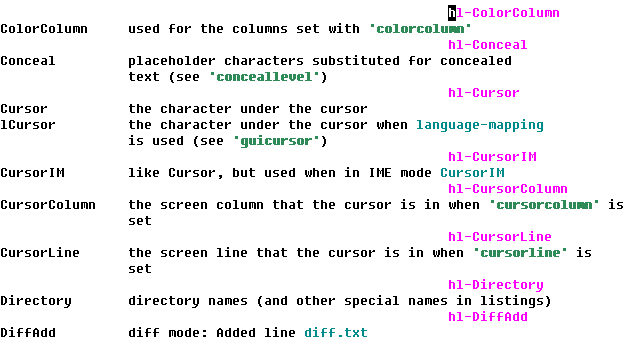
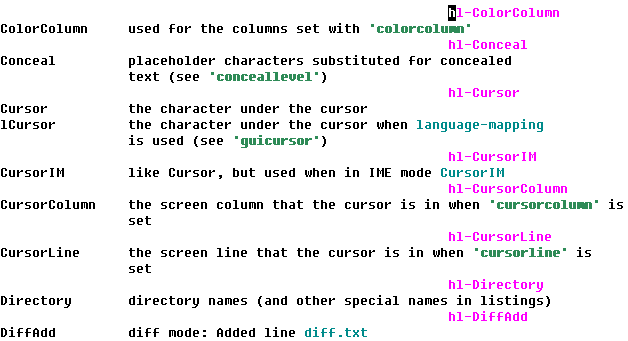
Expected behaviour
The highlight groups should be highlighted, like on Linux:

Version of Vim
8.2.4929 (from vim/vim-win32-installer/releases)
Environment
Windows 10
cmd.exe
Logs and stack traces
No response
—
Reply to this email directly, view it on GitHub.
You are receiving this because you are subscribed to this thread.
Gabriel Dupras
I believe this new feature was added in 8.2.4891 (b3c9077) but for some reason it doesn't work on Windows.
—
Reply to this email directly, view it on GitHub.
You are receiving this because you are subscribed to this thread.
lacygoill
If you run these Ex commands:
:help hl-ColorColumn
/^ColorColumn\t
You cursor should end up on the name of the ColorColumn group which is meant to be highlighted.
From this position, what is the output of these Ex commands:
:echo prop_type_list({'bufnr': bufnr('%')})->index('help-hl-ColorColumn')
:echo prop_list(line('.'))
—
Reply to this email directly, view it on GitHub.
You are receiving this because you are subscribed to this thread.
Gabriel Dupras
This is what I get:
:echo prop_type_list({'bufnr': bufnr('%')})->index('help-hl-ColorColumn')
-1
:echo prop_type_list({'bufnr': bufnr('%')})
[]
:echo prop_list(line('.'))
[]
—
Reply to this email directly, view it on GitHub.
You are receiving this because you are subscribed to this thread.
lacygoill
If you write this code in a script:
vim9script
help syntax
search("^ErrorMsg\t")
var word: string = 'ErrorMsg'
var buf: number = bufnr('%')
prop_type_add('help-hl-' .. word, {
    bufnr: buf,
    highlight: word,
    combine: false,
})
prop_add(line('.'), 1, {length: word->strlen(), type: 'help-hl-' .. word})
Then, start Vim with no config and source the previous script:
vim -Nu NONE -S /path/to/script
Is ErrorMsg highlighted as an error?
—
Reply to this email directly, view it on GitHub.
You are receiving this because you are subscribed to this thread.
lacygoill
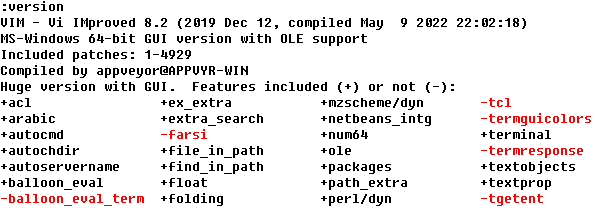
Also, for this to work, Vim needs to have been compiled with the +textprop feature. Is +textprop present in the output of :version?
—
Reply to this email directly, view it on GitHub.
You are receiving this because you are subscribed to this thread.
LemonBoy
Change
https://github.com/vim/vim/blob/d899e51120798d3fb5420abb1f19dddf3f014d05/runtime/syntax/help.vim#L218
into
if expand('%:p') == $VIMRUNTIME .. join(['', 'doc', 'syntax.txt'], &shellslash ? '/' : '\')
—
Reply to this email directly, view it on GitHub.
You are receiving this because you are subscribed to this thread.
Gabriel Dupras
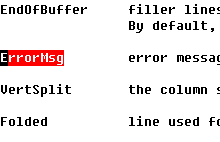
Is ErrorMsg highlighted as an error?
Yes:
Is +textprop present in the output of :version?
Yes:
@LemonBoy Yes, changing that line as you suggested fixed the problem.
—
Reply to this email directly, view it on GitHub.
You are receiving this because you are subscribed to this thread.
Gabriel Dupras
if expand('%:p') == $VIMRUNTIME .. join(['', 'doc', 'syntax.txt'], &shellslash ? '/' : '\')
But this won't work on Linux, right? On Linux:
:echo &shellslash
0
so you will end up with backslashes in the path.
—
Reply to this email directly, view it on GitHub.
You are receiving this because you are subscribed to this thread.
lacygoill
How about this patch then:
diff --git a/runtime/syntax/help.vim b/runtime/syntax/help.vim
index f5a50bfac..dc2765646 100644
--- a/runtime/syntax/help.vim
+++ b/runtime/syntax/help.vim
@@ -215,11 +215,17 @@ hi def link helpError		Error
 hi def link helpTodo		Todo
 hi def link helpURL		String

-if expand('%:p') == $VIMRUNTIME .. '/doc/syntax.txt'
-  " highlight groups with their respective color
-  import 'dist/vimhelp.vim'
-  call vimhelp.HighlightGroups()
-endif
+{
+  var path: string = $VIMRUNTIME .. '/doc/syntax.txt'
+  if exists('+shellslash') && !&shellslash
+    path = path->tr('/', '\')
+  endif
+  if expand('%:p') == path
+    # highlight groups with their respective color
+    import 'dist/vimhelp.vim'
+    vimhelp.HighlightGroups()
+  endif
+}

 let b:current_syntax = "help"
—
Reply to this email directly, view it on GitHub.
You are receiving this because you are subscribed to this thread.
Gabriel Dupras
I get this error:
"syntax.txt" [readonly][unix] 5824L, 231142B
Error detected while processing BufRead Autocommands for "C:/Program Files/Vim/vim82/doc/*.txt"..FileType Autocommands for "*"..Syntax Autocommands for "*"..function <SNR>8_SynSet[25]..script C:\Program Files\Vim\vim82\syntax\help.vim:
line  218:
E492: Not an editor command: {
line  219:
E1124: ":var" cannot be used in legacy Vim script
line  221:
E492: Not an editor command:     path = path->tr('/', '\')
line  223:
E121: Undefined variable: path
line  228:
E1128: } without {: }
—
Reply to this email directly, view it on GitHub.
You are receiving this because you are subscribed to this thread.
lacygoill
OK, new try:
diff --git a/runtime/syntax/help.vim b/runtime/syntax/help.vim
index f5a50bfac..d6e526f6e 100644
--- a/runtime/syntax/help.vim
+++ b/runtime/syntax/help.vim
@@ -215,12 +215,17 @@ hi def link helpError		Error
 hi def link helpTodo		Todo
 hi def link helpURL		String
-if expand('%:p') == $VIMRUNTIME .. '/doc/syntax.txt'
+let s:path = $VIMRUNTIME .. '/doc/syntax.txt'
+if exists('+shellslash') && !&shellslash
+  let s:path = s:path->tr('/', '\')
+endif
+if expand('%:p') == s:path
   " highlight groups with their respective color
   import 'dist/vimhelp.vim'
   call vimhelp.HighlightGroups()
 endif

+
 let b:current_syntax = "help"

 let &cpo = s:cpo_save
—
Reply to this email directly, view it on GitHub.
You are receiving this because you are subscribed to this thread.
Gabriel Dupras
Yeah, this worked on Windows. I think it should work on Linux too but I cannot test it at the moment.
—
Reply to this email directly, view it on GitHub.
You are receiving this because you are subscribed to this thread.
Bram Moolenaar
Does this work:
if expand('%:p') =~ $VIMRUNTIME .. '[/\\]doc[/\\]syntax.txt'
—
Reply to this email directly, view it on GitHub.
You are receiving this because you are subscribed to this thread.
Gabriel Dupras
This does not work on Windows. I think it has to do with backslashes.
Here's a sample session that could help figure out why it's not working.
:echo expand('%:p') =~ $VIMRUNTIME .. '[/\\]doc[/\\]syntax.txt'
0

:echo expand('%:p')
C:\Program Files\Vim\vim82\doc\syntax.txt

:echo $VIMRUNTIME
C:\Program Files\Vim\vim82

:echo '[/\\]doc[/\\]syntax.txt'
[/\\]doc[/\\]syntax.txt

:echo  $VIMRUNTIME .. '[/\\]doc[/\\]syntax.txt'
C:\Program Files\Vim\vim82[/\\]doc[/\\]syntax.txt

:echo 'C:\Program Files\Vim\vim82\doc\syntax.txt' =~ $VIMRUNTIME .. '[/\\]doc[/\\]syntax.txt'
0

:echo 'C:\Program Files\Vim\vim82\doc\syntax.txt' =~ 'C:\Program Files\Vim\vim82\doc\syntax.txt'
0

echo '\doc\syntax.txt'  =~ '[/\\]doc[/\\]syntax.txt'
1

:echo expand('%:p') =~ '[/\\]doc[/\\]syntax.txt'
1
—
Reply to this email directly, view it on GitHub.
You are receiving this because you are subscribed to this thread.
lacygoill
FWIW, the last posted patch works on Windows:
Yeah, this worked on Windows.
And I've tested it on Linux where it works too.
—
Reply to this email directly, view it on GitHub.
You are receiving this because you are subscribed to this thread.
Gabriel Dupras
Yeah, your patch does work. I like @brammool's one-liner though and I don't understand why it doesn't work.
Is below the expected behaviour?
:echo 'foo\bar' =~ 'foo\bar'
0
I would expect the output to be "1". These are single quoted string and :help literal-string says
This string is taken as it is.  No backslashes are removed or have a special
meaning.  The only exception is that two quotes stand for one quote.

Single quoted strings are useful for patterns, so that backslashes do not need
to be doubled.
Something is weird with those backslashes or I'm missing something.
—
Reply to this email directly, view it on GitHub.
You are receiving this because you are subscribed to this thread.
Gabriel Dupras
Oh, the backslashes have a special meaning in patterns, like on the right-hand sides of =~. I think I get it now.
—
Reply to this email directly, view it on GitHub.
You are receiving this because you are subscribed to this thread.
Bram Moolenaar
Right, the backslashes in $VIMRUNTIME need to be escaped.
Would expand() use forward slashes while $VIMRUNTIME has backward slashes?
—
Reply to this email directly, view it on GitHub.
You are receiving this because you are subscribed to this thread.
Gabriel Dupras
The latest runtime files update (3f32a5f) partially fixes the issue with syntax/help.vim.
There is still a problem on Windows when shellslash is set. To reproduce:
vim --clean -c "set shellslash -c "help hl-ColorColumn"
And the highlight groups are not highlighted.
This is because expand('%:p') contains slashes but $VIMRUNTIME contains backslashes in this line:
https://github.com/vim/vim/blob/d881d1598467d88808bafd2fa86982ebbca7dcc1/runtime/syntax/help.vim#L218
—
Reply to this email directly, view it on GitHub.
You are receiving this because you are subscribed to this thread.

Bram Moolenaar
> The latest runtime files update (3f32a5f1) partially fixes the issue
> with `syntax/help.vim`.
> There is still a problem on Windows when `shellslash` is set. To reproduce:
> ```
> vim --clean -c "set shellslash -c "help hl-ColorColumn"
> ```
> And the highlight groups are not highlighted.
>
> This is because `expand('%:p')` contains slashes but `$VIMRUNTIME`
> contains backslashes in this line:
> https://github.com/vim/vim/blob/d881d1598467d88808bafd2fa86982ebbca7dcc1/runtime/syntax/help.vim#L218
I think we can just drop $VIMRUNTIME. The file is already recognized as
a help file, just matching /doc/syntax.txt should be more than sufficient.
--
I thought I was eating a crab salad. It turned out to be a crap salad.
/// Bram Moolenaar -- Br...@Moolenaar.net -- http://www.Moolenaar.net \\\
/// \\\
\\\ sponsor Vim, vote for features -- http://www.Vim.org/sponsor/ ///
\\\ help me help AIDS victims -- http://ICCF-Holland.org ///
Gabriel Dupras
Fixed in the latest runtime files update (30ab04e). Thanks!
Closing.
—
Reply to this email directly, view it on GitHub.
You are receiving this because you are subscribed to this thread.
Gabriel Dupras
Closed #10397.
—
Reply to this email directly, view it on GitHub.
You are receiving this because you are subscribed to this thread.