
[vim/vim] [Feature] Ability to move text horizontally (#8558)

delvh
Problem
Often times, especially when coding (and presumably the user base of vim are mainly developers), it would be useful to move selected text either to the left or to the right by n chars, or alternatively, if no text is selected the char over which the caret currently is. However, according to my knowledge, this can currently only be performed using a workaround of deleting (→ implicitly copying) and pasting the expected text.
For its vertical counterpart, there exists a method to do so:
:m+/-<number of lines to move>, i.e. :m+5
Solution
Add a currently unused key combination to perform this action.
There are two possible approaches:
a) like the vertical approach: use another final mode, something like
:mh+/-<number of chars to move>
where + would shift right for scripts reading from left to right, such as English, and - would move left.
The question is then whether to invert the direction moved for scripts reading from right to left, or not. (In favor: Most likely easier to understand for RTL scripts, Contra: Way harder to implement (how do you detect if you currently write LTR or RTL?))
b) a normal mode command, i.e. something like m5r to move 5 characters to the right and m5l for the opposite. Most likely easier to implement, integrates most likely better into the current system (i.e. because it allows for calls like m2F(r or similar shenanigans), and is less confusing as the differentiation between RTL and LTR scripts does not need to be made.
—
You are receiving this because you are subscribed to this thread.
Reply to this email directly, view it on GitHub, or unsubscribe.
matveyt
There is a ton of plugins with such functionality. What is a benefit in making it builtin?
delvh
By that argumentation
:m+5
for example should also not be builtin, since there can be plugins for that.
Why should the vertical moving be implemented, but the horizontal one not?
Christian Brabandt
isn't that just using some clever implementation of yank, cut and put, so you just need to combine it to have it do what you want.
delvh
Yeah, just as
:m+5
is just a combination of yank, cut and put.
Christian Brabandt
Yes, but :m is demanded by POSIX. I think the possibility to move text horizontally is already easy enough to do in a manual way using v, x, and p.
If you need to move tons of text, script it together using a macro or some vimscript possibly using operator function setting and it should be okay.
So perhaps please give a better error description what is currently hard to do and what exact problem you are trying to solve here. Note, we do not lack ideas of possible enhancements, rather the man power to implement all bug fixes and enhancements.
Bram Moolenaar
> **Problem**
> Often times, especially when coding (and presumably the user base of vim
> are mainly developers), it would be useful to move selected text either
> to the left or to the right by n chars, or alternatively, if no text is
> selected the char over which the caret currently is. However, according
> to my knowledge, this can currently only be performed using a workaround
> of deleting (→ implicitly copying) and pasting the expected text.
>
> For its vertical counterpart, there exists a method to do so:
> :m+/-<number of lines to move>, i.e. :m+5
>
> **Solution**
> Add a currently unused key combination to perform this action.
> There are two possible approaches:
> ```vim
> :mh+/-<number of chars to move>
> ```
> where `+` would shift right for scripts reading from left to right,
> such as English, and `-` would move left.
> The question is then whether to invert the direction moved for scripts
> reading from right to left, or not. (In favor: Most likely easier to
> understand for RTL scripts, Contra: Way harder to implement (how do
> you detect if you currently write LTR or RTL?))
>
> b) a `normal mode` command, i.e. something like `m5r` to move 5
> characters to the right and `m5l` for the opposite. Most likely easier
> to implement, integrates most likely better into the current system
> (i.e. because it allows for calls like `m2F(r` or similar
> shenanigans), and is less confusing as the differentiation between RTL
> and LTR scripts does not need to be made.
move left. In Visual mode these are currently an error.
To make it a bit more convenient, we could use "g>>>" to move three
positions. Thus each extra ">" moves one more character.
Would be even more useful for a block selection! A bit tricky to handle
tabs, but it should be possible.
@matveyt: what plugin does this?
--
hundred-and-one symptoms of being an internet addict:
127. You bring your laptop and cellular phone to church.
/// Bram Moolenaar -- Br...@Moolenaar.net -- http://www.Moolenaar.net \\\
/// \\\
\\\ sponsor Vim, vote for features -- http://www.Vim.org/sponsor/ ///
\\\ help me help AIDS victims -- http://ICCF-Holland.org ///
lacygoill
vim-schlepp does it.
Which I rewrote in Vim9.
Both plugins have bugs (which I didn't have the time to fix), but usually it gets the job done.
lacygoill
Ah the OP wants an Ex command (presumably for scripting), not a mapping. OK, so forget the previous post.
lacygoill
Ah the OP wants an Ex command (presumably for scripting), not a mapping.
Ah no, they do want a normal command, right?
Add a currently unused key combination to perform this action.
If so, there are at least 2 other plugins which might be relevant:
Gary Johnson
columns/characters to move? That would leave the operator-pending
syntax the same as other operator-pending commands. E.g., "3g>w"
would move everything from the cursor to the end of the word right
by 3 columns; "g<f;" would move everything from the cursor through
the next semicolon left by 1 column.
In normal mode, though, g< already means "display previous command
output".
Regards,
Gary
vim-dev ML
>
> > **Problem**
> > are mainly developers), it would be useful to move selected text either
> > to the left or to the right by n chars, or alternatively, if no text is
> > selected the char over which the caret currently is. However, according
> > to my knowledge, this can currently only be performed using a workaround
> > of deleting (→ implicitly copying) and pasting the expected text.
> >
> > For its vertical counterpart, there exists a method to do so:
> > :m+/-<number of lines to move>, i.e. :m+5
> >
> > **Solution**
> > Add a currently unused key combination to perform this action.
> > There are two possible approaches:
> > ```vim
> > ```
> > where `+` would shift right for scripts reading from left to right,
> > such as English, and `-` would move left.
> > The question is then whether to invert the direction moved for scripts
> > reading from right to left, or not. (In favor: Most likely easier to
> > understand for RTL scripts, Contra: Way harder to implement (how do
> > you detect if you currently write LTR or RTL?))
> >
> > b) a `normal mode` command, i.e. something like `m5r` to move 5
> > characters to the right and `m5l` for the opposite. Most likely easier
> > to implement, integrates most likely better into the current system
> > (i.e. because it allows for calls like `m2F(r` or similar
> > shenanigans), and is less confusing as the differentiation between RTL
> > and LTR scripts does not need to be made.
>
> move left. In Visual mode these are currently an error.
>
> To make it a bit more convenient, we could use "g>>>" to move three
> positions. Thus each extra ">" moves one more character.
How about using a numeric prefix for the number of
columns/characters to move? That would leave the operator-pending
syntax the same as other operator-pending commands. E.g., "3g>w"
would move everything from the cursor to the end of the word right
by 3 columns; "g<f;" would move everything from the cursor through
the next semicolon left by 1 column.
In normal mode, though, g< already means "display previous command
output".
Regards,
Gary
cecamp
There's also DrawIt; turn DrawIt on (:DIsngl, for example), then use ctrl-v to select some text. You can then move that text with ctrl-leftmouse, which obviously includes up, down, sideways, and diagonally.
—
You are receiving this because you commented.
delvh
Interesting idea. We could perhaps use "g>" to move right and "g<" to move left. In Visual mode these are currently an error. To make it a bit more convenient, we could use "g>>>" to move three positions. Thus each extra ">" moves one more character. Would be even more useful for a block selection! A bit tricky to handle tabs, but it should be possible. @matveyt: what plugin does this?
Yeah, I can definitely see that. But I would also say that the navigating normal commands should work well alongside it for the best usability.
By doing that, it would be possible to call things such as gb< to move selected text to the start of the current word,
g2T(< to move text to the beginning of the second previous opening parentheses,
or even g((< to move it to the beginning of the previous sentence
just to name a few examples on how it could then be used.
Because I would say that for most times, it's exactly these kinds of actions that are requested when wanting to move text horizontally. As already mentioned, I noticed this most often during coding, where such states can generally occur, i.e. that a parameter of a function needs to be moved as another parameter got moved from before to behind it.
Another possible use case would be to use this to fix an incorrect order of words, i.e. if the cow yellow could become if the yellow cow by pressing fyvwg2b< (goto word, select it, move it back one word).
—
You are receiving this because you commented.
Maxim Kim
Another possible use case would be to use this to fix an incorrect order of words, i.e.
if the cow yellowcould becomeif the yellow cowby pressingfyvwg2b<(goto word, select it, move it back one word).
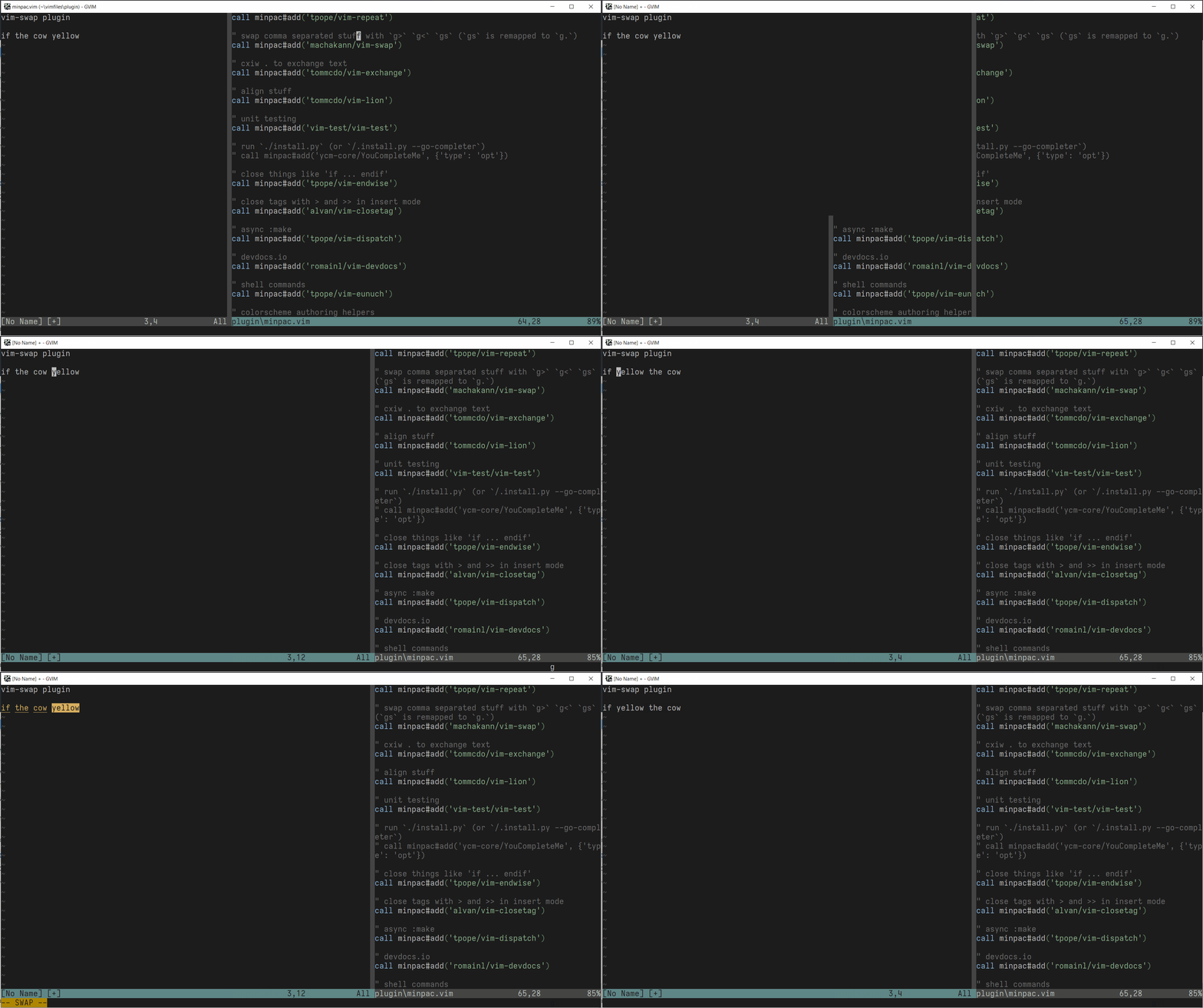
—
You are receiving this because you commented.
Maxim Kim
@delvh Swapping things: https://gist.github.com/habamax/8990424953c1b6ba314229d0da4fb4d9
—
You are receiving this because you commented.
matveyt
what plugin does this?
As a shameless plug (tm), vim-moveit.
—
You are receiving this because you commented.
Bram Moolenaar
For various movements you can just use the delete-move-put method. I was really just thinking about moving some number of characters. Anything else quickly gets too complicated and the result is a bit unpredictable.
Anyway, there are plugins available, thus I'm not sure there is much use implementing this in Vim itself.
—
You are receiving this because you commented.