
Can't open vesta on Mac
1,555 views
Skip to first unread message

Claudia
Nov 2, 2020, 7:33:41 PM11/2/20
to VESTA users' list
I think I'm having the same problem as Christina M. and Santosh Kumar, where all of a sudden I am unable to open Vesta on Mac (I am running catalina and have the latest version of Vesta). I have tried all suggested solutions - deleting the application support folder, restarting, installing an older version, deleting it completely and reinstalling. None has helped.
When I open the application, the icon appears in the toolbar but there is no display or options in the toolbar. I tried dragging a .cif file onto the vesta application to open it and I got this error message:
A debugging check in this application has failed.
When I open the application, the icon appears in the toolbar but there is no display or options in the toolbar. I tried dragging a .cif file onto the vesta application to open it and I got this error message:
A debugging check in this application has failed.
/Users/Momma/Documents/Developer/Mac/wxWidgets/include/wx/event.h(4078): assert ""dest"" failed in wxQueueEvent(): need an object to queue event for
Any advice would be appreciated.

Ke Yang
Jan 14, 2021, 10:58:01 AM1/14/21
to VESTA users' list
Hi Claudia, have you solved your problem? I am having the same issue. Thank you!

Prasad Matukumilli
Jan 14, 2021, 11:01:29 PM1/14/21
to vesta-...@googlegroups.com
I am having the same issue since last few months: unable to open Vesta on Mac. Any fix on this issue would be highly appreciated.
Regards,
Prasad MVD
--
---
You received this message because you are subscribed to the Google Groups "VESTA users' list" group.
To unsubscribe from this group and stop receiving emails from it, send an email to vesta-discus...@googlegroups.com.
To view this discussion on the web visit https://groups.google.com/d/msgid/vesta-discuss/a7cc9c3f-8866-4cb4-93a8-77e29e5c31ffn%40googlegroups.com.
**********************************
Prasad Matukumilli
Prasad Matukumilli

KK M
Jan 15, 2021, 8:35:23 PM1/15/21
to vesta-...@googlegroups.com
forward to Koichi momma vest...@gmail.com
To view this discussion on the web visit https://groups.google.com/d/msgid/vesta-discuss/CACbe3YJ4%2B_aABcWqFpPtFrqUkY6_E0RHLVNK%2Bq9U1Myauo8pEw%40mail.gmail.com.

Koichi Momma
Jan 30, 2021, 2:28:13 AM1/30/21
to vesta-...@googlegroups.com, Prasad Matukumilli
Can someone post a screenshot? I have
no idea what is happening.
TIA!
Koichi
TIA!
Koichi
To view this discussion on the web visit https://groups.google.com/d/msgid/vesta-discuss/CACbe3YJ4%2B_aABcWqFpPtFrqUkY6_E0RHLVNK%2Bq9U1Myauo8pEw%40mail.gmail.com.
--
Koichi Momma
National Museum of Nature and Science
4-1-1 Amakubo, Tsukuba, Ibaraki 305-0005, Japan
TEL: +81-29-853-8163
FAX: +81-29-853-8998
k-m...@kahaku.go.jp
vest...@gmail.com
Koichi Momma
Jan 30, 2021, 4:16:24 AM1/30/21
to Prasad Matukumilli, VESTA users' list
Thank you Prasad!
That seems to be due to a dead VESTA process still running in background. Would you please check the Activity Monitor and make sure that there is no VESTA process remaining before you launch VESTA?
If the problem still cannot be solved, something in your mac might be conflicting with VESTA. In that case, I will ask you to try other things.
Best regards,
Koichi
Prasad Matukumilli wrote on 2021/01/30 17:14:
That seems to be due to a dead VESTA process still running in background. Would you please check the Activity Monitor and make sure that there is no VESTA process remaining before you launch VESTA?
If the problem still cannot be solved, something in your mac might be conflicting with VESTA. In that case, I will ask you to try other things.
Best regards,
Koichi
Prasad Matukumilli wrote on 2021/01/30 17:14:
Dear Koichi Momma,Please find the attached screenshot. Even the main panel is not showing up.After clicking on this Vesta application, Vesta logo appears in the dock (bottom-right corner), and also show up as active application on the top-left corner. Nothing more than that is showing up, not even an error message.I hope you suggest some fix for this issue.Regards,Prasad Matukumilli
Koichi Momma
Feb 1, 2021, 1:23:00 AM2/1/21
to vesta-...@googlegroups.com
I found the solution for this issue.
Open the Terminal app and type
ls -la
In the output, try to find a name starting with .VESTA3-XXX
"XXX" part is your login name.
If that file exist, delete it by typing
sudo rm -f .VESTA3-XXX
Then, try running VESTA again.
That file is used to check if another instance of VESTA is running. After VESTA or the OS crashed, it remained.
In such a case, the file should be automatically removed and replaced when VESTA is executed next time. That didn't work for some unknown reason. This problem seems to only happen rarely on macOS.
Best regards,
Koichi
Open the Terminal app and type
ls -la
In the output, try to find a name starting with .VESTA3-XXX
"XXX" part is your login name.
If that file exist, delete it by typing
sudo rm -f .VESTA3-XXX
Then, try running VESTA again.
That file is used to check if another instance of VESTA is running. After VESTA or the OS crashed, it remained.
In such a case, the file should be automatically removed and replaced when VESTA is executed next time. That didn't work for some unknown reason. This problem seems to only happen rarely on macOS.
Best regards,
Koichi
To view this discussion on the web visit https://groups.google.com/d/msgid/vesta-discuss/CACbe3YJ4%2B_aABcWqFpPtFrqUkY6_E0RHLVNK%2Bq9U1Myauo8pEw%40mail.gmail.com.

Brooks Tellekamp
Feb 3, 2021, 5:59:02 PM2/3/21
to VESTA users' list
I am having the same issue, but I am not able to locate the .VESTA3-XXX file using terminal or finder.
I have tried searching the whole file system for such a file using finder and spotlight search, but I do not know if that works for hidden files.
Do you have any other suggestions of where to find the file or how to remedy this issue?
On Sunday, January 31, 2021 at 11:23:00 PM UTC-7, K.M. wrote:
I found the solution for this issue.
Open the Terminal app and type
ls -la
In the output, try to find a name starting with .VESTA3-XXX
"XXX" part is your login name.
If that file exist, delete it by typing
sudo rm -f .VESTA3-XXX
Then, try running VESTA again.
That file is used to check if another instance of VESTA is running. After VESTA or the OS crashed, it remained.
In such a case, the file should be automatically removed and replaced when VESTA is executed next time. That didn't work for some unknown reason. This problem seems to only happen rarely on macOS.
Best regards,
Koichi
Prasad Matukumilli wrote on 2021/01/15 13:01:
I am having the same issue since last few months: unable to open Vesta on Mac. Any fix on this issue would be highly appreciated.
Regards,Prasad MVD
On Thu, Jan 14, 2021 at 9:28 PM Ke Yang <yangke....@gmail.com> wrote:
Hi Claudia, have you solved your problem? I am having the same issue. Thank you!
--On Monday, November 2, 2020 at 7:33:41 PM UTC-5 Claudia wrote:
I think I'm having the same problem as Christina M. and Santosh Kumar, where all of a sudden I am unable to open Vesta on Mac (I am running catalina and have the latest version of Vesta). I have tried all suggested solutions - deleting the application support folder, restarting, installing an older version, deleting it completely and reinstalling. None has helped.
When I open the application, the icon appears in the toolbar but there is no display or options in the toolbar. I tried dragging a .cif file onto the vesta application to open it and I got this error message:
A debugging check in this application has failed./Users/Momma/Documents/Developer/Mac/wxWidgets/include/wx/event.h(4078): assert ""dest"" failed in wxQueueEvent(): need an object to queue event for
Any advice would be appreciated.
---
You received this message because you are subscribed to the Google Groups "VESTA users' list" group.
To unsubscribe from this group and stop receiving emails from it, send an email to vesta-...@googlegroups.com.
To view this discussion on the web visit https://groups.google.com/d/msgid/vesta-discuss/a7cc9c3f-8866-4cb4-93a8-77e29e5c31ffn%40googlegroups.com.
--
**********************************
Prasad Matukumilli
--
---
You received this message because you are subscribed to the Google Groups "VESTA users' list" group.
To unsubscribe from this group and stop receiving emails from it, send an email to vesta-...@googlegroups.com.
To view this discussion on the web visit https://groups.google.com/d/msgid/vesta-discuss/CACbe3YJ4%2B_aABcWqFpPtFrqUkY6_E0RHLVNK%2Bq9U1Myauo8pEw%40mail.gmail.com.

Gervais Chapuis
Feb 8, 2021, 8:18:36 AM2/8/21
to VESTA users' list
I wonder if anyone has been running Vesta on OSX Big Sur?
Is it working properly?
Many thanks in advance!

andremugen
Feb 8, 2021, 8:25:33 AM2/8/21
to VESTA users' list
Dear,
I have a MacBook Air 2017 with BigSur 11.1 and Vesta is running properly!
Regards!
Andrea

Anirudh Nandakumar
Jun 9, 2021, 6:45:04 AM6/9/21
to VESTA users' list
FYKI, this is the first time i'm trying to install VESTA.
Gervais Chapuis
Jun 9, 2021, 9:01:55 AM6/9/21
to VESTA users' list
i am running successfully Vesta on BigSur 11.4 on MacBook Pro without problem !
KK M
Jun 9, 2021, 10:03:30 PM6/9/21
to 'M, Christina' via VESTA users' list
may be try removing any security feature settings temporarily and see what happens.
just a suggestion. i never used Mac machine
--
---
You received this message because you are subscribed to the Google Groups "VESTA users' list" group.
To unsubscribe from this group and stop receiving emails from it, send an email to vesta-discus...@googlegroups.com.
To view this discussion on the web visit https://groups.google.com/d/msgid/vesta-discuss/da17a488-775f-4a32-880b-207f542b000fn%40googlegroups.com.
Koichi Momma
Jun 10, 2021, 8:44:48 AM6/10/21
to vesta-...@googlegroups.com, Anirudh Nandakumar
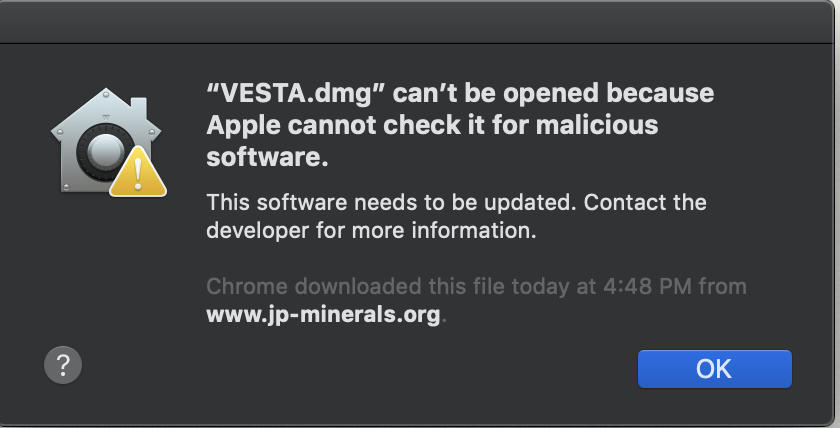
That is strange. From where did you
download the file?
The dmg file is code signed and notarized since VESTA version 3.5.4. So such warning is not supposed to be shown.
Did anyone else experience the same problem recently with the official package?
Best regards,
Koichi
The dmg file is code signed and notarized since VESTA version 3.5.4. So such warning is not supposed to be shown.
Did anyone else experience the same problem recently with the official package?
Best regards,
Koichi
--
---
You received this message because you are subscribed to the Google Groups "VESTA users' list" group.
To unsubscribe from this group and stop receiving emails from it, send an email to vesta-discus...@googlegroups.com.
To view this discussion on the web visit https://groups.google.com/d/msgid/vesta-discuss/d80f36e6-db8c-4760-a8bb-2a13f5c3f15en%40googlegroups.com.
anirudhn...@gmail.com
Jun 10, 2021, 9:05:55 AM6/10/21
to Koichi Momma, vesta-...@googlegroups.com
Thank you for your email.
I downloaded it from the website itself: https://jp-minerals.org/vesta/en/download.html (the macOS version)
Thank you,
Anirudh

On Thu, Jun 10, 2021 at 6:14 PM Koichi Momma <vest...@gmail.com> wrote:
That is strange. From where did you download the file?
The dmg file is code signed and notarized since VESTA version 3.5.4. So such warning is not supposed to be shown.
Did anyone else experience the same problem recently with the official package?
Best regards,
Koichi
Anirudh Nandakumar wrote on 2021/06/09 19:43:
Hello,
I am facing the same problem. I get an error when i try to open VESTA on mac.Please find attached the screenshot. Kindly help.
Regards,Anirudh
--On Monday, 8 February 2021 at 18:55:33 UTC+5:30 andremugen wrote:
Dear,
I have a MacBook Air 2017 with BigSur 11.1 and Vesta is running properly!
Regards!Andrea
---
You received this message because you are subscribed to the Google Groups "VESTA users' list" group.
To unsubscribe from this group and stop receiving emails from it, send an email to vesta-discuss+unsubscribe@googlegroups.com.
To view this discussion on the web visit https://groups.google.com/d/msgid/vesta-discuss/d80f36e6-db8c-4760-a8bb-2a13f5c3f15en%40googlegroups.com.

Boyang Zheng
Aug 17, 2021, 2:21:43 PM8/17/21
to VESTA users' list
This solution worked for me. My life was saved! 🙏BIG thanks!

Joshua Fujiwara
Jan 13, 2023, 6:59:43 PM1/13/23
to VESTA users' list
On my MacPro 2019 (Xeon), Vesta ver. 3.4.4 does not open with could related this issue. Please provide possible solution.
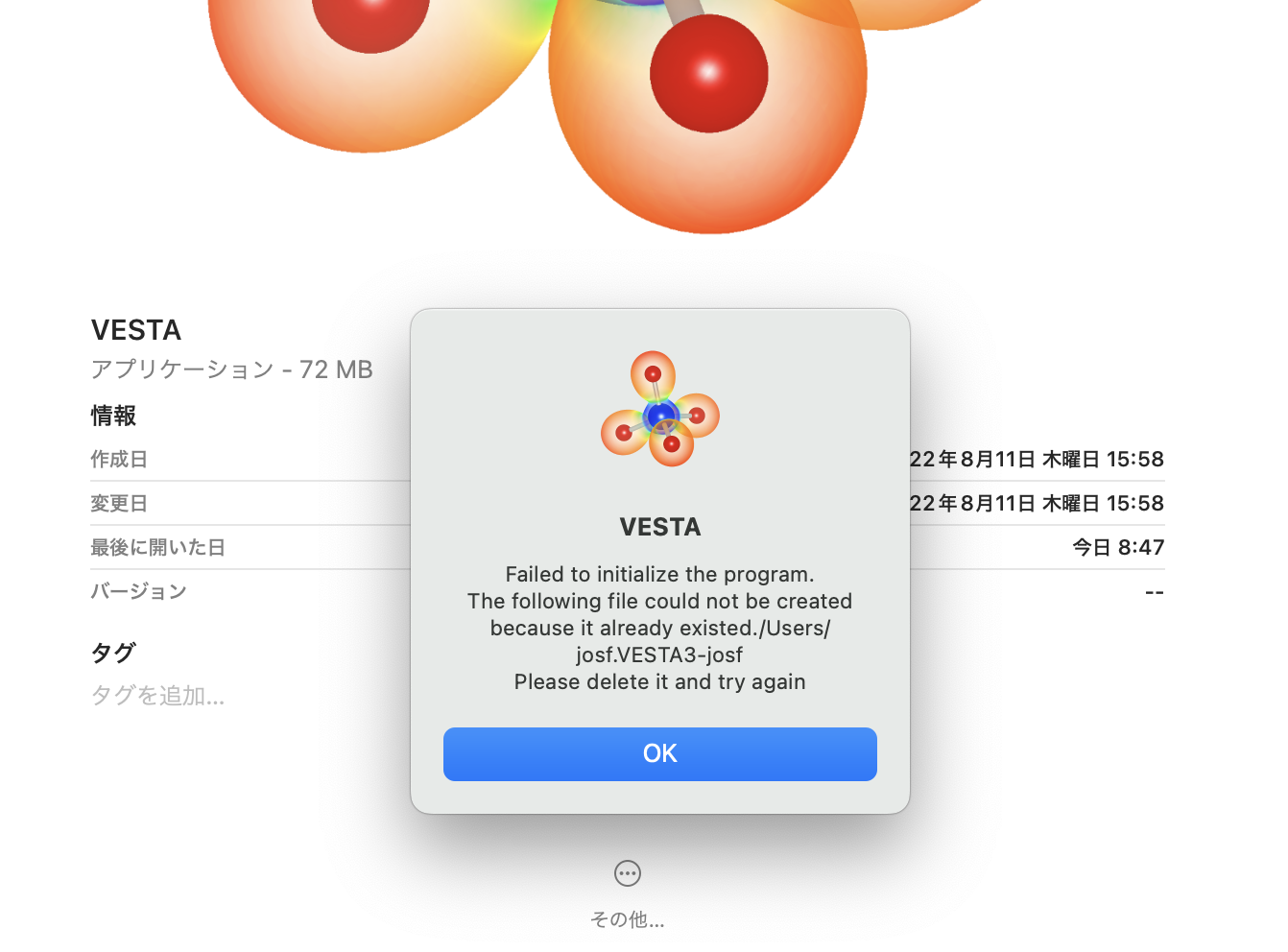
I have tried to create .VESTA3-XXX file with 'touch' command via terminal but it does not work with permission error (put chmod 777, though)
below is the 1st error with just weight after double click the app icon.
next one is after hit the OK button on the 1st dialogue.

best,
2021年8月18日水曜日 3:21:43 UTC+9 boyoun...@gmail.com:
Joshua Fujiwara
Jan 13, 2023, 7:07:46 PM1/13/23
to VESTA users' list
Oops, the version I installed is ver. 3.5.8.
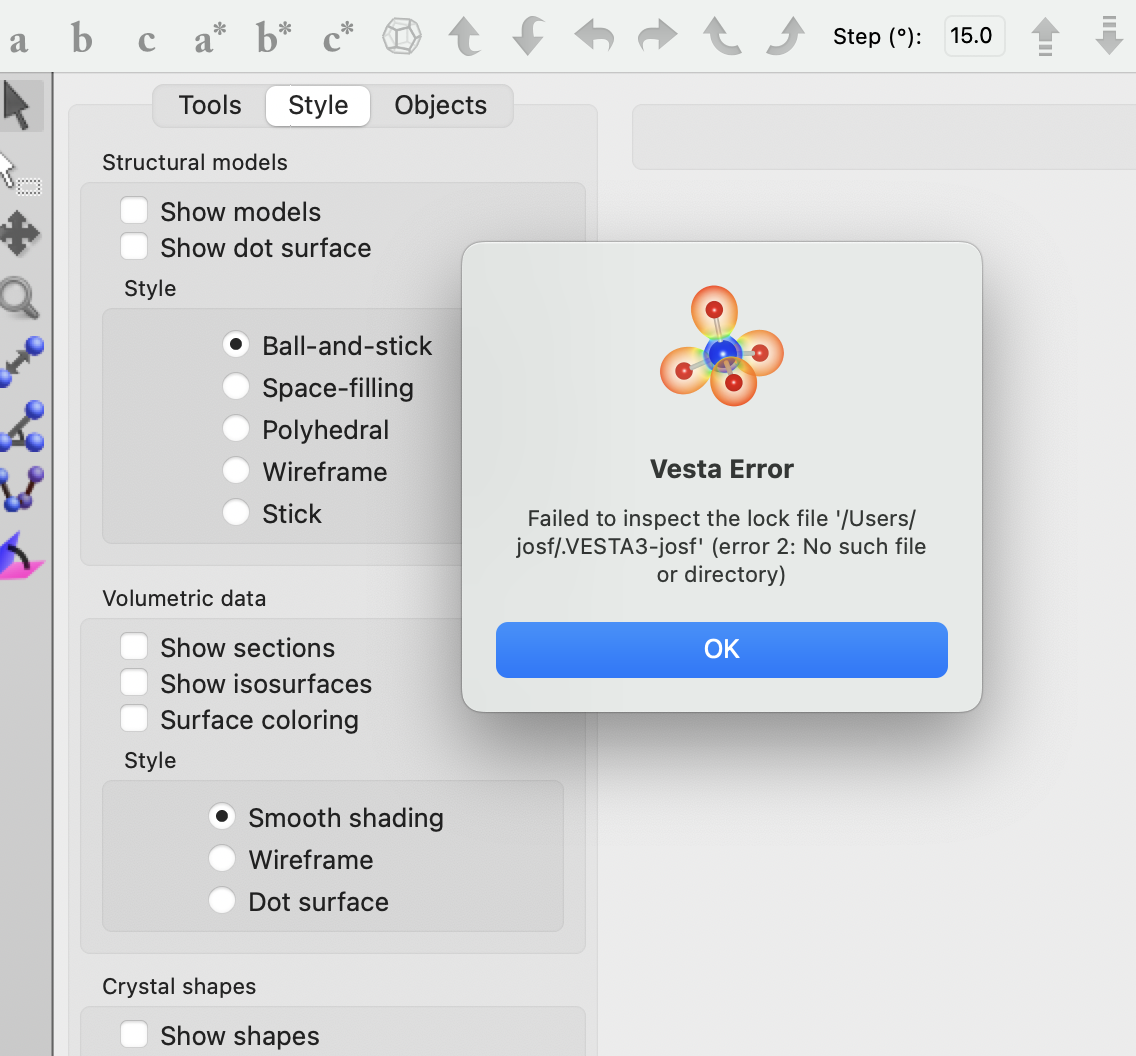
When I installed a older version of 3.4.4, it open with following error.
but it seems everything works fine except open error dialogue every time opened.
thanks,
2023年1月14日土曜日 8:59:43 UTC+9 Joshua Fujiwara:
Reply all
Reply to author
Forward
0 new messages