
[TW5] How to set the height and width of edit-text input boxes?
1,441 views
Skip to first unread message

Matabele
Apr 28, 2014, 3:50:00 AM4/28/14
to tiddl...@googlegroups.com
Hi
<$edit-text tiddler="target-tiddler" field="target-field" class="tw-edit-texteditor" tag="textarea" /> When, however, "target-field" already contains text, the height of the input box is chosen by default (and may be narrow and very tall) and can not be changed by dragging the corner to widen the box.
How can the default height and width of an edit-text input box be controlled?
regards

Jeremy Ruston
Apr 28, 2014, 8:01:27 AM4/28/14
to TiddlyWiki
Hi Matabele
What browser and operating system are you using? Could you include a screenshot?
TW5 takes steps to resize textarea controls automatically to fit the text that they contain. You shouldn't have to resize the textarea manually. It sounds like you're seeing a bug,
Best wishes
Jeremy
--
You received this message because you are subscribed to the Google Groups "TiddlyWiki" group.
To unsubscribe from this group and stop receiving emails from it, send an email to tiddlywiki+...@googlegroups.com.
To post to this group, send email to tiddl...@googlegroups.com.
Visit this group at http://groups.google.com/group/tiddlywiki.
For more options, visit https://groups.google.com/d/optout.
Jeremy Ruston
mailto:jeremy...@gmail.com
Matabele
Apr 28, 2014, 11:59:38 AM4/28/14
to tiddl...@googlegroups.com, jeremy...@gmail.com
Hi
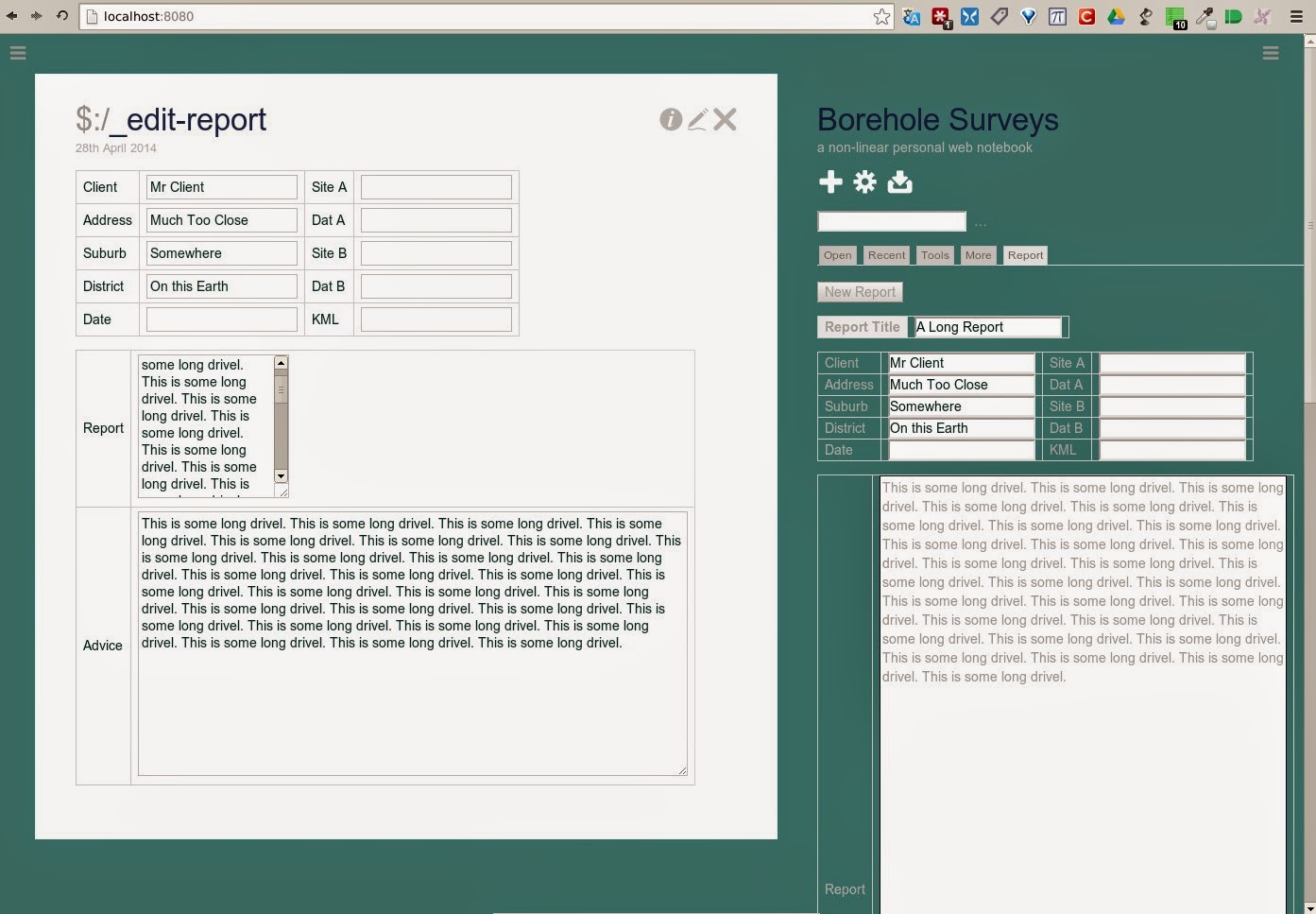
The edit-text boxes begin narrow, and get longer with more text. This can be remedied in the form shown in the main story -- the box may be widened then collapsed, at which point a slider appears. The same form, however, when transcluded (shown in the sidebar), begins very long and narrow and remains this height even if the box is widened (no slider appears either.)
This same behaviour is evident in the main story window, if text is already in the box when the form is opened (or when transcuded). It appears that the presence of existing text, or transcluding the form, sets the minimum height of the box - once set, this cannot be reduced.
Is there a way of pre-selecting the size (width and maximum height) of the box -- when more text is added, therefore, a slider appears?
regards
Matabele
Apr 28, 2014, 12:30:12 PM4/28/14
to tiddl...@googlegroups.com, jeremy...@gmail.com
Hi
There is a procedure to snap it out -- first widen the box, then begin editing -- the box then snaps back to a sensible height for the widened width. This, however, requires scrolling down to the bottom of the box -- which, with a long text entry, could be some distance.
I guess what is needed, is to set the default width of the box to fit the width of the space available -- when a form is opened, therefore, the initial minimum height will be reasonable.
regards
On Monday, April 28, 2014 2:01:27 PM UTC+2, Jeremy Ruston wrote:
On Monday, April 28, 2014 2:01:27 PM UTC+2, Jeremy Ruston wrote:
Matabele
Apr 28, 2014, 12:44:47 PM4/28/14
to tiddl...@googlegroups.com, jeremy...@gmail.com
Hi

OK - the problem occurs when the edit-text boxes are placed in the cells of a table -- I have removed them, and the behaviour is now sensible (shown in the main story window.) The problem remains, however, when the same form is transcluded (shown in the sidebar -- the same two windows are here placed side by side -- the other, off the bottom of the screen.)
regards
On Monday, April 28, 2014 2:01:27 PM UTC+2, Jeremy Ruston wrote:
On Monday, April 28, 2014 2:01:27 PM UTC+2, Jeremy Ruston wrote:
Jeremy Ruston
Apr 29, 2014, 6:46:47 AM4/29/14
to Matabele, TiddlyWiki
Hi Matebele
It looks like you're running Chrome, is that right? What version is it? Are you running any TW5 plugins?
If I understand you the issue is with the width of the edit box, not it's height, is that right? The width is entirely controlled by CSS.
Can you duplicate the problem on tiddlywiki.com?
Best wishes
Jeremy

Zaphod Beeblebrox
Sep 6, 2016, 5:04:19 PM9/6/16
to TiddlyWiki
No one ever really answered with a solution to this, and I am experiencing it now within a dashboard form tiddler I'm trying to make.
I've temporarily overcome it by enclosing the <$edit-text> in a div with a "width: 450px;" declaration, but it would be nice if we didn't have to resort to such tactics.
--Zaphod
I've temporarily overcome it by enclosing the <$edit-text> in a div with a "width: 450px;" declaration, but it would be nice if we didn't have to resort to such tactics.
--Zaphod

Danielo Rodríguez
Sep 6, 2016, 5:56:28 PM9/6/16
to TiddlyWiki
El martes, 6 de septiembre de 2016, 23:04:19 (UTC+2), Zaphod Beeblebrox escribió:
No one ever really answered with a solution to this, and I am experiencing it now within a dashboard form tiddler I'm trying to make.
I've temporarily overcome it by enclosing the <$edit-text> in a div with a "width: 450px;" declaration, but it would be nice if we didn't have to resort to such tactics.
In te latest version you can set the heigh of the text widget:

Zaphod Beeblebrox
Sep 7, 2016, 1:03:32 PM9/7/16
to TiddlyWiki
Thank You for that, Danielo :)
But I'm not having any trouble
with the Editor, Where I'm seeing the problem is with the
<$edit-text> widget, just as Matabele demonstrated in his OP...
I've
been using version 5.1.11, but just switched over to 5.1.13 and it
seems that it's even worse there, as my hacky little 'solution'
(enclosing the <$edit-text> in a div with a "width: 450px;"
declaration) isn't working there :(

It also displays this way when used within a flex div.
I can manually resize the area, but as soon as I close the tiddler it reverts back to its original size.
--Zaphod
Danielo Rodríguez
Sep 7, 2016, 1:36:01 PM9/7/16
to TiddlyWiki
Oh, so your problem is with the width.
Have you tried with the rows parameter? Set it to 200 for example and see what happens
Have you tried with the rows parameter? Set it to 200 for example and see what happens
Zaphod Beeblebrox
Sep 7, 2016, 1:50:29 PM9/7/16
to TiddlyWiki
But the rows parameter affects the height, not the width. The size parameter affects the width, but I already have it set to 53 in the example pic above -- the same width as all the single-line <$edit-text> fields in the form, and they all perform as expected.
--Zaphod
--Zaphod

Dave
Mar 2, 2017, 1:02:59 AM3/2/17
to TiddlyWiki
Did anyone here ever figure out how to force a specific width on opening the tiddler?
<$edit-text tiddler="someOtherTiddler" tag="textarea" field="somefield" />Dave
Mar 20, 2017, 7:03:22 PM3/20/17
to TiddlyWiki
FYI, this question is answered here if anyone tagged here is still interested:
Reply all
Reply to author
Forward
0 new messages