External editor works with all new tiddler field except for content field

79 views
Skip to first unread message

David Nebauer

unread,
Jan 2, 2019, 11:46:35 PM1/2/19
to TiddlyWiki

The web browser I'm using with TW, qutebrowser has a mechanism for opening an external editor when filling in forms fields. When creating a new tiddler this mechanism works with every editable field except for the content field, which is obviously the field for which an external editor would be most useful:
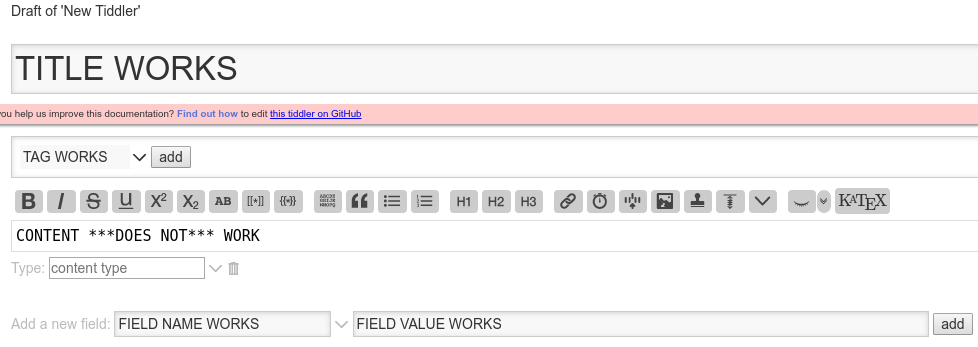

new-tiddler

In order to troubleshoot this at the browser end I need to understand what is different about the content field in comparison with the other fields.


If it helps, the mode of failure is that the external editor (gvim) launches, I enter the content in the editor, and close the editor -- at this point for all other fields the editor content appears in the browser form field, but in the case of the content field it remains empty.

I tried to view the page source but, of course, that showed me the entire wiki. I don't have sufficient knowledge of TW to wade through that.


[I've reported this as a TW github issue, but it since occurred to me it might be better discussed here.]

BurningTreeC

unread,
Jan 3, 2019, 12:49:05 AM1/3/19
to TiddlyWiki
Hi David, when you don't use CodeMirror does it behave better?

Try by writing a letter into the "type" field , like "a". That spawns the standard editor and you can try again

Mark S.

unread,
Jan 3, 2019, 1:00:26 AM1/3/19
to TiddlyWiki
I suspect that it is the iframe that is used to contain the text field that is blocking the action.

You can try an experiment. Open tiddler

$:/config/EditTemplateFields/Visibility/text


and change the text to "show". Now the text field will appear down with the other fields (only a bigger box). From that text field box try launching your external editor.

Good luck!
-- Mark

Ton Gerner

unread,
Jan 3, 2019, 1:02:26 AM1/3/19
to TiddlyWiki
Hi David,

As of v5.1.12 TiddlyWiki contains an editor toolbar which uses an iFrame for the editor (editor bookmarklets ceased to work as well since then).

According to @Jermolene: "The iframe was added around the textarea when we added the toolbar buttons because otherwise clicking on a button will remove any active selection from the textarea as a side effect of removing focus".

So, if you switch off the editor toolbar (Controlpanel > Settings > Editor toolbar) you can use an external editor (and bookmarklets) for the text field.

Note: I added a toggle switch for editor toolbar (and preview) below the tags field: $:/_toggle-editor-toolbar_preview, available at http://tongerner.tiddlyspot.com/ (see tab 'Code tiddlers').

Cheers,

Ton


David Nebauer

unread,
Jan 3, 2019, 1:27:38 AM1/3/19
to TiddlyWiki
Astounding, you are "two for two". Disabling the CodeMirror plugins resulted in me being able to sucessfully use an external editor with the new tiddler content field. Then, once I re-enabled the CodeMirror plugins I was again unable to use gvim with the content field. However, typing input into the "type" field did result in a different content field which I *could* use the external editor with.

Does this point to the cause, and to a workaround which lets me use an external editor with the content field, and use the CodeMirror plugin?

David Nebauer

unread,
Jan 3, 2019, 1:36:09 AM1/3/19
to TiddlyWiki
Mark S., I have to confess something embarrassing. After trawling through scads of TW documentation and related internet posts, I have seen hundreds of references to opening tiddlers with notation like "$:/config/EditTemplateFields/Visibility/text", but I have no idea how to do it. Can you give me a pointer?

David.

TonyM

unread,
Jan 3, 2019, 1:42:48 AM1/3/19
to TiddlyWiki
David,

Search for $:/config/EditTemplateFields/Visibility/text and open the advanced edit.

You will then see it listed in one of the tabs and can click on it to open.

Also if you stop to think about the code mirror editor, with its line numbers, highlights and other features it can not be a simple text field. Hence the need to toggle it off if you use something such as an external editor browser plugin that uses a simple textarea to work.

Regards
Tony

David Nebauer

unread,
Jan 3, 2019, 1:44:17 AM1/3/19
to TiddlyWiki
Thanks for the suggestion, Ton. I did toggle off the editor toolbar but it did not change the behaviour of the content field and external editor. I even restarted the TW server after turning off the toolbar, but it made no difference either.

Thanks again,
David.

David Nebauer

unread,
Jan 3, 2019, 1:54:57 AM1/3/19
to TiddlyWiki
I tried Mark S.' suggestion of changing $:/config/EditTemplateFields/Visibility/text to 'show' but it made no difference to the behaviour of the content field and external editor.

David.

On Thursday, 3 January 2019 15:30:26 UTC+9:30, Mark S. wrote:

David Nebauer

unread,
Jan 3, 2019, 1:59:34 AM1/3/19
to TiddlyWiki
Thanks, Tony M., for pointing me to the advanced search.

You may well be right about the the CodeMirror plugin. Frankly, as far as I know I've never used any of its features except for hghlighting matching parentheses, so it won't be a great hardship to do without it.

Regards,
David.

David Nebauer

unread,
Jan 3, 2019, 2:05:23 AM1/3/19
to TiddlyWiki
It seems the solution to my problem is to disable the CodeMirror plugin, which is no problem if I routinely use an external editor for entering content. Thanks to BurningTreeC for spotting the cause so quickly and to everyone else for their helpful input. This was my first request for help in this forum and I couln't be more impressed with the response.

Regards,
David.


On Thursday, 3 January 2019 14:16:35 UTC+9:30, David Nebauer wrote:

The web browser I'm using with TW, qutebrowser has a mechanism for opening an external editor when filling in forms fields. When creating a new tiddler this mechanism works with every editable field except for the content field, which is obviously the field for which an external editor would be most useful.

David Nebauer

unread,
Jan 3, 2019, 2:13:14 AM1/3/19
to TiddlyWiki
I don't see any way to mark this thread as resolved/solved/closed. If there is a way I'd appreciate someone pointing it out. If it's an access issue, someone with that access should feel free to mark this thread as solved.

Thanks again,
David.

On Thursday, 3 January 2019 14:16:35 UTC+9:30, David Nebauer wrote:

The web browser I'm using with TW, qutebrowser has a mechanism for opening an external editor when filling in forms fields. When creating a new tiddler this mechanism works with every editable field except for the content field, which is obviously the field for which an external editor would be most useful.

TonyM

unread,
Jan 3, 2019, 2:21:21 AM1/3/19
to TiddlyWiki
I could see a mark as complete to the bottom left of the last comment. Within the forum (online view).

Regards
Tony
Reply all
Reply to author
Forward
0 new messages