
[TW5] Images in tables not aligning middle.
153 views
Skip to first unread message

Christian de la Serna
Apr 13, 2015, 9:39:29 AM4/13/15
to tiddl...@googlegroups.com
Hello Everyone,
I have been trying add images inside tables and the images keep aligning top and not the middle.
Here is the screenshot:
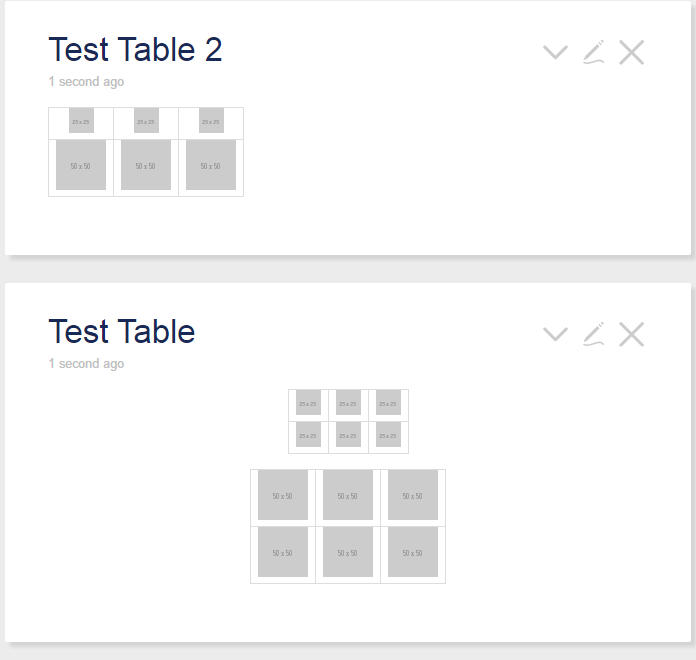
Inside the tiddlers I tested:
| [img [http://placehold.it/25.png]] | [img [http://placehold.it/25.png]] | [img [http://placehold.it/25.png]] |
| [img [http://placehold.it/50.png]] | [img [http://placehold.it/50.png]] | [img [http://placehold.it/50.png]] |
and html:
<table class="tg">
<tr>
<td class="cg">[img [http://placehold.it/25.png]]</td>
<td class="cg">[img [http://placehold.it/25.png]]</td>
<td class="cg">[img [http://placehold.it/25.png]]</td>
</tr>
<tr>
<td class="cg">[img [http://placehold.it/50.png]]</td>
<td class="cg">[img [http://placehold.it/50.png]]</td>
<td class="cg">[img [http://placehold.it/50.png]]</td>
</tr>
</table>
I tried both using the tiddlywiki format and html tables. I was able to do a quick fix by padding the top of each cell by 5px. I've been trying to search for the css handling the table alignment using the chrome dev tool but could not find it. Is there a better way to do it?
My quickfix css:
.tg {border:0;}
.tg .cg{border: 1px solid black;padding: 5px 5px 0px 5px;}
P.S. I have very basic html and css knowledge.

Jon
Apr 13, 2015, 10:02:31 AM4/13/15
to tiddl...@googlegroups.com
Hi Christian,
I'm at work so can't test this, but I think this has worked for me:
<td align="center"><img src="foldername/imagename.jpg" width=120 ></td>Regards
Jon
Christian de la Serna
Apr 13, 2015, 10:59:23 AM4/13/15
to tiddl...@googlegroups.com
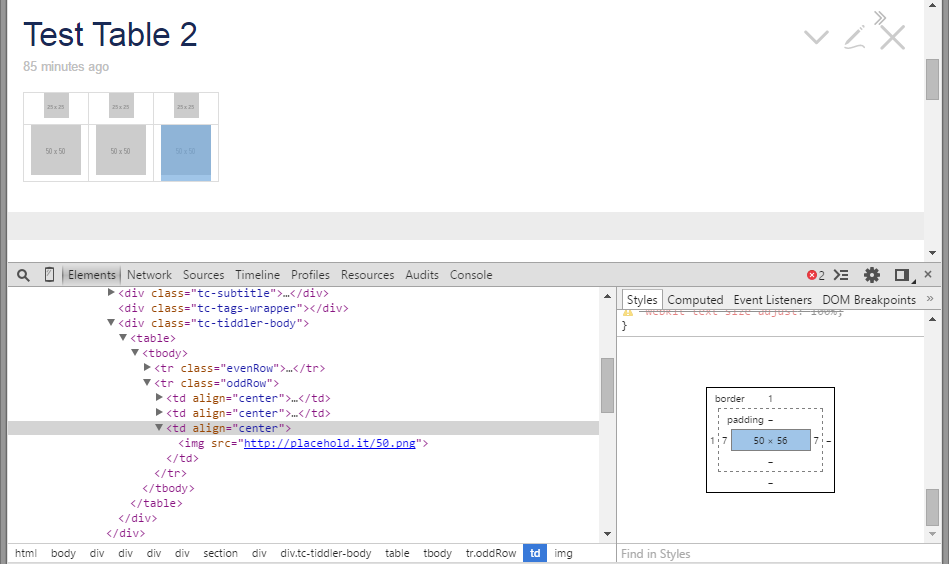
Hi Jon. Did not work for me. I am able to align the image left, right and center no problem but vertical alignment is where I am having issues with. It adds an addtional blank 6px below the image.
I took a screenshot to explain it better. My bad, I should have phrased the topic correctly by writing middle instead of centering.

Eric Shulman
Apr 13, 2015, 12:00:13 PM4/13/15
to tiddl...@googlegroups.com
On Monday, April 13, 2015 at 6:39:29 AM UTC-7, Christian de la Serna wrote:
I have been trying add images inside tables and the images keep aligning top and not the middle.
I tried both using the tiddlywiki format and html tables. I was able to do a quick fix by padding the top of each cell by 5px. I've been trying to search for the css handling the table alignment using the chrome dev tool but could not find it. Is there a better way to do it?
For your purposes, use "vertical-align:middle" on the <tr> elements.
enjoy,
-e
Eric Shulman
TiddlyTools / ELS Design Studios
YOUR DONATIONS ARE VERY IMPORTANT!
HELP ME TO HELP YOU - MAKE A CONTRIBUTION TO MY "TIP JAR"...
Christian de la Serna
Apr 13, 2015, 12:33:13 PM4/13/15
to tiddl...@googlegroups.com
Hi Eric,
I added this on a tiddler and tagged $:/tags/Stylesheet
tr {
vertical-align: middle;
}
Still having the same issue.
Christian de la Serna
Apr 14, 2015, 1:03:20 AM4/14/15
to tiddl...@googlegroups.com
I think I found the css causing the image to pad in the tables.
the tiddler contents have a line height of 22px. adjusting this removes the space at the bottom of the image.
Thank you Jon and Eric. Have a good day.
Reply all
Reply to author
Forward
0 new messages