
Trouble reading text "in between lines"
70 views
Skip to first unread message

Hu gePanic
Jun 14, 2019, 8:41:24 AM6/14/19
to tesseract-ocr
Hello,
I have trouble recognizing text that seems to be "in between lines".
Here is an example, extracted from a bigger technical drawing:

I am explicitly searching for the "80-T-32-1000" term.
In about 30-40% of these cases the complete text "80-T-...." is not recognized at all.
I assume this is due to the fact that it is in between lines.
Is there anything I can improve ??
Thank you
Hu gePanic
Jun 26, 2019, 5:08:45 AM6/26/19
to tesseract-ocr
I have "sort of" solved the problem.
I run tesseract 2 times.
After the first run I delete all the text already found by overwriting all positions with known text.
Then on the 2nd run tesseract finds only the "in between lines" text.

Lorenzo Bolzani
Jun 26, 2019, 9:22:32 AM6/26/19
to tesser...@googlegroups.com
Can you cut the image vertically in a simple way?
Lorenzo
--
You received this message because you are subscribed to the Google Groups "tesseract-ocr" group.
To unsubscribe from this group and stop receiving emails from it, send an email to tesseract-oc...@googlegroups.com.
To post to this group, send email to tesser...@googlegroups.com.
Visit this group at https://groups.google.com/group/tesseract-ocr.
To view this discussion on the web visit https://groups.google.com/d/msgid/tesseract-ocr/2114311b-fe50-41fb-9ce5-d1409f5d9886%40googlegroups.com.
For more options, visit https://groups.google.com/d/optout.
Hu gePanic
Jun 26, 2019, 10:08:38 AM6/26/19
to tesseract-ocr
Hi,
sure I can cut the image and process all pieces.
In the complete image there are many of these blocks as given in the example. I would have to process many slices with some overlap. I assume this would cost a lot of time...
Am Mittwoch, 26. Juni 2019 15:22:32 UTC+2 schrieb Lorenzo Blz:
Can you cut the image vertically in a simple way?Lorenzo
Il giorno mer 26 giu 2019 alle ore 11:08 'Hu gePanic' via tesseract-ocr <tesser...@googlegroups.com> ha scritto:
I have "sort of" solved the problem.--I run tesseract 2 times.After the first run I delete all the text already found by overwriting all positions with known text.Then on the 2nd run tesseract finds only the "in between lines" text.
You received this message because you are subscribed to the Google Groups "tesseract-ocr" group.
To unsubscribe from this group and stop receiving emails from it, send an email to tesser...@googlegroups.com.
Lorenzo Bolzani
Jun 26, 2019, 11:18:02 AM6/26/19
to tesser...@googlegroups.com
Cut the image in half with gimp and try to see if it is the case. Each image will be smaller so, if you discard empty white borders it could even be faster. I do it in my application with no problems.
I do not understand why you need overlap. Maybe you cannot cut the image in the way I would expect.
Just make sure to reuse the tesseract api rather than creating a new one any time (If you use python I recommend tesserocr real tesseract api bindings).
Lorenzo
To unsubscribe from this group and stop receiving emails from it, send an email to tesseract-oc...@googlegroups.com.
To post to this group, send email to tesser...@googlegroups.com.
Visit this group at https://groups.google.com/group/tesseract-ocr.
To view this discussion on the web visit https://groups.google.com/d/msgid/tesseract-ocr/9eb69918-5e3d-466f-8e03-21336c5ec40e%40googlegroups.com.
Hu gePanic
Jun 26, 2019, 11:44:02 AM6/26/19
to tesseract-ocr
Maybe I don't understand your idea of cutting.
Here is a samle of a "similar" drawing (i cant upload the original drawings).
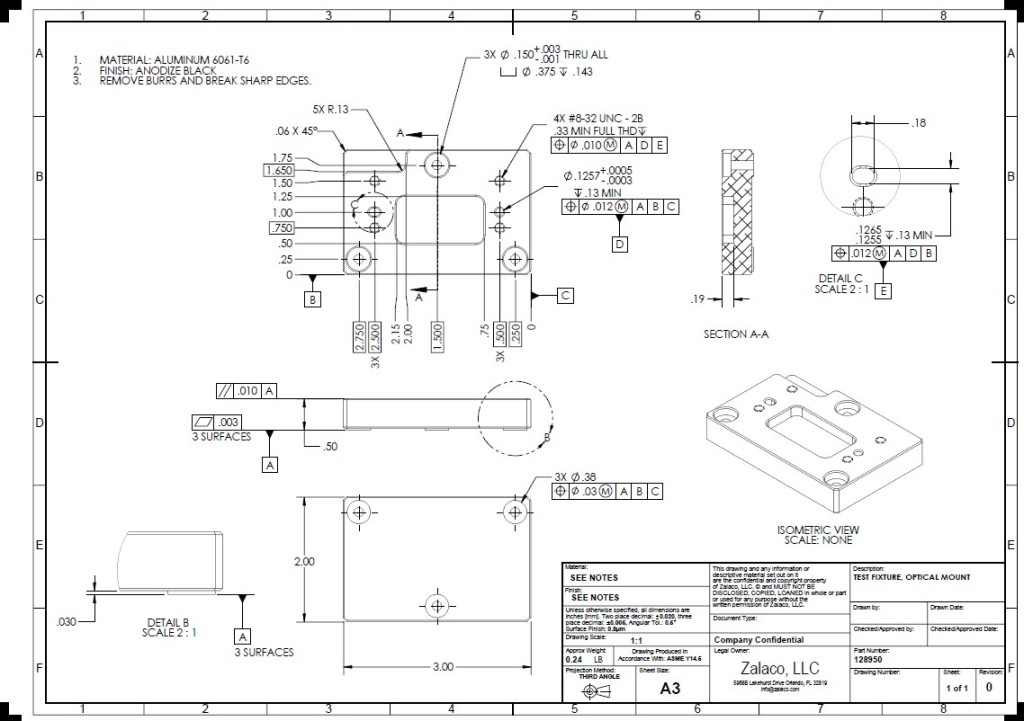
How would you cut this image?
How many pieces?
Why do I think i need overlap:
If I cut right between one line of text, the text will be 50% in one cell, and 50% in the other. So I will not find my key-words.
I have allready modified some images and did my tests. It is definetly a "in between lines" problem. If I move the text (example from 1st post) in the first or the second row, the text will be recognized. If the text is "in between" there is a high chance of not beeing found.
thx
Lorenzo Bolzani
Jun 26, 2019, 12:10:25 PM6/26/19
to tesser...@googlegroups.com
I was referring to the image sample you posted where there are three columns.
Regarding the new diagrams, I do not know what informations you need and if all the diagrams have the same layout.
Anyway I would first cut individual boxes from the bottom right table or at least three columns. I would also isolate the top left text.
I could also isolate individual lines of text (something like this) and process each fragment, this should be easy in the first sample you posted.
This could be quite easy or a nightmare it really depends on the images layout, how many variations, what is constant and what not. For example, first crop the top-left corner, then run the "text detection" code.
If you should find performance problems just merge all the fragments into a single image and process that.
I do not know your project, but usually you also need to be able to tell what the text means (part number, description, etc.) and this means that you need to know where each fragment comes from.
Even if you could process the first sample in one pass, later it would be hard to understand what the text means, what was on the left, on the right, etc. But I do not know what you need the text for.
Lorenzo
To unsubscribe from this group and stop receiving emails from it, send an email to tesseract-oc...@googlegroups.com.
To post to this group, send email to tesser...@googlegroups.com.
Visit this group at https://groups.google.com/group/tesseract-ocr.
To view this discussion on the web visit https://groups.google.com/d/msgid/tesseract-ocr/b037316a-61ea-4f7a-aa15-e8cefdfbbeba%40googlegroups.com.
Reply all
Reply to author
Forward
0 new messages