
Tasker - Auto Notification Accept Button and don't have full version
981 views
Skip to first unread message

Melissa Wallace
Jan 31, 2022, 7:59:54 AM1/31/22
to Tasker
I do freelance work -get job notices from a specific app that require me to hit accept. They go fast so I want to automate things so I always hit accept when they come in and then can decide. I've been told this can be done via Tasker with Auto Notification Listener, also Auto Input and Auto Notification Intercept. I can't get this set up - I don't know which one to use and when I get to configure I get lost.
Anyone available to walk me through the specific steps.
Anyone available to walk me through the specific steps.
Also - I keep getting notification that I don't have the full version of tasker but I paid for it. How do I fix this?

João Dias
Jan 31, 2022, 8:25:14 AM1/31/22
to Tasker
Hi, about clicking notification buttons, you can use this: https://forum.joaoapps.com/index.php?resources/press-a-button-on-a-notification-as-soon-as-you-receive-it.120/
About the notifications you're getting, can you please show me what those look like? Thanks!
 Join
Join
Melissa Wallace
Jan 31, 2022, 8:53:32 AM1/31/22
to Tasker
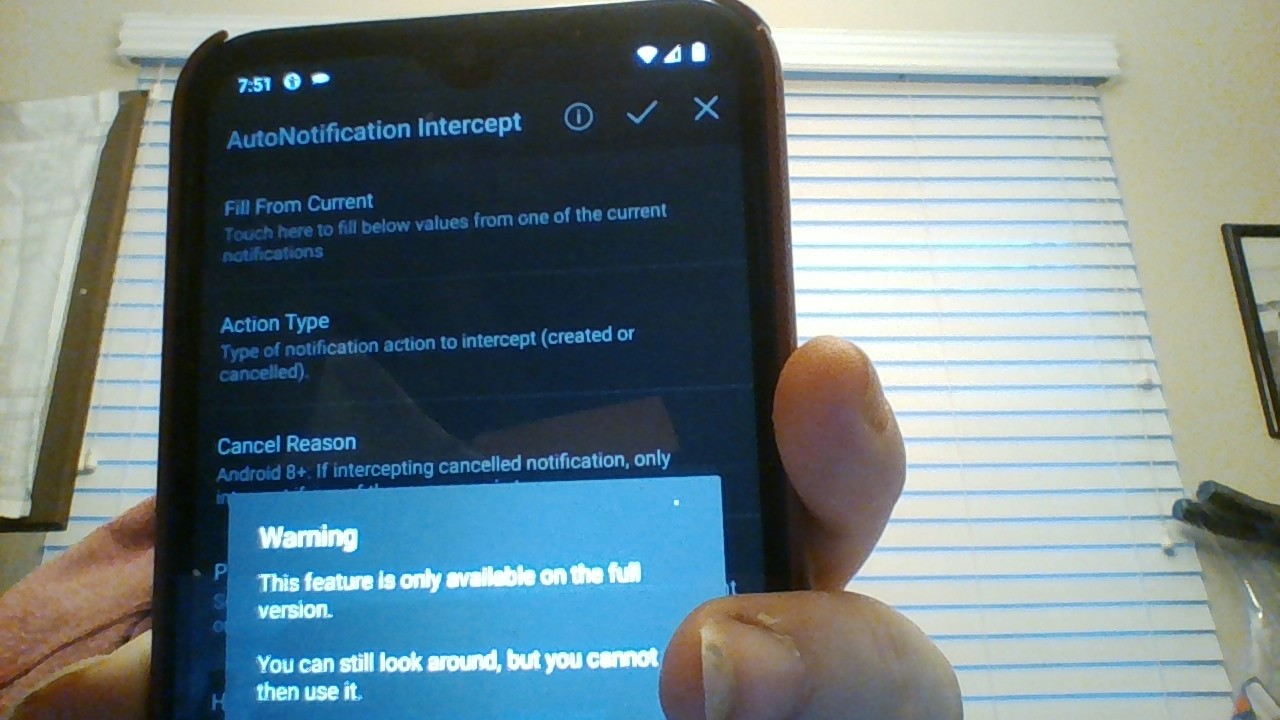
Hi - my first hurdle is having the full version - I've rebooted my phone and tried to uninstall/reinstall several times - still get notice I dont have full version
João Dias
Jan 31, 2022, 9:23:12 AM1/31/22
to Tasker
Hi. Can you please show me how that notice looks like? Thanks
Melissa Wallace
Jan 31, 2022, 9:53:30 AM1/31/22
to tas...@googlegroups.com
Here it is
--
You received this message because you are subscribed to a topic in the Google Groups "Tasker" group.
To unsubscribe from this topic, visit https://groups.google.com/d/topic/tasker/SVjG7QxAS-E/unsubscribe.
To unsubscribe from this group and all its topics, send an email to tasker+un...@googlegroups.com.
To view this discussion on the web visit https://groups.google.com/d/msgid/tasker/CAG6Z%2BFdjaqDuJ8%3DpfNhTsL6mvNURcLaLkQM3dfp-gxac4hJMzQ%40mail.gmail.com.
Melissa Wallace
Associate Broker - Realty Path Prestige
Certified Pricing Strategy Advisor (PSA)
Certified Seller Representative Specialists (SRS)
website: www.diyrealtors.com
email: diyre...@gmail.com

Jason Johnson
Feb 2, 2022, 8:53:10 AM2/2/22
to tas...@googlegroups.com
LOL instacart?
--
You received this message because you are subscribed to the Google Groups "Tasker" group.
To unsubscribe from this group and stop receiving emails from it, send an email to tasker+un...@googlegroups.com.
To view this discussion on the web visit https://groups.google.com/d/msgid/tasker/9464c098-02fa-4786-ba01-ac588fdaf457n%40googlegroups.com.
Jason Johnson
Feb 2, 2022, 9:04:45 AM2/2/22
to tas...@googlegroups.com
You can use autoinput to capture the screen, the problem is no matter how you make the script it eats up the phones cache and eventually makes the app unstable, even attempting to clear the phones cache after so much time eventually requires a restart of the phone to get it to function properly again.
I finished the script, worked great but was constantly having to restart the phone and do different tasks that I eventually abandoned it as it was a cache issue with how much had to be parsed from the screen captured.
The only way I found was to intercept the in and outcalls of the app on refreshes and interact with them in the background instead of through the app but abandoned it at that point.
I found using the apps like Uber, Lyft etc easier than trying to parse the data, than have a script to select X and than press accept.
Additionally the action commands were a mess once the cache had got so full that they would run great for about 15 minutes minutes and after that decided when it wanted to do a task on its own or skip it.
On Mon, Jan 31, 2022 at 7:00 AM Melissa Wallace <diyre...@gmail.com> wrote:
--
Jason Johnson
Feb 2, 2022, 10:12:39 AM2/2/22
to tas...@googlegroups.com
Needless to say it was a waste of time sadly. Since you make the statement of they go fast, I assume there’s a sense of urgency to how fast you select accept so I’ll begin there.
I’ll give you some of my experience.
1. You want a script to auto accept job offers.
2. You want to run this script on a phone.
—The app gets its job offers data that flows in through your data connection that the app displays.
3. You need to do it very quickly.
So the first step to figuring this out is straying true to your actual objective if speed is it and not just auto accept.
Based on point 2, if you have a 30mbs download on your phone, and you also have a 200 “latency” regardless of which script you use or path of automation, I’ll always see job offers before you if I have a 300mbs download and a 12 “latency”.
Being it’s a phone your using, your location to your towers has a lot to do with your download speeds and latency.
Additionally your carrier and phone your using, example not all devices work on 5G right now. I get 400mbs down on my phone near a tower and 8 latency.
So what I’m trying to illustrate is you might be missing things you need to identify first before automation or if urgency is important automation won’t matter.
I hope this makes sense.
On Mon, Jan 31, 2022 at 7:00 AM Melissa Wallace <diyre...@gmail.com> wrote:
--
João Dias
Feb 2, 2022, 10:17:01 AM2/2/22
to Tasker
That notice is for AutoNotification, not Tasker :) AutoNotification is a separate purchase.
Reply all
Reply to author
Forward
0 new messages