Exit task runs immediately after Enter task

217 views
Skip to first unread message

Nors233

unread,
Feb 24, 2021, 10:52:16 PM2/24/21
to Tasker
I set a profile that runs while the phone is charging. But sometimes it runs the exit task immediately after ( while still charging). It is extremely annoying and frustrating. This also happens when I use the WiFi, and Bluetooth connected state.

Rich D

unread,
Feb 25, 2021, 6:24:53 AM2/25/21
to Tasker Google Groups Post
This can happen when your Wi-Fi state is in an edge condition.. so it quickly triggers the profile inactive then active again. It can happen with the power context as well when plugging in or moving the plug and a slight interruption with the power.


This is sometimes referred to as bouncing, you can search this group for other approaches but this is the one I use. It will stop both the enter task and exit task from running when the context bounces. This example uses a context : state: Cell near.  This will work with any state context. 

Profile: Cell on
Context: cell near
Enter Task: Start
1. Enter task stuff

<put the following actions as the first actions in your exit task>

Exit task:stop
1. Wait 5 sec <whatever time you need>
2. Stop  <enter task> ;Start
3 Stop if %PACTIVE ~ *,Cell on,*
4. Rest of exit task !

Message has been deleted

Nors233

unread,
Feb 25, 2021, 12:14:55 PM2/25/21
to Tasker
I found out this is not a device issue but rather a Tasker issue. I did a simple profile for BT connected and flash a message whether it was on or off.  Then I toggled the switch to disable the profile. While BT was enabled I toggled it again to enable it. It ran the enter and exit tasks immediately. So I really hope the developer fixes this or finds some internal way to prevent bouncing.

Rich D

unread,
Feb 25, 2021, 12:42:15 PM2/25/21
to Tasker Google Groups Post

I found out this is not a device issue but rather a Tasker issue. I did a simple profile for BT connected and flash a message whether it was on or off. 

Could You give more details on that test on how it would prove to be a tasker issue?

The best way to figure out where the issue might lie is with the tasker 'Run log' .   Could you post a screenshot of the run log showing the issue?

Nors233

unread,
Feb 25, 2021, 12:56:11 PM2/25/21
to Tasker
Because if I had BT already on before I enabled the profile, I don't see how it could be related to the device.  I tried to reproduce the issue again but it stopped for now. (Strange because before I reproduced it everytime). I'll send the log if it happens again.
By the way I also tried that suggestion you mentioned,  but for some reason the PACTIVE variable does not show the active profile. But on the persistent notification it shows it's active.

Rich D

unread,
Feb 25, 2021, 5:14:34 PM2/25/21
to Tasker Google Groups Post

In order for the profiles active variable to be set, The profile needs to have a user given name. If you did not name the profile at the time of creation Tasker will assign a name for it, usually the name of the profile context. To give it a user given name long press the Tasker assigned name

Nors233

unread,
Feb 25, 2021, 5:34:17 PM2/25/21
to Tasker
Yes  that was it, I forgot to rename. So here's how I done mine.     Profile: BT Test (21)
        Restore: no
        Variables: [  ]
        State: BT Status [ Status:On ]
    Enter: Anon (45)
        A1: Flash [ Text:Bt is on Long:Off ]
    
    Exit: Anon (54)
        A1: Wait [ MS:0 Seconds:5 Minutes:0 Hours:0 Days:0 ]
        A2: Stop [ With Error:Off Task: ] If [ %PACTIVE ~R BT Test ]
        A3: If [ %PACTIVE ~R BT Test ]
        A4: Flash [ Text:Bt is active Long:Off ]
        A5: Else
        A6: Flash [ Text:Bt is not active Long:Off ]
        A7: End If

Rich D

unread,
Feb 25, 2021, 6:24:17 PM2/25/21
to Tasker Google Groups Post
On Thu, Feb 25, 2021, 5:34 PM Nors233 <matteoc...@live.com> wrote:
Yes  that was it, I forgot to rename. So here's how I done mine.     Profile: BT Test (21)
        Restore: no
        Variables: [  ]
        State: BT Status [ Status:On ]
    Enter: Anon (45)
        A1: Flash [ Text:Bt is on Long:Off ]
    
    Exit: Anon (54)
        A1: Wait [ MS:0 Seconds:5 Minutes:0 Hours:0 Days:0 ]
        A2: Stop [ With Error:Off Task: ] If [ %PACTIVE ~R BT Test ]
        A3: If [ %PACTIVE ~R BT Test ]
        A4: Flash [ Text:Bt is active Long:Off ]
        A5: Else
        A6: Flash [ Text:Bt is not active Long:Off ]
        A7: End If


2 issues..

1- You need to name your enter task.
    2-  you need to add another stop action after A1: of the exit task to stop the "Enter" Task. 

Nors233

unread,
Mar 1, 2021, 8:23:42 PM3/1/21
to Tasker
Would it help if I disabled the "Enforce task order" setting?

Rich D

unread,
Mar 1, 2021, 10:17:48 PM3/1/21
to Tasker Google Groups Post

Would it help if I disabled the "Enforce task order" setting?

Very doubtful that would work. It is having that setting enabled that allows this approach to work. 

Did you fix the two issues I mentioned?

Could you repost the new exported profile description?

Were you able to catch the issue with the run log?

Matteo Chirco

unread,
Mar 2, 2021, 2:02:57 AM3/2/21
to tas...@googlegroups.com

Yes I simply forgot to rename the profile. But here it should work. I still wasn’t able to catch it in the logs


    Profile: BT Test (21)

              Restore: no

              State: BT Status [ Status:On ]

    Enter: EnterTask (45)

              A1: Flash [ Text:Bt is on Long:Off ]


    Exit: Anon (54)

              A1: Wait [ MS:0 Seconds:5 Minutes:0 Hours:0 Days:0 ]

A2: Stop [ With Error:Off Task: EnterTask ]

              A3: Stop [ With Error:Off Task: ] If [ %PACTIVE ~R BT Test ]

              A4: If [ %PACTIVE ~R BT Test ]

              A5: Flash [ Text:Bt is active Long:Off ]

              A6: Else

              A7: Flash [ Text:Bt is not active Long:Off ]

              A8: End If

--
You received this message because you are subscribed to a topic in the Google Groups "Tasker" group.
To unsubscribe from this topic, visit https://groups.google.com/d/topic/tasker/aWevitRTACk/unsubscribe.
To unsubscribe from this group and all its topics, send an email to tasker+un...@googlegroups.com.
To view this discussion on the web visit https://groups.google.com/d/msgid/tasker/CADuUTAoHB%2BwP9HTcmaV0pM_u1JATyNJsmgPg%2BcWD4uDpPURKsA%40mail.gmail.com.


Rich D

unread,
Mar 2, 2021, 12:47:08 PM3/2/21
to Tasker Google Groups Post

Yes I simply forgot to rename the profile. But here it should work. I still wasn’t able to catch it in the logs


If you're testing with flash actions I'm not sure why you can't get the run log?  The run log holds a fairly substantial amount of data. so right after you see it fail with the flash action you should be able to check the run log.   correct?

If you check in the Tasker folder in the Log folder You will see a copy of the last saved run log as well. There is runlog.txt which is the current run log, and a runlog.txt.1 which is a saved copy of the previous run log.  Just change the file name to anything.txt to view it. 

In addition it's very important to realize there is a issue with the flash action with Tasker. If you have two flash actions immediately in a row you will only see the second flash action. Try a quick test and do

1. Flash on
2. Flash off

With the long option checked. You will only be able to see The  off text.  If you wish to see both you need to put a small wait action in between them. 

Instead of using flash actions I will very often use the notification action instead. If you include %TIMEMS in the title of the notification You will get a unique notification for every action. It looks like this.. 

    Bt Test On (1550)
    A1: Notify [ Title:Test bt.   %TIMEMS Text:Bt is on Icon:null Number:0 Permanent:Off Priority:3 Repeat Alert:Off LED Colour:Red LED Rate:0 Sound File: Vibration Pattern: Category: ] 
    

Nors233

unread,
Mar 2, 2021, 7:28:05 PM3/2/21
to Tasker
Here's a real profile I use. This one opens an app when the phone is connected to BT.

    Profile: TEST Open OMW in Car (63)
        Restore: no
        BT Connected [ Name:Echo Auto Address:* ]
    Enter: Open OMW (58)
        A1: Wait [ MS:0 Seconds:20 Minutes:0 Hours:0 Days:0 ]
        A2: AutoInput Unlock Screen [ Configuration:Unlocking Screen. Timeout (Seconds):100 Continue Task After Error:On ]
        A3: Perform Task [ Name:Unlock By Password Priority:%priority+1 Parameter 1 (%par1): Parameter 2 (%par2): Return Value Variable: Stop:Off Local Variable Passthrough:Off Limit Passthrough To: Reset Return Variable:Off Allow Overwrite Variables:Off ] If [ %err Set ]
        A4: Launch App [ Package/App Name:OnMyWay Data: Exclude From Recent Apps:On Always Start New Copy:Off ]
        A5: Wait [ MS:0 Seconds:5 Minutes:0 Hours:0 Days:0 ]
        A6: Back Button
        A7: Wait [ MS:0 Seconds:1 Minutes:0 Hours:0 Days:0 ]
        A8: Turn Off [ Dim:Off Lock:On ] If [ %aiscreen ~ off | %errmsg Set ]
    
    Exit: Anon (64)
        Abort Existing Task
        A1: Beep [ Frequency:8000 Duration:1000 Amplitude:50 Stream:3 ]
        A2: Wait [ MS:0 Seconds:5 Minutes:0 Hours:0 Days:0 ]
        A3: Stop [ With Error:Off Task:Open OMW ]
        A4: Stop [ With Error:Off Task: ] If [ %PACTIVE ~R OMW ]
        A5: AutoInput Unlock Screen [ Configuration:Unlocking Screen. Timeout (Seconds):200 Continue Task After Error:On ]
        A6: Perform Task [ Name:Unlock By Password Priority:%priority+1 Parameter 1 (%par1): Parameter 2 (%par2): Return Value Variable: Stop:Off Local Variable Passthrough:Off Limit Passthrough To: Reset Return Variable:Off Allow Overwrite Variables:Off ] If [ %err Set ]
        A7: Perform Task [ Name:Kill OMW Priority:%priority Parameter 1 (%par1): Parameter 2 (%par2): Return Value Variable: Stop:Off Local Variable Passthrough:Off Limit Passthrough To: Reset Return Variable:Off Allow Overwrite Variables:Off ]
        A8: Turn Off [ Dim:Off Lock:On ] If [ %aiscreen ~ off | %errmsg Set ]
  
I added a beep to the beginning of the  exit task before anything else so it should work better than the flash   

Alex Jaxon

unread,
Mar 3, 2021, 4:41:50 AM3/3/21
to Tasker

This is my "phone charging  profile"
    Profile: Start Charging (18)
     Restore: no
     Variables: [ ]
     State: Power [ Source:AC ]
     State: Not BT Connected [ Name:KW-R9**BT /OnePlus Bullets Wireless 2 Address:* ]
    Enter: Start Charging (20)
     A1: Wait [ MS:0 Seconds:1 Minutes:0 Hours:0 Days:0 ] 
     A2: Media Volume [ Level:8 Display:Off Sound:Off ] 
     A3: Open File [ File:Ringtones/charging_sequence.mp3 Mime Type: ] 
     A4: Flash [ Text:Started charging Long:Off ] 
     A5: Power Mode [ Mode:Normal ] 

Task.

        Start Charging (20)
     A1: Wait [ MS:0 Seconds:1 Minutes:0 Hours:0 Days:0 ] 
     A2: Media Volume [ Level:8 Display:Off Sound:Off ] 
     A3: Open File [ File:Ringtones/charging_sequence.mp3 Mime Type: ] 
     A4: Flash [ Text:Started charging Long:Off ] 
     A5: Power Mode [ Mode:Normal ] 

Rich D

unread,
Mar 3, 2021, 5:13:07 AM3/3/21
to Tasker Google Groups Post
Here's a real profile I use. This one opens an app when the phone is connected to BT.

I added a beep to the beginning of the  exit task before anything else so it should work better than the flash    

Yes, the Beep should work better. Hopefully you can capture any issues in the run log. Another good troubleshooting technique is to write to a text file at the beginning of both enter and exit task. You can then create your own log and show the time as well as %PACTIVE  %TRUN and any other useful information. 

Nors233

unread,
Mar 4, 2021, 8:01:30 PM3/4/21
to Tasker

Here's another profile I have. This has a single task for changing wallpaper
    Profile: Lockscreen On Dark Mode (61)
        Cooldown: 180
        State: Dark Mode
    Enter: Anon (62)
        A1: Set Wallpaper [ Type:Lockscreen Image:Download/bluespace.jpg Scale:Off Crop:Off ]
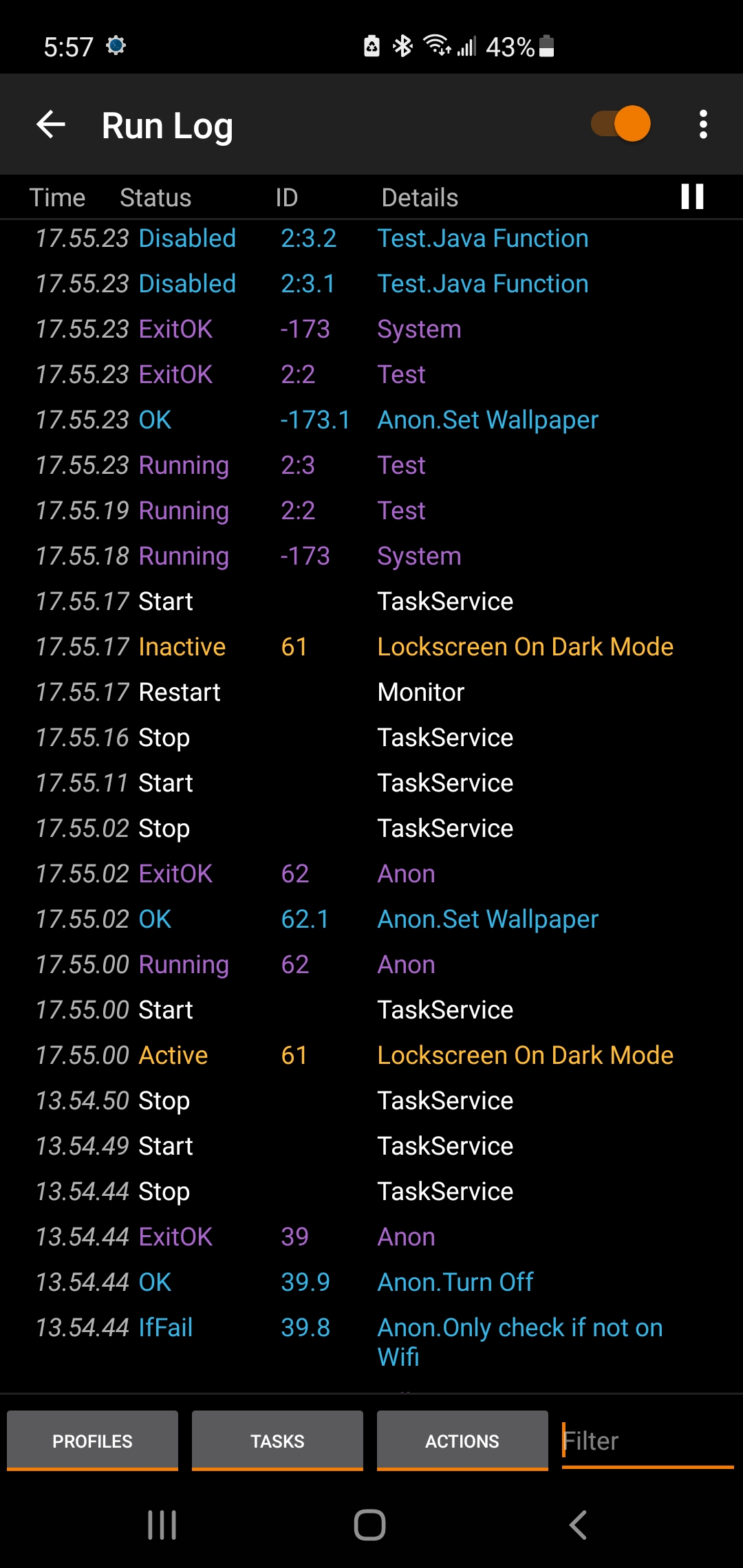
   
I enabled the restore settings option. It has no exit task. But somehow the task went inactive shortly after it was triggered. And I've managed to get the log for it. I have no idea why this happens. 
Screenshot_20210304-175723_Tasker.jpg
Reply all
Reply to author
Forward
0 new messages