
does AutoInput UI Query work on lockscreens?
382 views
Skip to first unread message

Logan Fury
Feb 27, 2020, 9:56:14 AM2/27/20
to Tasker
Hello,
Either what I'm attempting can't be done or im scripting it incorrectly.
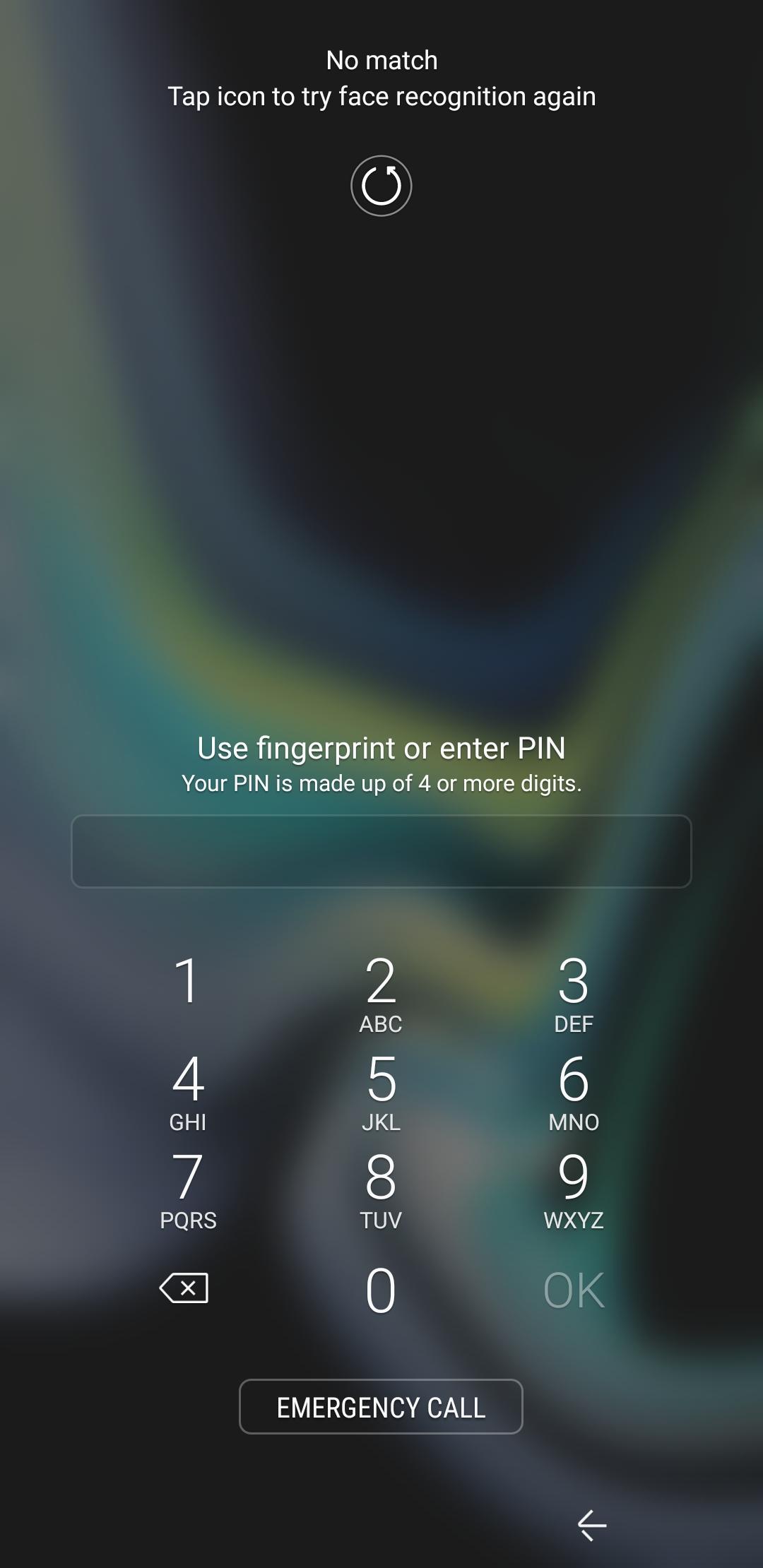
Please see included screenshot. Im trying to use AI's UI Query to recognize this page and perform the following Task:
Keep UNLOCKED at Home (93)
A1: AutoInput UI Query [ Configuration:Text: Use fingerprint or enter PIN Timeout (Seconds):20 ]
A2: If [ %aitext() ~ *Use fingerprint or enter PIN* ]
A3: Array Set [ Variable Array:%digit Values:1,2,3,4 Splitter:, ]
A4: For [ Variable:%digit Items:%digit() ]
A5: AutoInput Action [ Configuration:Type: Text
Value: %digit
Action : Click Timeout (Seconds):2 Continue Task After Error:On ]
A6: End For
A7: End If
Nothing happens. Can anyone identify the script problem or confirm if this is an impossible attempt?
(also 1234 is an example PIN for this post. security experts please stop screaming)
thanks for reading,
Logan

Stipe
Feb 27, 2020, 10:48:15 AM2/27/20
to Tasker
As far as I can understand, this is just a task... what is it triggered with? It won't work without a trigger.
Dne četrtek, 27. februar 2020 15.56.14 UTC+1 je oseba Logan Fury napisala:
If you checked the profile I shared for unlocking (https://groups.google.com/forum/#!msg/tasker/P2ZRL2xiah8/N01k-SbsEgAJ), I'm using a "AutoInput UI State" trigger in the profile (well, combined with Google assistant opened), which checks for a certain text "Use biometrics or enter PIN" ("Use fingerprint or enter PIN" in your case).
The task itself then merely does the taping of the PIN, when the trigger fires off.
Dne četrtek, 27. februar 2020 15.56.14 UTC+1 je oseba Logan Fury napisala:
Logan Fury
Feb 27, 2020, 10:51:25 AM2/27/20
to tas...@googlegroups.com
Hello Stipe,
I was using as a Profile the conditional Location: Home.
I'll take another look at your google profile and see if I can incorporate the AI section to get functionality.
--
You received this message because you are subscribed to a topic in the Google Groups "Tasker" group.
To unsubscribe from this topic, visit https://groups.google.com/d/topic/tasker/MtwaxwDoKMg/unsubscribe.
To unsubscribe from this group and all its topics, send an email to tasker+un...@googlegroups.com.
To view this discussion on the web visit https://groups.google.com/d/msgid/tasker/6ee9e559-2811-4687-9815-c6fa654be33a%40googlegroups.com.
Logan Fury
Feb 27, 2020, 10:58:08 AM2/27/20
to tas...@googlegroups.com
First edit isn't working:
Profile: Keep UNLOCKED at Home (74)
Restore: no
Location: xx / xx / 200.0m
State: AutoInput UI State [ Configuration:Text: Use fingerprint or enter PIN ]
Enter: Keep UNLOCKED at Home (93)
A1: Array Set [ Variable Array:%digit Values:1,2,3,4 Splitter:, ]
A2: For [ Variable:%digit Items:%digit() ]
A3: AutoInput Action [ Configuration:Type: Text
Value: %digit
Action : Click Timeout (Seconds):2 Continue Task After Error:On ]
A4: End For
Stipe
Feb 27, 2020, 11:01:16 AM2/27/20
to Tasker
Well, if I understand you correctly, you should then have two profile triggers combined as "Location: Home" as the first one and "AutoInput UI State" with app "SystemUI" active and "Use fingerprint or enter PIN" as conditions for the second one.
That means everytime you are at home AND lockscreen appears, it will get unlocked by itself, if that's what you want.
Dne četrtek, 27. februar 2020 16.51.25 UTC+1 je oseba Logan Fury napisala:
Dne četrtek, 27. februar 2020 16.51.25 UTC+1 je oseba Logan Fury napisala:
To unsubscribe from this group and all its topics, send an email to tas...@googlegroups.com.
Logan Fury
Feb 27, 2020, 11:08:30 AM2/27/20
to tas...@googlegroups.com
That is precisely what im attempting to do.
Unfortunately its looking like AutoInput isnt detecting anything until I get past the lock screen. The first screen displayed when my phone turns on display has the text Verizon Wireless in the top left corner. I just made an additional profile looking for that text and it is not working.
Now this works perfectly because it is triggered by Reboot, and doesnt rely on AutoInput:
Profile: Home Reboot (180)
Restore: no
Location: xx.x / xx.x / 200.0m
Event: Device Boot
Enter: Home Reboot (181)
A1: Wait [ MS:0 Seconds:10 Minutes:0 Hours:0 Days:0 ]
A2: Say WaveNet [ Text:Home Reboot initiated Voice:en-GB-Wavenet-A Stream:3 Pitch:20 Speed:8 Continue Task Immediately:Off File: Override API Key: Respect Audio Focus:On ]
A3: AutoInput Keyguard [ Configuration:Auto Dismiss Keyguard: Disable Timeout (Seconds):60 ]
A4: AutoInput Screen Off/On [ Configuration:Screen Off Or On: Turn On Timeout (Seconds):60 ]
A5: Wait [ MS:0 Seconds:1 Minutes:0 Hours:0 Days:0 ]
A6: Say WaveNet [ Text:Swiping Voice:en-GB-Wavenet-A Stream:3 Pitch:20 Speed:8 Continue Task Immediately:Off File: Override API Key: Respect Audio Focus:On ]
A7: AutoInput Gestures [ Configuration:Gesture Type: Swipe
Start Point: 200,1850
End Point: 800,1850
Duration: 100 Timeout (Seconds):60 ]
A8: Wait [ MS:0 Seconds:1 Minutes:0 Hours:0 Days:0 ]
A9: Array Set [ Variable Array:%digit Values:1,2,3,4 Splitter:, ]
A10: For [ Variable:%digit Items:%digit() ]
A11: AutoInput Action [ Configuration:Type: Text
Restore: no
Location: xx.x / xx.x / 200.0m
Event: Device Boot
Enter: Home Reboot (181)
A1: Wait [ MS:0 Seconds:10 Minutes:0 Hours:0 Days:0 ]
A2: Say WaveNet [ Text:Home Reboot initiated Voice:en-GB-Wavenet-A Stream:3 Pitch:20 Speed:8 Continue Task Immediately:Off File: Override API Key: Respect Audio Focus:On ]
A3: AutoInput Keyguard [ Configuration:Auto Dismiss Keyguard: Disable Timeout (Seconds):60 ]
A4: AutoInput Screen Off/On [ Configuration:Screen Off Or On: Turn On Timeout (Seconds):60 ]
A5: Wait [ MS:0 Seconds:1 Minutes:0 Hours:0 Days:0 ]
A6: Say WaveNet [ Text:Swiping Voice:en-GB-Wavenet-A Stream:3 Pitch:20 Speed:8 Continue Task Immediately:Off File: Override API Key: Respect Audio Focus:On ]
A7: AutoInput Gestures [ Configuration:Gesture Type: Swipe
Start Point: 200,1850
End Point: 800,1850
Duration: 100 Timeout (Seconds):60 ]
A8: Wait [ MS:0 Seconds:1 Minutes:0 Hours:0 Days:0 ]
A9: Array Set [ Variable Array:%digit Values:1,2,3,4 Splitter:, ]
A10: For [ Variable:%digit Items:%digit() ]
A11: AutoInput Action [ Configuration:Type: Text
Value: %digit
Action : Click Timeout (Seconds):2 Continue Task After Error:On ]
A12: End For
A13: Wait [ MS:0 Seconds:1 Minutes:0 Hours:0 Days:0 ]
A14: Launch App [ Package/App Name:AutoVoice Data: Exclude From Recent Apps:Off Always Start New Copy:Off ]
A15: Wait [ MS:500 Seconds:1 Minutes:0 Hours:0 Days:0 ]
A16: AutoInput Gestures [ Configuration:Gesture Type: Swipe
Start Point: 555,370
End Point: 555,370
Duration: 250 Timeout (Seconds):60 ]
A17: Say WaveNet [ Text:AutoVoice device registered Voice:en-GB-Wavenet-A Stream:3 Pitch:20 Speed:8 Continue Task Immediately:Off File: Override API Key: Respect Audio Focus:On ]
A18: Say [ Text:Phone ready Engine:Voice:default:default Stream:3 Pitch:5 Speed:5 Respect Audio Focus:On Network:Off Continue Task Immediately:Off ]
A19: AutoInput Global Action [ Configuration:Action: Home Timeout (Seconds):20 ]
A13: Wait [ MS:0 Seconds:1 Minutes:0 Hours:0 Days:0 ]
A14: Launch App [ Package/App Name:AutoVoice Data: Exclude From Recent Apps:Off Always Start New Copy:Off ]
A15: Wait [ MS:500 Seconds:1 Minutes:0 Hours:0 Days:0 ]
A16: AutoInput Gestures [ Configuration:Gesture Type: Swipe
Start Point: 555,370
End Point: 555,370
Duration: 250 Timeout (Seconds):60 ]
A17: Say WaveNet [ Text:AutoVoice device registered Voice:en-GB-Wavenet-A Stream:3 Pitch:20 Speed:8 Continue Task Immediately:Off File: Override API Key: Respect Audio Focus:On ]
A18: Say [ Text:Phone ready Engine:Voice:default:default Stream:3 Pitch:5 Speed:5 Respect Audio Focus:On Network:Off Continue Task Immediately:Off ]
A19: AutoInput Global Action [ Configuration:Action: Home Timeout (Seconds):20 ]
To unsubscribe from this group and all its topics, send an email to tasker+un...@googlegroups.com.
To view this discussion on the web visit https://groups.google.com/d/msgid/tasker/285cc439-46c1-47c4-ae32-a714a1b787cb%40googlegroups.com.
Logan Fury
Feb 27, 2020, 11:16:17 AM2/27/20
to tas...@googlegroups.com
Stipe, if you arent on a Samsung device, would you mind throwing together a quick script to test AutoInput's ability to read a screen prior to the lock screen?
This might help narrow the issue im having down to a Samsung platform problem.
Thanks :D
Stipe
Feb 27, 2020, 11:21:00 AM2/27/20
to Tasker
Well, as I stated before, it's crucial, that you select "SystemUI" under Apps section in configuration of "AutoInput UI State". Without that detail it doesn't work for me either :).
And maybe reduce the "Text" section to just "enter PIN" instead of a whole sentence in case it changes under certain conditions (biometrics/fingerprint/...).
Dne četrtek, 27. februar 2020 17.08.30 UTC+1 je oseba Logan Fury napisala:
Dne četrtek, 27. februar 2020 17.08.30 UTC+1 je oseba Logan Fury napisala:
To view this discussion on the web visit https://groups.google.com/d/msgid/tasker/285cc439-46c1-47c4-ae32-a714a1b787cb%40googlegroups.com.
Stipe
Feb 27, 2020, 11:23:10 AM2/27/20
to Tasker
Actually I am on a Samsung Galaxy Note 9... but not sure what you mean by throwing together a script. Do you have a script you would like me to test or....?
Dne četrtek, 27. februar 2020 17.16.17 UTC+1 je oseba Logan Fury napisala:
Dne četrtek, 27. februar 2020 17.16.17 UTC+1 je oseba Logan Fury napisala:
To view this discussion on the web visit https://groups.google.com/d/msgid/tasker/285cc439-46c1-47c4-ae32-a714a1b787cb%40googlegroups.com.
Logan Fury
Feb 27, 2020, 11:29:27 AM2/27/20
to tas...@googlegroups.com
Well were on the same platform, so we cant determine between the two of us if its Samsung specific. I was hoping you would just compose an AutoInput profile with a flash task to confirm that AutoInput was active on pre-lock screens :)
I have got System UI entered into the apps, and have edited down the text to enter Pin and now the Task is working on the PIN screen! Thank you so much for your help :)
I'm working backwards one success at a time to achieve this, so now I need to automate getting from the first displayed phone screen to the PIN screen. Ill make sure I have System UI under apps in the script looking for Verizon Wireless text.
More updates to come!
Logan
To unsubscribe from this group and all its topics, send an email to tasker+un...@googlegroups.com.
To view this discussion on the web visit https://groups.google.com/d/msgid/tasker/fb0273c9-6718-4499-b08f-a6b286ee2061%40googlegroups.com.
Logan Fury
Feb 27, 2020, 11:45:42 AM2/27/20
to tas...@googlegroups.com
Success!! Beautiful, wonderful, horrible SUCCESS!!
Stipe you provided the key with the System UI app setting and reduction of detected text. I have this working in 2 Profile/Tasks and can probably combine the two tasks and eliminate a Profile. Here is what is working:
Profile: Keep UNLOCKED at Home 1 (257)
Restore: no
State: AutoInput UI State [ Configuration:Apps: System UI
Text: Verizon Wireless ]
State: Display State [ Is:On ]
Enter: Keep UNLOCKED at Home 1 (259)
A1: Wait [ MS:500 Seconds:0 Minutes:0 Hours:0 Days:0 ]
A2: Say WaveNet [ Text:Swiping Voice:en-GB-Wavenet-A Stream:3 Pitch:20 Speed:8 Continue Task Immediately:Off File: Override API Key: Respect Audio Focus:On ]
A3: AutoInput Gestures [ Configuration:Gesture Type: Swipe
Start Point: 200,1850
End Point: 800,1850
Duration: 100 Timeout (Seconds):60 ]
Profile: Keep UNLOCKED at Home 2 (74)
Restore: no
Location: xx.x / xxx.x / 200.0m
State: AutoInput UI State [ Configuration:Apps: System UI
Text: enter PIN ]
Enter: Keep UNLOCKED at Home 2 (93)
A1: Array Set [ Variable Array:%digit Values:1,2,3,4 Splitter:, ]
A2: For [ Variable:%digit Items:%digit() ]
A3: AutoInput Action [ Configuration:Type: Text
Value: %digit
Action : Click Timeout (Seconds):2 Continue Task After Error:On ]
A4: End For
I'm really pleased with this! Thanks so much for the time and help Stipe :)

Robert Ryan
Feb 27, 2020, 12:30:23 PM2/27/20
to tas...@googlegroups.com
What action are you performing in step A3? It's not shown in your description:
A3: AutoInput Action [ Configuration:Type: TextValue: %digit
The location context is a state. It is going to activate when you enter the location and stay active until you leave it. This profile is only going to work if the screen is on and the lock screen is displayed at the moment you enter the location.
You received this message because you are subscribed to the Google Groups "Tasker" group.
To unsubscribe from this group and stop receiving emails from it, send an email to tasker+un...@googlegroups.com.
To view this discussion on the web visit https://groups.google.com/d/msgid/tasker/CAOr8%2B4Gb%3DsV4AeKSKBspx%2Bz0smeQPjRBxP7MMiCqdW8ekRCSMg%40mail.gmail.com.
Logan Fury
Feb 27, 2020, 12:38:02 PM2/27/20
to tas...@googlegroups.com
Good Morning Robert :)
A3 is AutoInput automating the process of entering the numerals assigned to %digit array into the Text field of the PIN screen.
It's odd that this action is so minimally depicted in it's description, I had to ask Stipe the exact same question to compose the script! The description was too vague for me to figure out how to configure AutoInput on that step.
This is actually functioning exactly as I wish. My final edit Profile conditions are Display On, Orientation not face down, at Home location, and the AutoInput text detection.
To view this discussion on the web visit https://groups.google.com/d/msgid/tasker/17087b282e0.2819.558997d9ea49a12c5d90790601ab7599%40gmail.com.
Logan Fury
Feb 27, 2020, 1:00:22 PM2/27/20
to tas...@googlegroups.com
OK. Trying to get away from brute force scripting, so here is a more elegant version with the two Tasks combined and one Profile to trigger:
Profile: Keep UNLOCKED at Home (257)
Restore: no
State: AutoInput UI State [ Configuration:Apps: System UI
Text: Stop face ]
State: Display State [ Is:On ]
State: Not Orientation [ Is:Face Down ]
Location: xx.x / xxx.x / 200.0m
Enter: Keep UNLOCKED at Home (260)
A1: Wait [ MS:500 Seconds:0 Minutes:0 Hours:0 Days:0 ]
A2: Say WaveNet [ Text:Swiping Voice:en-GB-Wavenet-A Stream:3 Pitch:20 Speed:8 Continue Task Immediately:Off File: Override API Key: Respect Audio Focus:On ]
A3: AutoInput Gestures [ Configuration:Gesture Type: Swipe
Start Point: 200,1850
End Point: 800,1850
Duration: 100 Timeout (Seconds):60 ]
A4: AutoInput UI Query [ Configuration:Text: enter PIN
Only Visible: true Timeout (Seconds):20 ]
A5: Wait [ MS:500 Seconds:0 Minutes:0 Hours:0 Days:0 ]
A6: Array Set [ Variable Array:%digit Values:1,2,3,4 Splitter:, ]
A7: For [ Variable:%digit Items:%digit() ]
A8: AutoInput Action [ Configuration:Type: Text
Value: %digit
Action : Click Timeout (Seconds):2 Continue Task After Error:On ]
A9: End For
I did this unaided and it works, which is probably a sure sign the fabric of the universe is unraveling. Everyone should probably retire to a storm cellar or stay close to a sturdy doorframe for a while.
Stipe
Feb 27, 2020, 3:17:45 PM2/27/20
to Tasker
I'm glad you got it running :).
Dne četrtek, 27. februar 2020 19.00.22 UTC+1 je oseba Logan Fury napisala:
And it just occured to me, that pasting descriptions here might really not be that helpfull to others, which are trying to use the profile/task or it's segments. Using https://taskernet.com/ to share actual profiles/tasks would surely be more helpfull (applies also to my shares :) ). You can do it by exporting the profile/task as a link (first option in export).
Of course, masking or deleting sensitive data (f.e. PIN) is a must before sharing :).
Dne četrtek, 27. februar 2020 19.00.22 UTC+1 je oseba Logan Fury napisala:
To unsubscribe from this group and all its topics, send an email to tas...@googlegroups.com.
To view this discussion on the web visit https://groups.google.com/d/msgid/tasker/6ee9e559-2811-4687-9815-c6fa654be33a%40googlegroups.com.
--
You received this message because you are subscribed to the Google Groups "Tasker" group.
To unsubscribe from this group and stop receiving emails from it, send an email to tas...@googlegroups.com.
To view this discussion on the web visit https://groups.google.com/d/msgid/tasker/CAOr8%2B4Gb%3DsV4AeKSKBspx%2Bz0smeQPjRBxP7MMiCqdW8ekRCSMg%40mail.gmail.com.
--
You received this message because you are subscribed to a topic in the Google Groups "Tasker" group.
To unsubscribe from this topic, visit https://groups.google.com/d/topic/tasker/MtwaxwDoKMg/unsubscribe.
To unsubscribe from this group and all its topics, send an email to tas...@googlegroups.com.
Logan Fury
Feb 27, 2020, 7:41:17 PM2/27/20
to tas...@googlegroups.com
Great idea. Here is the link:
To unsubscribe from this group and all its topics, send an email to tasker+un...@googlegroups.com.
To view this discussion on the web visit https://groups.google.com/d/msgid/tasker/38f3a58e-0ed9-43c1-a773-d0ebf3e9a2d7%40googlegroups.com.
Reply all
Reply to author
Forward
0 new messages