
How to start sage with jupyter notebook listening on port 1234
169 views
Skip to first unread message

ph h
Feb 20, 2022, 9:45:47 PM2/20/22
to sage-devel
Hi,
~/sage-9.6/b01$ ./sage --notebook --help
usage: sage-notebook [-h] [--log LOG] [--notebook [NOTEBOOK]]
The Sage notebook launcher is used to start the notebook, and allows
you to choose between different implementations. Any further command
line options are passed to the respective notebook.
optional arguments:
-h, --help show this help message and exit. Can be combined with "--notebook=[...]" to see notebook-
specific options
--log LOG one of [DEBUG, INFO, ERROR, WARNING, CRITICAL]
--notebook [NOTEBOOK], -n [NOTEBOOK], -notebook [NOTEBOOK]
The notebook to run [one of: default, ipython, jupyter, jupyterlab, export]. Default is
jupyter
EXAMPLES:
* Run default notebook on port 1234. Note that the first argument
after "-n" will be interpreted as notebook name unless you stop
processing with "--":
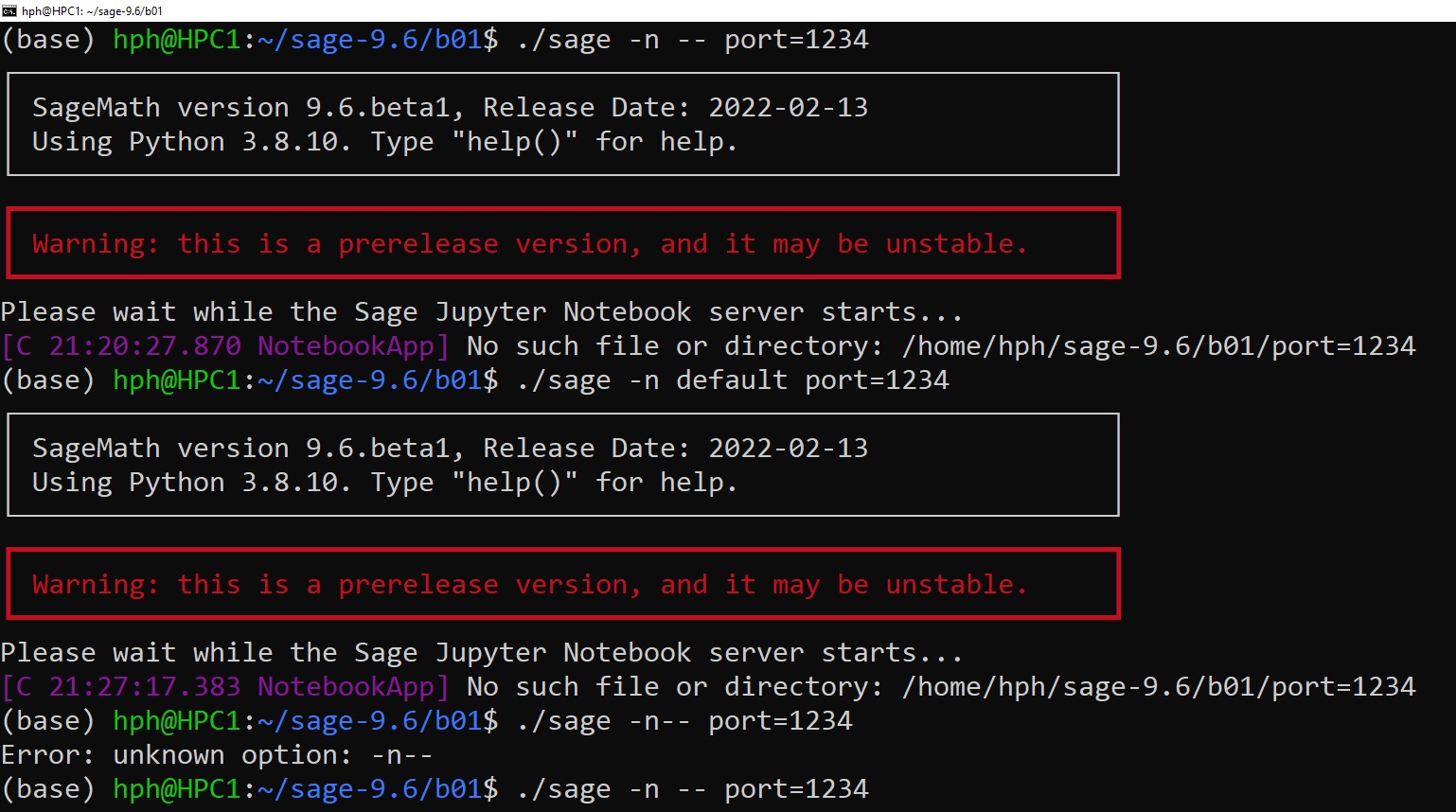
sage -n default port=1234
sage -n -- port=1234 # equivalent
sage -n port=1234 # ERROR: invalid notebook name
The Sage notebook launcher is used to start the notebook, and allows
you to choose between different implementations. Any further command
line options are passed to the respective notebook.
optional arguments:
-h, --help show this help message and exit. Can be combined with "--notebook=[...]" to see notebook-
specific options
--log LOG one of [DEBUG, INFO, ERROR, WARNING, CRITICAL]
--notebook [NOTEBOOK], -n [NOTEBOOK], -notebook [NOTEBOOK]
The notebook to run [one of: default, ipython, jupyter, jupyterlab, export]. Default is
jupyter
EXAMPLES:
* Run default notebook on port 1234. Note that the first argument
after "-n" will be interpreted as notebook name unless you stop
processing with "--":
sage -n default port=1234
sage -n -- port=1234 # equivalent
sage -n port=1234 # ERROR: invalid notebook name
Did I miss something in the attached screen capture?
Thank you for your help.
Regards,
phiho

Dima Pasechnik
Feb 21, 2022, 3:38:27 AM2/21/22
to sage-devel
The correct syntax is
sage -n --port 1234
(no space between -- and port, because --port is just an option name)
it seems to be a doumentation error that one needs a space.
> --
> You received this message because you are subscribed to the Google Groups "sage-devel" group.
> To unsubscribe from this group and stop receiving emails from it, send an email to sage-devel+...@googlegroups.com.
> To view this discussion on the web visit https://groups.google.com/d/msgid/sage-devel/4b9c9b38-7411-4c46-934d-471176ab3610n%40googlegroups.com.
sage -n --port 1234
(no space between -- and port, because --port is just an option name)
it seems to be a doumentation error that one needs a space.
> You received this message because you are subscribed to the Google Groups "sage-devel" group.
> To unsubscribe from this group and stop receiving emails from it, send an email to sage-devel+...@googlegroups.com.
> To view this discussion on the web visit https://groups.google.com/d/msgid/sage-devel/4b9c9b38-7411-4c46-934d-471176ab3610n%40googlegroups.com.
Dima Pasechnik
Feb 21, 2022, 3:58:59 AM2/21/22
to sage-devel
ph h
Feb 22, 2022, 6:34:21 PM2/22/22
to sage-...@googlegroups.com
Hi,
Thank you so much for the information. I should have guessed that standard syntax.
Now I can run different versions of sage concurrently through the jupyter notebook.
Your help is much appreciated.
Regards,
phiho
To view this discussion on the web visit https://groups.google.com/d/msgid/sage-devel/CAAWYfq2Ny5MZ4WzKa_ZQZ3%3D1GGumzuSn1tqXr4k3pKQOh3LO7w%40mail.gmail.com.

Samuel Lelievre
Feb 23, 2022, 3:25:37 AM2/23/22
to sage-devel
If you do not care about choosing the port number, when you run
./sage -n jupyter
and port 8888 is already used, a new Jupyter starts on port 8889,
and so on.
ph h
Feb 23, 2022, 2:40:50 PM2/23/22
to sage-...@googlegroups.com
Hi,
Thank you for your sharing but it seems not working on my machine.
Please find attached a series of 5 screen capturing these steps:
1/- For sage in versions (9.4 9.5 9.6B01):
./sage -n (in appropriate console, top to bottom)
open jupyter notebook (with url shown in console)
version() shows 9.4 (in all 3 notebooks)
(also note that only sage 9.4 console was active)
2/- Kill sage 9.4 with Control-C in the corresponding console
9.5 console became active
3/- Restarting notebooks for 9.4, 9.5,9.6B01 in order
version() showed 9.5
4/- Kill sage 9.5
5/- Restarting notebooks for 9.4, 9.5,9.6B01 in order
version() showed 9.6 beta1
9.6 console became active
Please advise if something was done incorrectly in the steps above or something was missing.
Thank you for your help.
Regards,
phiho
--
You received this message because you are subscribed to the Google Groups "sage-devel" group.
To unsubscribe from this group and stop receiving emails from it, send an email to sage-devel+...@googlegroups.com.
To view this discussion on the web visit https://groups.google.com/d/msgid/sage-devel/9132e1e5-7e67-485c-a454-457c7f3d486dn%40googlegroups.com.
Dima Pasechnik
Feb 23, 2022, 2:44:39 PM2/23/22
to sage-devel
On Monday, February 21, 2022 at 8:58:59 AM UTC Dima Pasechnik wrote:
Thanks for the report, I've opened https://trac.sagemath.org/ticket/33394
to fix this.
needs review now.
Reply all
Reply to author
Forward
0 new messages