
Retro Linux
458 views
Skip to first unread message

J.B. Langston
Sep 29, 2022, 11:37:23 PM9/29/22
to retro-comp
This isn’t this group’s usual vintage but I recently read Linus’s autobiography “Just for Fun” and now I’m reading “Rebel Code” to get a broader perspective. I’ve just been reading about Alan debugging the TCP/IP stack on a busy network. That got me interested in exploring really old distros and to that end I have a new project I thought folks might enjoy: https://github.com/jblang/retrodist. It’s a bit Slackware heavy at the moment but it has Debian 0.91 too. Hoping to add MCC, SLS, TAMU, and even the boot/root disks eventually.
Enjoy,
JB

Terry Fox
Sep 30, 2022, 12:12:54 AM9/30/22
to J.B. Langston, retro-comp
There was also Yggdrasil (sp) and a few others. I may still have some CDs around. I also have a few floppies, like 5.25 inch of the ancient 0.95? That was when it was a one or two floppy boot to get running.
--
You received this message because you are subscribed to the Google Groups "retro-comp" group.
To unsubscribe from this group and stop receiving emails from it, send an email to retro-comp+...@googlegroups.com.
To view this discussion on the web visit https://groups.google.com/d/msgid/retro-comp/8c8762b3-ce70-4424-ba71-fdac5bf3cf63n%40googlegroups.com.

David Richards
Sep 30, 2022, 4:29:23 AM9/30/22
to retro-comp
I have tried a couple of times to boot my old Yggdrasil CD, this looks like just the thing to make it available.
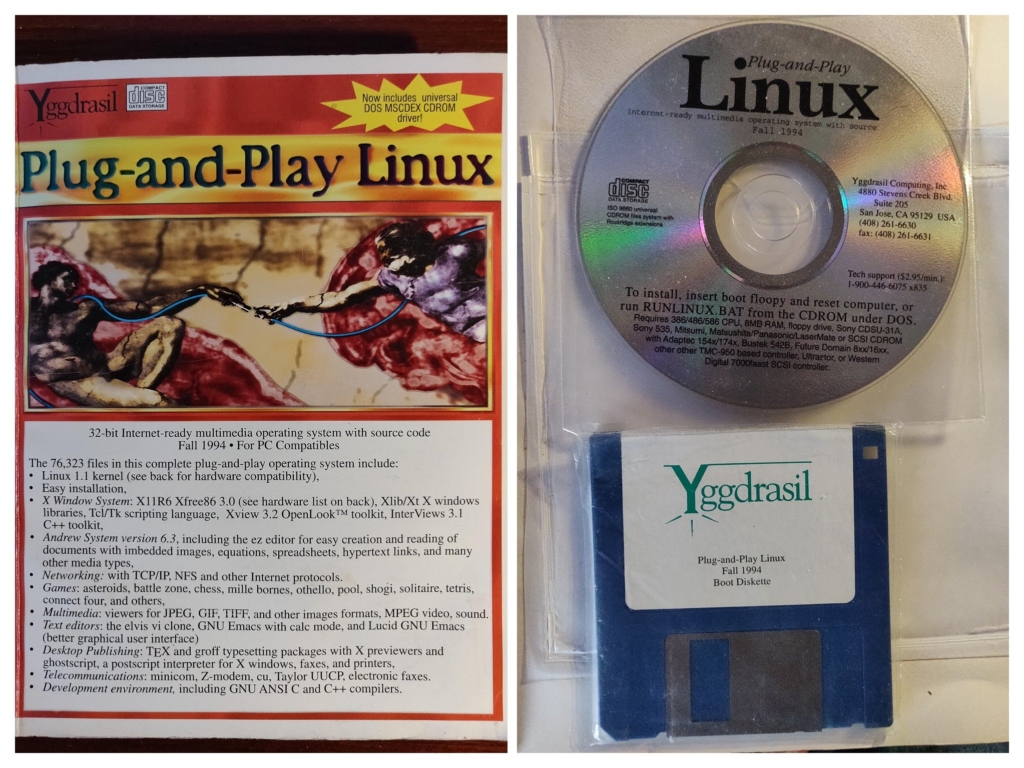
Looking forward to giving it a try, David.
David Richards
Sep 30, 2022, 8:09:53 AM9/30/22
to retro-comp
I have put images of the Yggdrasil CD and Floppy disks online here: https://data.djrm.netmx.co.uk/Yggdrasil/
Perhaps someone can work out how to use them with retrodist before me ...
I'll try some of the existing ones first ...
D
J.B. Langston
Sep 30, 2022, 9:13:59 AM9/30/22
to David Richards, retro-comp
That's beautifully preserved! I was aware of Yggdrasil but I haven't gotten around to playing with it yet. I will see if I can get it running when I get a chance, if you don't beat me to it.
There are also quite a few Yggdrasil ISOs on archive.org: https://archive.org/search.php?query=yggdrasil&and%5B%5D=mediatype%3A%22software%22&sort=date.
I should note that anyone who tries out retrodist will be among the first other than myself. Please report any issues you run into. I'm realizing I haven't really documented the needed prerequisites very well. I've been primarily developing this on an Ubuntu 22.04 host machine (specifically Kubuntu). I know you'll need at least the following extra packages installed:
unzip
qemu-system-x86
cloud-image-utils (for the Jump Box)
If there is anything I've forgotten you will probably get a command not found error and the script will halt. If this happens, you can usually type this command (without any parameters) at the shell prompt and Ubuntu will tell you what package you need to install.
I'm also realizing that using sudo to mount a bunch of disk images I found on the internet (and asking people to trust my scripts) is probably not the best way to do this. The 7z command from the p7zip-full package can extract files from most archive and image formats including ISOs and DOS floppy images. I will probably update the scripts where possible to use that instead of mounting the images and copying the files, since it doesn't use sudo.
A few other issues/limitations I'm aware of:
- Because I am using QEMU's socket backend for networking, only one retro distro can talk to the jump box at once. If you want another distro to work with it, you'll have to shut down the first one.
- Early versions of XFree86 2.0 leave QEMU's emulated Cirrus Logic SVGA in a weird state after returning to text mode. All the text is black and only the cursor is visible. Clearing the screen or resetting the terminal does not help as I think it has done something to the VGA palette registers. You can work around this by blindly typing "reboot -q" to reboot and reinitialize the video card, or by using the serial console instead of QEMU's emualted video console.
David Richards
Sep 30, 2022, 9:24:56 AM9/30/22
to retro-comp
II managed to boot into the Debian 0.91 install program (not using jump) but bailed out before partitioning the (virtual) disk.
brings back vague fuzzy memories. I think Yggdrasil was my first Linux after Minix. Later used some others before settling on Debian and Mint today, I've ditched Windows for the most part except for occasional use on my laptop.
Need to install the jump tools and read some docs before proceedng.
David.
J.B. Langston
Sep 30, 2022, 9:32:58 AM9/30/22
to Terry Fox, retro-comp
There was also Yggdrasil (sp) and a few others. I may still have some CDs around.
There are a lot of ISO images on archive.org, and I've got configurations for downloading most of the Infomagic and Walnut Creek CD-ROMs that I could find. I'm sure there are still lots of things they haven't preserved, and if you have anything that's not already there I'd highly encourage you to upload it to archive.org. I'll probably start a collection of pre-installed QEMU images there at some point.
I also have a few floppies, like 5.25 inch of the ancient 0.95? That was when it was a one or two floppy boot to get running.
Another cool site is http://www.oldlinux.org/. It has a fully commented Linux 0.12 kernel, in the style of the Lions Commentary. He has also collected a bunch of artifacts including many very old kernel versions and corresponding boot/root floppy images. Some are in the images subdirectory of http://www.oldlinux.org/Linux.old/ and more are nested in images subdirectories beneath various Linux-0.XX directories.
J.B. Langston
Sep 30, 2022, 9:47:08 AM9/30/22
to David Richards, retro-comp
II managed to boot into the Debian 0.91 install program (not using jump) but bailed out before partitioning the (virtual) disk.
Try the autoinst.sh script once you boot into Debian. It'll do the partitioning and full install for you. Going through the original install process can sometimes be nostalgic but because it requires swapping multiple floppy images and doesn't install LILO for you, the manual Debian install is not particularly fun.
I think Yggdrasil was my first Linux after Minix.
I never tried Yggdrasil when it was new. Slackware (3.0 IIRC) was my first, which is why I have a soft spot for it and why it was the first distro I added to retrodist.
Later used some others before settling on Debian and Mint today, I've ditched Windows for the most part except for occasional use on my laptop.
I'm mostly a Kubuntu guy these days. I tried out some other modern distros like Fedora, Manjaro, and openSUSE recently and they're pretty nice but I ended up going back home to Kubuntu. And of course there is Slackware 15 released this year. It's fun to play with in a VM but I'm sorry--manual dependency management jumped the shark when the number of shared libraries grew into the 1000s. Their solution is just to punt and tell you to install *everything*, but I'm not a fan of that approach.
I've got Windows 11 on a modern gaming desktop with a 5800X and a 3080ti but I have not been gaming much lately. My main Linux machine is an i7-4770K that will be 10 years old next year. Does that count as retro? :sadlol: Anyway it's got 16GB of RAM and SSD so it's still plenty peppy.
Need to install the jump tools and read some docs before proceedng.David.On Friday, 30 September 2022 at 14:13:59 UTC+1 J.B. Langston wrote:That's beautifully preserved! I was aware of Yggdrasil but I haven't gotten around to playing with it yet. I will see if I can get it running when I get a chance, if you don't beat me to it.There are also quite a few Yggdrasil ISOs on archive.org: https://archive.org/search.php?query=yggdrasil&and%5B%5D=mediatype%3A%22software%22&sort=date.I should note that anyone who tries out retrodist will be among the first other than myself. Please report any issues you run into. I'm realizing I haven't really documented the needed prerequisites very well. I've been primarily developing this on an Ubuntu 22.04 host machine (specifically Kubuntu). I know you'll need at least the following extra packages installed:unzipqemu-system-x86cloud-image-utils (for the Jump Box)If there is anything I've forgotten you will probably get a command not found error and the script will halt. If this happens, you can usually type this command (without any parameters) at the shell prompt and Ubuntu will tell you what package you need to install.I'm also realizing that using sudo to mount a bunch of disk images I found on the internet (and asking people to trust my scripts) is probably not the best way to do this. The 7z command from the p7zip-full package can extract files from most archive and image formats including ISOs and DOS floppy images. I will probably update the scripts where possible to use that instead of mounting the images and copying the files, since it doesn't use sudo.A few other issues/limitations I'm aware of:- Because I am using QEMU's socket backend for networking, only one retro distro can talk to the jump box at once. If you want another distro to work with it, you'll have to shut down the first one.- Early versions of XFree86 2.0 leave QEMU's emulated Cirrus Logic SVGA in a weird state after returning to text mode. All the text is black and only the cursor is visible. Clearing the screen or resetting the terminal does not help as I think it has done something to the VGA palette registers. You can work around this by blindly typing "reboot -q" to reboot and reinitialize the video card, or by using the serial console instead of QEMU's emualted video console.
--
You received this message because you are subscribed to a topic in the Google Groups "retro-comp" group.
To unsubscribe from this topic, visit https://groups.google.com/d/topic/retro-comp/3yPu48gGPmA/unsubscribe.
To unsubscribe from this group and all its topics, send an email to retro-comp+...@googlegroups.com.
To view this discussion on the web visit https://groups.google.com/d/msgid/retro-comp/f448558e-d97f-4616-aee8-96b96824b7c4n%40googlegroups.com.

Mark Bramwell
Oct 2, 2022, 10:49:27 AM10/2/22
to retro-comp
I downloaded the yggrasil Fall 1995 (2 x iso images)
I have the latest promox running with a few newer linux/bsd/solaris images on 3 dedicated servers (I support Linux for a living)
I tried booting yggrasil but it says the CD is not bootable.
I did not see a bootable floppy image.
How are you running your images?
David Richards
Oct 2, 2022, 11:03:49 AM10/2/22
to retro-comp
Greetings Mark, I used the boot floppy extracted from the image an extract script, see here etc: https://github.com/DavidJRichards/retrodist/blob/main/yygdrasil/README.md
I've just started writing the readme with a note about disabling the sbccd driver in the boot process. The full automated configure and install is still very much work in progress though a manual install ining the Yygdrasil installer is ok.
Kind regards, David.
J.B. Langston
Oct 2, 2022, 6:27:33 PM10/2/22
to Mark Bramwell, retro-comp
Images before ~1996-97 are not bootable. You can look at David's Yggdrasil 1995 config or one of the Slackware 2.3-3.1 images for an example of extracting boot/root floppy images from the ISO and then booting from them in order to run the installer from CD.
To view this discussion on the web visit https://groups.google.com/d/msgid/retro-comp/a4ce138c-890e-4461-b90c-ca006e248cb0n%40googlegroups.com.

Sergey Kiselev
Oct 3, 2022, 1:38:52 PM10/3/22
to retro-comp
Assuming that there is a bootable floppy image, you can re-create the CD images and make them bootable.
David Richards
Oct 5, 2022, 10:29:45 AM10/5/22
to retro-comp
Looking through some boxes I found this Debian book with DVD inside the back cover.
Published in 2005, I had the internet then but relied a lot on bought books for information. They were quite expensive.
I found a selection of old O'Reilly Linux books in my boxes too.
J.B. Langston
Oct 5, 2022, 3:28:41 PM10/5/22
to David Richards, retro-comp
Nice! This was the first Linux book I had: https://www.amazon.com/Linux-Unleashed-Tim-Parker/dp/0672309084/ref=sr_1_9
It came with a Slackware 3.0 CD in the back, and that was what I cut my teeth on. It was not a particularly well-written book but it served its purpose and I learned Linux from it. I actually got nostalgic and ordered a copy but the bookstore cancelled my order and said that the book was too damaged to sell... may try to find another copy down the road.
To view this discussion on the web visit https://groups.google.com/d/msgid/retro-comp/936a3740-00c7-4fde-8880-31be9f560427n%40googlegroups.com.
J.B. Langston
Oct 5, 2022, 3:39:33 PM10/5/22
to Sergey Kiselev, retro-comp
That would probably work for Yggdrasil since it only has a single boot disk. For distros that require both a boot and root disk, I think it would be more complicated than the instructions you linked. You'd need to convert the boot disk image into an initrd and then I guess you'd need to use a tool like isolinux to combine everything to a bootable ISO. Unfortunately, with a few exceptions most distros require both boot and root disks, and those that do use a single disk tend to be too old to support IDE CD-ROMs.
To view this discussion on the web visit https://groups.google.com/d/msgid/retro-comp/2fb7127e-9ff1-46be-8a30-34aa8bdc4a41n%40googlegroups.com.
J.B. Langston
Oct 5, 2022, 8:53:55 PM10/5/22
to retro-comp
Alan, if you're reading...
I'm in a bit of a retro Linux networking quandary... I'll understand if you don't want to, but if you are willing to help, I'd appreciate it.
I'm trying to get the networking up on Yggdrasil PnP Linux '95. It appears to be configured correctly and very similar configurations already work on old versions of Slackware and Debian.
QEMU is configured to emulate an ISA NE2000 card. It is using the socket networking backend to connect to another VM running a modern Ubuntu server. This is identical to the config I got working under Slackware and Debian.
This is the kernel version:
Linux linux 1.2.13 #2 Sat Aug 12 15:06:59 EDT 1995 i486
And here are the networking-related messages that are printed out at boot:
And here are the networking-related messages that are printed out at boot:
Swansea University Computer Society NET3.019
Swansea University Computer Society TCP/IP for NET3.019
IP Protocols: ICMP, UDP, TCP
SLIP: version 0.8.3-NET3.019-NEWTTY (4 channels) (6 bit encapsulation enabled)
CSLIP: code copyright 1989 Regents of the University of California
NE*000 ethercard probe at 0x300: 52 54 00 12 34 56
eth0: NE2000 found at 0x300, using IRQ 9.
ne.c:v1.10 9/23/94 Donald Becker (becker@)
Swansea University Computer Society TCP/IP for NET3.019
IP Protocols: ICMP, UDP, TCP
SLIP: version 0.8.3-NET3.019-NEWTTY (4 channels) (6 bit encapsulation enabled)
CSLIP: code copyright 1989 Regents of the University of California
NE*000 ethercard probe at 0x300: 52 54 00 12 34 56
eth0: NE2000 found at 0x300, using IRQ 9.
ne.c:v1.10 9/23/94 Donald Becker (becker@)
Here's the output of ifconfig:
eth0 Link encap:10Mbps Ethernet HWaddr 52:54:00:12:34:56
inet addr:10.0.2.195 Bcast:10.0.2.255 Mask:255.255.255.0
UP BROADCAST RUNNING MTU:1500 Metric:1
RX packets:0 errors:0 dropped:0 overruns:0
TX packets:0 errors:0 dropped:0 overruns:0
Interrupt:9 Base address:0x300
And the output of route:
inet addr:10.0.2.195 Bcast:10.0.2.255 Mask:255.255.255.0
UP BROADCAST RUNNING MTU:1500 Metric:1
RX packets:0 errors:0 dropped:0 overruns:0
TX packets:0 errors:0 dropped:0 overruns:0
Interrupt:9 Base address:0x300
And the output of route:
Kernel routing table
Destination Gateway Genmask Flags MSS Window Use Iface
localhost * 255.255.255.255 UH 1936 0 0 lo
10.0.2.0 * 255.255.255.0 U 1436 0 0 eth0
default 10.0.2.2 255.255.255.0 UG 1436 0 0 eth0
Pinging the host's own IP address (10.0.2.195) works, but pinging the gateway (10.0.2.2) or the jump box (10.0.2.1) does not.
Destination Gateway Genmask Flags MSS Window Use Iface
localhost * 255.255.255.255 UH 1936 0 0 lo
10.0.2.0 * 255.255.255.0 U 1436 0 0 eth0
default 10.0.2.2 255.255.255.0 UG 1436 0 0 eth0
Pinging the host's own IP address (10.0.2.195) works, but pinging the gateway (10.0.2.2) or the jump box (10.0.2.1) does not.
# ping 10.0.2.195
PING 10.0.2.195 (10.0.2.195): 56 data bytes
64 bytes from 10.0.2.195: icmp_seq=0 ttl=255 time=3.1 ms
64 bytes from 10.0.2.195: icmp_seq=1 ttl=255 time=0.6 ms
--- 10.0.2.195 ping statistics ---
2 packets transmitted, 2 packets received, 0% packet loss
round-trip min/avg/max = 0.6/1.8/3.1 ms
# ping 10.0.2.2
PING 10.0.2.2 (10.0.2.2): 56 data bytes
--- 10.0.2.2 ping statistics ---
4 packets transmitted, 0 packets received, 100% packet loss
# ping 10.0.2.1
PING 10.0.2.1 (10.0.2.1): 56 data bytes
--- 10.0.2.1 ping statistics ---
4 packets transmitted, 0 packets received, 100% packet loss
After running ping, route shows that the loopback and network routes have been used, but not the default gateway:
PING 10.0.2.195 (10.0.2.195): 56 data bytes
64 bytes from 10.0.2.195: icmp_seq=0 ttl=255 time=3.1 ms
64 bytes from 10.0.2.195: icmp_seq=1 ttl=255 time=0.6 ms
--- 10.0.2.195 ping statistics ---
2 packets transmitted, 2 packets received, 0% packet loss
round-trip min/avg/max = 0.6/1.8/3.1 ms
# ping 10.0.2.2
PING 10.0.2.2 (10.0.2.2): 56 data bytes
--- 10.0.2.2 ping statistics ---
4 packets transmitted, 0 packets received, 100% packet loss
# ping 10.0.2.1
PING 10.0.2.1 (10.0.2.1): 56 data bytes
--- 10.0.2.1 ping statistics ---
4 packets transmitted, 0 packets received, 100% packet loss
After running ping, route shows that the loopback and network routes have been used, but not the default gateway:
# route
Kernel routing table
Destination Gateway Genmask Flags MSS Window Use Iface
localhost * 255.255.255.255 UH 1936 0 16 lo
10.0.2.0 * 255.255.255.0 U 1436 0 8 eth0
default 10.0.2.2 255.255.255.0 UG 1436 0 0 eth0
Any ideas, or other things that I should check?
Kernel routing table
Destination Gateway Genmask Flags MSS Window Use Iface
localhost * 255.255.255.255 UH 1936 0 16 lo
10.0.2.0 * 255.255.255.0 U 1436 0 8 eth0
default 10.0.2.2 255.255.255.0 UG 1436 0 0 eth0
Any ideas, or other things that I should check?

Dylan Hall
Oct 6, 2022, 6:03:59 AM10/6/22
to J.B. Langston, retro-comp
Probably not related, but shouldn't the default route have a 0.0.0.0 mask rather than 255.255.255.0?
Dylan
--
You received this message because you are subscribed to the Google Groups "retro-comp" group.
To unsubscribe from this group and stop receiving emails from it, send an email to retro-comp+...@googlegroups.com.
To view this discussion on the web visit https://groups.google.com/d/msgid/retro-comp/9646b65e-8795-456c-a379-5b703e13d32cn%40googlegroups.com.

Fred Weigel
Oct 6, 2022, 3:33:31 PM10/6/22
to retro-comp
Dylan:
As I understand it, you are correct.
FredW
J.B. Langston
Oct 6, 2022, 5:05:35 PM10/6/22
to Fred Weigel, retro-comp
That's not the problem. It was originally configured with netmask of 0.0.0.0 and I changed it to 255.255.255.0 thinking it might fix it. I get the same behavior either way. I have switched back to 0.0.0.0 now.
You received this message because you are subscribed to a topic in the Google Groups "retro-comp" group.
To unsubscribe from this topic, visit https://groups.google.com/d/topic/retro-comp/3yPu48gGPmA/unsubscribe.
To unsubscribe from this group and all its topics, send an email to retro-comp+...@googlegroups.com.
To view this discussion on the web visit https://groups.google.com/d/msgid/retro-comp/151a5b4a-e873-4894-b40e-9597170728b4n%40googlegroups.com.
Dylan Hall
Oct 6, 2022, 5:13:49 PM10/6/22
to J.B. Langston, Fred Weigel, retro-comp
When you try and ping the .1 and .2 addresses do you get ARP entries for them?
Dylan
To view this discussion on the web visit https://groups.google.com/d/msgid/retro-comp/CAMwROAx62jaj36oUZrzUZO_c-tc%2BkCkU3SAarzcarbCENYDZAw%40mail.gmail.com.
Dylan Hall
Oct 6, 2022, 5:20:43 PM10/6/22
to J.B. Langston, Fred Weigel, retro-comp
Also, do you have access to tcpdump (or its old school equivalent) on any of the hosts involved?
I'm wondering if it's possible to establish if the retro VM is talking to the other hosts and if they're replying etc.
Dylan
David Richards
Oct 6, 2022, 5:31:59 PM10/6/22
to retro-comp
Im looking at the mac addresses in rerojump and yggdrasil and see the same repeated, sounds fishy, but maybe a red herring as they are on different networks.
```
retro@retrojump:~$ ifconfig
enp0s2: flags=4163<UP,BROADCAST,RUNNING,MULTICAST> mtu 1500
inet 10.0.1.15 netmask 255.255.255.0 broadcast 10.0.1.255
inet6 fec0::5054:ff:fe12:3456 prefixlen 64 scopeid 0x40<site>
inet6 fe80::5054:ff:fe12:3456 prefixlen 64 scopeid 0x20<link>
ether 52:54:00:12:34:56 txqueuelen 1000 (Ethernet)
RX packets 88 bytes 52911 (52.9 KB)
RX errors 0 dropped 0 overruns 0 frame 0
TX packets 98 bytes 7654 (7.6 KB)
TX errors 0 dropped 0 overruns 0 carrier 0 collisions 0
enp0s3: flags=4163<UP,BROADCAST,RUNNING,MULTICAST> mtu 1500
inet 10.0.2.1 netmask 255.255.255.0 broadcast 10.0.2.255
inet6 fe80::5054:ff:fe12:3457 prefixlen 64 scopeid 0x20<link>
ether 52:54:00:12:34:57 txqueuelen 1000 (Ethernet)
RX packets 0 bytes 0 (0.0 B)
RX errors 0 dropped 0 overruns 0 frame 0
TX packets 50 bytes 2588 (2.5 KB)
TX errors 0 dropped 0 overruns 0 carrier 0 collisions 0
lo: flags=73<UP,LOOPBACK,RUNNING> mtu 65536
inet 127.0.0.1 netmask 255.0.0.0
inet6 ::1 prefixlen 128 scopeid 0x10<host>
loop txqueuelen 1000 (Local Loopback)
RX packets 174 bytes 15255 (15.2 KB)
RX errors 0 dropped 0 overruns 0 frame 0
TX packets 174 bytes 15255 (15.2 KB)
TX errors 0 dropped 0 overruns 0 carrier 0 collisions 0
retro@retrojump:~$

```
retro@retrojump:~$ ifconfig
enp0s2: flags=4163<UP,BROADCAST,RUNNING,MULTICAST> mtu 1500
inet 10.0.1.15 netmask 255.255.255.0 broadcast 10.0.1.255
inet6 fec0::5054:ff:fe12:3456 prefixlen 64 scopeid 0x40<site>
inet6 fe80::5054:ff:fe12:3456 prefixlen 64 scopeid 0x20<link>
ether 52:54:00:12:34:56 txqueuelen 1000 (Ethernet)
RX packets 88 bytes 52911 (52.9 KB)
RX errors 0 dropped 0 overruns 0 frame 0
TX packets 98 bytes 7654 (7.6 KB)
TX errors 0 dropped 0 overruns 0 carrier 0 collisions 0
enp0s3: flags=4163<UP,BROADCAST,RUNNING,MULTICAST> mtu 1500
inet 10.0.2.1 netmask 255.255.255.0 broadcast 10.0.2.255
inet6 fe80::5054:ff:fe12:3457 prefixlen 64 scopeid 0x20<link>
ether 52:54:00:12:34:57 txqueuelen 1000 (Ethernet)
RX packets 0 bytes 0 (0.0 B)
RX errors 0 dropped 0 overruns 0 frame 0
TX packets 50 bytes 2588 (2.5 KB)
TX errors 0 dropped 0 overruns 0 carrier 0 collisions 0
lo: flags=73<UP,LOOPBACK,RUNNING> mtu 65536
inet 127.0.0.1 netmask 255.0.0.0
inet6 ::1 prefixlen 128 scopeid 0x10<host>
loop txqueuelen 1000 (Local Loopback)
RX packets 174 bytes 15255 (15.2 KB)
RX errors 0 dropped 0 overruns 0 frame 0
TX packets 174 bytes 15255 (15.2 KB)
TX errors 0 dropped 0 overruns 0 carrier 0 collisions 0
retro@retrojump:~$
and yggdrasil ...
J.B. Langston
Oct 6, 2022, 6:08:40 PM10/6/22
to David Richards, retro-comp
Im looking at the mac addresses in rerojump and yggdrasil and see the same repeated, sounds fishy, but maybe a red herring as they are on different networks.
Just in case, I tried explicitly setting a different MAC address for the enp0s2 interface in the QEMU parameters:
-device virtio-net-pci,netdev=internet,mac=52:54:00:12:34:50
I confirmed that it was reflected in the VM's `ip addr` output:
2: enp0s2: <BROADCAST,MULTICAST,UP,LOWER_UP> mtu 1500 qdisc fq_codel state UP group default qlen 1000
link/ether 52:54:00:12:34:50 brd ff:ff:ff:ff:ff:ff
inet 10.0.1.15/24 metric 100 brd 10.0.1.255 scope global dynamic enp0s2
valid_lft 86373sec preferred_lft 86373sec
inet6 fec0::5054:ff:fe12:3450/64 scope site dynamic mngtmpaddr noprefixroute
valid_lft 86376sec preferred_lft 14376sec
inet6 fe80::5054:ff:fe12:3450/64 scope link
valid_lft forever preferred_lft forever
link/ether 52:54:00:12:34:50 brd ff:ff:ff:ff:ff:ff
inet 10.0.1.15/24 metric 100 brd 10.0.1.255 scope global dynamic enp0s2
valid_lft 86373sec preferred_lft 86373sec
inet6 fec0::5054:ff:fe12:3450/64 scope site dynamic mngtmpaddr noprefixroute
valid_lft 86376sec preferred_lft 14376sec
inet6 fe80::5054:ff:fe12:3450/64 scope link
valid_lft forever preferred_lft forever
Also, do you have access to tcpdump (or its old school equivalent) on any of the hosts involved?I'm wondering if it's possible to establish if the retro VM is talking to the other hosts and if they're replying etc.
I had tcpdump running on the Ubuntu VM's enp0s3 interface and it didn't show any of the arp requests (or anything else for that matter) coming through.
tcpdump isn't available on Yggdrasil, and was apparently never officially supported on 1.2 kernels. From the libpcap-0.3 INSTALL doc:
> If you use Linux, this version of libpcap is known to compile and run
> under Red Hat 4.0 with the 2.0.25 kernel. It may work with earlier 2.X> versions but is guaranteed not to work with 1.X kernels.
libpcap-0.2's INSTALL doc points to a hacked up version for Linux on sunsite, which I was able to find on the Infomagic LDR April 1996 disc3.iso in /system/Network/management/tcpdump-3.0.2-linux.tar.gz. I couldn't get it to compile but there was also a pre-compiled binary in /system/Network/management/tcpdump-3.0.2-ELF-bin.tar.gz , which appears to work.
It shows arp requests but no replies:
tcpdump: listening on eth0
17:24:59.105503 arp who-has 10.0.2.1 tell 10.0.2.195
17:25:08.684256 arp who-has 10.0.2.2 tell 10.0.2.195
17:25:24.104303 arp who-has 10.0.2.1 tell 10.0.2.195
17:25:33.689463 arp who-has 10.0.2.2 tell 10.0.2.195
17:25:49.110810 arp who-has 10.0.2.1 tell 10.0.2.195
17:25:58.699840 arp who-has 10.0.2.2 tell 10.0.2.195
17:24:59.105503 arp who-has 10.0.2.1 tell 10.0.2.195
17:25:08.684256 arp who-has 10.0.2.2 tell 10.0.2.195
17:25:24.104303 arp who-has 10.0.2.1 tell 10.0.2.195
17:25:33.689463 arp who-has 10.0.2.2 tell 10.0.2.195
17:25:49.110810 arp who-has 10.0.2.1 tell 10.0.2.195
17:25:58.699840 arp who-has 10.0.2.2 tell 10.0.2.195
> When you try and ping the .1 and .2 addresses do you get ARP entries for them?
Arp shows entries for both IPs but the MAC is wrong (all 0):
# arp -a
Address HW type HW address Flags Mask
10.0.2.1 10Mbps Ethernet 00:00:00:00:00:00 *
10.0.2.2 10Mbps Ethernet 00:00:00:00:00:00 *
Address HW type HW address Flags Mask
10.0.2.1 10Mbps Ethernet 00:00:00:00:00:00 *
10.0.2.2 10Mbps Ethernet 00:00:00:00:00:00 *

shadow 338 (shadow338)
Oct 6, 2022, 6:24:04 PM10/6/22
to retro-comp
Which kernel version you are using on those vms where this works (Debian/Ubuntu)? All I know is that the TCP/IP stack in those days was meh
J.B. Langston
Oct 6, 2022, 7:41:50 PM10/6/22
to shadow 338 (shadow338), retro-comp
Slackware 1.x and Debian 0.91 use various versions of 0.99.x. Slackware 2.0.x uses kernel 1.0. Slackware 2.3/3.0 uses kernel 1.2.x, same as Yggdrasil 95. I've gotten networking to work on all of them except for Slackware 1.1.2 and Yggdrasil. Slackware 1.1.2 is a different situation because the driver doesn't even initialize. Yggdrasil acts like it brings the interface up successfully but then the packets never seem to go anywhere.
--
You received this message because you are subscribed to a topic in the Google Groups "retro-comp" group.
To unsubscribe from this topic, visit https://groups.google.com/d/topic/retro-comp/3yPu48gGPmA/unsubscribe.
To unsubscribe from this group and all its topics, send an email to retro-comp+...@googlegroups.com.
To view this discussion on the web visit https://groups.google.com/d/msgid/retro-comp/b1b564ee-3ac7-4b45-98b1-59c9ad6a384cn%40googlegroups.com.
shadow 338 (shadow338)
Oct 6, 2022, 11:13:13 PM10/6/22
to retro-comp
I see you switched from socket to virtio-net-pci.
Can you please provide the full command you using to fire up both vms?
J.B. Langston
Oct 6, 2022, 11:33:27 PM10/6/22
to shadow 338 (shadow338), retro-comp
No, it was always virtio-net-pci. That is a network frontend while socket is the backend, in qemu parlance. Neither has changed, all I did was add an explicit MAC address. You can see the entire jump and retro scripts here:
https://github.com/jblang/retrodist. They are both in the root directory of the repo.
To view this discussion on the web visit https://groups.google.com/d/msgid/retro-comp/19c6e329-57b6-4e63-bcfa-8519b3a4d4fdn%40googlegroups.com.
David Richards
Oct 7, 2022, 3:34:43 PM10/7/22
to retro-comp
Yggdrasil networking works now:-)
I have disabled the ps/2 mouse in qemu.sh
# mouse configuration
#MOUSEDEV=ps2aux
#MOUSETYPE=PS/2
# mouse configuration
MOUSEDEV=cua1
MOUSETYPE=Microsoft
#MOUSEDEV=ps2aux
#MOUSETYPE=PS/2
# mouse configuration
MOUSEDEV=cua1
MOUSETYPE=Microsoft
Now to try and find what the pproblem was - interrupt maybee but I had already tried changing from 9 to 12 so perhaps its i/o conflict.
On Thursday, 6 October 2022 at 22:20:43 UTC+1 dy...@deedums.com wrote:
David Richards
Oct 7, 2022, 3:39:55 PM10/7/22
to retro-comp
oops, started the wrong VM, still not working, doh
shadow 338 (shadow338)
Oct 7, 2022, 3:43:44 PM10/7/22
to retro-comp
well you did away better than me. I can't even get 'retro' to work as does not seem to do anything rather than setting up the directories and what not.
I'm most sure I'm doing something wrong but I was relying on what the README says:
"The retro script provides commands for downloading, extracting, and running retro distros. All of the commands take a configuration directory as their first argument. If no directory is provided, the current directory is used."
...
"You won't normally need to run extract and download manually since run will automatically run each of them in turn."
$ ./retro /home/user/test
Retro Distro Playground by J.B. Langston
Command: run
Config: /home/user/test
Download: /home/user/retrodist/.downloads//home/user/test
Cache: /home/user/test/.cache
QEMU: /home/user/test/.qemu
Nothing to extract
No bootable devices
Retro Distro Playground by J.B. Langston
Command: run
Config: /home/user/test
Download: /home/user/retrodist/.downloads//home/user/test
Cache: /home/user/test/.cache
QEMU: /home/user/test/.qemu
Nothing to extract
No bootable devices
David Richards
Oct 7, 2022, 3:49:06 PM10/7/22
to retro-comp
to run the Debian VM I use these commands:
```
cd /home/david/Github/retrodist/debian/0.91/infomagic
../../../retro run
```
Then follow the commands to run the autoinstall.
hth David.
shadow 338 (shadow338)
Oct 7, 2022, 3:55:08 PM10/7/22
to retro-comp
oh you need to cd into the distro dir first! gotcha. Gonna try this later. thanks!
J.B. Langston
Oct 7, 2022, 5:49:21 PM10/7/22
to shadow 338 (shadow338), retro-comp
Yes, you can either cd into the distro directory or give it the directory containing a distro's config files as a parameter. In your earlier test it looked like you were giving it an empty directory that didn't contain any config files, so it wasn't able to do anything.
To view this discussion on the web visit https://groups.google.com/d/msgid/retro-comp/8184d1f2-1dab-444b-b6a4-ad485236a2b4n%40googlegroups.com.
J.B. Langston
Oct 7, 2022, 5:53:53 PM10/7/22
to shadow 338 (shadow338), retro-comp
Also, if you are wanting to play with Yggdrasil, you'll need to check out the yggdrasil branch (https://github.com/jblang/retrodist/tree/yggdrasil). I haven't merged it into main yet since I have been trying to get the networking to work first.
I'd suggest starting with debian 0.91 or slackware 1.01 though so that you will have a known working configuration to play with (and these support fully automated installation and configuration as well).
shadow 338 (shadow338)
Oct 8, 2022, 11:14:47 PM10/8/22
to retro-comp
I had a go with yggdrasil so I created the directory with the following structure but the script is not running. I didn't have time to debug it yet but just wanted to confirm first if I'm using the correct paths
$ pwd
/home/test/retrodist/yggdrasil/1995-fall/djrm
/home/test/retrodist/yggdrasil/1995-fall/djrm
$ ls -ltr
total 20
-rw-r----- 1 test test 51 Oct 8 23:04 autoconf.txt
-rw-r----- 2 test test 430 Oct 8 23:05 config.sh
-rw-r----- 1 test test 98 Oct 8 23:05 extract.sh
-rw-r----- 1 test test 54 Oct 8 23:05 qemu.sh
-rw-r----- 1 test test 30 Oct 8 23:05 source.txt
total 20
-rw-r----- 1 test test 51 Oct 8 23:04 autoconf.txt
-rw-r----- 2 test test 430 Oct 8 23:05 config.sh
-rw-r----- 1 test test 98 Oct 8 23:05 extract.sh
-rw-r----- 1 test test 54 Oct 8 23:05 qemu.sh
-rw-r----- 1 test test 30 Oct 8 23:05 source.txt
$ ../../../retro run
Retro Distro Playground by J.B. Langston
Command: run
Config: /home/user/retrodist/yggdrasil/1995-fall/djrmCommand: run
Download: /home/user/retrodist/.downloads/yggdrasil/1995-fall/djrm
Cache: /home/user/retrodist/yggdrasil/1995-fall/djrm/.cache
QEMU: /home/user/retrodist/yggdrasil/1995-fall/djrm/.qemu
Using cached files
No bootable devices
David Richards
Oct 9, 2022, 4:27:26 AM10/9/22
to retro-comp
I have just tested the yggdrasil branch and everything seems in order to run the distro:
```
mkdir ytest
cd ytest
git clone --branch yggdrasil https://github.com/jblang/retrodist.git
cd retrodist
cd yggdrasil/1995-fall/djrm/
../../../retro run
```
cd ytest
git clone --branch yggdrasil https://github.com/jblang/retrodist.git
cd retrodist
cd yggdrasil/1995-fall/djrm/
../../../retro run
```
The first thing which should happen is the downloading of the install cd image.
J.B. Langston
Oct 9, 2022, 12:39:32 PM10/9/22
to shadow 338 (shadow338), retro-comp
It’s possible the cached files are invalid. Try running “retro reset”
To view this discussion on the web visit https://groups.google.com/d/msgid/retro-comp/b1f280a9-00ac-4725-819e-35974c448c00n%40googlegroups.com.
shadow 338 (shadow338)
Oct 9, 2022, 10:24:01 PM10/9/22
to retro-comp
I was missing the 'cdrom' dir. Once I cloned the correct branch the retro script worked.
Reply all
Reply to author
Forward
0 new messages