
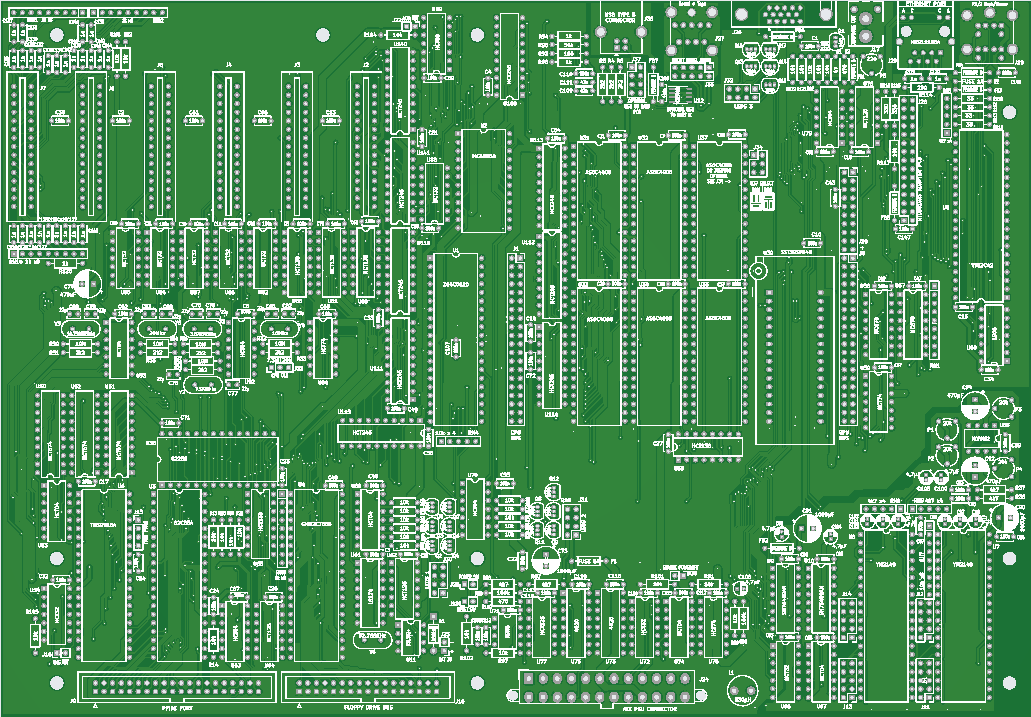
Z80-PC mainboard - progress update - PCBs ordered

Rodney Knaap


kurt....@web.de

karlab
Karl
Rodney Knaap
Thanks for your message and kind wishes!
I am glad to finish the design stage which took a long time to complete.
Making a simple circuit for controlling the ATX power up and reset has proved challenging when I started to test things. It proved really funny how circuits can behave when parts are in a powered off state, connected with the standby circuits which are powered all the time. Especially CMOS ICs have a strange behaviour which lets them draw power from input pins and not entirely be powered off! I used a 4020 counter which simply didn't reset after powering off! (or rather, not powering off!) That is really tricky and I haven't observed such a behaviour from ICs before! haha! I heard Bil Herd who worked at Commodore before mentioning about this fenomenon recently on youtube, unfortunately too late for me to learn about this because I already discovered it myself, a lesson I won't forget! I know I could have programmed some small controller like an ATMega or even smaller for this purpose, but I still like this method more for now, even if it uses a few chips.
I hope that the I/O timing will be fast enough for everything.
Or else I may have to revise the IO decoder circuits entirely.
I made some standardised decoding circuits which can wire up any I/O address as needed.
Karl, thanks for your message!
Definately the Z180 has been in the back of my mind.
For me, this process is fluent and may change along the way.
Making this PCB has been a natural next step in my process to connect things that I want together in a solid way, and the plan may change later.
I wanted to get away from those initial hand wired PCBs which after joining 6 PCBs showed me the potential of a very complete Z80 system, enough so that I committed to this mainboard PCB stage with enough circuits to fill it, rather than designing and building more separate interface PCBs, which would also consume a lot of time.
I ordered some Z84C0020 DIP ICs from Aliexpress, and found them to be relabeled old CPUs, some of which thankfully qualified to run at 7,3728 Mhz. I do want to test at 20Mhz later on the mainboard, so I will be looking for other suppliers. Indeed, using a Z180 may be an easier step to get up to 20Mhz, I will look into that too. I need to take some time to study the documentation and examples of the Z180.
Also I am realising that my system still doesn't have a timer included, which may prove necessary later for software which require some stable and regular flow.
I can build some changes up on expansion cards, and later move them onto the mainboard in next revisions.
I am still looking at adding an FPGA for the GPU card right now, especially after seeing the MiSTer FPGA project, and the comments on that website do make sense, notably that FPGAs can do certain things better and faster than processors which are more sequential in nature. Definately a hybrid design similar to the MiSTer would be even more capable and desirable, however surely also more complex to master. I just need to get more experience in this field, to lower the threshold for possibly getting into this kind of setup.
Kind regards,

Patrick Jackson

Mircea Teletin
--
You received this message because you are subscribed to the Google Groups "RC2014-Z80" group.
To unsubscribe from this group and stop receiving emails from it, send an email to rc2014-z80+...@googlegroups.com.
To view this discussion on the web, visit https://groups.google.com/d/msgid/rc2014-z80/2f9ccb76-f477-41f5-8bb8-3896d36e036fn%40googlegroups.com.
karlab
Rodney Knaap
Rodney Knaap
I have received the manufactured mainboard PCBs from JLCPCB (a big recommendation from me!) and built one up. At first I have connected all the ICs which were necessary for basic function and starting via ROMWBW HBIOS software.
During my test work I have found some issues, as I expected. I was not able to test several things on my previous hand wired setup because I would have to dramatically alter all the PCBs in such a way that it would have been much more work than manufacturing and building up this mainboard, and would have been considerably less stable and solid.
The issues I have found were:
- I need to rename some signals in the ROMWBW bankswitching circuits because I used the naming convention "MAxx" for all the address lines which control the memory ICs after separating the memory and IO bus. Specifically the A14 and A15 lines need to be taken from the Z80 directly to the bankswitching register ICs, which then control the memory IC MA14 and MA15 lines amongst others. I have disconnected those pins on the registers with an extra socket inbetween, and taken the signals from the CPU directly to the registers with a few wires.
- There is an I/O timing issue (of course!) with the decoder which creates the IO direction signal for the I/O data buffer. Apparently one extra gate in the signal path from /IORQ is creating a delay which is too long to get the data on the bus fast enough for the CPU to handle it. I have taken out the /IORQ and /M1 evaluation gate for the time being, since it is only necessary for certain /INTACK events which are currently not used. I will see how I can solve the problem to later include /M1 for the /INTACK conditions.
- I wrongly assumed that for ROMWBW IO ports the not decoded A3 line should probably be low, however this turns out to break ROMWBW function. I temporarily disabled evaluation of the A3 line and simply wired it true. After this I found that ROMWBW initialized properly.
- my ACIA was not working, I needed to change the IO port in the ROM.
- I will change the mounting holes of the mainboard to include some grounding pads and vias inside them as we see on brand manufactured mainboards. This is simply a small change to make the mainboard more solidly grounded to the chassis, which is not an actual issue but simply better to do so.
- I need to move one IC down a millimeter or two to create more spacing for the IC packages to fit more easily.
- I need to change the clock crystal footprint because apparantly the 32768 Hz crystals do not come in HC49S packaging. Probably I will switch to a tube shaped crystal.
- I need to change the RESET (positive logic) line because using it in this way creates problems in my power up and reset circuits. I probably need to invert /RESET another time with an inverter and route that signal to the PPI and FDC. For the time being I separated the RESET pins from the PCB with an extra socket and wired the RESET lines manually with a resistor to ground. So far I didn't find any problems with the PPIDE or FDC even without a reset occurring on them.
- I will see about possibly adding a trimmer capacitor to the clock generator for the TMS. This may help in the future to slightly adjust the clock for better display.
- I will be adding some pull up resistor packs to the databus and maybe also to the address bus in several areas. This will help to improve the signal stability and reduce reflections as well. I really need to get a suitable oscilloscope to evaluate all the signals for stability and see if there are any issues that can be otherwise improved. I do have a HM205-3 scope but I am currently repairing a broken off control where I need to replace a shaft on one of the potmeters. After that I can test this scope and see if it can be sufficiently accurate at this frequency to look at the bus signals and see how I can make some improvements from actually seeing the signals. Later when I get a 20Mhz Z80 I will test and look more at the signals for that frequency.
- The SN76489 sound generators are quite noisy. I will think about some method to disable them when they are not in use, or to initialize them at boot of the PC to become more "quiet".
- the I/O databus is currently not working with a 74HCT245 transceiver, I am using a 74LS245 for the time being, after getting my scope operational I will do further testing to find the issue with the 74HCT245.
- the LED pins on the ethernet connector are slightly off, but still able to assemble it onto the PCB correctly. I will adjust the LED pins a little on the next PCB revision.
Basically, that was it so far up until this point. Only a few small changes were needed to get things running on the mainboard PCB. I am very happy that the big change of using the bus transceivers didn't experience too many difficult problems. It was to be assumed that because it alters the timing that some issues might occur since I was not able to test anything before yet, but I am pleased to be able to separate the bus and buffer everything successfully according to plan. Also the I/O address decoders which I totally changed to a more standardized design were all working properly.
I was able to test one of the YM2149 sound chips which operates on the MSX standard ports, which works with the TUNE.COM CP/M program. It is working fine which confirms my YM port circuits to be correct. That also means that the second YM2149 chip will work fine with software that can support it.
I am waiting for some components to arrive from China, which is of course rather delayed because most people in China were celebrating the spring festival with their family. So I will do further soldering and testing as soon as further parts arrive. I desoldered some things from a few PC mainboards so I could at least test things sooner.
So what I have confirmed to function is:
- ROMWBW
- PPIDE
- RCWDC floppy controller
- ACIA
- YM sound on one chip, I need to see if any software is available to test both YMs for a total of 6 channels
- DS1302 realtime clock
- ATX power supply control
- power-on reset circuits
- PS/2 keyboard interface
After receiving further parts I will be testing:
- TMS video output
- USB direct cable connection to PC for ACIA serial output
- mixed audio output to speakers
After getting the last things tested and getting all the bus signals
optimized, I will move on to have the PCBs made for the RTL8019AS
ethernet chip to plug into the mainboard. After that I will probably
move on to the GPU design.
Possibly I will design a second revision
mainboard right away, just to get rid of the wired fixes and have a 100%
signal optimized system which needs no modifications as a solid basis to
continue.
Further updates will follow below on this thread!

Mircea Teletin
--
You received this message because you are subscribed to the Google Groups "RC2014-Z80" group.
To unsubscribe from this group and stop receiving emails from it, send an email to rc2014-z80+...@googlegroups.com.
To view this discussion on the web, visit https://groups.google.com/d/msgid/rc2014-z80/35147d76-c6cd-4907-843f-bbb845adcd41n%40googlegroups.com.

Doug Jackson
--

Gary S
For a number of years when moving to rackmount for my ISP we went to "PICMG 1.0" as an experiment so that we actually had an easy & relatively cheap upgrade path in the then changing processor market.
Patrick Jackson
Rodney Knaap
Mircea Teletin
--
You received this message because you are subscribed to the Google Groups "RC2014-Z80" group.
To unsubscribe from this group and stop receiving emails from it, send an email to rc2014-z80+...@googlegroups.com.
To view this discussion on the web, visit https://groups.google.com/d/msgid/rc2014-z80/e0d44e4a-7323-4268-9b69-b99dce9afab6n%40googlegroups.com.

Alan Cox
I was thinking about what Garry S. just said above but I am not sure I would like another using a preexisting SBC. I would think more like a CPU daughterboard that you can use multiple times thus effectively making it a multi CPU. I'm tinkering on something like this myself.My idea is to have the daughterboard self contained (CPU, 64K RAM and buffers to tie it into a secondary bus on the motherboard).
The Motherboard's job would be to kickstart each daughterboard and poll the multiple Z80 states (waiting for I/O) or upload/download RAM via the DMA-like system. I would also like a ZX Spectrum Like bitmapped video adapter hooked.
Mircea Teletin
--
You received this message because you are subscribed to the Google Groups "RC2014-Z80" group.
To unsubscribe from this group and stop receiving emails from it, send an email to rc2014-z80+...@googlegroups.com.
To view this discussion on the web, visit https://groups.google.com/d/msgid/rc2014-z80/CAK9X0%2Bvg0ZQj57R_FzEvtb4L09FsWu%3DCaQe7RQeY-ZUJ%2BJ6KGw%40mail.gmail.com.
Rodney Knaap
Mircea Teletin
To view this discussion on the web, visit https://groups.google.com/d/msgid/rc2014-z80/805c197b-4bf1-4430-b28f-2bebf4e5c7e5n%40googlegroups.com.

Rob Gowin
Somehow I have this idea in the back of my mind of "what if?", I mean, what if the industry developed PC systems using a Z80 in a similar fashion as we have seen with the IBM compatible PC, and what if we would have had MS-DOS type of capabiliy and standard for a Z80, with all advantages of that?It seems like a kind of cool project to me to some day port some kind of MS-DOS, or any kind of DOS software to the Z80 processor, giving the advantages that this would offer to a Z80, such as native FAT(32) access, TSR programs etc.Or even to expand further upon CP/M could be another way. I am not sure yet which would be better. MS-DOS also kept some compatibility with CP/M as well, so there is even some overlap present.CP/M does seem to appeal to hobbyists more and more in the recent years.My motivation for making this system now is completely from the hobby and learning perspective.To be able to use existing software is really a big advantage that for the time being I want to keep.I think that this process I am following now could possibly enable me to explore the limits of what a Z80 can achieve in terms of providing a user friendly expandable system that possibly could become comparable with early PCs.And offloading the GPU functions from the Z80 could perhaps even make the system capable of running arcade style games as well, which should also be fun to play with and develop.
Alan Cox
Rodney Knaap
Rodney Knaap
Rodney Knaap
RC2014 Z80 @ 7.376MHz
0 MEM W/S, 1 I/O W/S, INT MODE 1, Z2 MMU
512KB ROM, 2048KB RAM
ROM VERIFY: 00 00 00 00 PASS
AY: MODE=MSX IO=0xA0
SN76489: LEFT IO=0xFF, RIGHT IO=0xFB
ACIA0: IO=0x80 ACIA MODE=115200,8,N,1
DSRTC: MODE=STD IO=0xC0 Sat 2000-01-01 00:00:30 CHARGE=OFF
TMS: MODE=RCKBD IO=0x98
KBD: IO=0xE0
MD: UNITS=2 ROMDISK=384KB RAMDISK=1792KB
FD: MODE=RCWDC IO=0x50 UNITS=2
PPIDE: IO=0x20
PPIDE0: LBA BLOCKS=0x02542980 SIZE=19077MB
PPIDE1: NO MEDIA
Unit Device Type Capacity/Mode
---------- ---------- ---------------- --------------------
Char 0 ACIA0: RS-232 115200,8,N,1
Char 1 TERM0: Terminal Video 0,ANSI
Disk 0 MD0: RAM Disk 1792KB,LBA
Disk 1 MD1: ROM Disk 384KB,LBA
Disk 2 FD0: Floppy Disk 3.5",DS/HD,CHS
Disk 3 FD1: Floppy Disk 3.5",DS/HD,CHS
Disk 4 PPIDE0: Hard Disk 19077MB,LBA
Disk 5 PPIDE1: Hard Disk --
Video 0 TMS0: CRT Text,40x24
Sound 0 SND0: AY-3-8910 3+1 CHANNELS
Sound 1 SND1: SN76489 3+1 CHANNELS
RC2014 Boot Loader
Boot [H=Help]:

Wayne Warthen
I saw the RAM correctly stated in the boot messages, and apparently ROMWBW now creates a large RAM Disk of 1792 KB.I think this is another setting, should I reserve RAM space for the CPU/OS to change how RAM is allocated?
I have done some reading in the github documentation, but it's not clear yet. I will look into this configuration in more detail, but for the time being, at least I have confirmed that a larger ROMWBW RAM memory according to my new circuits on the mainboard is possible and appears to be working correctly as expected.
Memory allocation is also dependent on support by an operating system, so testing this is also a more elaborate process. It all starts with ROMWBW paging of the RAM chips which appears to work. The rest of support comes down to configuration and ROM compiling in combination with operating system functionality.

Bill Shen
Bill
Rodney Knaap
Rodney Knaap


karlab
Rodney Knaap
Bill Shen
Wayne Warthen is obvious the best person to answer your question about RAM allocation. I'm interested in Wayne's answer as well since several of my designs also have large RAM. While waiting for Wayne's answer, my thought was using RAM outside of ROMWBW for my own applications. So if first 512K of 2meg RAM is used by ROMWBW, then the last 1.5meg is unknown to ROMWBW and can be used for my own purpose.
Bill
Wayne Warthen
Let's say for example that I want to reserve 1024KB exclusively for ROMWBW and OS purposes(regardless for the moment if an operating system could control it or not), and allocate the remaining RAM to create RAM disk space.I have tried to set PLT_RAM_R to 1024 however after compiling the ROM won't boot.I have studied the source code, but I can't find any means to set a reserved amount of RAM space of which would (for example) prevent the first 1024KB to be allocated as RAM disk.Is perhaps such a setting currently not available in the source code/configuration?What I mean is as follows, sequentially:512 KB ROM (for BIOS and ROM disk)1024 KB RAM (for ROMWBW and OS)
1024 KB RAM (for RAM disk)
Rodney Knaap
Rodney Knaap
Wayne Warthen
Do I understand correctly that if I set WBW_RAM_R to 1024, and RAMSIZE to 2048 for example, I would get the following situation?[0KB] -> ROM Disk -> ROM Reserved -> [512KB] -> RAM Disk -> [1536KB] -> Rodney RAM Reserved -> [2304KB] WBW RAM Reserved -> [2560KB]The GPU would use one RAM chip from [3584KB] until [4096KB].
Do I understand correctly that ROMWBW will always use the top 256KB of RAM, regardless of any value of WBW_RAM_R larger than 256KB?
I will test some more with the new source code!

Dylan Hall
--
You received this message because you are subscribed to the Google Groups "RC2014-Z80" group.
To unsubscribe from this group and stop receiving emails from it, send an email to rc2014-z80+...@googlegroups.com.
To view this discussion on the web, visit https://groups.google.com/d/msgid/rc2014-z80/0792ad6f-b1ec-4ab9-8a96-c661a11e7454n%40googlegroups.com.
Wayne Warthen
I've got my Raspberry Pi Pico pretending to be a 512k ROM 512k RAM memory board. The caveat being that the Pico only has 256k of RAM so I've allocated 128k to cover the OS/BIOS/etc and another 32k which gets reused for all of the RAM disk pages. This obviously renders the RAM disk unusable but was enough to make it boot and run. I was testing with 3.0.1.
I believe there is an option in the newer releases to disable the RAM disk, or resize it which I want to try next. However, I see from your comments that the newer release now uses 256k for the OS/BIOS/etc. Can that value be safely shrunk?In a perfect world, I'd aim to emulate a system with 192k of RAM (leaving 64k spare on the Pico for other functions), that would be broken down as 64k RAM disk and 128k OS/BIOS/etc.
Rodney Knaap
RC2014 Z80 @ 7.372MHz
0 MEM W/S, 1 I/O W/S, INT MODE 1, Z2 MMU
512KB ROM, 2048KB RAM
ROM VERIFY: 00 00 00 00 PASS
AY: MODE=MSX IO=0xA0
SN76489: LEFT IO=0xFF, RIGHT IO=0xFB
ACIA0: IO=0x80 ACIA MODE=115200,8,N,1
TMS: MODE=RCKBD IO=0x98
KBD: IO=0xE0
FD: MODE=RCWDC IO=0x50 UNITS=2
PPIDE: IO=0x20
PPIDE1: NO MEDIA
Unit Device Type Capacity/Mode
---------- ---------- ---------------- --------------------
Char 0 ACIA0: RS-232 115200,8,N,1
Char 1 TERM0: Terminal Video 0,ANSI
Disk 1 MD1: ROM Disk 384KB,LBA
Disk 2 FD0: Floppy Disk 3.5",DS/HD,CHS
Disk 3 FD1: Floppy Disk 3.5",DS/HD,CHS
Disk 5 PPIDE1: Hard Disk --
Video 0 TMS0: CRT Text,40x24
Sound 0 SND0: AY-3-8910 3+1 CHANNELS
Sound 1 SND1: SN76489 3+1 CHANNELS
RC2014 Boot Loader
Boot [H=Help]:
Wayne Warthen
Wayne Warthen
I believe there is an option in the newer releases to disable the RAM disk, or resize it which I want to try next. However, I see from your comments that the newer release now uses 256k for the OS/BIOS/etc. Can that value be safely shrunk?In a perfect world, I'd aim to emulate a system with 192k of RAM (leaving 64k spare on the Pico for other functions), that would be broken down as 64k RAM disk and 128k OS/BIOS/etc.Yes, the RAM disk can be disabled now. Set the config variable MDROM to FALSE.I think you could safely reduce the 256KB RAM reserved area to 128KB as long as you don't use CP/M 3 (or ZPM3). You would need to change the value of WBW_RAM_R from 256 to 128 in std.asm.
Dylan Hall
Bill Shen
Bill
Wayne Warthen
I'm also quite interested in running ROMWBW in Z80 with 128K RAM. I have a number of minimalist designs with no ROM, small RAM (128K) and compact flash disk or Disk-on-module. Since CF or DOM drive is always present, they don't need ROM or RAM drives. It would be very cool to run ROMWBW on these small Z80 designs.
Bill Shen
For the ROM-less minimal designs, the CF disk serves as the ROM. There are various mechanism to get 512-byte master boot record into low RAM and execute; it then loads and runs various system files in the first track of the CF disk. The first track of CF disk (128KB) is outside of ROMWBW so that's where I stored my monitor, diagnostic, loader and CPM BIOS/BDOS/CCP. Maybe that's enough space to store ROMWBW specific monitor and OS software?
The HBIOS software can store in CF as first file of the first slice, which is similar to how ZRC's 512K image was stored in CF. the downside to this method of storing system files is the inflexibility. I'm less concerned about fixed system files in the reserved track, but system files stored at fixed LBA address in a slice does seem inflexible.
Bill
Alan Cox
The HBIOS software can store in CF as first file of the first slice, which is similar to how ZRC's 512K image was stored in CF. the downside to this method of storing system files is the inflexibility. I'm less concerned about fixed system files in the reserved track, but system files stored at fixed LBA address in a slice does seem inflexible.
Bill
Wayne Warthen
Wayne Warthen
For the ROM-less minimal designs, the CF disk serves as the ROM. There are various mechanism to get 512-byte master boot record into low RAM and execute; it then loads and runs various system files in the first track of the CF disk. The first track of CF disk (128KB) is outside of ROMWBW so that's where I stored my monitor, diagnostic, loader and CPM BIOS/BDOS/CCP. Maybe that's enough space to store ROMWBW specific monitor and OS software?
The HBIOS software can store in CF as first file of the first slice, which is similar to how ZRC's 512K image was stored in CF. the downside to this method of storing system files is the inflexibility. I'm less concerned about fixed system files in the reserved track, but system files stored at fixed LBA address in a slice does seem inflexible.
Bill Shen
I'll be delighted if you use ZRC as testbed for 128K ROMWBW. It is rather selfish because I have several such ROM-less 128K RAM Z80 designs. Fast 128K RAM is cheap, ROM is slow, so RAM-only Z80 can run fast, like 29.5MHz fast. Handshake for serial transfer may not be needed at that speed.
Bill
Rodney Knaap
RC2014 Z80 @ 7.372MHz
0 MEM W/S, 1 I/O W/S, INT MODE 1, Z2 MMU
512KB ROM, 2048KB RAM
ROM VERIFY: 00 00 00 00 PASS
AY: MODE=MSX IO=0xA0
DSRTC: MODE=STD IO=0xC0 Sat 2000-01-01 00:00:11 CHARGE=OFF
TMS: MODE=RCKBD IO=0x98
KBD: IO=0xE0
FD: MODE=RCWDC IO=0x50 UNITS=2
PPIDE: IO=0x20
PPIDE1: NO MEDIA
PPIDE: IO=0x28
PPIDE2: LBA BLOCKS=0x098ABA00 SIZE=12631MB
PPIDE3: NO MEDIA
Unit Device Type Capacity/Mode
---------- ---------- ---------------- --------------------
Char 0 ACIA0: RS-232 115200,8,N,1
Char 1 TERM0: Terminal Video 0,ANSI
Disk 1 MD1: ROM Disk 384KB,LBA
Disk 2 FD0: Floppy Disk 3.5",DS/HD,CHS
Disk 3 FD1: Floppy Disk 3.5",DS/HD,CHS
Disk 5 PPIDE1: Hard Disk --
Disk 7 PPIDE3: Hard Disk --
Video 0 TMS0: CRT Text,40x24
Sound 0 SND0: AY-3-8910 3+1 CHANNELS
Boot [H=Help]: 6
Booting Disk Unit 6, Slice 0, Sector 0x00000000...
Volume "Unlabeled" [0xD000-0xFE00, entry @ 0xE600]...
CBIOS v3.1.1-pre.148 [WBW]
Formatting RAMDISK...
Configuring Drives...
A:=PPIDE2:0
B:=MD0:0
C:=MD1:0
D:=FD0:0
E:=FD1:0
F:=PPIDE2:1
G:=PPIDE2:2
H:=PPIDE2:3
I:=PPIDE2:4
J:=PPIDE2:5
K:=PPIDE2:6
L:=PPIDE2:7
1057 Disk Buffer Bytes Free
CP/M-80 v2.2, 54.0K TPA
A>dir
A: ASM COM : DDT COM : DUMP COM : ED COM
A: HELP COM : HELP HLP : LIB COM : LINK COM
A: LOAD COM : MAC COM : PIP COM : RMAC COM
A: STAT COM : SUBMIT COM : XSUB COM : ZSID COM
A: README TXT : ASSIGN COM : FAT COM : FDU COM
A: FDU DOC : FORMAT COM : MODE COM : RTC COM
A: SURVEY COM : SYSCOPY COM : SYSGEN COM : TALK COM
A: TBASIC COM : TIMER COM : TUNE COM : XM COM
A: ZMP COM : ZMP HLP : ZMP DOC : ZMXFER OVR
A: ZMTERM OVR : ZMINIT OVR : ZMCONFIG OVR : ZMD COM
A: VGMPLAY COM : CPM SYS : CLRDIR COM : COMPARE COM
A: CRUNCH COM : CRUNCH28 CFG : DDTZ COM : DDTZ DOC
A: EX COM : FDISK80 COM : FIND COM : FLASH COM
A: FLASH DOC : MBASIC COM : NULU COM : PMARC COM
A: PMEXT COM : RMXSUB1 COM : SUPERSUB COM : SUPERSUB DOC
A: TDLBASIC COM : UNARC COM : UNARC DOC : UNCR COM
A: UNZIP COM : UNZIP DOC : XSUB1 COM : ZAP COM
A: ZDE COM : ZDE DOC : ZDENST COM : ZMRX COM
A: ZMTX COM : KERCPM22 COM : QUIT


