
Connection blocked by client?
3,198 views
Skip to first unread message

Bernie
Feb 2, 2017, 1:24:05 AM2/2/17
to qz-print
Hi,
I was able to connect successfully with my certificate and was even able to check on "remember my decision" ; however, now I keep on receiving this "connection blocked by client" message and I can't seem to figure out what's causing this issue.
I see the following showing in "inspect > console" in my browser:
I tried shutting down and reopening my QZ tray client and there is nothing showing under "Site Manager > Blocked" section; so I'm not sure what could be causing this issue.
This is what it shows in the debug file:
And in the following screenshot link below is the code I'm using that seemed to work fine before but not now.
https://gyazo.com/38f4005533223983a501dbf520b3315d
Thank you!
I was able to connect successfully with my certificate and was even able to check on "remember my decision" ; however, now I keep on receiving this "connection blocked by client" message and I can't seem to figure out what's causing this issue.
I see the following showing in "inspect > console" in my browser:
Established connection with QZ Tray on ws://localhost:8182
sample.html:1615 Error: Connection blocked by client
at WebSocket._qz.websocket.connection.onmessage (qz-tray.js:271)
qz-tray.js:37 Closed connection with QZ Tray
qz-tray.js:163 Uncaught TypeError: Cannot read property 'promise' of null
at WebSocket._qz.websocket.connection.onclose (qz-tray.js:163)
I tried shutting down and reopening my QZ tray client and there is nothing showing under "Site Manager > Blocked" section; so I'm not sure what could be causing this issue.
This is what it shows in the debug file:
2017-02-02 01:15:45,739 [INFO] Connection opened from /0:0:0:0:0:0:0:1:58561 on socket port 8182
2017-02-02 01:15:45,746 [DEBUG] Message: {"certificate":"-----BEGIN CERTIFICATE----------END CERTIFICATE-----\n","promise":{},"timestamp":1486016145745,"uid":"qtlm51"}
2017-02-02 01:15:45,754 [DEBUG] Received new certificate from connection through 58561
2017-02-02 01:15:45,765 [INFO] Denied OVH to connect to QZ
2017-02-02 01:15:45,766 [INFO] Connection closed: 1006 - Disconnected
2017-02-02 01:15:45,767 [INFO] Closing all communication channels for OVH
And in the following screenshot link below is the code I'm using that seemed to work fine before but not now.
https://gyazo.com/38f4005533223983a501dbf520b3315d
Thank you!

Tres Finocchiaro
Feb 2, 2017, 10:21:28 AM2/2/17
to olimits7, qz-print
Sounds like you clicked "always block" instead of "always allow".
Can you blow away %appdata%\qz\blocked.dat and see if that helps?
Alternatively you can also use the Tray, Advanced, Site Manager screen to list blocked Certificates.
Bernie
Feb 2, 2017, 10:25:28 AM2/2/17
to qz-print, olim...@gmail.com
Hi Tres,
I checked the "blocked.dat" file but it's empty. I also checked the "Advanced > Site Manager > Blocked" list and it also shows empty.
This "sample.html" page use to work fine before and now I keep getting this message; should I try uninstalling QZ Tray client and reinstalling it again? Is there anything else I can do to debug this issue?
Thank you!
I checked the "blocked.dat" file but it's empty. I also checked the "Advanced > Site Manager > Blocked" list and it also shows empty.
This "sample.html" page use to work fine before and now I keep getting this message; should I try uninstalling QZ Tray client and reinstalling it again? Is there anything else I can do to debug this issue?
Thank you!
Tres Finocchiaro
Feb 2, 2017, 9:43:04 PM2/2/17
to Bernie, qz-print
According to your previous emails, you're likely providing a non-QZ cert.
... so if you're receiving this message, it's most likely self-inflicted.
--
You received this message because you are subscribed to the Google Groups "qz-print" group.
To unsubscribe from this group and stop receiving emails from it, send an email to qz-print+unsubscribe@googlegroups.com.
For more options, visit https://groups.google.com/d/optout.
Bernie
Feb 2, 2017, 11:23:32 PM2/2/17
to qz-print, olim...@gmail.com
I ended up uninstalling and reinstalling the QZ Tray client and now I'm able to connect again using my own certificate.
I'm now able to print again using the "sample.html" page using my own certificate, however, for some reason we used this same code on my website and we're able to successfully connect but we are having an issue printing. It looks like the data isn't being sent to the printer and I don't see any error log entries in QZ Tray.
I'm now able to print again using the "sample.html" page using my own certificate, however, for some reason we used this same code on my website and we're able to successfully connect but we are having an issue printing. It looks like the data isn't being sent to the printer and I don't see any error log entries in QZ Tray.
To unsubscribe from this group and stop receiving emails from it, send an email to qz-print+u...@googlegroups.com.
Tres Finocchiaro
Feb 2, 2017, 11:27:53 PM2/2/17
to Bernie, qz-print
If connection is successful now, I would recommend sending your Chrome (F12) console/Developer Mode logs and QZ Tray logs. They'll likely point to the problem. Try qz.showDebug(true) in console to get more info.
If you're hitting a bug, launch QZ Tray from command line to see if there's a strange JVM bug you're hitting. https://qz.io/wiki/faq#debugging-qz-tray
Tres Finocchiaro
Feb 2, 2017, 11:28:55 PM2/2/17
to Bernie, qz-print
Bernie
Feb 2, 2017, 11:49:04 PM2/2/17
to qz-print, olim...@gmail.com
Hi,
I've checked Console in Chrome but it doesn't show much information. How exactly would I use qz.api.showDebug(true) ? Do I have to add this to my website code?
Also, I ran java -Xms512M -jar "%PROGRAMFILES%\QZ Tray\qz-tray.jar" in CMD and I noticed that it showed the following:
I have authcert.override=certificate.crt in my qz-tray.properties file and my certificate.crt file is in the same directory as my qz-tray.properties file so I'm not sure why this file can't be found.
Thank you.
I've checked Console in Chrome but it doesn't show much information. How exactly would I use qz.api.showDebug(true) ? Do I have to add this to my website code?
Also, I ran java -Xms512M -jar "%PROGRAMFILES%\QZ Tray\qz-tray.jar" in CMD and I noticed that it showed the following:
Main properties file C:\Program Files\QZ Tray\qz-tray.properties
java.io.FileNotFoundException: certificate.crt (The system cannot find the file specified)
I have authcert.override=certificate.crt in my qz-tray.properties file and my certificate.crt file is in the same directory as my qz-tray.properties file so I'm not sure why this file can't be found.
Thank you.
Tres Finocchiaro
Feb 2, 2017, 11:54:57 PM2/2/17
to Bernie, qz-print
In chrome, you can type commands against the page you're on without editing the source code. There's a command line within the console window (lesser known feature).
Try full path for cert.
--
You received this message because you are subscribed to the Google Groups "qz-print" group.
To unsubscribe from this group and stop receiving emails from it, send an email to qz-print+unsubscribe@googlegroups.com.
Bernie
Feb 3, 2017, 12:22:49 AM2/3/17
to qz-print, olim...@gmail.com
Ok, I see what you mean; I tried printing from my site with that debug and I see the following in console.
https://gyazo.com/123b9a2fa2c1450f5fcfece30ba385d8
I see it says rejectPromise but you can see in the image below that my certificate is showing properly in the QZ Tray.
https://gyazo.com/7e7d4a09558a57c42c3ec2914cb2c88f
Thank you.
https://gyazo.com/123b9a2fa2c1450f5fcfece30ba385d8
I see it says rejectPromise but you can see in the image below that my certificate is showing properly in the QZ Tray.
https://gyazo.com/7e7d4a09558a57c42c3ec2914cb2c88f
Thank you.
To unsubscribe from this group and stop receiving emails from it, send an email to qz-print+u...@googlegroups.com.
Bernie
Feb 3, 2017, 1:10:43 AM2/3/17
to qz-print, olim...@gmail.com
Using qz.api.showDebug(true) I compared what I saw in my "sample.html" page, which is working; and compared it to what my website showed.
I noticed on the "sample.html" page the "signature:" section actually shows the signature data, however, on my website it shows "signature: undefined".
Does this most likely mean that we're not using "setSignaturePromise" properly? and maybe it's not getting redirected to the "sign-message.php" file to get the signature?
Thank you.
I noticed on the "sample.html" page the "signature:" section actually shows the signature data, however, on my website it shows "signature: undefined".
Does this most likely mean that we're not using "setSignaturePromise" properly? and maybe it's not getting redirected to the "sign-message.php" file to get the signature?
Thank you.
Tres Finocchiaro
Feb 3, 2017, 7:07:17 AM2/3/17
to olimits7, qz-print
Is "block anonymous requests" checked in advanced?
To unsubscribe from this group and stop receiving emails from it, send an email to qz-print+unsubscribe@googlegroups.com.
olimits7
Feb 3, 2017, 8:10:06 AM2/3/17
to Tres Finocchiaro, qz-print
No, it's not checked on.
Is this signature undefined issue due to the "setSignaturePromise" function?
Thank you.
Bernie
Feb 3, 2017, 12:24:22 PM2/3/17
to qz-print, tres.fin...@gmail.com
Hi Tres,
Please see images in links below; I don't know why my "sample.html" is acting buggy. Yesterday, I was able to print to my "Adobe PDF" printer fine because I would see it open up in the print queue and actually print.
https://gyazo.com/3a010ff70b8af12835dcfc649f3247f6
https://gyazo.com/c5ad5f92af63aef0892b2cf04813c53a
However, you can see in the image above it says "Allowed OVH to print to Adobe PDF" but nothing gets printed; the print queue dialog box doesn't show in my task bar.
Why isn't QZ Tray printing the document today when yesterday this "sample.html" page was working fine?
Thank you.
Please see images in links below; I don't know why my "sample.html" is acting buggy. Yesterday, I was able to print to my "Adobe PDF" printer fine because I would see it open up in the print queue and actually print.
https://gyazo.com/3a010ff70b8af12835dcfc649f3247f6
https://gyazo.com/c5ad5f92af63aef0892b2cf04813c53a
However, you can see in the image above it says "Allowed OVH to print to Adobe PDF" but nothing gets printed; the print queue dialog box doesn't show in my task bar.
Why isn't QZ Tray printing the document today when yesterday this "sample.html" page was working fine?
Thank you.
Bernie
Feb 3, 2017, 12:39:37 PM2/3/17
to qz-print, tres.fin...@gmail.com
The only way I can get it to actually print again is by un-installing QZ Tray and installing it back on my PC; however, it only prints on my first request, if I then try to print again it no longer prints.
Why does this issue happen? I see the API request is the same in Console when I try to print again but nothing happens.
Why does this issue happen? I see the API request is the same in Console when I try to print again but nothing happens.
Bernie
Feb 3, 2017, 1:14:17 PM2/3/17
to qz-print, tres.fin...@gmail.com
Ok, we finally figured out the issue; it was a compatibility issue with jQuery; we are using an older version and it didn't work with the version you currently use.
My developer:
Thank you.
My developer:
they wrote jQuery based on jQuery v 1.8 +
and they are using 1.11
and we are using 1.4
and they using promises with ajax calls
and this concept wasn't even existing when jQuery 1.4 released
Thank you.
Tres Finocchiaro
Feb 3, 2017, 3:45:31 PM2/3/17
to Bernie, qz-print
Thanks for the update. As you probably know, you don't need jQuery at all to use the library.
I encourage you to post your compat code for the rest of the mailing list, which would remove the .then() logic and replace it with the older success function + resolve callback method, like we used to recommend in QZ Tray 1.9.
- Also, FYI, the promise support in jQuery is still only partially implemented. More information here: http://stackoverflow.com/a/14220323/3196753
- jQuery 1.4 is 7 years old now
- Deprecation Notice: The $.ajax().success(), .error(), and .complete() callbacks are removed as of jQuery 3.0. You can use $.ajax().done(), $.ajax().fail(), and $.ajax().always() instead.
- Our API does not require jQuery at all (many of our clients replace $.ajax with a pure JavaScript XMLHttpRequest.
- Our sample.html ships with this example as a proof-of-concept only please use any asynchronous method for fetching certificate, signature.
Bernie
Feb 3, 2017, 6:41:01 PM2/3/17
to qz-print, olim...@gmail.com
Hi Tres,
Ok, thank you for this information; I'll pass it along to my developer.
Quick question, if I wanted to setup 2 PCs with the same exact printer setup; I would just have to make sure I name the printers with the same exact name on both PCs this way I can still print?
Thank you.
Ok, thank you for this information; I'll pass it along to my developer.
Quick question, if I wanted to setup 2 PCs with the same exact printer setup; I would just have to make sure I name the printers with the same exact name on both PCs this way I can still print?
Thank you.
Tres Finocchiaro
Feb 3, 2017, 8:31:54 PM2/3/17
to Bernie, qz-print
Quick question, if I wanted to setup 2 PCs with the same exact printer setup; I would just have to make sure I name the printers with the same exact name on both PCs this way I can still print?
If it's 100% silent, yes, you'll have to match on printer name (whether you decide it needs to be exact or not is up to you, since you can use the search method)
Bernie
Feb 3, 2017, 8:51:29 PM2/3/17
to qz-print, olim...@gmail.com
Ok, I'm saving the value in the back-end of my website (e.g. Zebra Printer, Samsung Printer); so I'm just calling these values in the request, so I think it will be better to keep the printer names on different PCs the same too this way my PDFs print properly.
If I had a network printed added to my PC; it would work just like a local printer because QZ Tray uses the printer name to print; right?
Thank you.
Tres Finocchiaro
Feb 3, 2017, 8:58:21 PM2/3/17
to Bernie, qz-print
If I had a network printed added to my PC; it would work just like a local printer because QZ Tray uses the printer name to print; right?
Correct.

Ravi
Sep 29, 2023, 2:19:54 AM9/29/23
to qz-print
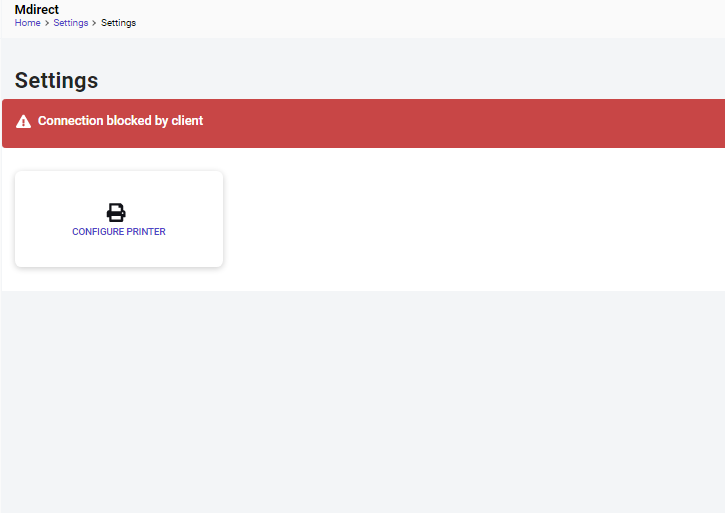
how to solve this

Lite Finocchiaro
Sep 29, 2023, 10:30:11 AM9/29/23
to Ravi, qz-print
Ravi:
This thread is six years old now, and many things have changed, but if the connection has been blocked by the client, you should be able to unblock it by clicking QZ-Tray, Advanced, Site Manager, Blocked tab move it to the "Allowed" tab,
OR, remove it from the Blocked tab with the "minus sign (-)" and reload the page and click "remember this decision" and "allow".
Cheers,
Lite Finocchiaro
VP, QZ Industries
--
You received this message because you are subscribed to the Google Groups "qz-print" group.
To unsubscribe from this group and stop receiving emails from it, send an email to qz-print+u...@googlegroups.com.
To view this discussion on the web visit https://groups.google.com/d/msgid/qz-print/77dd17f8-0a07-4c11-a8c4-f7e8f309f800n%40googlegroups.com.
Reply all
Reply to author
Forward
0 new messages