
CMAKE_PREFIX_PATH Not Found Question
118 views
Skip to first unread message

Bryan Kinzer
Feb 19, 2021, 12:30:45 PM2/19/21
to PRISMS-PF Users
Hey PRISMS-PF,
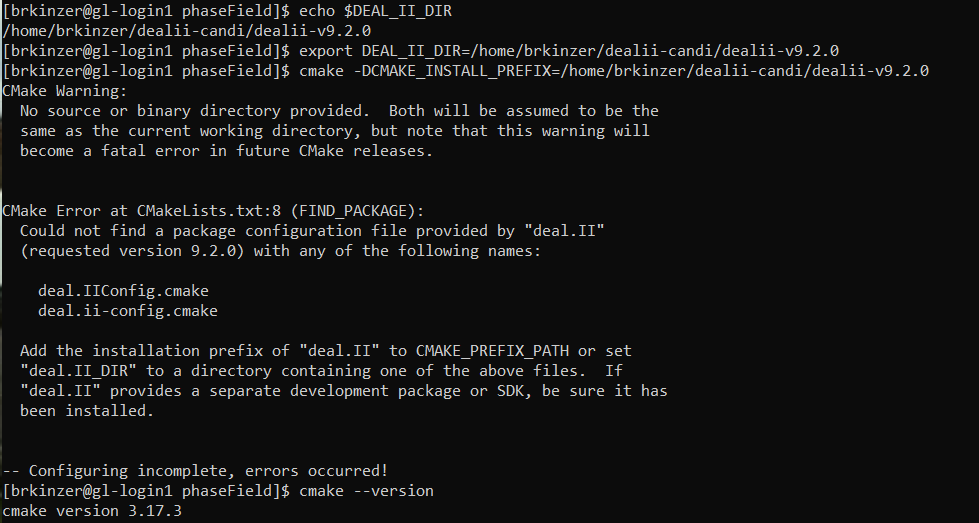
I used Candi to install deal.II and Cmake, but when I try running cmake . to compile the phaseField folder I get a suggestion to add the prefix of "deal.II" to CMAKE_PREFIX_PATH as shown below. I am attempting the installation on the Great Lakes Computing Cluster, but I think originally I had compiled the phaseField code using the default Cmake 2.8.12 and the code was running really slowly (much slower than on my laptop), so now I have loaded Cmake 3.17.3, which is already installed in the Cluster. This is different than the Cmake version that is used in Candi, 3.11.2.
When I use echo $DEAL_II_DIR I get a file location, so then I ran export DEAL_II_DIR to that file location, and then ran cmake . but it still says I need to add to the CMAKE_PREFIX_PATH. Any suggestions on what to do? Am I running the wrong command?
Cheers
Cheers

David Montiel Taboada
Feb 19, 2021, 3:25:48 PM2/19/21
to Bryan Kinzer, PRISMS-PF Users
Hello, Bryan
I am not sure what is going on. Can you try please the following?
1) Go to the phaseField folder
2) Remove the following files and directories (if they exist):
CMakeCache.txt
cmake_install.cmake
libprisms_pf_debug.a
libprisms_pf.a
Makefile
CMakeFiles
3) Type:
$ cmake .
4) Copy the full output and send it as a reply to this email
Thank you,
David
--
You received this message because you are subscribed to the Google Groups "PRISMS-PF Users" group.
To unsubscribe from this group and stop receiving emails from it, send an email to prisms-pf-use...@googlegroups.com.
To view this discussion on the web visit https://groups.google.com/d/msgid/prisms-pf-users/5b71dde9-f920-4e35-9432-4fb2294774fen%40googlegroups.com.
Bryan Kinzer
Feb 19, 2021, 4:18:01 PM2/19/21
to David Montiel Taboada, PRISMS-PF Users
Hey David,
After clearing out the files when I ran "$export DEAL_II_DIR=/home/brkinzer/deal.ii-candi/deal.II-v9.2.0/lib/cmake/deal.II" instead of "$export DEAL_II_DIR=/home/brkinzer/deal.ii-candi/deal.II-v9.2.0", and then ran "cmake ." cmake now appears to be successful as shown below. However, when I run the allenCahn example afterwards it still takes 20x longer to run the simulation than on my personal laptop. The team at ARC-TS suggested I try running the code using Singularity, so I am working on that now. Since that deals with another topic, I will respond in the "PRISMS-PF is running super slow on Computing Cluster" thread.

Cheers

pelerona
Mar 16, 2021, 2:31:47 AM3/16/21
to PRISMS-PF Users
Hi,
I am asking in this thread as it has the same error except the Cmake warning in the first few lines.
I am trying to compile the core library of PRISMS-PF as per the youtube tutorial. My current CMake version is 3.20.0 and deal.ii version 9.2.0 installed in MacOS Big Sur (installed CMake and deal.ii using binary packages). After gitcloning prisms-pf earlier, I went to the phaseField directory and typed
$ cmake .
However, this message appears:

I have no idea how to fix it. Thank you in advance.
P.S. I tried editing the CMakeLists.txt in the minimum version instead of 2.8.12 to 3.20.0 (as shown below) and the CMake Deprecation Warning disappeared but the CMake Error at FIND_PACKAGE error still persists.
##
# CMake script for the PRISMS-PF applications:
##
CMAKE_MINIMUM_REQUIRED(VERSION 3.20.0)
# Find deal.II installation
Best,
Gab
David Montiel Taboada
Mar 16, 2021, 8:56:54 AM3/16/21
to pelerona, PRISMS-PF Users
Hello, Gab
I don't think the issue is the CMake version, but rather that it is not finding deal.II
If you installed the binary package for deal.II in Mac OS, it is probably installed in
/Applications/deal.II.app/Contents/Resources
Before doing "cmake ." can you type:
export DEAL_II_DIR=/Applications/deal.II.app/Contents/Resources
If that does not work, make sure you replace that with the correct path where deal.II is installed.
You can also add the following lines in your .profile file so that you can running from within any directory:
export DEAL_II_CONF_SILENT=ON
. /Applications/deal.II.app/Contents/Resources/share/deal.II/dealii.conf
. /Applications/deal.II.app/Contents/Resources/share/deal.II/dealii.conf
A third option is to open the deal.II app and within the terminal that appears, go to the directory where you have PRISMS-PF and try typing "cmake ."
Please let me know if you still have any issues.
Best,
David
To view this discussion on the web visit https://groups.google.com/d/msgid/prisms-pf-users/c95134c5-26e4-4cca-8a84-746d52ac1117n%40googlegroups.com.

Zachary Croft
May 10, 2023, 4:02:34 PM5/10/23
to PRISMS-PF Users
Hi,
I ran into this same error while following the PRISMS YouTube installation tutorial but I was able to fix it.
Since the error says it can't locate the file deal.IIConfig.cmake, I just looked for it in the deal.II.app folder. For me, it was located at /Applications/deal.II.app/Contents/Resources/Libraries/lib/cmake/deal.II, so I set my DEAL_II_DIR to this location, and I no longer get the error during "cmake ." and I'm able to run PRISMS-PF after following the rest of the tutorial.
-Zach
Reply all
Reply to author
Forward
0 new messages