
Scroll to div
642 views
Skip to first unread message

Gee Jay Almestas
Nov 11, 2014, 10:30:28 PM11/11/14
to polym...@googlegroups.com
im using core-scaffold and core-item for my menu i also have my own element wrapped by a div id i want my core-item menu to scroll to that div when i click it... what will i do to do it? tried to use jquery but its not working... see info below
my element
im trying to use a js script but its not working
here's my header panel
<core-scaffold responsiveWidth="600px"> <core-header-panel navigation flex mode="scroll"> <core-toolbar>Navigation</core-toolbar> <core-menu theme="core-light-theme"> <core-item icon="home" label="Home"></core-item> <core-item icon="assignment-ind" label="Who am i"></core-item> <core-item icon="work" label="Works"></core-item> <core-item icon="work" label="Skills"><a class="nav" href="#skill"></a></core-item> <!-- WHEN CLICK WILL GO TO SKILL ID DIV --> <core-item icon="settings-phone" label="Contacts"></core-item> <core-item icon="link" label="v8"></core-item> <core-item icon="link" label="v7"></core-item> <core-item icon="link" label="v6"></core-item> </core-menu> </core-header-panel>my element
<div id="skills"> <!-- should scroll on this part -->    <skills-koh></skills-koh> <!-- my element --></div>
</core-scaffold>
im trying to use a js script but its not working
jQuery(".nav").on("click", function(event){ event.preventDefault(); var dest=null; if(($($(this.hash)).offset().top) > ($(document).height()-$(window).height())){ dest= $(document).height()-$(window).height(); }else{ dest=$($(this.hash)).offset().top; } $($(this.hash)).trigger("click"); $('html,body').animate({scrollTop:dest}, 500, 'swing' ); });also added on my index.html
<script src="//ajax.googleapis.com/ajax/libs/jquery/1.11.0/jquery.min.js"></script>

Eric Bidelman
Nov 11, 2014, 11:55:57 PM11/11/14
to Gee Jay Almestas, polymer-dev
Hi Gee,
I suspect asking these types of questions on StackOverflow. The community is fairly good about responding to the them and folks on this list also monitor the polymer tag.
Follow Polymer on Google+: plus.google.com/107187849809354688692
---
You received this message because you are subscribed to the Google Groups "Polymer" group.
To unsubscribe from this group and stop receiving emails from it, send an email to polymer-dev...@googlegroups.com.
To view this discussion on the web visit https://groups.google.com/d/msgid/polymer-dev/158ccc8e-3707-4624-9ec6-a62267f8ead6%40googlegroups.com.
For more options, visit https://groups.google.com/d/optout.

Atomiko Lex
Nov 12, 2014, 1:33:26 AM11/12/14
to polym...@googlegroups.com
I had a similar issue with an anchor link inside a core-header-panel going to an id in a core-scroll-header-panel, and was lucky to get a fix from Frankie Fu in this post.
and give my core-item the corresponding name (skills in your case). Maybe that works or you can adapt it, if your element is not inside a core-scroll-header-panel.
I just needed to add this function:
scrollToTopic: function(e) { var id = e.target.getAttribute('name'); if (id) { this.$.core_scroll_header_panel.scroller.scrollTop = this.$[id].offsetTop - 75; } }
Lex
Gee Jay Almestas
Nov 12, 2014, 9:05:18 AM11/12/14
to polym...@googlegroups.com
tried it but im having error on my console
Uncaught SyntaxError: Unexpected token scrollToTopic: function(e) {
added {{scrollToTop}}
then added a script on my index.html which where my core-scaffold located
<core-item icon="gesture" label="Skills" name="skills" on-tap="{{scrollToTop}}"><a href="#skill"></a></core-item>
then added a script on my index.html which where my core-scaffold located
<script> Polymer({ ready: function() { scrollToTopic: function(e) { var id = e.target.getAttribute('name'); if (id) { this.$.core_scroll_header_panel.scroller.scrollTop = this.$[id].offsetTop - 75; } } } }); </script>sorry im only familiar with jquery only knows a bit
and here's my full index.html
<!DOCTYPE html><head><title>Test Site</title><meta charset="utf-8"><meta http-equiv="X-UA-Compatible" content="chrome=1" /><meta name="viewport" content="width=device-width, initial-scale=1.0"><link rel="stylesheet" href="css/style.css"><script src="//ajax.googleapis.com/ajax/libs/jquery/1.11.0/jquery.min.js"></script><script src="js/viewportchecker.js?v=20120206"></script><script src="js/jigsv9.js?v=1.9"></script><script src="components/platform/platform.js"></script>	<link rel="stylesheet" type="text/css" href="css/animate.css" />    <link rel="import" href="components/polymer/polymer.html">    <link rel="import" href="components/core-scaffold/core-scaffold.html">    <link rel="import" href="components/core-header-panel/core-header-panel.html">    <link rel="import" href="components/core-item/core-item.html">    <link rel="import" href="components/core-menu/core-menu.html">    <link rel="import" href="components/core-toolbar/core-toolbar.html">    <link rel="import" href="components/core-icon/core-icon.html">    <link rel="import" href="elements/header-koh.html">    <link rel="import" href="elements/toolbar-koh.html">    <link rel="import" href="elements/about-koh.html">    <link rel="import" href="elements/works-koh.html">    <link rel="import" href="elements/skills-koh.html">	<link rel="import" href="elements/contacts-koh.html">    <link rel="import" href="components/paper-icon-button/paper-icon-button.html">    <link rel="import" href="components/paper-fab/paper-fab.html">    <link rel="import"     href="components/font-roboto/roboto.html">        <link rel="stylesheet" href="foundation/css/foundation.css" />    <script src="foundation/js/vendor/modernizr.js"></script>    <link href="css/hover-min.css" rel="stylesheet" media="all">    <!-- load icons -->  <link rel="import" href="components/core-icons/av-icons.html">  <link rel="import" href="components/core-icons/communication-icons.html">  <link rel="import" href="components/core-icons/device-icons.html">  <link rel="import" href="components/core-icons/editor-icons.html">  <link rel="import" href="components/core-icons/hardware-icons.html">  <link rel="import" href="components/core-icons/image-icons.html">  <link rel="import" href="components/core-icons/maps-icons.html">  <link rel="import" href="components/core-icons/notification-icons.html">  <link rel="import" href="components/core-icons/social-icons.html">

</head><body unresolved><toolbar-koh></toolbar-koh><a href="http://google.com" target="_blank"><paper-fab icon="assignment-ind" class="cv"></paper-fab></a>
<core-scaffold responsiveWidth="600px"> <core-header-panel navigation flex mode="scroll"> <core-toolbar>Navigation</core-toolbar> <core-menu theme="core-light-theme"> <core-item icon="home" label="Home"></core-item> <core-item icon="account-circle" label="Who am i"></core-item> <core-item icon="work" label="Works"></core-item> <core-item icon="gesture" label="Skills" name="skills" on-tap="{{scrollToTop}}"><a href="#skill"></a></core-item> <core-item icon="settings-phone" label="Contacts"></core-item> <core-item icon="link" label="v8"></core-item> <core-item icon="link" label="v7"></core-item> <core-item icon="link" label="v6"></core-item> </core-menu> </core-header-panel> <div tool><strong>Test</strong> <span style="font-weight:300;">Site</span></div>
<div><header-koh></header-koh></div>
<div class="ab-effect"> <div id="about"> <about-koh></about-koh> </div></div><div class="wk-effect"> <div id="works"> <works-koh></works-koh> </div></div><div class="sk-effect"> <div id="skills"> <skills-koh></skills-koh> </div></div><div class="ct-effect"> <div id="contacts"> <contacts-koh></contacts-koh> </div></div>
</core-scaffold>
<script src="foundation/js/vendor/jquery.js"></script> <script src="foundation/js/foundation.min.js"></script> <script> $(document).foundation(); </script> <script> Polymer({ ready: function() { scrollToTopic: function(e) { var id = e.target.getAttribute('name'); if (id) { this.$.core_scroll_header_panel.scroller.scrollTop = this.$[id].offsetTop - 75; } } } }); </script>
</body></html>
Atomiko Lex
Nov 12, 2014, 10:24:29 AM11/12/14
to polym...@googlegroups.com
You sure know far more than me, then, but your core-item should definitely have a on-tap={{scrollToTopic}}. I guess it wouldn't work with this.$.core_scroll_header_panel.scroller.scrollTop in your case, however, as your link targets are not inside that element. Maybe you'd have to use this.$.core_scaffold.scroller.scrollTop then? Just guessing though...
Lex
Am Mittwoch, 12. November 2014 04:30:28 UTC+1 schrieb Gee Jay Almestas:
Gee Jay Almestas
Nov 12, 2014, 8:25:05 PM11/12/14
to polym...@googlegroups.com
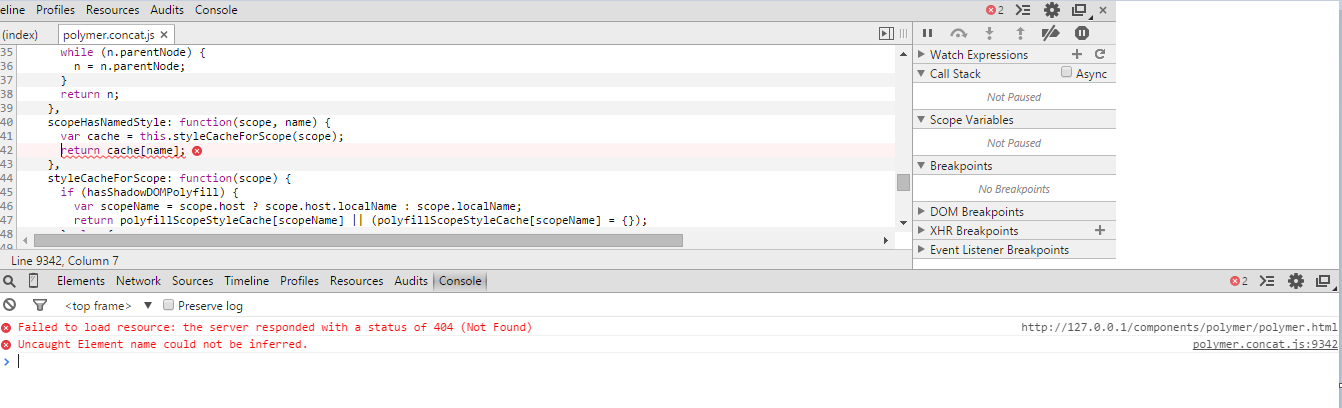
and here's my full index.html
<!DOCTYPE html>
<head><title>Test Site</title><meta charset="utf-8"><meta http-equiv="X-UA-Compatible" content="chrome=1" /><meta name="viewport" content="width=device-width, initial-scale=1.0"><link rel="stylesheet" href="css/style.css"><script src="//ajax.googleapis.com/ajax/libs/jquery/1.11.0/jquery.min.js"></script><script src="js/viewportchecker.js?v=20120206"></script><core-scaffold responsiveWidth="600px"> <core-header-panel navigation flex mode="scroll"> <core-toolbar>Navigation</core-toolbar> <core-menu theme="core-light-theme"> <core-item icon="home" label="Home"></core-item> <core-item icon="account-circle" label="Who am i"></core-item> <core-item icon="work" label="Works"></core-item> <core-item icon="gesture" label="Skills" name="skills" on-tap="{{scrollToTopic}}"><a href="#skill"></a></core-item> <core-item icon="settings-phone" label="Contacts" name="contacts" on-tap="{{scrollToTopic}}"><a href="#contacts"></a></core-item> <core-item icon="link" label="v8"></core-item> <core-item icon="link" label="v7"></core-item> <core-item icon="link" label="v6"></core-item> </core-menu> </core-header-panel> <div tool><strong>Test</strong> <span style="font-weight:300;">Site</span></div> <div><header-koh></header-koh></div><div class="ab-effect"> <div id="about"><about-koh></about-koh></div></div><div class="wk-effect"> <div id="works" touch-action="pan-y"> <works-koh></works-koh> </div></div><div class="sk-effect"> <div id="skills"> <skills-koh></skills-koh> </div></div><div class="ct-effect"> <div id="contacts"> <contacts-koh></contacts-koh> </div></div>
</core-scaffold>
<script src="foundation/js/vendor/jquery.js"></script> <script src="foundation/js/foundation.min.js"></script> <script> $(document).foundation(); </script> <script> Polymer({ scrollToTopic: function(e) { var id = e.target.getAttribute('name'); if (id) { this.$.core_scaffold.scroller.scrollTop = this.$[id].offsetTop - 75; } } }); </script>
</body></html>
can anyone do it on jsfiddle? thanks

Frankie Fu
Nov 12, 2014, 8:36:56 PM11/12/14
to Gee Jay Almestas, polymer-dev
Your code is not correct about where you can use Polymer({... }); I suggest to read the "Understanding Polymer" section here: https://www.polymer-project.org/docs/start/everything.html
Follow Polymer on Google+: plus.google.com/107187849809354688692
---
You received this message because you are subscribed to the Google Groups "Polymer" group.
To unsubscribe from this group and stop receiving emails from it, send an email to polymer-dev...@googlegroups.com.
To view this discussion on the web visit https://groups.google.com/d/msgid/polymer-dev/f8323ede-d4f6-43cd-8ccc-17569390e2b0%40googlegroups.com.
Gee Jay Almestas
Nov 12, 2014, 9:05:10 PM11/12/14
to polym...@googlegroups.com, jigsg...@gmail.com
thanks alot this solved my problem... can i request one more thing? to add a smooth scroll effect :) many thanks
Eric Bidelman
Nov 12, 2014, 9:11:24 PM11/12/14
to Gee Jay Almestas, polymer-dev
Smooth scrolling is coming to the native DOM APIs: https://www.chromestatus.com/features/5812155903377408
To view this discussion on the web visit https://groups.google.com/d/msgid/polymer-dev/cf9433e4-7568-4b34-b010-08d1f46e0014%40googlegroups.com.
Gee Jay Almestas
Nov 13, 2014, 4:25:18 AM11/13/14
to polym...@googlegroups.com, jigsg...@gmail.com
sorry because im only a newbie coder and only know basic jquery so don't have any idea of how to deal with it.. would be better if can add it to this code
<script> var scraffold = document.getElementById('scaffold'); var menu = document.getElementById('menu'); menu.addEventListener('core-select', function(e) { if (e.detail.isSelected) { scrollToSection(e.detail.item.getAttribute('name')); } }); function scrollToSection(id) { var section = document.getElementById(id); if (section) { scaffold.$.headerPanel.scroller.scrollTop = section.offsetTop; } } </script>
Claudius Nicolae
Nov 14, 2014, 11:56:23 AM11/14/14
to polym...@googlegroups.com, jigsg...@gmail.com
Reply all
Reply to author
Forward
0 new messages