
General question about using core-component-page
119 views
Skip to first unread message

Jeff Schwartz
Jan 15, 2015, 8:56:32 AM1/15/15
to polym...@googlegroups.com
How do I get core-component-page to include multiple .html and .js files. I tried this:
<core-component-page sources="['rtr-router.html', 'rtr-router.js',
'rtr-history.html', 'rtr-history.js', 'rtr-route.html', 'rtr-route.js',
'rtr-lazyroute.html', 'rtr-lazyroute.js']"></core-component-page>
but it doesn't work:
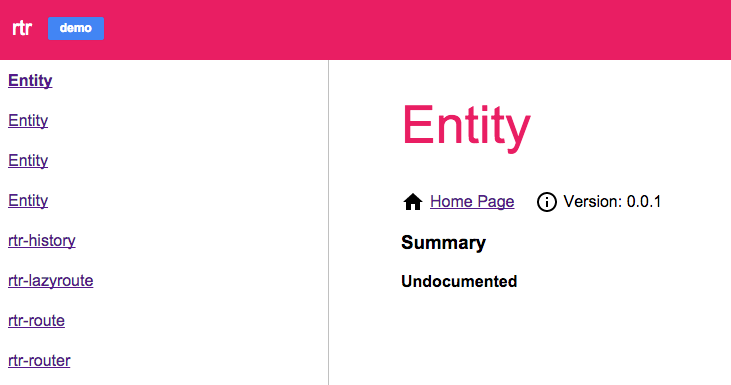
Thanks in advance.
Jeff Schwartz
Jan 15, 2015, 9:29:51 AM1/15/15
to polym...@googlegroups.com
I forgot to mention that I am using the instructions found @ https://www.polymer-project.org/docs/start/reusableelements.html to publish my element on github pages. You can view the page here http://jeffschwartz.github.io/rtr/components/rtr/.

Arthur Evans
Jan 15, 2015, 8:58:36 PM1/15/15
to Jeff Schwartz, polymer-dev
Two things I noticed -- your .js files don't include @element, which is why you're seeing the Entity entries. Unfortunately, in my limited testing the doc tool doesn't merge entries with the same name, so if you add @element here, you end up with two rtr-history entries, for example, one from the .html file and one from the .js file.
In your case, since there's no other doc in the .html files, you can move all of the docs to the .js files and you should be fine (I think).
Also, the methods should be:
Description
@method methodname
Unfortunately, unlike JSDoc the tool doesn't infer method names, so if you leave out the @method it won't show up.
Hope this helps.
OK
Arthur
Follow Polymer on Google+: plus.google.com/107187849809354688692
---
You received this message because you are subscribed to the Google Groups "Polymer" group.
To unsubscribe from this group and stop receiving emails from it, send an email to polymer-dev...@googlegroups.com.
To view this discussion on the web visit https://groups.google.com/d/msgid/polymer-dev/011ca175-9e69-4646-87d6-7912e04d6885%40googlegroups.com.
Jeff Schwartz
Jan 20, 2015, 11:48:08 AM1/20/15
to polym...@googlegroups.com, jeffts...@gmail.com
Thanks, Arthur. I've removed all standalone scripts and inlined everything. I've modeled my JSDocs after those I found in core elements (i.e. core-ajax). I am still experiencing numerous issues after all of that:
I've spent more time on this than on building my components lol. Any advice you throw at this would be greatly appreciated. Thank you.
Arthur Evans
Jan 20, 2015, 3:01:36 PM1/20/15
to Jeff Schwartz, polymer-dev
Hi Jeff,
Sorry about the confusion.
I still see problems with the method docs. Here, there's a function with no @method tag:
(Although perhaps that's an internal function and is not supposed to be documented.)
And here, the description is on the same line as the @method tag:
From looking at the core docs, it looks like the format should be similar to your @attribute docs, with the description first, followed by:
@method methodName
On its own line. Here's an example:
Thanks,
Arthur
To view this discussion on the web visit https://groups.google.com/d/msgid/polymer-dev/fbf403b7-3ba3-4d91-808b-53d206e43d18%40googlegroups.com.
Jeff Schwartz
Jan 20, 2015, 4:03:39 PM1/20/15
to polym...@googlegroups.com, jeffts...@gmail.com
Yes, those are internal api functions and not to be documented. In regard to your other suggestions I had tried all of them previously but they didn't work either. To provide more context I just pushed out a version implementing your suggestions. If you visit again you'l now find different issues:
Although @method is used it isn't rendered.
Although @attribute is used it isn't rendered. Same goes for @default.
Further investigation -- looking into the DOM -- reveals that the markup is present in the DOM but their text contents aren't being rendered. I've included the screen shot below which clearly shows that method name "ready" is in the markup but isn't being rendered. Same goes for issues with attributes as well:

What do you suggest I do at this point and thanks again for your assistance?
Arthur Evans
Jan 20, 2015, 8:40:21 PM1/20/15
to Jeff Schwartz, polymer-dev
Hi Jeff,
Thanks for the screenshot, that's helpful.
I'm seeing very different results over here. Here's what that page looks like to me:

I'm not seeing the invisible text issue. Parameter types are also showing correctly, which seem to be missing in your screenshot. If you're reproducing this consistently, can you please open a bug over here:
And include your browser, browser version and OS? You might also want to try opening it with extensions disabled and/or in an incognito window to verify that you haven't got something funky hanging around your browser session.
Thanks,
Arthur
To view this discussion on the web visit https://groups.google.com/d/msgid/polymer-dev/cb49f910-0e00-44f8-9ac8-fe6c7a93d68c%40googlegroups.com.
Jeff Schwartz
Jan 20, 2015, 8:45:47 PM1/20/15
to polym...@googlegroups.com, jeffts...@gmail.com
I'm using Chrome v39.0.2171.99 (64-bit) on a Mac. What are you using?
Jeff Schwartz
Jan 23, 2015, 11:33:07 AM1/23/15
to polym...@googlegroups.com, jeffts...@gmail.com
You must be using Canary. It works for me there also. It breaks in Chrome. Issue filed.
Thank you, Arthur, for your assistance and help. Most excellent!
Arthur Evans
Jan 23, 2015, 5:08:37 PM1/23/15
to Jeff Schwartz, polymer-dev
Thanks, Jeff.
I was actually on Beta (40), which just updated to 41. Hopefully this bug is confined to 39, and it will go away as stable updates to 40. I appreciate your patience -- thanks for filing a bug.
Cheers,
Arthur
To view this discussion on the web visit https://groups.google.com/d/msgid/polymer-dev/c17ee988-2566-4ac7-9702-71ca8c426b13%40googlegroups.com.
Reply all
Reply to author
Forward
0 new messages