
Introducing the Metawidget Web Component
98 views
Skip to first unread message

Richard Kennard
Nov 2, 2014, 7:24:50 PM11/2/14
to polym...@googlegroups.com
Hi guys,
I've recently ported my Open Source project Metawidget to Web Components/Polymer, and would really value your feedback.
What is Metawidget?
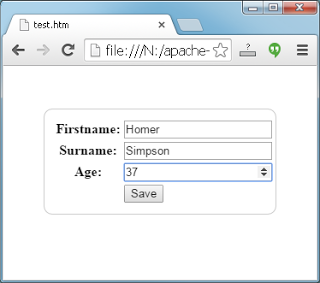
Metawidget is a smart widget that populates itself, at runtime, with UI components to match the properties of domain objects. For example, this Web Components code...
...will produce...
Metawidget is a mature project that supports over a dozen front-end frameworks, but Web Components is very new to me so I'd love any 'best practice' advice!
Regards,
Richard.
I've recently ported my Open Source project Metawidget to Web Components/Polymer, and would really value your feedback.
What is Metawidget?
Metawidget is a smart widget that populates itself, at runtime, with UI components to match the properties of domain objects. For example, this Web Components code...
<!DOCTYPE HTML>
<html>
<head>
<script src="metawidget-core.min.js"></script>
<style>
#metawidget {
border: 1px solid #cccccc;
width: 250px;
border-radius: 10px;
padding: 10px;
margin: 50px auto;
display: block;
}
</style>
<script>
var person = {
firstname: 'Homer',
surname: 'Simpson',
age: 36,
save: function() {
document.getElementById( 'metawidget' ).save();
console.log( person );
}
}
</script>
</head>
<body>
<x-metawidget id="metawidget" path="person"></x-metawidget>
</body>
</html>
...will produce...
Metawidget is a mature project that supports over a dozen front-end frameworks, but Web Components is very new to me so I'd love any 'best practice' advice!
Regards,
Richard.

Nickolas Daskalou
Nov 2, 2014, 8:09:10 PM11/2/14
to Richard Kennard, polymer-dev
Richard, thanks for this, it looks powerful and a time saver.
Look forward to taking it for a spin.
Nick
Follow Polymer on Google+: plus.google.com/107187849809354688692
---
You received this message because you are subscribed to the Google Groups "Polymer" group.
To unsubscribe from this group and stop receiving emails from it, send an email to polymer-dev...@googlegroups.com.
To view this discussion on the web visit https://groups.google.com/d/msgid/polymer-dev/4f9c2f0f-2b6d-4b84-89dd-5864f6c27710%40googlegroups.com.
For more options, visit https://groups.google.com/d/optout.
Reply all
Reply to author
Forward
0 new messages