
Serial Terminal for PiDP-8
1,904 views
Skip to first unread message

phi...@geyer.co.uk
Jul 14, 2015, 6:44:42 AM7/14/15
to pid...@googlegroups.com
Hi all,
I was just thinking, SSH'ing into the PiDP seems a little like cheating. Would it be possible to hook up simh to an external serial terminal and connect with that?
Not that I own a serial terminal, but I've been thinking for a while that I'd love to make something like a VT220 clone using a pi and a little screen.

Obsolescence
Jul 14, 2015, 11:40:16 AM7/14/15
to pid...@googlegroups.com, phi...@geyer.co.uk
Yes, I've used a VT-100 using a TTL-to-RS-232 converter ($2 on Aliexpress and the like).
The PiDP needs the serial modification done as per the web site, and then it's no problem.
One very nice feature with the serial modification: you can use a TTL-Serial-to-USB cable ($5 or so) and it both powers the PiDP from your laptop and acts as the terminal. So one wire is all you need then.
Regards,
Oscar.
phi...@geyer.co.uk
Jul 14, 2015, 12:08:27 PM7/14/15
to pid...@googlegroups.com, vermeul...@gmail.com
That's great! I knew I wouldn't have been the first person to think about this.
I am definitely going to have to find time to make a terminal clone using a pi or other single board computer. I have a little 5" HDMI screen which will display one row too little for a VT220 (I think) but it might be good enough.
Phil

Mike Barnes
Jul 26, 2015, 6:15:56 AM7/26/15
to phi...@geyer.co.uk, pid...@googlegroups.com, vermeul...@gmail.com
Actually, there is another, easier way, to connect one or more serial terminals to SimH without the bother of TTL-- just use regular USB serial ports. The PiDP8 changes have been against SimH 3.9. The current version for the last several years has been '4.0'. It's not really a 'version', it's just a GIT repository where you pull the latest contents. They don't plan on doing regular releases. Besides lots of bug fixes since the old 3.9, they made some major changes to the multiplexer (across all CPU's that use it, which includes the PDP8 TTIX device) so that instead of just handling telnet connections, you can have combinations of telnet and regular serial lines. You just list the baud rates and serial ports and away you go. I back ported Oscar's SimH 3.9 changes against the latest 4.0 'version' and so far so good-- although not extensively tested at this point.
Mike--
You received this message because you are subscribed to the Google Groups "PiDP-8" group.
To unsubscribe from this group and stop receiving emails from it, send an email to pidp-8+un...@googlegroups.com.
To post to this group, send email to pid...@googlegroups.com.
To view this discussion on the web visit https://groups.google.com/d/msgid/pidp-8/f8f725a7-cda5-43ef-8394-d77a18ee10b0%40googlegroups.com.

Dylan McNamee
Jul 26, 2015, 2:05:56 PM7/26/15
to PiDP-8, michael.r...@gmail.com, michael.r...@gmail.com
Mike,
This sounds great! Do you plug something like an FTDI serial->USB device in to the Pi (if so, where?), or something else? If you've got your simh 4.0 merge with PiDP8 on github, a pointer to that would be cool too.
thanks,
thanks,
dylan
-
Mike Barnes
Jul 26, 2015, 8:02:47 PM7/26/15
to Dylan McNamee, PiDP-8
Dylan,
I'd be happy to post the patch, but since it's basically Oscar's code would like to get his permission first. Not really clear based on the lack of any licensing information for simh39, simh40, or Oscar's code what the limits are.load tss8_init.bin
set df disabled
set rl disabled
set rf enabled
attach rf tss8_rf.dsk
attach ttix Line=0,192.168.11.39:2321
attach ttix Line=1,192.168.11.39:2322
attach ttix Line=2,Connect=/dev/ttyUSB0;300-8n1
attach ttix Line=3,Connect=/dev/ttyUSB1;300-8n1
run 24200

Jamie Cox
Aug 4, 2015, 11:11:56 AM8/4/15
to PiDP-8, phi...@geyer.co.uk, vermeul...@gmail.com
I'm interested in adding a serial port in this way. What do you mean "regular USB serial ports"? I have a Keyspan USB-serial adapter USA-19Qi, for example. Any idea if that will work? I'd obviously need to get it working in Linux, first.
-Jamie
-Jamie
On Sunday, July 26, 2015 at 6:15:56 AM UTC-4, Mike Barnes wrote:
Actually, there is another, easier way, to connect one or more serial terminals to SimH without the bother of TTL-- just use regular USB serial ports. The PiDP8 changes have been against SimH 3.9. The current version for the last several years has been '4.0'. It's not really a 'version', it's just a GIT repository where you pull the latest contents. They don't plan on doing regular releases. Besides lots of bug fixes since the old 3.9, they made some major changes to the multiplexer (across all CPU's that use it, which includes the PDP8 TTIX device) so that instead of just handling telnet connections, you can have combinations of telnet and regular serial lines. You just list the baud rates and serial ports and away you go. I back ported Oscar's SimH 3.9 changes against the latest 4.0 'version' and so far so good-- although not extensively tested at this point.Mike
On Tue, Jul 14, 2015 at 12:08 PM, <phi...@geyer.co.uk> wrote:
That's great! I knew I wouldn't have been the first person to think about this.I am definitely going to have to find time to make a terminal clone using a pi or other single board computer. I have a little 5" HDMI screen which will display one row too little for a VT220 (I think) but it might be good enough.Phil
On Tuesday, July 14, 2015 at 4:40:16 PM UTC+1, Obsolescence wrote:Yes, I've used a VT-100 using a TTL-to-RS-232 converter ($2 on Aliexpress and the like).The PiDP needs the serial modification done as per the web site, and then it's no problem.One very nice feature with the serial modification: you can use a TTL-Serial-to-USB cable ($5 or so) and it both powers the PiDP from your laptop and acts as the terminal. So one wire is all you need then.Regards,Oscar.
--
You received this message because you are subscribed to the Google Groups "PiDP-8" group.
To unsubscribe from this group and stop receiving emails from it, send an email to pidp-8+unsubscribe@googlegroups.com.
To post to this group, send email to pid...@googlegroups.com.
Mike Barnes
Aug 4, 2015, 11:48:34 AM8/4/15
to Jamie Cox, PiDP-8
In general, to see if your USB to serial adapter would work in Linux with SimH 4.0 mods, do the following:
Type:Jamie Cox
Aug 5, 2015, 11:09:14 AM8/5/15
to PiDP-8, jamie...@gmail.com
Thanks, Mike,
My Keyspan adapter was not recognized initially. However, after following instructions here:
http://www.chrisdanielson.com/2012/04/10/linux-firmware-keyspan-usb-to-serial/
It is now recognized by Linux. It needed the secret-sauce firmware.
My Keyspan adapter was not recognized initially. However, after following instructions here:
http://www.chrisdanielson.com/2012/04/10/linux-firmware-keyspan-usb-to-serial/
It is now recognized by Linux. It needed the secret-sauce firmware.
Jamie Cox
Aug 5, 2015, 2:10:48 PM8/5/15
to PiDP-8, jamie...@gmail.com
So, I have a really easy and useful way to get a serial port working with the PiDP8.
You'll need some sort of USB-to-serial adapter. They're cheap. I used my old Keyspan USA-19Qi. And, of course, you'll need some sort of serial terminal.
Assuming your adapter is recognized by Linux, it will probably be /dev/ttyUSB0. If not, see my previous post.
After that, I added the following line to /etc/inittab:
where 9600 is my terminal's baud rate, and ansi is the terminal type, like vt100. I chose to have it login automatically after you hit return. You don't have to type the username or password. It is a local terminal, after all. With Oscar's standard scripts, you just drop right into the simulator. No modifications to simh or to the hardware are required. My terminal is a Zenith Z-19, which seems to respond okay to the ansi terminal type. Enjoy!
You'll need some sort of USB-to-serial adapter. They're cheap. I used my old Keyspan USA-19Qi. And, of course, you'll need some sort of serial terminal.
Assuming your adapter is recognized by Linux, it will probably be /dev/ttyUSB0. If not, see my previous post.
After that, I added the following line to /etc/inittab:
# Example how to put a getty on a serial line (for a terminal)
#
T0:23:respawn:/sbin/agetty -L --autologin pi --login-pause ttyUSB0 9600 ansi
#T1:23:respawn:/sbin/getty -L ttyS1 9600 vt100
#
T0:23:respawn:/sbin/agetty -L --autologin pi --login-pause ttyUSB0 9600 ansi
#T1:23:respawn:/sbin/getty -L ttyS1 9600 vt100
where 9600 is my terminal's baud rate, and ansi is the terminal type, like vt100. I chose to have it login automatically after you hit return. You don't have to type the username or password. It is a local terminal, after all. With Oscar's standard scripts, you just drop right into the simulator. No modifications to simh or to the hardware are required. My terminal is a Zenith Z-19, which seems to respond okay to the ansi terminal type. Enjoy!
Philipp Geyer
Aug 5, 2015, 4:58:23 PM8/5/15
to Jamie Cox, PiDP-8
This is great!
Unfortunately I've not got a real life terminal, but I've got a stack of Prolific USB-TTL adapters that came with various things so using one on the PiDP and one plugged into my laptop, I can use screen to connect directly with the PDP simulator.
Now I just need to decide which connectors to put on the back of my PiDP and start building my VT220 clone :p
Phil
Unfortunately I've not got a real life terminal, but I've got a stack of Prolific USB-TTL adapters that came with various things so using one on the PiDP and one plugged into my laptop, I can use screen to connect directly with the PDP simulator.
Now I just need to decide which connectors to put on the back of my PiDP and start building my VT220 clone :p
Phil
Dylan McNamee
Aug 9, 2015, 2:00:11 PM8/9/15
to PiDP-8
I don't own a serial terminal (yet) either - I've given up looking for a reasonable one on eBay, so I've decided to build one, using the instructions here:
For about $30-ish in parts, I'll have something that will turn a cheap VGA LCD and a PS/2 keyboard into a VT-100. I'm planning on ordering multiple of the PCB's, so if anyone wants to amortize that cost with me, let me know.
Once I've built this, I'll be performing the serial port modification to my PiDP-8...
dylan

Norman Davie
Aug 9, 2015, 2:55:51 PM8/9/15
to PiDP-8
Dylan, it would help to know where you're located. I'm near Vancouver, BC, Canada.
Dylan McNamee
Aug 9, 2015, 3:48:14 PM8/9/15
to PiDP-8
Oops - I'm in Portland, Oregon (USA) - shipping to you should be pretty cheap.
Norman Davie
Aug 9, 2015, 6:06:31 PM8/9/15
to PiDP-8
Ok, count me in. PM the details.

Jeff
Aug 9, 2015, 6:16:15 PM8/9/15
to PiDP-8
Please add me to the list, also. Thank you for doing this.
j.e.b.

Mark Jungwirth
Aug 9, 2015, 11:32:51 PM8/9/15
to PiDP-8
Here's another option that's been around a while. You might even be interested in an Apple I replica as well:
http://www.brielcomputers.com/wordpress/?cat=25
http://www.brielcomputers.com/wordpress/?cat=25

Chris Smith
Aug 10, 2015, 12:05:44 AM8/10/15
to PiDP-8
This isn't exactly a "serial terminal" solution, but it might serve some of the common scenarios described above.
I haven't tried this myself, but these instructions -- https://lb.raspberrypi.org/forums/viewtopic.php?f=47&t=2505 -- give details on pointing the default output to the composite video port.
Although not the ideal solution for graphics, it should be tweakable to support a basic 80x25 text mode screen.
Then use a USB port - even a single USB port - for a wireless keyboard dongle. I would likely go with something like a Logitech K400, which I have used in several mobile scenarios. For my needs, it has always been lightweight and robust, and it includes a touchpad so you don't need a mouse.
Having your "PDP-8" showing on a plain monitor would be fairly classic looking. I still own a Zenith ZVM-1220A (composite NTSC, amber) so the phosphor should colour co-ordinate with the PiDP-8 front panel!
If you were travelling with the device, many TVs and projectors still sport a composite input, which I would expect the Pi can drive quite handily. It's still no Teletype Model 33 ASR, but it also does not require a network!
You still need to get a composite video signal out of the box (and 5 volt power into it!) but those would be much less intrusive than either a network or HDMI connection. Both an RCA jack for video and a barrel connector for power will mount in easily drilled small holes. (For more compatibility, this is rather cool -- http://www.datapro.net/products/usb-micro-b-panel-mount-extension-cable-m-f.html (As an aside, it looks like searching for "waterproof jacks" often shows hole mounted USB, power, and network connectors, since the O-ring seal is more easily managed when round; for us, it's just easier to drill one round hole, and mount a connector in that.) It has also occurred to me that I could cut one reasonable sized hole and put a six hole keystone wall cover over it, and mount whatever connectors I need in the keystone openings. If you did that, you could connect a serial terminal over an RJ-45 (8P8C) connector in the same way that Cisco consoles work.
I haven't tried this myself, but these instructions -- https://lb.raspberrypi.org/forums/viewtopic.php?f=47&t=2505 -- give details on pointing the default output to the composite video port.
Although not the ideal solution for graphics, it should be tweakable to support a basic 80x25 text mode screen.
Then use a USB port - even a single USB port - for a wireless keyboard dongle. I would likely go with something like a Logitech K400, which I have used in several mobile scenarios. For my needs, it has always been lightweight and robust, and it includes a touchpad so you don't need a mouse.
Having your "PDP-8" showing on a plain monitor would be fairly classic looking. I still own a Zenith ZVM-1220A (composite NTSC, amber) so the phosphor should colour co-ordinate with the PiDP-8 front panel!
If you were travelling with the device, many TVs and projectors still sport a composite input, which I would expect the Pi can drive quite handily. It's still no Teletype Model 33 ASR, but it also does not require a network!
You still need to get a composite video signal out of the box (and 5 volt power into it!) but those would be much less intrusive than either a network or HDMI connection. Both an RCA jack for video and a barrel connector for power will mount in easily drilled small holes. (For more compatibility, this is rather cool -- http://www.datapro.net/products/usb-micro-b-panel-mount-extension-cable-m-f.html (As an aside, it looks like searching for "waterproof jacks" often shows hole mounted USB, power, and network connectors, since the O-ring seal is more easily managed when round; for us, it's just easier to drill one round hole, and mount a connector in that.) It has also occurred to me that I could cut one reasonable sized hole and put a six hole keystone wall cover over it, and mount whatever connectors I need in the keystone openings. If you did that, you could connect a serial terminal over an RJ-45 (8P8C) connector in the same way that Cisco consoles work.

Bill Laing
Aug 16, 2015, 12:02:35 AM8/16/15
to PiDP-8, jamie...@gmail.com
I intend to connect an RJ45 socket to the serial port on the PiDP8. Then using a terminal emulator on my laptop (and there are several of those the most common of which is Putty) along with a Cisco console cable and USB adapter, I will have as near to a serial terminal as I can get without actually using a terminal.
Chris Smith
Aug 17, 2015, 11:34:04 AM8/17/15
to PiDP-8, jamie...@gmail.com
You've got a bit of historical plausible deniability for using a 8P8C serial connection on your PiDP-8!
The first modular jacks of that style started appearing in the U.S. phone system in 1976. So, the last of the PDP-8 line would still have been selling when these style of connectors were introduced.
Use of the connector as a serial port is standardized in EIA-TIA-561, which dates to about 1990. However, it was definitely in use before that (many "standards" work this way), but it's not clear by how much.
Given the presence of the modular connectors and a realization that even the most sophisticated serial port on a PDP-8 used only 8 lines, it would have been a obvious connection option to anyone familar with all the pieces. (However, I suspect that all PDP-8/I units had a current loop interface for an original ASR-33, not a RS-232 style serial port.)
... chris
Jamie Cox
Aug 26, 2015, 12:05:30 PM8/26/15
to PiDP-8
Is anyone else using inittab to connect their serial terminal?
I am seeing two problems with my own method here.
1.) The terminal doesn't always connect at startup. If it doesn't, usually nothing I do at the terminal will get it to connect, although today I cycled power on the terminal and it came up. This could be a problem with my terminal or with my USB-serial adapter. If it doesn't startup, I can still ssh in via WiFi.
2.) The Z-19 gets into some odd graphics mode and doesn't get out unless I reset it from the keyboard. The Z-19 works fine in the PDP-8 environment, but it doesn't get along with "screen". As I remember, the PDP-8 was probably about the last machine & OS that the Z-19 was fully compatible with :). The Z-19 is supposed to be an ANSI terminal, but it emulates a vt52, not a vt100, and maybe not totally faithfully, at that. Most of you will probably find a VT100-compatible terminal, I hope, and not see this problem.
-Jamie
I am seeing two problems with my own method here.
1.) The terminal doesn't always connect at startup. If it doesn't, usually nothing I do at the terminal will get it to connect, although today I cycled power on the terminal and it came up. This could be a problem with my terminal or with my USB-serial adapter. If it doesn't startup, I can still ssh in via WiFi.
2.) The Z-19 gets into some odd graphics mode and doesn't get out unless I reset it from the keyboard. The Z-19 works fine in the PDP-8 environment, but it doesn't get along with "screen". As I remember, the PDP-8 was probably about the last machine & OS that the Z-19 was fully compatible with :). The Z-19 is supposed to be an ANSI terminal, but it emulates a vt52, not a vt100, and maybe not totally faithfully, at that. Most of you will probably find a VT100-compatible terminal, I hope, and not see this problem.
-Jamie
Dylan McNamee
Aug 27, 2015, 11:59:36 PM8/27/15
to PiDP-8
The VT100 project is alive -- here it is, connected to my PiDP-8, running adventure:
I'll send details (to Jeff and Norman) about options for getting your own. PCB only, PCB + programmed PIC32, or "all the parts included". PCB only is going to be $5 + shipping to you. Parts cost will depend on amortized shipping from Mouser. Others are still welcome to join (I still have 3 PCBs unclaimed).
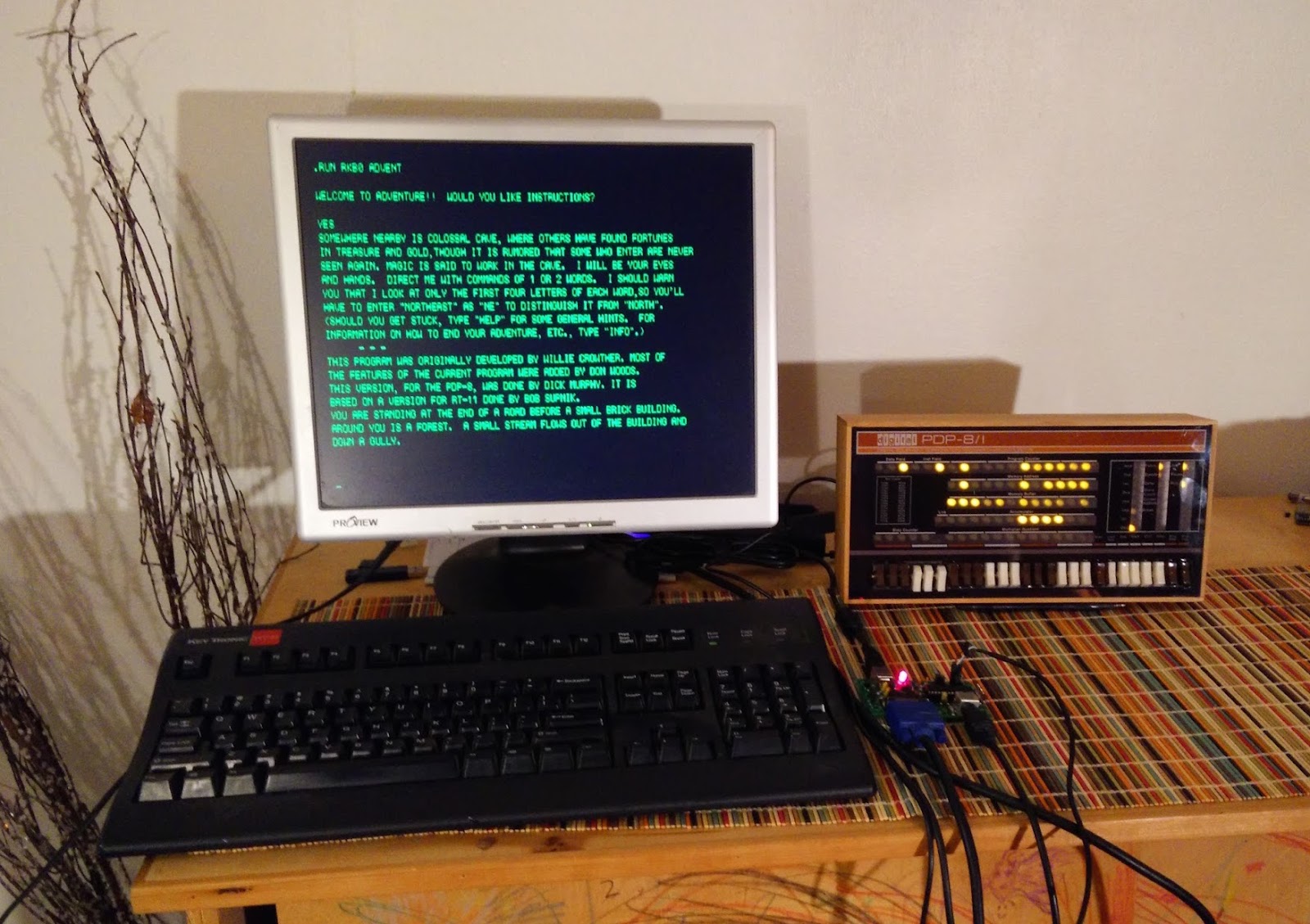
Hope folks will have fun at the V C F M W this weekend - I'm jealous.
very best,
dylan


AB
Mar 6, 2016, 9:08:29 PM3/6/16
to PiDP-8
Hi Dylan, can you count me in?
thanks
Andy
thanks
Andy

Jon Jackson
Mar 6, 2016, 9:39:43 PM3/6/16
to PiDP-8
Dylan,
I don't know if you have any PCBs or kits left, but I would be interested in one.
Jon
Dylan McNamee
Mar 6, 2016, 9:57:48 PM3/6/16
to PiDP-8
Andy, Jon,
I don't have any of these PCB's left...sorry!
dylan
--
Jon Jackson
Mar 6, 2016, 10:04:06 PM3/6/16
to PiDP-8
No problem Dylan. Thanks for the response.
Jon
AB
Mar 7, 2016, 12:25:34 PM3/7/16
to PiDP-8
hey no worries :-)

Tom Stewart
Mar 7, 2016, 1:33:18 PM3/7/16
to PiDP-8
I've been looking for something like this as well. The company I work for sold software that ran on mini computers via serially connected dumb terminals (proprietary, though...) until perhaps 10 years ago. We still have customers running this stuff. Towards the end of the active sales life of the product, we worked with Data General to produce a new dumb terminal, and the nice thing was that it was a simple box with a VGA connector for the monitor, a PS/2 connector for keyboard, and a serial port. So it used the vernacular hardware of the day that it could, and of course inside the box was a simple circuit board with only those 3 external connections. Oh, plus power. :-)
In my searching, I came across 3 likely candidates: "ASCII Video Terminal (AVT)", PockeTerm, and CoggyTerm. CoggyTerm (http://forums.parallax.com/discussion/108928/coggyterm-2-0d-terminal-w-vt100-emulation) appears to be software which presumably can run on some kind of Propellor dev board. PockeTerm (http://www.brielcomputers.com/wordpress/?cat=25) is/was more of a product, made by Vince Briel, but his site has been idle for 2+ years, and there have been messages on other fora indicating people have sent money & received no product. :-( Other than that, it looks like a great option! AVT is a similar, dedicated circuit board http://geoffg.net/terminal.html that Geoff has done as an open source project. At least it looks that way. Schematic is there, Gerber files, firmware, source for firmware, etc. And I think you can buy the board at least, possibly other components, from an australian site where the article was first published: http://www.siliconchip.com.au/Shop/8/2760.
Seems almost ripe for someone to package up :-)

Roger Smith
Mar 8, 2016, 6:45:28 AM3/8/16
to PiDP-8
There is certainly code on the propeller object exchange to do vga output, and there is even a standard breakout board to give a vga connector and ps/2 keyboard and mouse connectors. I'd have to go digging in the graveyard of old projects to find all the pieces, but I have certainly had a very nice vga display from just a propeller chip plus the breakout board. If I remember rightly, I also added a 32k eeprom for the propeller to boot from, giving me a self-contained unit.
The other thing is that there is a fully functioning IDE for SPIN and PASM which runs happily on a raspberry pi.
Roger
The other thing is that there is a fully functioning IDE for SPIN and PASM which runs happily on a raspberry pi.
Roger

Andrew Bingham
Mar 9, 2016, 4:13:19 PM3/9/16
to PiDP-8
Several of us on the S100Computers Google group & RetroBrew Computer Forums have experimented with the little PIC ASCII terminal. I have a board here waiting to be built. The boards are small and easy to get from for example OSH Park or Seedstudio using the Gerber files provided on the site.
Some potential advantages over the Propeller boards:
-Program storage is internal to the PIC so no external ROM is required
-Smaller DIP28 package of the PIC vs the larger Propeller
-PIC chip significantly less expensive than Propeller
-Extended VT100 emulation may be better than CoggyTerm which is of unknown completeness
One thing to note. The serial connection on the ASCII terminal board is tolerant to RS232-level +/- 12V on the Rx line by way of a resistor, but the Tx line only transmits at 3.3V. This is perfect for interfacing directly to a 3.3V Pi, not may not work so well with actual vintage equipment that expects full RS-232 levels.
Andrew
Tom Stewart
Mar 11, 2016, 12:33:41 PM3/11/16
to PiDP-8
You're specifically referring to the ASCII Video Terminal at "Geoff's Projects" from my post? It says on the site, "TTL or RS232 serial input/output" but you're telling me that's an exaggeration at best? Bit of a bummer. If I were a better/more motivated engineer, I'd tack on a MAX232 or similar to the board. Certainly adds some cost, but for safety/compatibility, it would seem useful.

Derek Hofmann
Mar 28, 2018, 2:27:04 AM3/28/18
to PiDP-8
Hi, I ordered a run of those ASCII Video Terminal boards and built one for myself, would anyone like a board? $5 should cover the cost of the board plus shipping to anywhere in the USA. I built mine with 4.7K and 47K resistors in place of the 10K and 100K pull-up resistors on the RX and 3.3V pins, and no composite jack (couldn't find the right one). Still waiting for the MAX3232 board to arrive before I test with the Altairduino. Can't wait!
Derek

slob
Mar 29, 2018, 12:24:29 AM3/29/18
to pid...@googlegroups.com
I've built a few of Geoff's PIC terminals (no PCB, WW) for myself. They work very well and I like that they support composite and PAL (with PAL, you get more columns/lines, and many studio monitors support PAL). The PIC's seem easier/less expensive to get in surface mount, even including a breadboard adapter, but Microchip's store is always available and not terribly expensive.
Although I made a standalone unit with PS/2 keyboard and composite/VGA, I took a somewhat different tack on a purpose-built terminal. This one, at https://hackaday.io/project/28227-esp8266-based-i8008-emulator (scroll down to the "Companion Terminal"), uses a TI99/4a keyboard* and another pic as a keyboard scanner to send" RS-232, and uses the terminal only to receive RS-232. I made another one similar to this using a 70's era keyboard "'plastic block" (no electronics). One works at 300 baud, one at 9600 baud because it is a big PITA to change the baud and unless I'm really trying to replicate that old time feel, 300 baud is really slow.
The hassle with this is that it took some work/reverse engineering to make the keyboard scanner; and, you have to move jumpers to change baud (on both processors, the keyboard and the video PIC). Also, you can't get to the video PIC's setup screen without a PS/2 keyboard.
I have found that dirt cheap PS/2 keyboards don't like to work with the terminal PIC. A good old Dell keyboard, no problem. You might think, "well, I'll recode it for USB instead of PS/2". This is easier said than done. I've tried to compile the unmodified source with the recommended version of the tools, and I could not get it to fit with the "free" version. I suspect that this is EXTREMELY tight even with the pro version ($$$) of the PIC compiler. Then, there is the small matter of actually getting USB hosting to work...
One thing I learned from another project was that a fairly inexpensive "arcade scan line generator" can make a VGA look something pretty close to a CRT. I have the schematic for one (I cheated when I built my MAMEish arcade game, I bought one built) but I haven't tried it out on a character based terminal yet. If you build one yourself, it's about $2.00 in chips max.
*NOTE: No good condition, working TI994/a computers were harmed in building that project.
Although I made a standalone unit with PS/2 keyboard and composite/VGA, I took a somewhat different tack on a purpose-built terminal. This one, at https://hackaday.io/project/28227-esp8266-based-i8008-emulator (scroll down to the "Companion Terminal"), uses a TI99/4a keyboard* and another pic as a keyboard scanner to send" RS-232, and uses the terminal only to receive RS-232. I made another one similar to this using a 70's era keyboard "'plastic block" (no electronics). One works at 300 baud, one at 9600 baud because it is a big PITA to change the baud and unless I'm really trying to replicate that old time feel, 300 baud is really slow.
The hassle with this is that it took some work/reverse engineering to make the keyboard scanner; and, you have to move jumpers to change baud (on both processors, the keyboard and the video PIC). Also, you can't get to the video PIC's setup screen without a PS/2 keyboard.
I have found that dirt cheap PS/2 keyboards don't like to work with the terminal PIC. A good old Dell keyboard, no problem. You might think, "well, I'll recode it for USB instead of PS/2". This is easier said than done. I've tried to compile the unmodified source with the recommended version of the tools, and I could not get it to fit with the "free" version. I suspect that this is EXTREMELY tight even with the pro version ($$$) of the PIC compiler. Then, there is the small matter of actually getting USB hosting to work...
One thing I learned from another project was that a fairly inexpensive "arcade scan line generator" can make a VGA look something pretty close to a CRT. I have the schematic for one (I cheated when I built my MAMEish arcade game, I bought one built) but I haven't tried it out on a character based terminal yet. If you build one yourself, it's about $2.00 in chips max.
*NOTE: No good condition, working TI994/a computers were harmed in building that project.
Derek Hofmann
Mar 30, 2018, 4:10:44 AM3/30/18
to PiDP-8
I had that PS/2 keyboard compatibility issue with my FleaFPGA Ohm running the minimig (Amiga 68010 ECS) core. Only one out of the three PS/2 keyboards I own works with it. However, I've just checked and all three work with the PIC terminal, so compatibility is pretty good. And there's something really satisfying about instant-on devices that makes a Raspberry Pi seem clunky. I just wish the resolution on the PIC terminal were better, preferably MDA/VGA or better, but it's perfectly usable as-is.
Reply all
Reply to author
Forward
0 new messages