alternative picoweb

1,233 views
Skip to first unread message

Dirk Sommerfeld

unread,
Mar 8, 2021, 5:41:00 AM3/8/21
to PicoChess
Hi ,
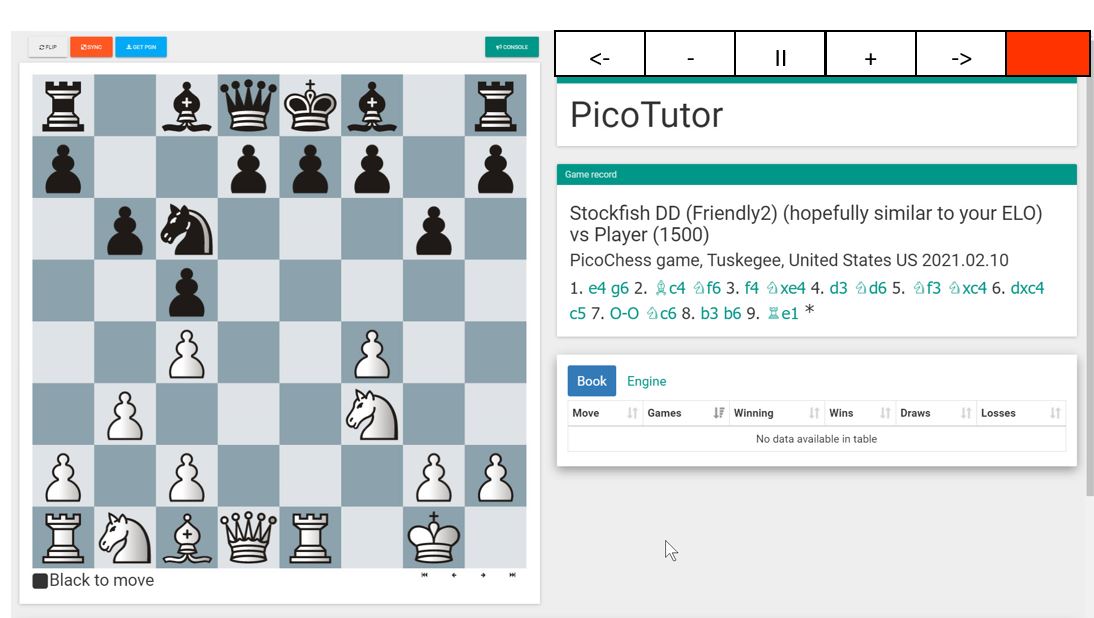
I'm looking for alternative Webdisplay's. Are any modifies version's of picoweb available? I'm looking for  optimized versiosn for small display's (3.5") . The button's to setup the engine are a little bit tiny...

Thanks Dirk

clarke baxter

unread,
Mar 8, 2021, 5:51:09 AM3/8/21
to PicoChess
Hi

Me too! Spent hours tinkering with the CSS of the existing. I managed to alter the button styling to make them larger but at the same time messed up the whole layout.

I've given up for now
cb

Chessfriend

unread,
Mar 8, 2021, 12:53:20 PM3/8/21
to PicoChess
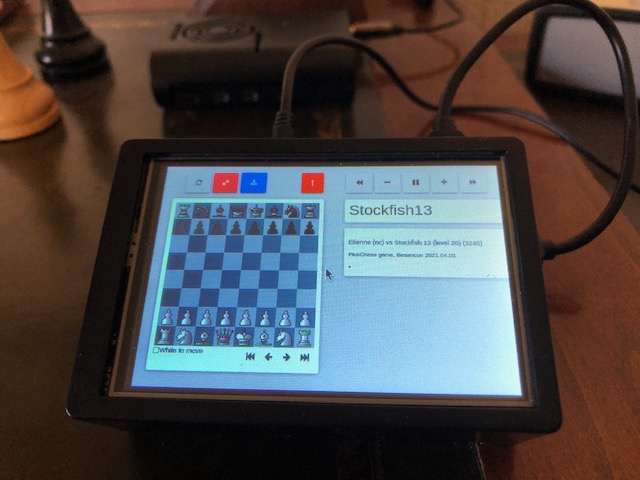
3B12B1DF-0F84-484E-A270-42E3CE371007.jpegHi Dirk,
I think Shiv is going to change this. The idea is to make the buttons MUCH bigger.
It should look like this. But I dont know WHEN Shiv will find the time to do this!

Peter

Shivkumar Shivaji

unread,
Mar 8, 2021, 12:55:41 PM3/8/21
to pico...@googlegroups.com
This should be very easy, i will look soon. 

--
You received this message because you are subscribed to the Google Groups "PicoChess" group.
To unsubscribe from this group and stop receiving emails from it, send an email to picochess+...@googlegroups.com.
To view this discussion on the web visit https://groups.google.com/d/msgid/picochess/b3e7e5e6-fd44-447b-8f5e-6c31600479cbn%40googlegroups.com.

clarke baxter

unread,
Mar 8, 2021, 4:09:08 PM3/8/21
to PicoChess
Just a thought. If there is to be an alternative for touch screen would it be better if the buttons were placed between the DGT Clock panel and the game record panel? That way one's hand is not covering the display of the menu items.

cb

Dirk Sommerfeld

unread,
Mar 9, 2021, 3:39:17 AM3/9/21
to PicoChess
@Chessfriend... it goe's in the right direction....
A first workarround is to modifiy the stylesheet section -> custom.css the values of bt_group to 3vh 2vw  ... The buttons will be a litte bit bigger , but this make the right buttons also a litte bit bigger.(there are in the same group).. so that 4vh 4vw will damage the design... But it helps a litte bit.

@shiv  I have a small wishlist for a small tft compatible design.. I think it is easy to change for someone with UX experiences..

All tables between engine books on buttons are informations, I don't need.

A good interface have the following components.

Buttons on Top, so it is possible zu use it on a tochscreen.
On the left... the graphical Board.... so it's fine now

On the right
Informations about the status of the Board
A line of the clock messages. If you use Long notes line H2-H2 it would be nice to see the same as like the clock. In BIG letters
A Line with big letters for the tutor

On the Botton with the full width..
Game records

That's all.... I think that will be easy to make ...

Cool and a dream would be a list of the favorites engines to select via a small click....  , but this is a dream :)


It would be very nice if someone could make this changes for a picoweb_small   
I take a look to the NG interface... that's nice, but you need a clock also to change the engine.. what ever

Best Dirk

Kyle Washington

unread,
Mar 10, 2021, 9:58:49 AM3/10/21
to PicoChess
Picochess with touchscreen.jpg
I purchased the 7" touchscreen and a case for it from Amazon.  I put it all together last night, and I love how it is so compact!  It's hard to get to the Pi, so I'm going to have to learn more about how to make upgrades instead of just grabbing the newest image every time... but that's ok.  I'm getting better at Linux stuff bit by bit.  Having larger buttons would be great, but I can make it work now.

The two things I would like to change first is to have a shortcut on the desktop - that is surprisingly more complex than it is in Windows.  I googled a bunch, and it seems I have to create a launcher file or something - so instead I just put a shortcut in the bookmarks bar, so I can get to it in a couple of finger presses.  That's fine.  The second issue is that the screen goes black every couple of minutes.  I need to adjust the timing in the configuration of the Pi, I guess... but if the Webserver could ping the screen every 60 seconds or so where it would only stay on when the webserver is running, then I wouldn't have to have the Pi screen be on all of the time.  I'll probably turn  the whole thing off when I'm not using it, but I'll share my thoughts in case it gives someone a great idea.

The case is very well done, and they give you a lot of attachments to configure it.  But I don't get to plug in my speaker... so I am using it via Bluetooth.  That mostly works, but it may be better to find a small speaker to plug in that fits inside the case.  If I could get the speaker and the board to both work via Bluetooth, then it really would be closer to portable...

Kyle

Scally

unread,
Mar 10, 2021, 10:14:02 AM3/10/21
to PicoChess
Hi Kyle,

Very nice. I purchased a similar device way back in 2016 which I was using all the time until I got my DGT Pi.

It was shown on Jürgen’s website way back then: https://picochess.com/picochess-running-raspberry-pi-7-touchscreen-display/


Al.

Dirk Sommerfeld

unread,
Mar 10, 2021, 10:31:06 AM3/10/21
to PicoChess
@kw4au  

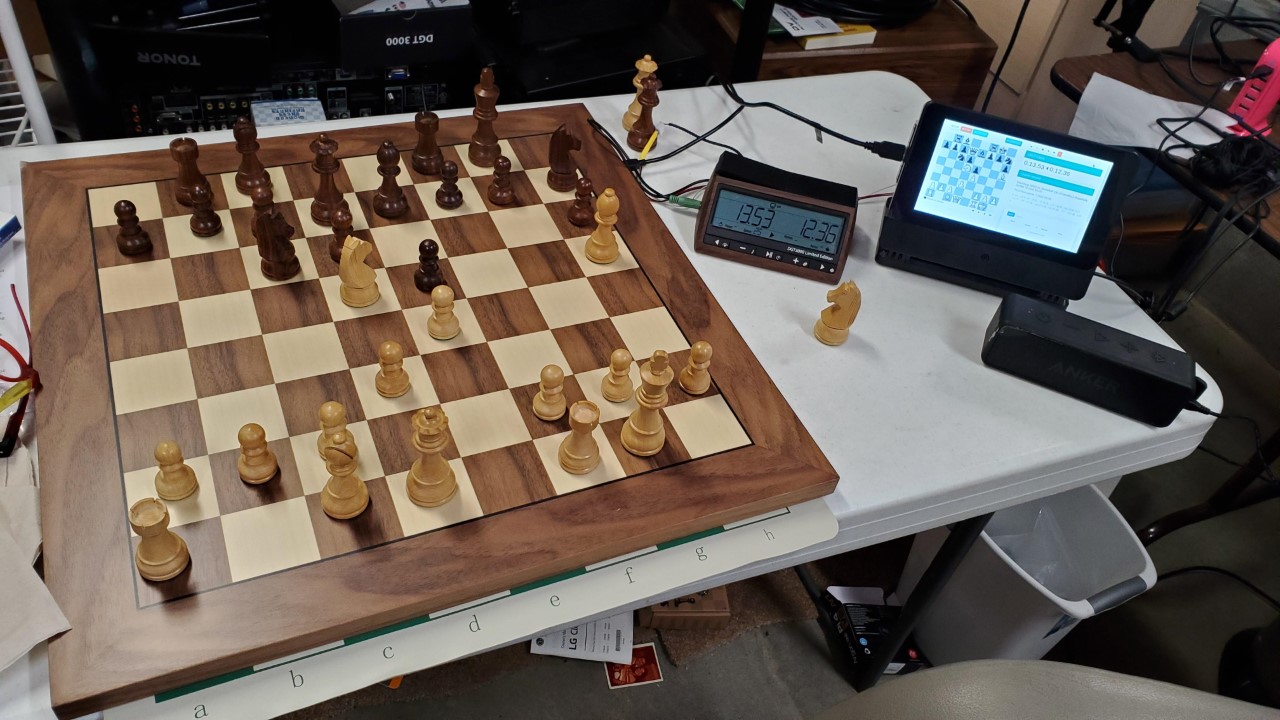
I will make a picture of my version. It is based on d MHS35 (3.5inch)display and after two day's working on details,  I'm ready. You must disable the screensaver on the xwindows desktop side, I can send you the entry's this evening. I modify the buttonsize a little bit so that I can easy push them on my small display. I alway's start chromium in kioskmode so that I use the full display. I use a 10.000Ah Powerbank in the same size of the pi and make an enclosure with a 3D print. Board and Sound will be connected by bluetooth, so that my version ist 100% wireless. It runs 7 - 8hours with the powerbank. The last step was to sort the engines, so that I can switch my lovely settings with the two queens on the board. I love the result......
Dirk

Scally

unread,
Mar 10, 2021, 10:35:31 AM3/10/21
to PicoChess
Hi Dirk,

Sounds great, I look forward to the pictures etc…


Al.

Dirk Sommerfeld

unread,
Mar 10, 2021, 12:58:09 PM3/10/21
to PicoChess
here we are
PXL_20210310_173216500.jpg

Dirk Sommerfeld

unread,
Mar 10, 2021, 1:02:36 PM3/10/21
to PicoChess
PXL_20210310_173254388.jpg

RandyR

unread,
Mar 10, 2021, 1:05:06 PM3/10/21
to PicoChess
Hmmmm,

Now I want one. :^)

Randy

On Wednesday, March 10, 2021 at 12:02:36 PM UTC-6 dirk.d.s...@gmail.com wrote:
PXL_20210310_173254388.jpg

Kyle Washington

unread,
Mar 10, 2021, 9:27:22 PM3/10/21
to PicoChess
These are great setups!  I hadn't paid attention to the fact that my webserver board is a different color configuration than everyone else. That looks like one more option to configure!  It's a lot to take in, but the more I learn, the more fascinated I become...

Kyle

Dirk Sommerfeld

unread,
Mar 11, 2021, 3:50:09 AM3/11/21
to PicoChess
@kyle  to deactivate the screensaver you must login as pi 
and than

sudo nano ./.config/lxsession/LXDE/autostart

@xset s off
@xset -dpms
# set screenaver xsession off
@xset s noblank
# connect my bluettothboard at startup
@sudo rfcomm connect 0 68:27:19:F3:64:D7
# start picochess gui in kioskmode
@chromium-browser --incognito --kiosk http://localhost

Best Dirk

Dirk Sommerfeld

unread,
Mar 11, 2021, 4:00:27 AM3/11/21
to PicoChess
here is a shot from my display.... the buttons right are bigger for a better use....
Next steps are 
Delete console button  that I got more space to make the buttons bigger again
Delete the Book / Engine section
Delete the analyse section
use bigger fonts for the Game record view

Than I will look how to modify picochees to handle two different views... One the big one for a standard browser and the tiny version only for my display...  


PXL_20210310_174642470_mi.jpg


Shivkumar Shivaji

unread,
Mar 11, 2021, 1:23:07 PM3/11/21
to pico...@googlegroups.com
Looks great, can you do a github pull request when you are ready? To github.com/jromang/picochess

This would be great for everyone to enjoy.

To show different content based on display size, you can use CSS.

Shiv

--
You received this message because you are subscribed to the Google Groups "PicoChess" group.
To unsubscribe from this group and stop receiving emails from it, send an email to picochess+...@googlegroups.com.

Dirk Sommerfeld

unread,
Mar 11, 2021, 2:49:25 PM3/11/21
to PicoChess
will do !!

Etienne

unread,
Mar 20, 2021, 8:56:30 AM3/20/21
to PicoChess
Hello Dirk,
Just received my 12€ screen to play with and now trying to play around the webserver...
I have managed to remove the buttons toggle boxes that were making selection dfficult (in clock.html); If we want to remove some of the webserver such as book stats I believe it is there.
Now I would really like to make the buttons bigger like you but didn't manage by changing custom.css with vh and vw parameters.
Did you make progress on your side?
Best,
Etienne

Dirk Sommerfeld

unread,
Mar 20, 2021, 3:41:54 PM3/20/21
to PicoChess
Hi Etienne,,

see attached my running version.
The clock.html is only with the needed elements
The custum.css (static/css folder) makes the buttons bigger.

hth

Dirk
clock.html
custom.css

Etienne

unread,
Mar 20, 2021, 4:12:16 PM3/20/21
to PicoChess

Thank you Dirk, I will try your files
Here what I got on my side....but I ram ealizing that there is an issue with time without clock in the webserver (reset)
Best reg, Etienne
Webserve35.jpg

Dirk Sommerfeld

unread,
Mar 20, 2021, 5:04:57 PM3/20/21
to PicoChess
looks good...
the timefiles have bugs. I tested the alternative one and this would not run , too.... 
Meanwhile I play 30 0 and this will work. If I  use 30 10 or any other time with an add, there is a problem. I think the time add function is not needed, because if you don't make the computer move, the time stops and start in the moment you finish the move. So you have so much tome as you want....

Dirk

clarke baxter

unread,
Mar 21, 2021, 4:26:58 PM3/21/21
to PicoChess
Finally... I have buttons that fit my fingers, and my hand touching the buttons does not obscure the selections as they are made.

DSC02473.jpg

Because the screen is small I reduced the white space and expanded the board so the column split is 7:5 rather than 6:6. It remains 'responsive' despite my rudimentary (understatement) coding skills.

This is my enclosure, fashioned from an old CD ROM drive and a cut up picture frame. Dremel - wonderful thing!

DSC02471.jpg

cb

Scally

unread,
Mar 21, 2021, 4:42:55 PM3/21/21
to PicoChess
Hi Simon,

Great stuff, I love all these individual projects people are doing …..


Al.

Micha

unread,
Mar 30, 2021, 12:58:24 PM3/30/21
to PicoChess
Hi,

i had another idea. 

Picoweb_3.jpg

Screenshot:

Picoweb_2.jpg

I have created images for 3 (Monitor) resolutions - (1080p, 720p, 1024px). 


Hope it is of interest.

Best regards
Micha

Dirk

unread,
Mar 30, 2021, 2:03:26 PM3/30/21
to PicoChess
Ah that's cool, I really like your new simplified web ui!

Thank you, Micha!
 
Dirk

Micha

unread,
Mar 30, 2021, 3:22:15 PM3/30/21
to PicoChess
Most of all however I have to thank you for the perfect Version 3. Its brilliant...

And Al, Randy, Jürgen, Wilhelm and and and...

A great community project. John Stanback (WASP), for example, has created a Raspi version specially for PICOCHESS. Version 4.50 is included in the last images.  It's fantastic how many people work together on this project.

Micha

Shivkumar Shivaji

unread,
Mar 30, 2021, 3:26:37 PM3/30/21
to pico...@googlegroups.com
This looks great! Is this on your github account? Can you put in a pull request, and this can be merged as official picochess.

Shiv

Micha

unread,
Mar 31, 2021, 11:00:40 AM3/31/21
to PicoChess
No, I don't have a Github account. 

I think, it makes sense for small displays, for systems without DGT Pi. 

picochess_web.jpg

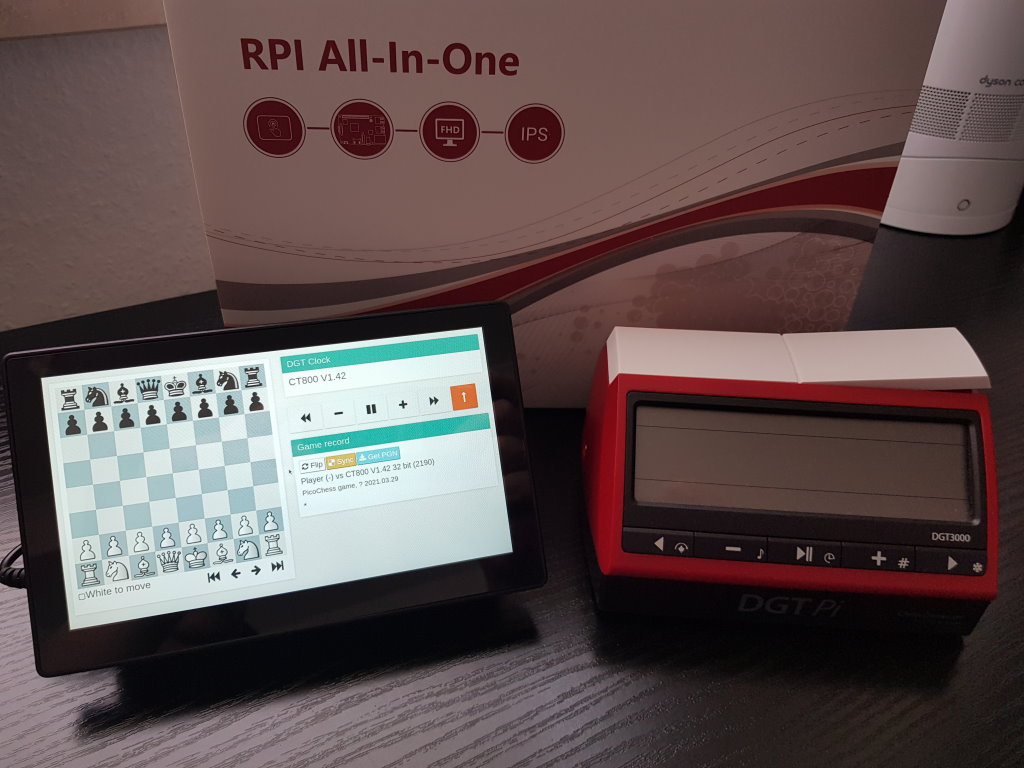
The DGT Pi display is limited, but a touchscreen (image example: touchscreen monitor with a resolution of 1280x720 px) offers a big gain for Picochess. This is a great gain for PicoChess. 

The system is very simple. You need Raspi 3 or 4 and a touchscreen. There are these touchscreens for sale. You just screw the Pi onto the monitor and connect it with a few cables. Insert the SD card with the existing image and you're ready to play. 

No configuration, plug and play. It's very simple and the gain is enormous. 

The DGT Pi is from the year 2016. This is the next step and cheaper than a DGT Pi. 

A DGT Pi costs ~250 euros. The system in the picture costs:

100 Euro - Touchscreen
40 Euro - Raspi 3B+ (for more power Raspi 4B ~60 Euro)
5 Euro - SD card 16 GB 
0,00 Euro - Picochess Image 

+ 3-Steps simple installation and ready to go.

Over 140 engines to play, on a 7'' touch screen...

Micha

Peter Eßer

unread,
Apr 2, 2021, 1:52:45 AM4/2/21
to PicoChess

Hello. Can someone send me the IMG link for V3 Stockfish 13 DGT PI or Standalone. Greetings Peter

Dirk

unread,
Apr 2, 2021, 7:27:20 AM4/2/21
to PicoChess
Hi Micha,

I just tried your small image: all works perfect except for the webserver when calling it from another device (eg. for downloading the pgn to the iPad)? I just try to call the IP of the PI with suffix :8080 in the Safari browser like for my DGTPI). Maybe be there is a port (80) conflict with the VNC server which is also active (which is nice as I use it as well)?!
Do you have an idea how I could fix this?

Thanks Dirk

Micha

unread,
Apr 2, 2021, 8:07:25 AM4/2/21
to PicoChess
Hi,

please try only the IP address. 

I find it easier for the user. 

My idea: Can you query the IP via Picochess? Yes, we can. ;) OK,  simply type in the ip address in your browser and you are connected with picochess web. 

I find it logical and simple. Or what do you think?

Micha

Dirk

unread,
Apr 2, 2021, 8:23:58 AM4/2/21
to PicoChess
Yes, IP only works - perfect.
Thanks, Micha!
Dirk

Etienne

unread,
Apr 2, 2021, 12:54:32 PM4/2/21
to PicoChess
Hello, anybody knows where to increase the font of the clock buttons in the webserver?
My CSS knowledge is nil and I didn't manage to undestand what Firrefox tells me about this style.
Best Regards, Etienne

Shivkumar Shivaji

unread,
Apr 2, 2021, 1:14:22 PM4/2/21
to pico...@googlegroups.com
Wow, thanks for your vote of confidence in this feature.

We tried a way to automatically populate a local name like http://picochess.local:8080 but it did not work with certain configs in the past.

I still personally feel people having to know the IP of their PI is a pain.

Tom Emmelot

unread,
Apr 2, 2021, 3:40:28 PM4/2/21
to PicoChess
Hi Micha,
That's nice work you have done, can you post here the custom.css file?
I have both screens, 7"and 3.5 ",  so I think that is the nicest presentation.
Kind regards,
Tom


Op woensdag 31 maart 2021 om 17:00:40 UTC+2 schreef Micha:

Micha

unread,
Apr 2, 2021, 5:55:19 PM4/2/21
to PicoChess
Hello Tom,

yes, of course. I had created 3 variants. 

For displays with a resolution of 1080p, 720p and 1020px (or lower). Just import or you can modify the design of the web panel as you wish. It's quite simple.

Don't forget to clear the browser cache. Restart the system, done. 

Regards
Micha
small_1024px.zip
720p.zip
1080p.zip

Shivkumar Shivaji

unread,
Apr 2, 2021, 6:00:34 PM4/2/21
to pico...@googlegroups.com
Thanks!

Can we apply this back to the picochess github source and share with the community?

Shiv

Micha

unread,
Apr 2, 2021, 6:07:31 PM4/2/21
to PicoChess
Hi Shiv,

of course. It's nothing unusual, only a few small changes.

Regards
Micha

Tom Emmelot

unread,
Apr 2, 2021, 6:12:40 PM4/2/21
to pico...@googlegroups.com
Hi Micha,

Thanks i shall try them all!

Good job,

Kind regards,
Tom

Op 02-04-2021 om 23:55 schreef Micha:

Shivkumar Shivaji

unread,
Apr 2, 2021, 6:20:11 PM4/2/21
to pico...@googlegroups.com

Etienne

unread,
Apr 3, 2021, 3:06:40 AM4/3/21
to PicoChess
Hello Friends,
Did try Micha's css and clock files but didn't manage to get something nice with my 3.5" LCD
I  eventually found where to increase buttons' font size in : bootstrap-material-design.min.css
However I cannot increase beyond 11px otherwise the buttons need a second row....there is plenty of room for improvement!
Best R,
IMG_7911.jpg

Micha

unread,
Apr 3, 2021, 4:57:43 AM4/3/21
to PicoChess
Hi,

important! Start the browser, go to Settings, close all windows (not Settings of course) and clear the cache.

Link to the image (german) for small displays:


I can create a new image for small displays in english.

Try it out. I have some feedback from users in my forum, it works.


Micha

Etienne Chaffanjon

unread,
Apr 3, 2021, 5:31:00 AM4/3/21
to pico...@googlegroups.com
Thank you Micha, I will try again and send a picture.
I had to install the RPI LCD and it did start well  in Kiosk mode (or full screen) but the lay out was not the same as on your pictures...I will let you know
Best R, Etienne

Le 3 avr. 2021 à 10:57, Micha <voel...@gmail.com> a écrit :


clarke baxter

unread,
Apr 3, 2021, 6:17:18 AM4/3/21
to PicoChess
This is the layout I am using on a 5" LCD. Worth trying on a 3.5" screen?

Capture.PNG

I am ashamed to say I used in-line styling though so everything is in a modified clock.html.

cb
clock.zip

Etienne

unread,
Apr 3, 2021, 7:07:09 AM4/3/21
to PicoChess
Hello Micha,
From the picoweb_small image, I had to change the cmdline.txt to enable BT with RPI LCD 3.5
Then after clearing the cache I get:
small picoweb.jpg
Best regards, Etienne

Etienne

unread,
Apr 3, 2021, 7:20:21 AM4/3/21
to PicoChess
Hello Simon, Here what I got with my 12€ LCD RPI, the css were twisted but assuming the styles in the clock.html makes it....
Best R, Etienne
clark.jpg

Micha

unread,
Apr 3, 2021, 9:36:46 AM4/3/21
to PicoChess
Hi Etienne,

uhhh, that doesn't look good.

OK, please try the new variant. It should look better with it.

Don't forget to clear the cache again and restart.

Please show a photo. 

Regards
Micha


small_1024px.zip

Etienne

unread,
Apr 3, 2021, 10:25:48 AM4/3/21
to PicoChess
Micha, see new picture...better indeed.
I have noticed that after a fair amount of moves the pieces tend to slip out from the center of the squares...
On the version I was working on I had the clock buttons slip on two rows  after 15-20 moves....
Webserver is rather tricky to play with....
I will live with that for a while....thank you for your help and for your great forum as well!
Best R, Etienne

pico (2).jpg

clarke baxter

unread,
Apr 3, 2021, 11:14:29 AM4/3/21
to PicoChess
Hi Etienne

I guess it doesn't scale down very nice to 3.5". Thanks for posting back the result.

cb

Micha

unread,
Apr 3, 2021, 11:16:55 AM4/3/21
to PicoChess
Hi Etienne,

Thanks for the info.

Well, better but not perfect. The problem is the very small display. I don't have such a small display, unfortunately. Do you have a name of your display? Company, resolution...?

I know the jumping figures. The problem occurs when the move list is too long for the display.  

It gets much easier at higher resolutions. 

Greetings
Micha

Etienne Chaffanjon

unread,
Apr 3, 2021, 11:47:33 AM4/3/21
to pico...@googlegroups.com
Micha, this is probably the most common and cheapest:
Best, Etienne

Le 3 avr. 2021 à 17:16, Micha <voel...@gmail.com> a écrit :

Hi Etienne,

clarke baxter

unread,
Apr 3, 2021, 12:18:30 PM4/3/21
to PicoChess
Hi Etienne

I checked my clock.html on 480 x 320 resolution and this is what I see...

Capture2.PNG

The custom.css file I am using is the one supplied with the original v3 image. I wonder if you have a different custome.css.

cb

Etienne

unread,
Apr 3, 2021, 1:07:11 PM4/3/21
to PicoChess
Hi Simon,
I did repeat the test to make sure I was using originals css files and apparently  I was not...here what I got now:
PICOSIMON (2).jpg
Best Regards, Etienne

clarke baxter

unread,
Apr 3, 2021, 2:01:14 PM4/3/21
to PicoChess
Hi Etienne
That looks better, but not good enough I think. I will have a closer look - it would be nice to get it scaling properly across all screen sizes as the original does. I'll get back to you.

cb

Micha

unread,
Apr 3, 2021, 2:37:36 PM4/3/21
to PicoChess
Hi Etienne,

about the jumping pieces after 15-20 moves. If you use Chrome on the Pi, you can disable the scrollbar.

Edit the file /etc/chromium-browser/customizations/00-rpi-vars

Original: 

CHROMIUM_FLAGS="${CHROMIUM_FLAGS} --force-renderer-accessibility --disable-quic --enable-tcp-fast-open"


NEW:

CHROMIUM_FLAGS="${CHROMIUM_FLAGS} --force-renderer-accessibility --disable-quic --enable-tcp-fast-open --enable-features=OverlayScrollbar,OverlayScrollbarFlashAfterAnyScrollUpdate,OverlayScrollbarFlashWhenMouseEnter"

Save and restart the Pi and the scrollbar is disabled, no jumping figures.


Regards
Micha

clarke baxter

unread,
Apr 3, 2021, 2:50:44 PM4/3/21
to PicoChess
Hi Etienne

The right side of your display appears to be cut off. Are you running the browser in full screen mode?

Capture3.PNG

cb

Etienne Chaffanjon

unread,
Apr 3, 2021, 4:47:41 PM4/3/21
to pico...@googlegroups.com
Hi Simon, in kiosk mode

Le 3 avr. 2021 à 20:50, clarke baxter <simon....@gmail.com> a écrit :

Hi Etienne

The right side of your display appears to be cut off. Are you running the browser in full screen mode?

clarke baxter

unread,
Apr 6, 2021, 9:51:26 AM4/6/21
to PicoChess
Hi Etienne

Can you confirm that the native resolution of your screen is 480 x 320?

Do you have a custom CVT line in your /boot/config.txt file?

It might look like this: hdmi_cvt 480 x 320 60 6 0 0 0 

cb

Etienne Chaffanjon

unread,
Apr 7, 2021, 2:42:34 AM4/7/21
to pico...@googlegroups.com
Hi Clarke, I won’t have access for a while and cannot tell the setting in the config.txt
Thank you anyway and will let you know when back home.
Best Regards,
Etienne
You received this message because you are subscribed to a topic in the Google Groups "PicoChess" group.
To unsubscribe from this topic, visit https://groups.google.com/d/topic/picochess/_DLwzq10UWk/unsubscribe.
To unsubscribe from this group and all its topics, send an email to picochess+...@googlegroups.com.
To view this discussion on the web visit https://groups.google.com/d/msgid/picochess/b6abc3b6-0861-4181-a6ff-908e88483d52n%40googlegroups.com.

clarke baxter

unread,
Apr 7, 2021, 7:54:19 AM4/7/21
to PicoChess
Hi Etienne

This is what I have:
Capture.PNG

DSC02475-2.jpg

I think the key is in the resolution settings in a custom CVT in config.txt.

This is what I have...
...
hdmi_group=2
hdmi_mode=87
hdmi_cvt 960 600 60 6 0 0 0
...

Whilst hdmi_cvt 480 320 60 6 0 0 0 seems more logical is does not scale nicely. If I use that setting I see the same disarray as in your last screenshot.

I've made some additional changes to the styling for best fit at 3.5 inches. Files attached.

cb
custom.css
clock.html

Etienne Chaffanjon

unread,
Apr 7, 2021, 8:59:04 AM4/7/21
to pico...@googlegroups.com
Hi Clarke,
I could check what is in my config.txt
There is no such line (hdmi_group and hdmi_mode are commented)
Best, Etienne

Le 7 avr. 2021 à 13:54, clarke baxter <simon....@gmail.com> a écrit :

Hi Etienne

This is what I have:
<Capture.PNG>

To view this discussion on the web visit https://groups.google.com/d/msgid/picochess/c0cedeb4-21eb-47ac-a0db-dc0baf1efb69n%40googlegroups.com.
<custom.css>
<clock.html>
<Capture.PNG>
<DSC02475-2.jpg>

clarke baxter

unread,
Apr 7, 2021, 10:00:37 AM4/7/21
to PicoChess
Hi Etienne

You could try adding these lines then: 

hdmi_group=2
hdmi_mode=87
hdmi_cvt 960 600 60 6 0 0 0

It is probably a good idea to have a backup of your SD card before trying it.

cb

Etienne Chaffanjon

unread,
Apr 7, 2021, 10:21:28 AM4/7/21
to pico...@googlegroups.com
Hi Clarke,
Tried but didn’t change much.
I have also taken your latest clock and custom files:

Beet R, Etienne

clarke baxter

unread,
Apr 7, 2021, 11:24:09 AM4/7/21
to PicoChess
Hi Etienne

That is disappointing. Clearly the setting in config.txt is making no difference, so I assume your display is not HDMI. I have no experience with other types.

cb

Etienne Chaffanjon

unread,
Apr 7, 2021, 11:58:34 AM4/7/21
to pico...@googlegroups.com
Hi Clarke, it is connected to GPIO not HDMI.
I will investigate further when I will have time.
All the best, Etienne

Dirk Sommerfeld

unread,
Apr 8, 2021, 3:55:52 AM4/8/21
to PicoChess
Hi Etienne, did you have the exact name and number of your display, it looks like this one i also use.
If it right, I can support you with my setup. 
Did you install a manual driver ( I did it) and which one?
Dirk

Etienne Chaffanjon

unread,
Apr 8, 2021, 5:25:04 AM4/8/21
to pico...@googlegroups.com
Hi Dirk,
Best regards, Etienne

Le 8 avr. 2021 à 09:55, Dirk Sommerfeld <dirk.d.s...@gmail.com> a écrit :

Hi Etienne, did you have the exact name and number of your display, it looks like this one i also use.

Dirk Sommerfeld

unread,
Apr 8, 2021, 12:36:44 PM4/8/21
to PicoChess
hmm oki.. I have a different one mhs35 this comes with a vendor set of drivers...but I have the same resolution. 
Be care that the virtual desktop size is not bigger than the 480 x 320 from the display....   I can look tomorrow into my picochess, I have made two entry's but don't have it in my mind yet.

Dirk

Dirk

unread,
May 1, 2021, 1:20:06 PM5/1/21
to PicoChess
Hello again,

I am still playing with the "PicoChessWeb" solution by using a 7 inch display and the 1080p web gui settings Micha posted above.
The problem with these settings is that the DGT Clock text is way too small for my eyes (I almost can't read the important clock times ) so I would like to increase the font size of the DGT Clock text output.


IMG_0457.jpg

I tried by changing a font size setting in the custom.css file (#DGTClockText { font-size: 4vh; margin: 0; } by changing the 4vh to 6vh and other values but it seems to have no effect.

As I don't know anything about these html/style things maybe someone can give me a hint...

Thanks
Dirk

dirk.d.s...@gmail.com

unread,
May 1, 2021, 1:45:26 PM5/1/21
to pico...@googlegroups.com

The wrong line this one is uncommented. This change has no effect. Look to the groups…


I can do it at 8pm when I’m back home…


Von: 'Dirk' via PicoChess <pico...@googlegroups.com>
Gesendet: Samstag, 1. Mai 2021 19:20
An: PicoChess <pico...@googlegroups.com>
Betreff: Re: alternative picoweb


Hello again,


I am still playing with the "PicoChessWeb" solution by using a 7 inch display and the 1080p web gui settings Micha posted above.

The problem with these settings is that the DGT Clock text is way too small for my eyes (I almost can't read the important clock times ) so I would like to increase the font size of the DGT Clock text output.


I tried by changing a font size setting in the custom.css file (#DGTClockText { font-size: 4vh; margin: 0; } by changing the 4vh to 6vh and other values but it seems to have no effect.


As I don't know anything about these html/style things maybe someone can give me a hint...


Thanks

Dirk

Micha schrieb am Dienstag, 30. März 2021 um 18:58:24 UTC+2:

Hi,


i had another idea. 


Screenshot:


I have created images for 3 (Monitor) resolutions - (1080p, 720p, 1024px). 


Hope it is of interest.


Best regards

Micha


Scally schrieb am Sonntag, 21. März 2021 um 21:42:55 UTC+1:

Hi Simon,


Great stuff, I love all these individual projects people are doing …..


Al.


On Sunday, March 21, 2021 at 8:26:58 PM UTC simon....@gmail.com wrote:

Finally... I have buttons that fit my fingers, and my hand touching the buttons does not obscure the selections as they are made.


Because the screen is small I reduced the white space and expanded the board so the column split is 7:5 rather than 6:6. It remains 'responsive' despite my rudimentary (understatement) coding skills.


This is my enclosure, fashioned from an old CD ROM drive and a cut up picture frame. Dremel - wonderful thing!


cb

On Saturday, March 20, 2021 at 9:04:57 PM UTC dirk.d.s...@gmail.com wrote:

looks good...

the timefiles have bugs. I tested the alternative one and this would not run , too.... 

Meanwhile I play 30 0 and this will work. If I  use 30 10 or any other time with an add, there is a problem. I think the time add function is not needed, because if you don't make the computer move, the time stops and start in the moment you finish the move. So you have so much tome as you want....


Dirk


Etienne schrieb am Samstag, 20. März 2021 um 21:12:16 UTC+1:


Thank you Dirk, I will try your files

Here what I got on my side....but I ram ealizing that there is an issue with time without clock in the webserver (reset)

Best reg, Etienne

will do !!


Dirk Sommerfeld schrieb am Donnerstag, 11. März 2021 um 09:50:09 UTC+1:

@kyle  to deactivate the screensaver you must login as pi 

and than


sudo nano ./.config/lxsession/LXDE/autostart


@xset s off

@xset -dpms

# set screenaver xsession off

@xset s noblank

# connect my bluettothboard at startup

@sudo rfcomm connect 0 68:27:19:F3:64:D7

# start picochess gui in kioskmode

@chromium-browser --incognito --kiosk http://localhost


Best Dirk


kw4au...@gmail.com schrieb am Donnerstag, 11. März 2021 um 03:27:22 UTC+1:

These are great setups!  I hadn't paid attention to the fact that my webserver board is a different color configuration than everyone else. That looks like one more option to configure!  It's a lot to take in, but the more I learn, the more fascinated I become...


Kyle

On Wednesday, March 10, 2021 at 12:05:06 PM UTC-6 RandyR wrote:

Hmmmm,


Now I want one. :^)


Randy

On Wednesday, March 10, 2021 at 12:02:36 PM UTC-6 dirk.d.s...@gmail.com wrote:

--

You received this message because you are subscribed to the Google Groups "PicoChess" group.
To unsubscribe from this group and stop receiving emails from it, send an email to picochess+...@googlegroups.com.

--
You received this message because you are subscribed to a topic in the Google Groups "PicoChess" group.
To unsubscribe from this topic, visit https://groups.google.com/d/topic/picochess/_DLwzq10UWk/unsubscribe.
To unsubscribe from this group and all its topics, send an email to picochess+...@googlegroups.com.
To view this discussion on the web visit https://groups.google.com/d/msgid/picochess/e7e367c1-891a-4e5d-9fe2-a9ac2cd18a21n%40googlegroups.com.

image001.jpg

Dirk Sommerfeld

unread,
May 1, 2021, 2:19:03 PM5/1/21
to PicoChess
Dirk modifiziere mal : 

.panel {
    margin-bottom: 3vh;
}
oder

.panel-body {
    padding: 2vh 1.2vw;
Message has been deleted

Dirk

unread,
May 1, 2021, 2:43:51 PM5/1/21
to PicoChess
Hmm - this also has no effect (I set both to 4 and 5vh) .

I will try the other lines as well...

Thanks Dirk anyway.

dirk.d.s...@gmail.com

unread,
May 1, 2021, 3:06:07 PM5/1/21
to pico...@googlegroups.com

I don’t have access to Michas version. Take a look in the template, which class of the css file is used.


Dirk

clarke baxter

unread,
May 1, 2021, 3:49:53 PM5/1/21
to PicoChess
Hi

As it is for my own use I have used in-line styling in the clock.html file to get the screen layout as I like it. Clearly it is not the right way, but good enough for my purposes.

So to alter the size of the clock text just add styling to this line:

<h4 id="DGTClockText"></h4>

Like this:

<h4 id="DGTClockText" style="font-size: 5.5vw"></h4>


cb

Dirk

unread,
May 1, 2021, 4:27:23 PM5/1/21
to PicoChess
That's it, Clark! 

Finally... (I have spent almost the whole day ....)

IMG_0459.jpg

Thanks you Clark and Dirk for helping!

Dirk

dirk.d.s...@gmail.com

unread,
May 1, 2021, 4:39:46 PM5/1/21
to pico...@googlegroups.com

Looks cool congrats !!!


Von: 'Dirk' via PicoChess <pico...@googlegroups.com>
Gesendet: Samstag, 1. Mai 2021 22:27
An: PicoChess <pico...@googlegroups.com>
Betreff: Re: alternative picoweb


That's it, Clark! 


Finally... (I have spent almost the whole day ....)


image001.jpg

Dirk

unread,
May 2, 2021, 5:14:52 PM5/2/21
to PicoChess
I did some further changes for me:
a) I moved the lever to the left as we often have to press the "right" button to enter the menu and then the lever at the right side is not in a good position (any the way on the Rev 2 emulated Clock the lever is on the left as well).
b) I added the Book/Analysis section back again because I think this information really adds value to the PicoChessWeb (otherwise I still could just use the DGTPI).

The analysis functionality has one problem: After activating one analysis line a big "COPY" button appears and I can't find the definition of this copy button in neither in the clock template nor in custom.css file. 

PicoWeb (picochess) – VNC Viewer 2021-05-02 23-02-03.png


Does anybody know how to reduce the size of this button? 

Furthermore I would like to enlarge the Flip/Snyc/PGN buttons a little bit as they are really small. Again: No luck for me in identifying the correct button group in the css file.

Any help is welcome.

Thanks
Dirk

clarke baxter

unread,
May 2, 2021, 7:04:02 PM5/2/21
to PicoChess
Hi Dirk

The workings of the Copy button are beyond me. Something dynamic going on that I cannot follow. I wonder if the Copy button sizing is a casualty of the change that was made to enlarge the clock buttons.

This is how my screen layout looks. I reduced the white space and expanded the board so the column split is 7:5 rather than 6:6. Bigged up the buttons and put them below the Clock.

Capture1.PNG

I enlarged the Flip and Sync buttons and moved them below the board. It seems like a logical place and I don't use them very often. Get PGN stays with the Game record, also seems logical.

Capture2.PNG

I didn't do anything with the Analyse / Stop and Copy buttons. They look like this:

Capture3.PNG

The Lever is in the wrong place for you, but we can move that. Happy to post the clock and css files if they would suit you.

cb

Dirk

unread,
May 3, 2021, 7:37:07 AM5/3/21
to PicoChess
Hi Simon,

I really do like your changes a lot!!!

I even tried out one of your clock templates but it doesn't fit my screen correctly - I guess because the css changes were missing although you mentioned that all your changes took place in the clock template!?

I have a 7inch 1024X600 pixel display so that there would be enough space for all the important items.

Regarding your changes and my display size I would rather keep the original smaller chess board size so that I can see the lower buttons all the time without scrolling (otherwise I will forget where they are in some month ;-)

Furthermore I would put the GetPGN Button to the left bottom beside the SYNC button because it would allow more space for the game record history and the GetPGN button won't be used at all on this local webserver page because the pgn games are stored on this device anyway!? (Although it makes sense to keep that button in case we are calling the webserver page from another device in order to save it there or send it from your mobile top someone else etc.)

So even without these changes I would be happy if you would share your changes files here and I hope I can do the further changes for myself (Unfortunately I really have no html/css knowledge).

Thanks a lot
Dirk

clarke baxter

unread,
May 3, 2021, 9:05:38 AM5/3/21
to PicoChess
Hi Dirk

When I first started trying to change the layout I did make changes to the .css. I thought they were all reverted before I moved onto changing clock.html, but perhaps not. My version control is not what it might be.

Anyway, I made some changes as you suggested, but I don't have a 1024 x 600 display to try it out. I use the Chrome developer tools though and it looks OK there.

Let me know how you get on, I'm sure it can be tweaked if it is not quite right.

cb

clock.html
custom.css

Dirk

unread,
May 3, 2021, 9:38:08 AM5/3/21
to PicoChess
Wow! Almost perfect (for me), Simon!

PicoWeb (picochess) – VNC Viewer 2021-05-03 15-21-55.png

If we could reduce the size of all big buttons (Flip, Sync, PGN, Lever, << -, II, +, >>) a little bit so that I can see the the buttons on the lower left fully it would be perfect for me.

If you could show me the place where I have to change the size of these buttons I can experiment myself the correct size.

...
just had a look it seems it is in the clock file within the button definition (font size?)

eg the Sync button:

<button type="button" id="flipOrientationBtn" class="btn btn-raised btn-default btn-xs text-break" style="margin-right: 1.3vw;" data-placement="auto" data-toggle="tooltip" title="flip board">

<i class='fa fa-refresh' style="font-size: 1.5vw; margin-left: 1.6vw; margin-right: 1.6vw"></i><span class="hidden-xs" style="font-size: 2vw"> Flip</span>

</button>

???

I will try that...

Thanks you so much, Simon!

Dirk

Dirk

unread,
May 3, 2021, 10:26:59 AM5/3/21
to PicoChess
Ok I think I got it:

PicoWeb (picochess) – VNC Viewer 2021-05-03 16-24-41.png

Thanks Simon for your great help!

Dirk

clarke baxter

unread,
May 3, 2021, 10:44:45 AM5/3/21
to PicoChess
Hi Dirk

Looking good! You beat me to it.  I just finished tweaking again. If you have time it would be nice to see if it fits now, but I understand you have what you need.


cb

clock.html

Dirk

unread,
May 3, 2021, 11:04:13 AM5/3/21
to PicoChess
Yes Simon, yours is looking even a little better as mine (better margins etc).

I think I will use yours ;-)

Thanks
Dirk

PicoWeb (picochess) – VNC Viewer 2021-05-03 17-01-16.png

clarke baxter

unread,
May 3, 2021, 12:31:45 PM5/3/21
to PicoChess
Hi Dirk

Thank you for trying it out, it is good to see a result.

Good luck with the chess.

cb

Dirk

unread,
May 3, 2021, 1:17:29 PM5/3/21
to PicoChess
Hi Simon,

don't kill me but maybe I will change my mind and the 3 lower left buttons are really  not needed to be in view the whole time (sop they can jump out of the screen).
With these three buttons it might be difficult for me to operate the navigation buttons which are more important to me.

Would you mind to share your enlarged chessboard which I would need if I just want the chessboard and the navigation buttons on the left side?

Thanks
Dirk

Dirk

unread,
May 3, 2021, 1:45:39 PM5/3/21
to PicoChess
I think I just need to add some margin space between the chessboard and the board status & navigation buttons - then it would look perfect.

PicoWeb (picochess) – VNC Viewer 2021-05-03 19-42-49.png

clarke baxter

unread,
May 3, 2021, 3:33:13 PM5/3/21
to PicoChess
Hi Dirk

:-)

I have attached a 7/5 split - gives the bigger board and a 6/6 split. Let me know which is better. I suspect either will need a final adjustment as the Chrome developer tool does not render quite the same as your screen.

cb

clock75.html
clock66.html

Dirk

unread,
May 3, 2021, 3:47:57 PM5/3/21
to PicoChess
Thanks Simon,
I will check soon...
Dirk

Dirk

unread,
May 4, 2021, 6:43:31 AM5/4/21
to PicoChess
Hi Simon,

thanks you again for your help.

The clock66 has no visible chessboard on my display and the clock75 has the full chessboard but no board status and game navigation buttons.

But thats ok - I can play with that and I think I have all what I need to know because of your help!
Thanks
Dirk

josc...@gmail.com

unread,
May 16, 2021, 11:00:40 AM5/16/21
to PicoChess
Hi Etienne,

on April 3rd you wrote you had to adapt cmdline.txt to get bluetooth working again after installing display drivers. At least that was what I understood.
I seem to have the same issue, i.e. no bluetooth after driver installation. What exactly did you change in cmdline.txt?

Thank you

-Joscho

PS: No, this is not the 4B rev 1.4 issue again ;-)  It is a 3B+ which works perfectly with all images except picoweb_small after display driver installation.

josc...@gmail.com

unread,
May 16, 2021, 11:33:09 AM5/16/21
to PicoChess
Hi Etienne, all,

Regarding the question in my previous post: I figured out a solution myself. Adding "dtoverlay=pi3-miniuart-bt" to /boot/config.txt did the job.
However, I would still be interested what your solution was to check which one works better.

Thanks and cheers

-Joscho

Randy Reade

unread,
May 16, 2021, 12:32:54 PM5/16/21
to pico...@googlegroups.com

--
You received this message because you are subscribed to a topic in the Google Groups "PicoChess" group.
To unsubscribe from this topic, visit https://groups.google.com/d/topic/picochess/_DLwzq10UWk/unsubscribe.
To unsubscribe from this group and all its topics, send an email to picochess+...@googlegroups.com.
Reply all
Reply to author
Forward
0 new messages