
Ducted Fan Inside of Wing
705 views
Skip to first unread message

Anna Valcarcel
Feb 18, 2021, 11:41:06 PM2/18/21
to OpenVSP
Hello,
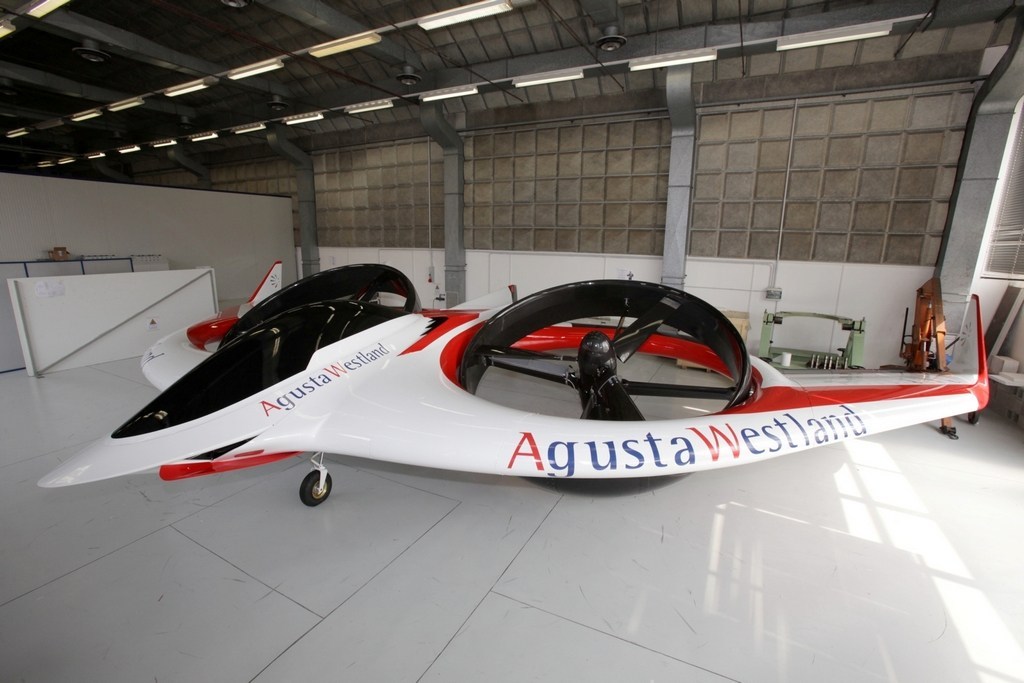
I am new to VSP but am using it to model a project for my university. I would like to display a ducted fan in the wing. I can place the duct and propeller inside of the wing but the wing is a solid body and does not change with it to show the duct hole or the propeller. Is there any way to currently do this on VSP? Thanks for any help!
For reference, it would be something like the AugustaWetland Project Zero aircraft, among others:

Rob McDonald
Feb 19, 2021, 2:51:30 AM2/19/21
to ope...@googlegroups.com
There is not a great way to do this.

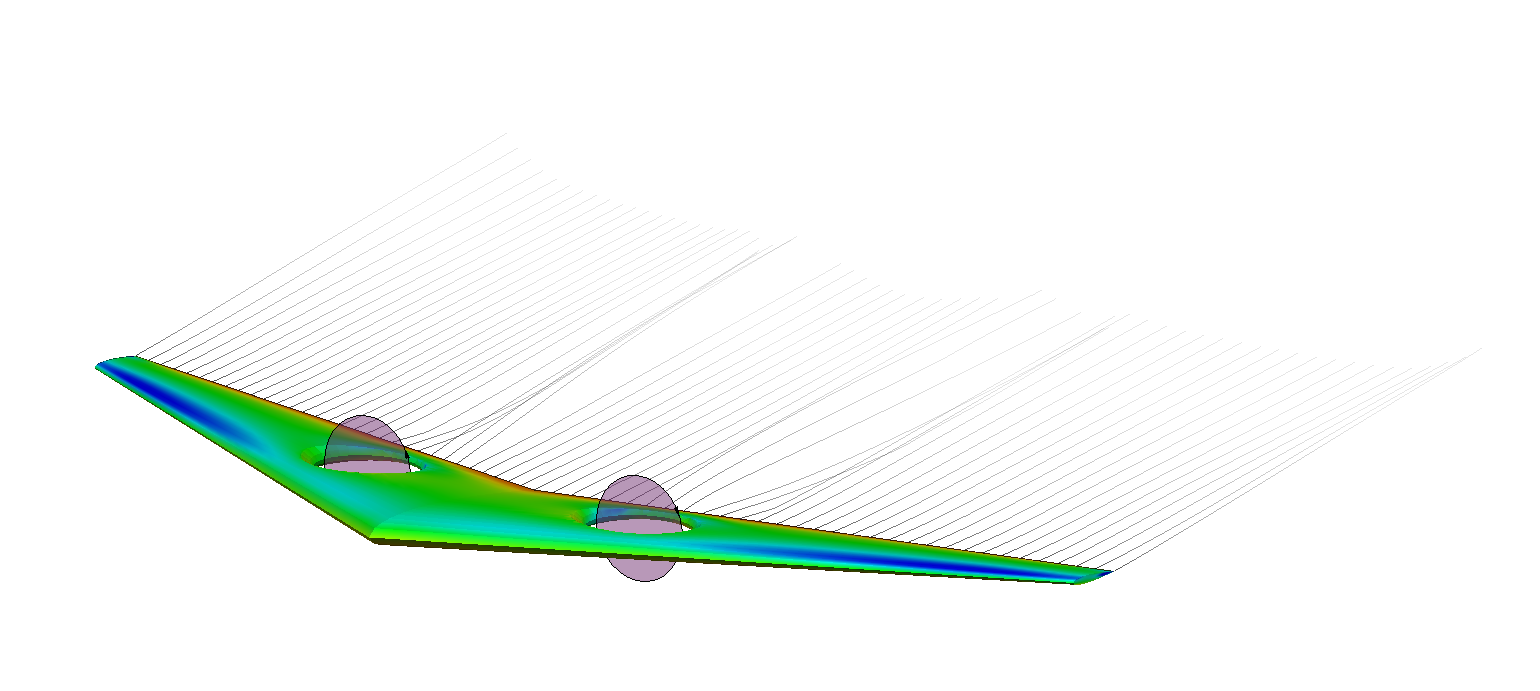
In particular, it depends on what (if any) analysis you want to do with this model.
If you only want to model the Project Zero fans in a cruise position with an actuator disk approach -- then there is a way... Unfortunately, I ran into a handful of bugs in order to get it to work. I fought my way past them to create these images, but it isn't practical for 'normal users'....
That said -- things are improving in this regard and we should be able to do better in the next release.
If you don't want to do any analysis, but you just want to have a 3D visualization of the concept (or create surfaces to export to CAD), then we might be able to do something more useful.
Rob
--
You received this message because you are subscribed to the Google Groups "OpenVSP" group.
To unsubscribe from this group and stop receiving emails from it, send an email to openvsp+u...@googlegroups.com.
To view this discussion on the web visit https://groups.google.com/d/msgid/openvsp/c50705dc-c0c7-444e-a59e-8306ab453a7dn%40googlegroups.com.
Anna Valcarcel
Feb 19, 2021, 3:20:26 AM2/19/21
to ope...@googlegroups.com
That looks great Rob!
Currently our focus is to use VSP for the initial visuals and layout to get feedback on our design ideas.
Can you walk me through how you accomplished this? I just want to show them the concept I had for the fan in the wing and see if they think it’s a feasible design.
Thank you so much! It looks really good!
On Feb 18, 2021, at 23:51, Rob McDonald <rob.a.m...@gmail.com> wrote:
There is not a great way to do this.In particular, it depends on what (if any) analysis you want to do with this model.If you only want to model the Project Zero fans in a cruise position with an actuator disk approach -- then there is a way... Unfortunately, I ran into a handful of bugs in order to get it to work. I fought my way past them to create these images, but it isn't practical for 'normal users'....That said -- things are improving in this regard and we should be able to do better in the next release.If you don't want to do any analysis, but you just want to have a 3D visualization of the concept (or create surfaces to export to CAD), then we might be able to do something more useful.Rob
<Screen Shot 2021-02-18 at 11.48.11 PM.png>
<Screen Shot 2021-02-18 at 11.48.27 PM.png>
On Thu, Feb 18, 2021 at 8:41 PM Anna Valcarcel <anna24v...@gmail.com> wrote:
Hello,I am new to VSP but am using it to model a project for my university. I would like to display a ducted fan in the wing. I can place the duct and propeller inside of the wing but the wing is a solid body and does not change with it to show the duct hole or the propeller. Is there any way to currently do this on VSP? Thanks for any help!For reference, it would be something like the AugustaWetland Project Zero aircraft, among others:
<AW1038-Project-Zero_1.jpg>
--
You received this message because you are subscribed to the Google Groups "OpenVSP" group.
To unsubscribe from this group and stop receiving emails from it, send an email to openvsp+u...@googlegroups.com.
To view this discussion on the web visit https://groups.google.com/d/msgid/openvsp/c50705dc-c0c7-444e-a59e-8306ab453a7dn%40googlegroups.com.
--
You received this message because you are subscribed to a topic in the Google Groups "OpenVSP" group.
To unsubscribe from this topic, visit https://groups.google.com/d/topic/openvsp/7YAZR7k_6vY/unsubscribe.
To unsubscribe from this group and all its topics, send an email to openvsp+u...@googlegroups.com.
To view this discussion on the web visit https://groups.google.com/d/msgid/openvsp/CAEppYpGmTvhQupuxPH054oDbfbVAfxChnBLyNCkmVfRkhFXD4w%40mail.gmail.com.
Rob McDonald
Feb 19, 2021, 12:21:00 PM2/19/21
to ope...@googlegroups.com
OK, for visualization, here is a recipe...
It helps if you are familiar with the concept of Sets in OpenVSP. There is a video from the last workshop that includes a bit on Sets. Other things are covered in the video, so you may need to scan through if you don't have 30 minutes.
Go to the Set Editor, name Set_0 'WingAndHole'
1) Add a wing, adjust as needed, add it to WingAndHole Set.
2) Add a geom to cut the hole in the wing. I suggest a body of revolution, but it can be anything. Start simple at first, once you understand the process, you can go back and make it pretty. Add this geom to the WingAndHole Set. On the Gen tab, just above the Set list, click the box for 'Negative Volume'.
3) Add your propeller, adjust as needed, align it at the middle of the future hole.
4) From the Analysis menu, choose CompGeom. Change the 'Normal Set' to WingAndHole. Leave the Degen Set as None. Click Execute at the bottom of the UI. This will convert the wing into a mesh and will cut the hole into it. This will hide all Geoms except for the newly created MeshGeom.
5) Select your propeller component, Show it.
6) Adjust view (Shade everything) and other similar changes as needed.
This should get you pretty far down the road for visualizing a concept like this.
Rob
To view this discussion on the web visit https://groups.google.com/d/msgid/openvsp/4CC45A1B-F33C-42B2-B59A-A507F32584F4%40gmail.com.
Anna Valcarcel
Feb 19, 2021, 6:26:37 PM2/19/21
to ope...@googlegroups.com
Rob you're a life saver, I'll let you know how it goes!
Thanks again!!
To view this discussion on the web visit https://groups.google.com/d/msgid/openvsp/CAEppYpE_NkTpu23pk%2Bk6Jo1HqKcSxe%2BKBgfqEbpphq5KQxcYXg%40mail.gmail.com.
Anna Valcarcel
Feb 21, 2021, 1:46:20 AM2/21/21
to ope...@googlegroups.com
Hi Rob,

Is there any way to get the wings to not be different colors after they're meshed? I've got the design down though, it looks great!
Rob McDonald
Feb 22, 2021, 1:43:12 AM2/22/21
to ope...@googlegroups.com
After you do the CompGeom step, you can export the result as a STL or TRI mesh file.
You can then import that file back in -- when it comes back in, it will be read as a single mesh (vs. multiple different colored meshes).
Rob
To view this discussion on the web visit https://groups.google.com/d/msgid/openvsp/CAJnVSDAXa3CkR7x9Qai3E%2BQLWFRFvV38QNtW39zR7VTCb%2BQwWA%40mail.gmail.com.
Reply all
Reply to author
Forward
0 new messages