
Pick and place file from diptrace
783 views
Skip to first unread message

SMdude
Dec 26, 2016, 12:12:33 AM12/26/16
to OpenPnP
Ok, I am trying to import a board file into openpnp.
I am using Diptrace and am exporting as "pick and place"
Now, I don't have all the options available that are in the example csv fie on the wiki page, and exporting the file with what I do have and renaming the headers to those shown in the example and I get an error "Unable to parse CSV filenames"
Digging deeper, I found that the Eagle mountsmd.ulp output format was quite usable by Diptrace, so exported the file with the columns matching the eagle .mnt format.
I have renamed the row headers to match the eagle format, everything separated by semicolons, renamed the file from csv(that's what diptrace outputs) to .mnt but then get the following error from openpnp "No match found"
Any help and insight or even just a few mnt/mnb/csv example files that have worked for others would be most appreciated.
Merry Christmas!
Cheers
I am using Diptrace and am exporting as "pick and place"
Now, I don't have all the options available that are in the example csv fie on the wiki page, and exporting the file with what I do have and renaming the headers to those shown in the example and I get an error "Unable to parse CSV filenames"
Digging deeper, I found that the Eagle mountsmd.ulp output format was quite usable by Diptrace, so exported the file with the columns matching the eagle .mnt format.
I have renamed the row headers to match the eagle format, everything separated by semicolons, renamed the file from csv(that's what diptrace outputs) to .mnt but then get the following error from openpnp "No match found"
Any help and insight or even just a few mnt/mnb/csv example files that have worked for others would be most appreciated.
Merry Christmas!
Cheers
SMdude
Dec 26, 2016, 6:05:43 PM12/26/16
to OpenPnP
Ok, so on further digging I found the MNT/MNB files in the samples directory. I was able to confirm that they imported. I got rid of the header from my file and also changed the separator from a semicolon to just a space to match the example file. Also missing part values needed to be filled in.
It still didn't work!
Anyway, tracked it down to R17 and it's X position was 38, however it needed to be 38.00. After making that change I was able to load my file!
So, 2 things from this,
Does openpnp need to be made tolerant of whole numbers for the component coordinates?
Would it be possible when importing, if there is an error with the file, show what line/value it has failed on?
I have attached the edited working mnt file for interest sake.
So a run down on how to generate a pick and place file from diptrace:
File>Export>pick and place
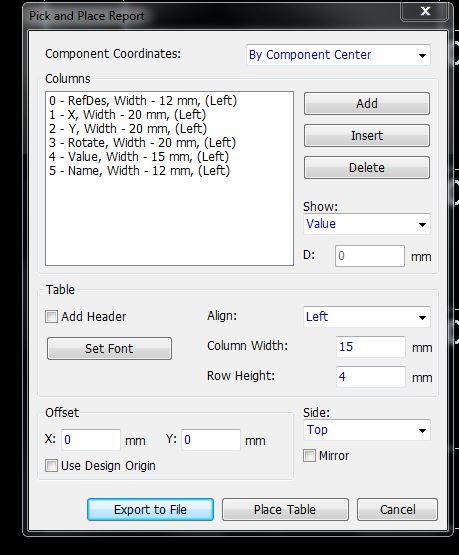
Arrange the columns as per the image, make sure all your parts have a value in each of the required fields, otherwise it won't import correctly.
Uncheck "add header"
Select if it is top or bottom.
Select "export to file"
select csv or txt for the file type, it doesn't matter.
specify the column divider as a space only.
Make sure the name mentions if it is top or bottom.
If it makes you feel good you can change the file name extension to mnt/mnb to stick with the eagle export convention, but it doesn't matter openpnp will open the file no matter what the extension is.
Then in opnepnp, file>import>EAGLE Mountsmd.ulp
Select your file and import
If you get any errors first check that there are no whole numbers, eg 38 instead of 38.00 and check that all fields are filled correctly and no extra spaces between values.
I used 010 Editor to edit my file, but Excel could probably also be used.
Cheers!
It still didn't work!
Anyway, tracked it down to R17 and it's X position was 38, however it needed to be 38.00. After making that change I was able to load my file!
So, 2 things from this,
Does openpnp need to be made tolerant of whole numbers for the component coordinates?
Would it be possible when importing, if there is an error with the file, show what line/value it has failed on?
I have attached the edited working mnt file for interest sake.
So a run down on how to generate a pick and place file from diptrace:
File>Export>pick and place
Arrange the columns as per the image, make sure all your parts have a value in each of the required fields, otherwise it won't import correctly.
Uncheck "add header"
Select if it is top or bottom.
Select "export to file"
select csv or txt for the file type, it doesn't matter.
specify the column divider as a space only.
Make sure the name mentions if it is top or bottom.
If it makes you feel good you can change the file name extension to mnt/mnb to stick with the eagle export convention, but it doesn't matter openpnp will open the file no matter what the extension is.
Then in opnepnp, file>import>EAGLE Mountsmd.ulp
Select your file and import
If you get any errors first check that there are no whole numbers, eg 38 instead of 38.00 and check that all fields are filled correctly and no extra spaces between values.
I used 010 Editor to edit my file, but Excel could probably also be used.
Cheers!

Jason von Nieda
Dec 26, 2016, 6:20:45 PM12/26/16
to OpenPnP
SMdude,
A few things:
1. Yes, OpenPnP should absolutely be able to handle whole numbers. I've logged a ticket to look into that: https://github.com/openpnp/openpnp/issues/390
2. I assume you must be a different person than @BendRocks on Github? Either way, @BendRocks has just submitted a pull request for native Diptrace support in OpenPnP and I have just merged it. It should be up for download by the time you see this email. More information at: https://github.com/openpnp/openpnp/pull/389
And with special thanks to @BendRocks for a really great pull request!
Jason
--
You received this message because you are subscribed to the Google Groups "OpenPnP" group.
To unsubscribe from this group and stop receiving emails from it, send an email to openpnp+u...@googlegroups.com.
To post to this group, send email to ope...@googlegroups.com.
To view this discussion on the web visit https://groups.google.com/d/msgid/openpnp/f0460f83-be33-483f-9db1-8ac7ef9c1e5d%40googlegroups.com.
For more options, visit https://groups.google.com/d/optout.
SMdude
Dec 26, 2016, 6:48:24 PM12/26/16
to OpenPnP
Hi Jason,
Excellent!
Thanks BendRocks, you rock!
Now the next bit of fun, getting diptrace to output a panellised pnp file. Seems it only outputs one board and leaves the fiducial out.
I found this "potential" solution, which although tedious, will work and also might make some fun at the board house.
http://www.diptrace.com/forum/viewtopic.php?f=4&t=10127&p=16928&hilit=pick+and+place+panel#p16928
Might have to rock the boat over there and see if it is supported in V3 yet..
Cheers
Ps, Jason, sometimes the auto update checker finds new updates automatically, other times I need to go to the download page and manually download..?
Excellent!
Thanks BendRocks, you rock!
Now the next bit of fun, getting diptrace to output a panellised pnp file. Seems it only outputs one board and leaves the fiducial out.
I found this "potential" solution, which although tedious, will work and also might make some fun at the board house.
http://www.diptrace.com/forum/viewtopic.php?f=4&t=10127&p=16928&hilit=pick+and+place+panel#p16928
Might have to rock the boat over there and see if it is supported in V3 yet..
Cheers
Ps, Jason, sometimes the auto update checker finds new updates automatically, other times I need to go to the download page and manually download..?
Jason von Nieda
Dec 26, 2016, 6:54:10 PM12/26/16
to OpenPnP
SMdude,
When you first installed OpenPnP it would have asked you how often you wanted it to check for updates. If you didn't select "On Every Start" you might have selected "Daily" or something like that, so there may be a delay. That's the only thing I can think of. If you can find a pattern to it, or if you can find a specific update that is refusing to download, let me know and I'll look into it.
On that note, it reminds me I wanted to add a "Check for Updates..." menu item. Added a ticket for that, too: https://github.com/openpnp/openpnp/issues/391
Jason
--
You received this message because you are subscribed to the Google Groups "OpenPnP" group.
To unsubscribe from this group and stop receiving emails from it, send an email to openpnp+u...@googlegroups.com.
To post to this group, send email to ope...@googlegroups.com.
To view this discussion on the web visit https://groups.google.com/d/msgid/openpnp/8295bc8e-021e-4cee-aed4-c5767c4bdb32%40googlegroups.com.
SMdude
Dec 26, 2016, 7:11:14 PM12/26/16
to OpenPnP
I will have to double check next time I do an installation but I'm fairly sure it has "check on every start" selected.
And it seems random, sometimes it will find it, other not.
Also, in the import tabs, it might be worth noting there what order the data is expected to be in. I changed the order of my Diptrace export to match the eagle mnt/mnb. Now would need to change to back to use the diptrace csv importer.. Sometimes I'm a hazard to myself!!! :D LOL
Cheers
And it seems random, sometimes it will find it, other not.
Also, in the import tabs, it might be worth noting there what order the data is expected to be in. I changed the order of my Diptrace export to match the eagle mnt/mnb. Now would need to change to back to use the diptrace csv importer.. Sometimes I'm a hazard to myself!!! :D LOL
Cheers

evilwulfie
Dec 26, 2016, 7:14:32 PM12/26/16
to ope...@googlegroups.com
mine also does not get latest update
every time even though its set to check on every startup.
Bitdefender still complains about it too.
Bitdefender still complains about it too.
--
You received this message because you are subscribed to the Google Groups "OpenPnP" group.
To unsubscribe from this group and stop receiving emails from it, send an email to openpnp+u...@googlegroups.com.
To post to this group, send email to ope...@googlegroups.com.
To view this discussion on the web visit https://groups.google.com/d/msgid/openpnp/37c3cf8d-e03e-45f5-bf90-a2220d207038%40googlegroups.com.
Jason von Nieda
Dec 26, 2016, 7:21:40 PM12/26/16
to ope...@googlegroups.com
I made some changes 6 days ago to improve update reliability, but it requires that you download a new version at least once since those changes were made. My hope is that after that it will be reliable. Previously there was a situation where the updates could switch back and forth between the master and develop branches - now they should be locked to the branch you downloaded. So, please download a new version and install it, and then let me know if you still see this behavior in the future.
As for BitDefender, I apologize, but I am not going to spend time fighting with anti-virus and anti-malware software. If you are able to tell me specifically what the problem is I will be happy to fix it, but otherwise I don't feel like this is a good use of my time. All of the source is available online, so any user can inspect it to be sure I'm not doing anything evil if they wish.
Jason
To view this discussion on the web visit https://groups.google.com/d/msgid/openpnp/2dd86716-cab2-fbbb-5fc3-afe49d414301%40gmail.com.
evilwulfie
Dec 26, 2016, 7:25:03 PM12/26/16
to ope...@googlegroups.com
Jason I dont expect you to waist your
time fixing Bitdefenders problem.
I deal with it as i need to install so no biggie. Not much you can expect from a free service anyway.
I am running 0.0.1-alpha-SNAPSHOT build e52997
just recently installed. If thats the most current one then everything is cool.
I deal with it as i need to install so no biggie. Not much you can expect from a free service anyway.
I am running 0.0.1-alpha-SNAPSHOT build e52997
just recently installed. If thats the most current one then everything is cool.
To view this discussion on the web visit https://groups.google.com/d/msgid/openpnp/CA%2BQw0jwYDvpco84q8s_cP%3D3EusV1D_rVzXAAJOg%3DVvcEscxvAg%40mail.gmail.com.
Jason von Nieda
Dec 26, 2016, 7:26:21 PM12/26/16
to ope...@googlegroups.com
Yep, that version should be good. If you get a failed update in the future please let me know. I'm hoping the changes I made 6 days ago will resolve it.
Jason
To view this discussion on the web visit https://groups.google.com/d/msgid/openpnp/5e77ab87-bde2-dc28-7b6f-bde62229688f%40gmail.com.

Cri S
Dec 27, 2016, 12:37:45 AM12/27/16
to OpenPnP
As diptrace had two problems, first inconsistent value export, http://liteplacer.com/phpBB/viewtopic.php?f=4&t=26 .
Second as for centered part position it used silk legend too, polarized parts like diodes and LEDs or caps have offsets.
Second as for centered part position it used silk legend too, polarized parts like diodes and LEDs or caps have offsets.
Because this external software, for example smt-maestro,
was needed to resolve this problem.
The side effect was that the resulting centeroid file was correct read by openpnp and liteplacer importer.
Can you confirm that the first problem is resolved?
SMdude
Dec 27, 2016, 12:55:19 AM12/27/16
to OpenPnP
Hi Cri,
Thanks for bringing this up.
I think the value export is working alright. The only components that didn't export "correctly" are ones that didn't have their component properties filled out correctly(my fault).
However, the second problem, is still very much a problem. What a half arsed export feature! Time to go and rattle the cage again..
It might work if I select "by component origin" Component origin should be good for the most part, but for some components I have made footprints for, I will need to make sure the defined origin is correct.
Also, looks like it is not exporting my Fids for some reason..
Thanks for bringing this up.
I think the value export is working alright. The only components that didn't export "correctly" are ones that didn't have their component properties filled out correctly(my fault).
However, the second problem, is still very much a problem. What a half arsed export feature! Time to go and rattle the cage again..
It might work if I select "by component origin" Component origin should be good for the most part, but for some components I have made footprints for, I will need to make sure the defined origin is correct.
Also, looks like it is not exporting my Fids for some reason..
SMdude
Dec 27, 2016, 1:35:55 AM12/27/16
to OpenPnP
Argh!
Cri, the first problem of package not exporting still exists.
The fiducials weren't exporting to the pnp file as DT saw them as a pad, not a component. A bit of silkscreen around the fid sorted that out.
Exporting by component origin might sort out the components not being centred. Will have to edit the decimal places again..
Cheers!
Cri, the first problem of package not exporting still exists.
The fiducials weren't exporting to the pnp file as DT saw them as a pad, not a component. A bit of silkscreen around the fid sorted that out.
Exporting by component origin might sort out the components not being centred. Will have to edit the decimal places again..
Cheers!

BendRocks
Dec 27, 2016, 1:47:11 PM12/27/16
to OpenPnP
When you create a fiducial, you will usually want to make it a part such that it has a copper dot, the solder mask is removed around the dot, and there is a "keepout" region around both to keep copper pour from flooding over the dot.
Once you have that created as a part, you can use it anywhere you wish. HOWEVER, there is currently a bug with parts such that they will always panelize, even if you select the "do not panelize" option for that particular part. They have said it will be fixed in the March 2016 release. This is really only a problem for fiducials that are not part of a PCB (since you always want those to replicate) and are instead part of a panel (which you do not want to replicate--eg the lower left and upper right fids on a panelized board). The summary here is double check your gerber very closely
Panelizing in diptrace is actually very easy and works well.
Yes, you are correct, you want to export by component origin, not centroids. Centroids will take into account silk it seems. When you build a part footprint, always select the "center pattern" command just before the final save. That will center the footprint in the same way the camera will try to center the footprint (copper centroid).
Also, build your part such that it is oriented as it appears on the tape. That is, if it appears on the tape with pin 1 on the lower left, then create it in the footprint editor with pin 1 on the lower left. This will make things easy down the road. If you build a resistor as running from North to South, an then it's on the top as running from East to West, then all your exports will need a tweak.
BendRocks
Dec 27, 2016, 5:02:27 PM12/27/16
to OpenPnP
Sorry, just to correct, DipTrace says the bug where parts do not obeying "do not panelize" setting will be fixed in March 2017, not 2016
Message has been deleted
Cri S
Dec 29, 2016, 5:51:59 AM12/29/16
to OpenPnP
Example with SMT-Maestro:
Result:
Ref,X,Y,rot,Footprint,PartNumber,Value,,,
R2,14.05,4.4,180,0603,RC0603FR-071ML,RES 1M OHM 1/10W 1%,,,,
R6,26.06,18.35,180,1206,ERJ-P08J180V,18 Ohm resistor 2/3w,,,,
R5,23.4,3.1,180,1206,RC1206JR-0715RL,15 Ohm resistor 1/4w,,,,
R7,23.8,26.8,180,1206,RC1206JR-0730RL,30 Ohm resistor 1/4w,,,,
F1,3.25,25.9,180,1812,0ZCC0150BF2C,PTC RESTTBLE 1.50A 24V CHIP 1812,,,,
X1,14.02,7.79,0,3-SMD,PBRC16.00MR50X000,16mhz ceramic osc,,,,
U1,13.85,14.3,0,44 QFN-EP,IC MCU 8BIT 16KB FLASH 44QFN,ATMEGA16U4-MU,,,,
U2,15,15.3,180,6-SMD,High Power LEDs - Multi-Color RGB,XZCB25MO24DG25X111S,,,,
C3,1.85,22.9,0,CAP_0603,,1uF,,,,
C4,5.95,28.8,0,CAP_0603,,1uF,,,,
C5,8.6,27.75,90,CAP_0603,,.1uF,,,,
C2,7.2,12.25,270,CAP_0603,GRM188R61A105KA61D,1uF,,,,
C1,13.25,19,180,CAP_0603,GRM188R71E104KA01D,.1uF,,,,
Q1,27.86,4.27,270,MOSFETN,,BUK9277-55A,,,,
Q2,26.29,15.21,0,MOSFETN,,BUK9277-55A,,,,
Q3,27.44,25.63,90,MOSFETN,,BUK9277-55A,,,,
R10,27.75,22.8,180,RES_0603,,10k,,,,
R4,7.15,14.7,180,RES_0603,,22,,,,
R8,27.75,7.3,0,RES_0603,,10k,,,,
R9,23.66,15.1,90,RES_0603,,10k,,,,
R3,7.15,16,180,RES_0603,MCT06030C2209FP500,22,,,,
R1,9.05,1.9,0,RES_0603,RC0603JR-0710KL,10k,,,,
J2,2.11,14.92,270,uUSB SMT,10118192-0001LF,CONN USB MICRO B RECPT SMT R/A,,,,
Reply all
Reply to author
Forward
0 new messages