
Bottom camera pipeline MaskCircle.

tyee...@gmail.com

mark maker
Hi Al,
It depends.
In normal/legacy operation it takes it from the nozzle tip Max.
Part Diameter.
If
- you have multi-shot enabled (camera Roaming Radius is
set)
- and your part package has a footprint defined,
- and you do not have Vision Offsets
then it is determined by the vision compositing algorithm, so the
shot can isolate the corners.
https://github.com/openpnp/openpnp/wiki/Vision-Compositing
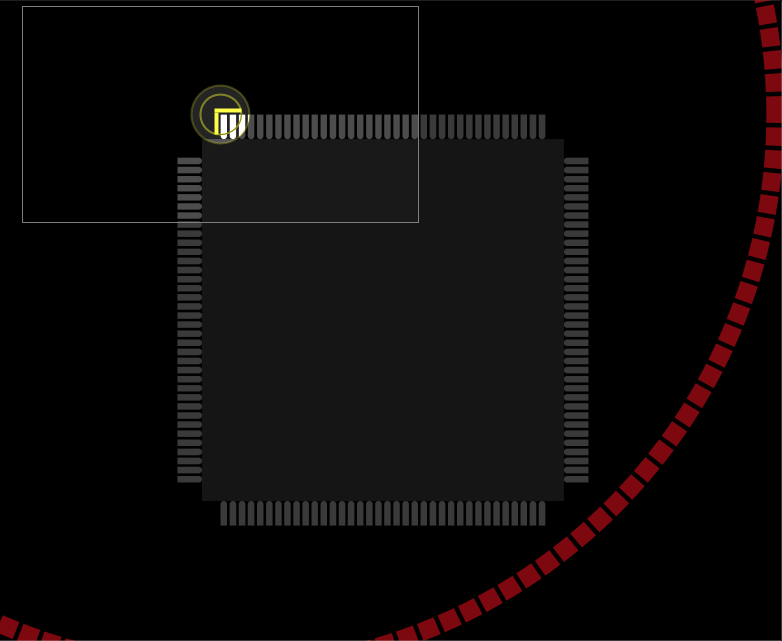
If the corner needs no isolating, I see that in your case
this might choose a mask that is too large, i.e. it tends to take
as much as possible.
But you can easily edit the pipeline and add a second
MaskCircle stage, then drag it to before the one
controlled by bottom vision.

Make sure to set the stage propertyName to something other than "MaskCircle", so you can control it inside the pipeline.

https://github.com/openpnp/openpnp/wiki/Computer-Vision#overriding-controlled-stage-properties
I will look into the behavior of multi-shots. Maybe taking the
largest possible mask is not ideal. The smallest possible mask is
already computed too. Hmmm...
_Mark
--
You received this message because you are subscribed to the Google Groups "OpenPnP" group.
To unsubscribe from this group and stop receiving emails from it, send an email to openpnp+u...@googlegroups.com.
To view this discussion on the web visit https://groups.google.com/d/msgid/openpnp/5161327f-76e3-43c4-b904-d4d746b2fecen%40googlegroups.com.

Jim Freeman
I was having this same issue. Mark’s solution looks good. What I did to get around the inability to use Maskcircle (I didn’t think to change it’s name) wa to use maskrectangle.
Sent from Mail for Windows
To view this discussion on the web visit https://groups.google.com/d/msgid/openpnp/527927e5-55b4-cca6-3dff-d10d9e8a7226%40makr.zone.
mark maker
Hi Jim, Al,
Note, this is just a temporary work-around. Now that I understand
the underlying problem ("some random light reflections
around the outer edge of my bottom camera view"), I'll find
a better solution that works without editing the pipeline.
Important: This is also related to background calibration, where
the nozzle tip Max. Part Diameter is actually taken as the
nominal mask, so it calibrates the background just from pixels inside
this area. Therefore I will need to change multi-shot, so it still
respects Max. Part Diameter in any case.
It actually becomes clear from my own earlier doc 😇:
_Mark
To view this discussion on the web visit https://groups.google.com/d/msgid/openpnp/BBCDCD2E-30EB-4AE5-9CDE-BA65482D2D8E%40hxcore.ol.
mark maker
Hi all,
this should now be fixed.

Details here:
https://github.com/openpnp/openpnp/pull/1471
You can upgrade to the newest testing version.
Please help me test this in real life !! 🏆 🏆 🏆
(I have only tested in simulation)
@Al, @Jim, thanks again for reporting this.
_Mark
To view this discussion on the web visit https://groups.google.com/d/msgid/openpnp/1bdf75ba-13e6-68e4-310a-44e45f5b3550%40makr.zone.
tyee...@gmail.com
tyee...@gmail.com
mark maker
Could you please send your machine.xml?
To view this discussion on the web visit https://groups.google.com/d/msgid/openpnp/a0ec8747-f797-42cd-a1b8-a3b295de454an%40googlegroups.com.
mark maker
Hi Al,
you have a Pick Tolerance of 20mm set. This cannot work, typical max. values are 0.5 ... 1mm.

But it is true that this tolerance is only now properly
applied in the the new version, which explains the
difference to the old version.
_Mark
To view this discussion on the web visit https://groups.google.com/d/msgid/openpnp/b81cca64-019b-4490-9de5-c7487f1ed2b5n%40googlegroups.com.
tyee...@gmail.com
mark maker
> Just as a thought, on parameters where the units aren't
obvious, the units should be included.
As a convention, it is done the other way around: if it is a percentage, it says so, e.g. it would be labelled "Max. Pick Tolerance [%]".
Example:

Wouldn't the GUI be too cluttered if all the countless labels
that contain Lengths or Coordinates had units?
Apart from that, it would also be a lot of work to implement because the system units are changeable. 😎
> but am trying to learn the new way of
calibrating. It has been going well but I have to do a lot of
reading to understand what the results mean.
Report if things are not understandable.
_Mark
To view this discussion on the web visit https://groups.google.com/d/msgid/openpnp/f52c1e2f-0589-4f4d-a458-4381d5715d47n%40googlegroups.com.
tyee...@gmail.com
ma...@makr.zone
Issues & Solutions would now tell you when the Pick Tolerance is unreasonable.
https://github.com/openpnp/openpnp/pull/1472
_Mark