
Bottom Vision offsets error

geo0rpo


bert shivaan
--
You received this message because you are subscribed to the Google Groups "OpenPnP" group.
To unsubscribe from this group and stop receiving emails from it, send an email to openpnp+u...@googlegroups.com.
To view this discussion on the web visit https://groups.google.com/d/msgid/openpnp/9386ec5a-4492-4b21-93d2-396169190105n%40googlegroups.com.
geo0rpo
geo0rpo
geo0rpo

mark maker
This is on the nozzle tip, Max pick tolerance. The idea
is that smaller/finer nozzle tips have less tolerance.
https://github.com/openpnp/openpnp/wiki/DetectRectlinearSymmetry#nozzle-tip-configuration
I will add this info to the error message. Thanks for testing/pointing this out.
Btw:
The Machine Setup->Vision->Bottom Vision->Max linear
offset has a different meaning, namely when to quit doing the next
pass in bottom vision. If the detected offset is smaller, the
vision loop will stop and the final offset is only compensated in
placement.
_Mark
To view this discussion on the web visit https://groups.google.com/d/msgid/openpnp/6507a4d9-3429-4307-a1cd-c7e09f5612afn%40googlegroups.com.
geo0rpo
mark maker
Hi geo0rpo
> Yes please add the message. I spent all day on this :)
Duh!
In the testing version I tried to introduce a significantly more
"semantic" or "opinionated" control of pipelines to make things
easier.
Some parameters are now controlled by sliders from outside the pipeline...

https://github.com/openpnp/openpnp/wiki/Exposed-Pipeline-Parameters
At the same time I wanted to avoid any parameters that aren't
actually "vision" parameters per se, but rather "physical" or
"mechanical" ones.
Consequently, some of them are now controlled centrally on the
nozzle tip, as described here:
https://github.com/openpnp/openpnp/wiki/DetectRectlinearSymmetry#nozzle-tip-configuration
These "physical" ones often have multiple uses, i.e. across multiple applications. One example is the Max Part Diameter, with is also used to define the sensitive area in Auto Focus...

https://github.com/openpnp/openpnp/wiki/Up-looking-Camera-Auto-Focus#nozzle-tip-configuration
... and in background calibration:
If these three usages of Max Part Diameter were effectively buried in unrelated pipeline parameters, there would likely be inconsistencies between them, which would very likely lead to hard to diagnose problems!
Therefore I recommend you restore the standard pipeline and let
your MaskCircle be controlled by the Max Part Diameter.
Adjust it on the nozzle tip instead.
Btw. if you ever want to override control in a pipeline, just
change the propertyName. But again, this is really, really
not recommended:
https://github.com/openpnp/openpnp/wiki/Computer-Vision#overriding-controlled-stage-properties
_Mark
To view this discussion on the web visit https://groups.google.com/d/msgid/openpnp/7002f73a-4fcd-411a-9f82-4a1c23c1430bn%40googlegroups.com.
mark maker
Fixed, the error now points to the nozzle tip, see the screen
shot:

https://github.com/openpnp/openpnp/pull/1400
Will be deployed as testing version in a few minutes.
_Mark
To view this discussion on the web visit https://groups.google.com/d/msgid/openpnp/8480bc44-c07c-6efc-177d-9ce67378b2e6%40makr.zone.
geo0rpo
mark maker
> Where can I see a list or log of each versions and reference to the changes etc?
For the testing branch use this link:
https://github.com/openpnp/openpnp/pulls?q=is%3Apr+is%3Amerged+base%3Atest+
Unfortunately these are sorted by opening date, not by merge
date, so the sequence might sometimes a bit off. On larger
changes, the Description/Discussion might sometimes be a bit
"evolving", but at least all my changes then also link to
Wiki pages that describe the final instruction for use.
A high level summary is in the Change Log file which you can
access from the Help menu, but it is usually not up to date in the
testing version, i.e. it is only finalized for the develop
version.
Also always have a look at Issues & Solutions, after an
Upgrade. Sometimes new issues/solutions will pop up, hinting at
new features. But these might sometimes be lagging behind a few
versions, they are typically highly influenced by the community
testing effort.
_Mark
To view this discussion on the web visit https://groups.google.com/d/msgid/openpnp/a5d74971-d174-4351-83bc-51fcfc3fe8d4n%40googlegroups.com.
mark maker
> The vision setting has only 1 threshold setting and it magically finds the part outline.
The advantage of a commercial machine is that each machine is the
practically the same. So you can build many assumptions into the
software and never present a choice to the user. Conversely, in
OpenPnP you are not only setting up parts/packages, but also your
whole machine, cameras, lights, diffusers, shades, nozzle tips,
the background etc. pp. which are sometimes a bit more DIY and
"makeshift" than on a commercial machine.
If you try to mentally distinguish the two sides of this, you'll
see that we have recently reached practically the same level of
comfort: there are now merely two sliders that you will routinely
use once the machine side is set up. See this screenshot:

https://github.com/openpnp/openpnp/wiki/Exposed-Pipeline-Parameters
This is one more reason why I wanted to separate the "physical"
or "mechanical" stuff from the true vision stuff, i.e. why I
separated the "machine side" parameters (in this case the one-time
nozzle tip setup) from the everyday "part/package vision side"
parameters.
I will probably add Issues & Solutions suggestions for these
"machine side" setup steps in a future version, so users will
handle them as part of the machine setup and no longer consider
them in vision.
_Mark
To view this discussion on the web visit https://groups.google.com/d/msgid/openpnp/29bba641-ba29-b7b6-0d2d-4532451c4fe8%40makr.zone.

Jan
I'm coming from a Chinese software (CHM-T36VA) because the vision setup
was not as good as I wont it to be. They just had a single threshold
value for the entire bottom vision. Works well, but has its limits if
the legs are not that shiny. Likely the software you've seen is better.
I find it interesting to see that a) the pickup position and angle is
jittering, b) they somehow seem to mask the dome of the nozzle but not
its body, c) they can clearly distinguish the legs from the body and d)
the rectangular around the legs of the SOT23 looks like our MinAreaRect
stage.
From NXT machines I know, that they only use template matching, which
seems to be not supported by OpenPnp anymore...
Thanks to Mark, I think, the new DetectCircularSymmetry state and
exposed parameters make a very good job.
Jan
On 20.04.2022 16:23, geo0rpo wrote:
> Hello Mark!
> I reverted but to the mask circle. Brilliant idea to have it dynamically
>
> Also take a look here:
> https://www.youtube.com/watch?v=6G9EPDplttU
>
> This is a Chinese machine in local pcb-pcba facility I visited some days
> ago.
> The vision setting has only 1 threshold setting and it magically finds
> the part outline.
>
>
> Also I think that it is hard for people (for me at least) to keep track
> of all the constant improvements and version upgrades, what they
> actually do, where are the new settings etc.
> Where can I see a list or log of each versions and reference to the
> changes etc?
>
> Thanks again!
>
>
>
> On Sunday, April 17, 2022 at 8:55:58 PM UTC+3 ma...@makr.zone wrote:
>
> Fixed, the error now points to the nozzle tip, see the screen shot:
>
> image
>
>
> Will be deployed as testing version in a few minutes.
>
> _Mark
>
>
> On 17.04.22 19:47, mark maker wrote:
>>
>> Hi geo0rpo
>>
>> Duh!
>>
>> In the testing version I tried to introduce a significantly more
>> "semantic" or "opinionated" control of pipelines to make things
>> easier.
>>
>> Some parameters are now controlled by sliders from outside the
>> pipeline...
>>
>>
>> https://github.com/openpnp/openpnp/wiki/Exposed-Pipeline-Parameters <https://github.com/openpnp/openpnp/wiki/Exposed-Pipeline-Parameters>
>> At the same time I wanted to avoid any parameters that aren't
>> actually "vision" parameters per se, but rather "physical" or
>> "mechanical" ones.
>>
>> Consequently, some of them are now controlled centrally on the
>> nozzle tip, as described here:
>> https://github.com/openpnp/openpnp/wiki/DetectRectlinearSymmetry#nozzle-tip-configuration
>> <https://github.com/openpnp/openpnp/wiki/DetectRectlinearSymmetry#nozzle-tip-configuration>
>>
>> These "physical" ones often have multiple uses, i.e. across
>>
>>
>> https://github.com/openpnp/openpnp/wiki/Up-looking-Camera-Auto-Focus#nozzle-tip-configuration
>>
>> ... and in background calibration:
>>
>> https://github.com/openpnp/openpnp/wiki/Nozzle-Tip-Background-Calibration#calibration-pipeline-control
>> <https://github.com/openpnp/openpnp/wiki/Nozzle-Tip-Background-Calibration#calibration-pipeline-control>
>>
>> inconsistencies between them, which would very likely lead to hard
>> to diagnose problems!
>>
>> Therefore I recommend you restore the standard pipeline and let
>> it on the nozzle tip instead. *
>> *
>> Btw. if you ever want to override control in a pipeline, just
>>
>> https://github.com/openpnp/openpnp/wiki/Computer-Vision#overriding-controlled-stage-properties
>> <https://github.com/openpnp/openpnp/wiki/Computer-Vision#overriding-controlled-stage-properties>
>>
>> _Mark
>>
>>
>> On 17.04.22 19:10, geo0rpo wrote:
>>> Yes please add the message. I spent all day on this :)
>>> Also I can not figure out how to set the "mask circle" diameter
>>> in the pipeline anymore.
>>> It is controlled elsewhere. I had to disable this and add an
>>> extra "mask rectangle".
>>> it has been some months since I last used the machine, and now
>>> after the update I am lost :))
>>>
>>>
>>>
>>> Thanks!
>>>
>>>
>>> On Sunday, April 17, 2022 at 7:57:54 PM UTC+3 ma...@makr.zone wrote:
>>>
>>>>
>>>> --
>>>> You received this message because you are subscribed
>>>> to the Google Groups "OpenPnP" group.
>>>> To unsubscribe from this group and stop receiving
>>>> emails from it, send an email to
>>>> openpnp+u...@googlegroups.com.
>>>> To view this discussion on the web visit
>>>> https://groups.google.com/d/msgid/openpnp/9386ec5a-4492-4b21-93d2-396169190105n%40googlegroups.com
>>>> --
>>>> You received this message because you are subscribed to the
>>>> Google Groups "OpenPnP" group.
>>>> To unsubscribe from this group and stop receiving emails
>>>> from it, send an email to openpnp+u...@googlegroups.com.
>>>> To view this discussion on the web visit
>>>> <https://groups.google.com/d/msgid/openpnp/6507a4d9-3429-4307-a1cd-c7e09f5612afn%40googlegroups.com?utm_medium=email&utm_source=footer>.
>>> --
>>> You received this message because you are subscribed to the
>>> Google Groups "OpenPnP" group.
>>> To unsubscribe from this group and stop receiving emails from it,
>>> send an email to openpnp+u...@googlegroups.com.
>>> To view this discussion on the web visit
>>> <https://groups.google.com/d/msgid/openpnp/7002f73a-4fcd-411a-9f82-4a1c23c1430bn%40googlegroups.com?utm_medium=email&utm_source=footer>.
>> You received this message because you are subscribed to the Google
>> Groups "OpenPnP" group.
>> To unsubscribe from this group and stop receiving emails from it,
>> send an email to openpnp+u...@googlegroups.com.
>> To view this discussion on the web visit
>> <https://groups.google.com/d/msgid/openpnp/8480bc44-c07c-6efc-177d-9ce67378b2e6%40makr.zone?utm_medium=email&utm_source=footer>.
> --
> You received this message because you are subscribed to the Google
> Groups "OpenPnP" group.
> To unsubscribe from this group and stop receiving emails from it, send
> an email to openpnp+u...@googlegroups.com
> <https://groups.google.com/d/msgid/openpnp/a5d74971-d174-4351-83bc-51fcfc3fe8d4n%40googlegroups.com?utm_medium=email&utm_source=footer>.
geo0rpo
bert shivaan
To view this discussion on the web visit https://groups.google.com/d/msgid/openpnp/2a132702-961d-41c4-b6e8-dd4552fee2a2n%40googlegroups.com.
mark maker
Hi geo0rpo
> For some reason in my PC the sliders work very slow.
Just to be sure: are you using the stock pipeline?
I'm asking because if you use the new DetectRectlinearSymmetry stage/pipeline, that is currently also in testing, it is a completely different issue/topic. I guess that new stage/pipeline needs serious work or may even turn out to be non-feasible in Java 🙁.
Please use the stock pipeline and/or report back.
_Mark
To view this discussion on the web visit https://groups.google.com/d/msgid/openpnp/2a132702-961d-41c4-b6e8-dd4552fee2a2n%40googlegroups.com.
geo0rpo
mark maker
You could also do the background calibration to knock out the green Juki nozzle, which might become essential if you ever have a duller part:
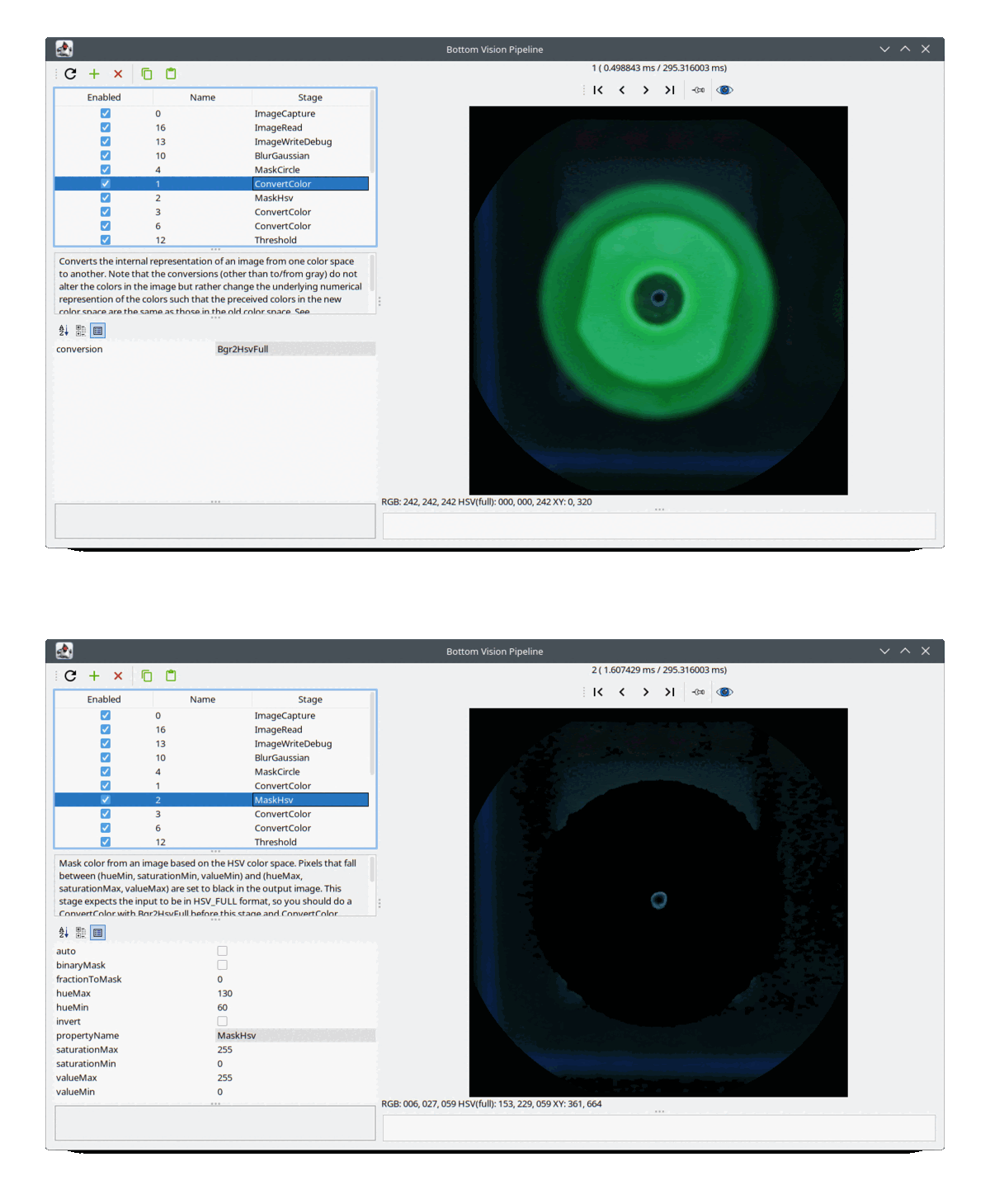
https://github.com/openpnp/openpnp/wiki/Nozzle-Tip-Background-Calibration
_Mark
To view this discussion on the web visit https://groups.google.com/d/msgid/openpnp/38884195-e85f-4a53-9fb1-7a13a74aeb41n%40googlegroups.com.