
Blinds Feeder will not calibrate

David Griffiths

ma...@makr.zone
Hi David
The fiducial should be 2mm and it accepts down to 1.4mm, up to
2.3mm, both limits are hard-coded. As you see in your result, it
is borderline, i.e. it will work/not work unpredictably.
I suspect it's actually good to not be
recognized, you may have slightly color-tinted shadows inside the
fiducial that are not excluded by MaskHSV (the light is shining
through the green PETG and tinting the shadows). Shadows must not
be recognized as part of the fiducial, they will throw off
accuracy, as they are not necessarily symmetrical.
You are on the testing version, right? The following is
only available on testing:
First, if not yet done, switch off USB Automatic White
Balance and apply the OpenPnP White Balance? Why? and How? See
here:
https://github.com/openpnp/openpnp/wiki/Camera-White-Balance
It is the basis for stable green-screening.
Maybe you can then tune the MaskHSV yourself, to exclude the
shadows in the fiducial. When the background of your fiducial is
very reflective, you might have to color the inside of the
fiducials with a complementary color (red/blue/magenta) or black.
Just use a fine permanent felt marker.
If you need help with MaskHSV, please do the following:
- Place the camera over the fiducial, as the calibration would.
- Double click the camera view, to save a snapshot
- Send the snapshot from .openpnp2/snapshots to me
- Edit your pipeline, copy & paste and send to me
--
You received this message because you are subscribed to the Google Groups "OpenPnP" group.
To unsubscribe from this group and stop receiving emails from it, send an email to openpnp+u...@googlegroups.com.
To view this discussion on the web visit https://groups.google.com/d/msgid/openpnp/a0527542-c208-4165-a264-83abda025ac9n%40googlegroups.com.

Virender Kumar

mark maker
No.
OpenPnP must be able to discern the blinds covers against parts in their pockets, but those parts may be black too:

https://youtu.be/dGde59Iv6eY?t=393
It needs a unique vivid (=high saturation) color, i.e. it can be
red or blue etc., but not black or grey or white. It must be from
the upper and outer edge of that color cylinder:
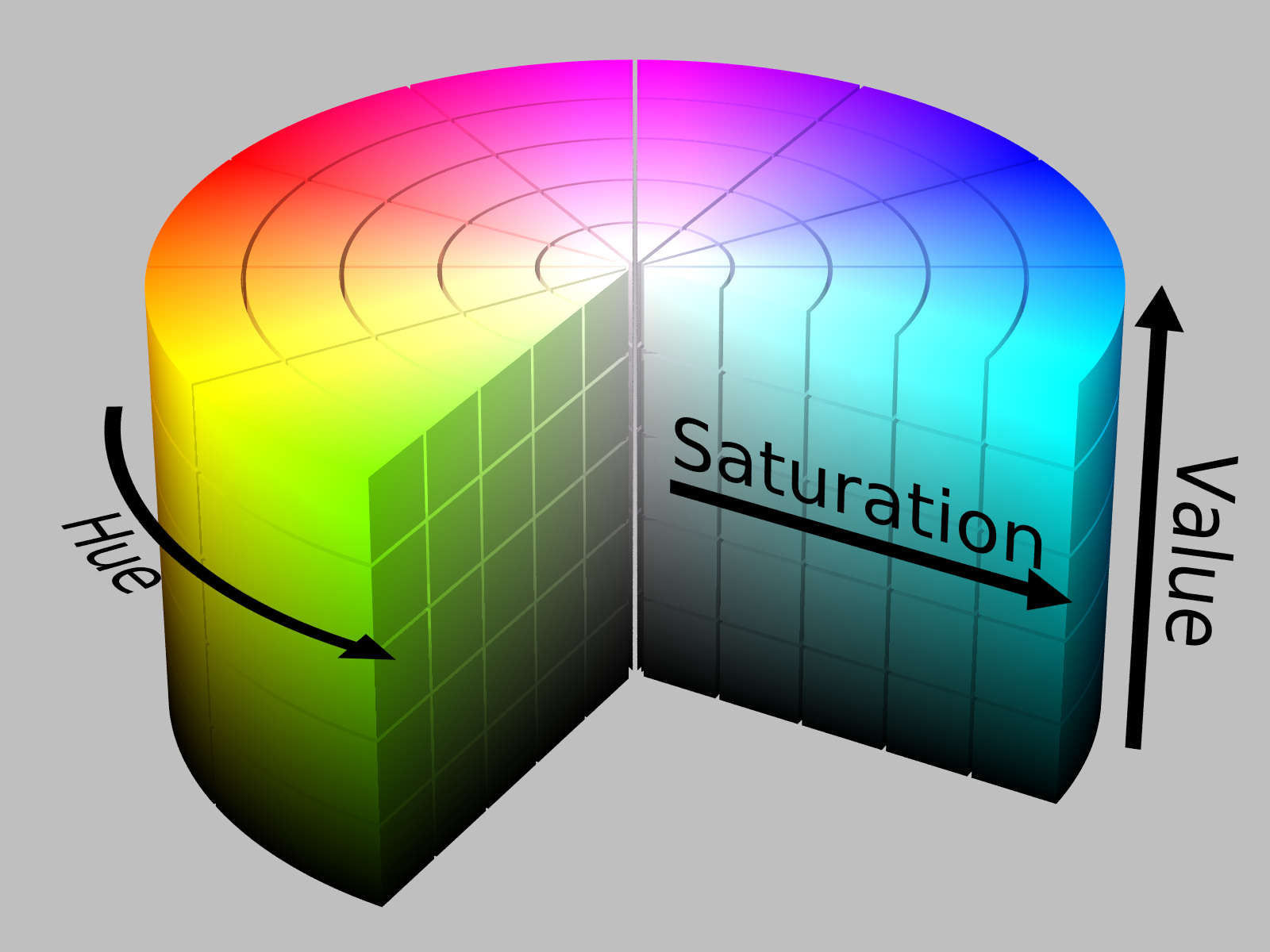
https://en.wikipedia.org/wiki/HSL_and_HSV#Basic_principle
You can then adjust the MaskHsv stage in the pipeline to key the
right color.
_Mark
To view this discussion on the web visit https://groups.google.com/d/msgid/openpnp/976ea4d9-e682-4c4a-8d75-a63635e9d0bfn%40googlegroups.com.

mark maker
Dear Virender,
I see several issues.
- Lighting should be symmetrical. You seem to have a side light and this will continue to give you headaches. Use a LED ring and diffuser around the camera.
- Your camera seem very wide angle. I recommend a longer lens
and mouting the camera higher up if at all possible.
- Make sure to follow Issues & Solutions to calibrate your
camera. I see massive lens distortion.
- Make sure to follow Issues & Solutions to calibrated Camera White Balance.
- Your 3D-Print quality might not be tuned enough. The fiducial
does not look like a diamond shape at all. There might be
settings that affect this, like "outer perimeter first" etc.
(I'm not much of an expert, the PRUSA printers I used just
always worked perfectly, once I figured out to use 3D-printing
spray for adhesion)
To view this discussion on the web visit https://groups.google.com/d/msgid/openpnp/510daf53-a5fb-46e7-ab34-462851f6074an%40googlegroups.com.
Virender Kumar
I have sorted out 3D print issue.
Light is in the center now.
Camera is a bit far away from the previous one.
Here is my pipeline
<cv-pipeline>
<stages>
<cv-stage class="org.openpnp.vision.pipeline.stages.ImageRead" name="00" enabled="false" file="test.png" color-space="Bgr" handle-as-captured="false"/>
<cv-stage class="org.openpnp.vision.pipeline.stages.ImageCapture" name="0" enabled="true" default-light="true" settle-option="Settle" count="1"/>
<cv-stage class="org.openpnp.vision.pipeline.stages.BlurGaussian" name="1" enabled="true" kernel-size="3" property-name="BlurGaussian"/>
<cv-stage class="org.openpnp.vision.pipeline.stages.AffineWarp" name="ocr1" enabled="true" length-unit="Millimeters" x-0="0.0" y-0="0.0" x-1="0.0" y-1="0.0" x-2="0.0" y-2="0.0" scale="1.0" rectify="true" region-of-interest-property="regionOfInterest"/>
<cv-stage class="org.openpnp.vision.pipeline.stages.ConvertColor" name="ocr2" enabled="false" conversion="Bgr2Gray"/>
<cv-stage class="org.openpnp.vision.pipeline.stages.SimpleOcr" name="OCR" enabled="true" alphabet="0123456789.-+_RCLDQYXJIVAFH%GMKkmuµnp" font-name="Liberation Mono" font-size-pt="7.0" font-max-pixel-size="28" auto-detect-size="false" threshold="0.75" draw-style="OverScaledImage" debug="false" property-name="SimpleOcr"/>
<cv-stage class="org.openpnp.vision.pipeline.stages.ImageRecall" name="11" enabled="true" image-stage-name="1"/>
<cv-stage class="org.openpnp.vision.pipeline.stages.ConvertColor" name="2" enabled="true" conversion="Bgr2HsvFull"/>
<cv-stage class="org.openpnp.vision.pipeline.stages.Normalize" name="3" enabled="false"/>
<cv-stage class="org.openpnp.vision.pipeline.stages.MaskHsv" name="4" enabled="true" auto="false" fraction-to-mask="0.0" hue-min="65" hue-max="115" saturation-min="50" saturation-max="255" value-min="40" value-max="255" soft-edge="0" soft-factor="1.0" invert="false" binary-mask="true" property-name="MaskHsv"/>
<cv-stage class="org.openpnp.vision.pipeline.stages.BlurMedian" name="5" enabled="true" kernel-size="13"/>
<cv-stage class="org.openpnp.vision.pipeline.stages.FindContours" name="7" enabled="true" retrieval-mode="List" approximation-method="Simple"/>
<cv-stage class="org.openpnp.vision.pipeline.stages.FilterContours" name="8" enabled="true" contours-stage-name="7" min-area="1000.0" max-area="100000.0" property-name="FilterContours"/>
<cv-stage class="org.openpnp.vision.pipeline.stages.MinAreaRectContours" name="results" enabled="true" contours-stage-name="8"/>
<cv-stage class="org.openpnp.vision.pipeline.stages.ImageRecall" name="10" enabled="true" image-stage-name="0"/>
<cv-stage class="org.openpnp.vision.pipeline.stages.DrawRotatedRects" name="12" enabled="false" rotated-rects-stage-name="results" thickness="3" draw-rect-center="true" rect-center-radius="20" show-orientation="false"/>
</stages>
</cv-pipeline>

mark maker
I suspect a scale issue, i.e. Units per Pixel.
You should still use Issues & Solutions to calibrate the camera. And White Balance. If all these things are okay, you should be able to use the stock pipeline unchanged.
I wrote down the steps in the Wiki:
https://github.com/openpnp/openpnp/wiki/BlindsFeeder#openpnp-preparation
If it does still not work, send the native image and a log at TRACE level.
https://github.com/openpnp/openpnp/wiki/FAQ#how-can-i-get-a-native-camera-image
https://github.com/openpnp/openpnp/wiki/FAQ#where-are-configuration-and-log-files-located
_Mark
To view this discussion on the web visit https://groups.google.com/d/msgid/openpnp/349dc2cb-ba6a-4c40-b613-54ece04ca911n%40googlegroups.com.