
advanced camera calibration: position of the up-looking camera

Jan
I just wonted to verify the position of the up-looking camera after
advanced camera calibration by placing the nozzle tip over its
configured position. I found, that the nozzle is off by quite a distance
(please see the attached screenshot). Would anyone please tell me if
that's ok or what went wrong? I've attached the log of the advance
camera calibration. (It did the calibration twice with the same result)
Thank You!
Jan

mark maker
I leave that one to @Tony Luken.


tonyl...@gmail.com

Jan
Sorry for the late response!
Yes, if you use the suggested function, the nozzle tip is moved closer
to the center of the camera. (see attached screenshot, I also moved it
by the indicated distance (DRO) to bring it really into center) This
leads to some more questions:
1) why does advanced camera calibration shifts the center of the
displayed image? I'm assuming any tilt != 0 would result in a Z
dependence of the position. But for what Z is the correction applied?
The function you pointed out moves the nozzle to the Z position the
camera position was recorded with. (switching advanced camera
calibration off moves the nozzle tip by (0.25,1.55,0)mm) I would assume,
that the correction is linked to that position such, that its image
stays the same.
I'd suggest to add a remark next to the position coordinates which
explains why the camera/nozzle relation is shifted now.
2) If I move the nozzle up and down, its position moves in x and y as
well. That's expected for a tilted camera/nozzle. As there is 3d
calibration in action, couldn't that be correct?
3) at which Z level will bottom vision take place? The calibration was
performed at the "Default Working Plan Z" (-6.3mm) and 2mm above. PCB-Z
is about -8.8mm (for 1.6mm PCB thickness, lower for thinner PCBs).
4) I assume, that best performance (xy-precision wise) is still
archived, if bottom vision takes place at PCB-Z. Is that still true with
advanced camera calibration in action? How can I archive this or how can
I force advanced camera calibration to take this level as the/my
preferred level.
5) Can you disentangle camera tilts from nozzle tilts? The xy-movement
provides a reference plane, nozzle tilts have a fix angle with respect
to z, while camera tilts don't as each point is connected by a straight
line with the camera center (surface of the sensor chip). I wonder
whether this divergence would be enough.
It would be great if you could rate the results of the advance camera
calibration automatically. I'd love to see some remarks if you think
like a tilt angle is undesirable large and/or the estimated location
accuracy is to low/to high. Please also provide rating results if you
think the values are good.
Jan
On 21.01.2022 18:17, tonyl...@gmail.com wrote:
> I believe that is moving the nozzle tip to the /uncalibrated/ position
> up-looking camera view and select "Move Selected Nozzle to Camera" to
> On Friday, January 21, 2022 at 7:23:17 AM UTC-6 ma...@makr.zone wrote:
>
> I leave that one to @Tony Luken.
>
> On 21.01.22 14:20, 'Jan' via OpenPnP wrote:
>> Hi all!
>> I just wonted to verify the position of the up-looking camera
>> after advanced camera calibration by placing the nozzle tip over
>> its configured position. I found, that the nozzle is off by quite
>> a distance (please see the attached screenshot). Would anyone
>> please tell me if that's ok or what went wrong? I've attached the
>> log of the advance camera calibration. (It did the calibration
>> twice with the same result)
>> Thank You!
>>
>> Jan
>>
> You received this message because you are subscribed to the Google
> Groups "OpenPnP" group.
> To unsubscribe from this group and stop receiving emails from it, send
> an email to openpnp+u...@googlegroups.com
> <mailto:openpnp+u...@googlegroups.com>.
> To view this discussion on the web visit
> https://groups.google.com/d/msgid/openpnp/febb3a9c-5e94-46e3-81d7-3ef8d57a8284n%40googlegroups.com
> <https://groups.google.com/d/msgid/openpnp/febb3a9c-5e94-46e3-81d7-3ef8d57a8284n%40googlegroups.com?utm_medium=email&utm_source=footer>.

mark maker
Good points, I let Tony explain in detail, just a few remarks.
Re 1) "why does advanced camera calibration shifts the center of the displayed image?"
If you backtrace the light-rays that a camera receives, you have
a a fanned-out cone of (reverse) light beams. From all these
"rays" the calibration now picks the one that happens to be
perfectly perpendicular to the machine X/Y plane. Because the rays
are fanned-out at all angles, there is always one with that
property (assuming your camera is not too tilted). That
one ray, or rather the corresponding pixel in the image then forms
the new camera center:

I explained more about that here.
https://groups.google.com/g/openpnp/c/_BqWBSMAdt8/m/rNyOVROUDwAJ
re 2) " If I move the nozzle up and down, its position moves in x and y as well."
The Advanced Camera Calibration calibrates the camera, not
the nozzle. Because we always hold the part into the focal
plane of the camera, i.e. we lift up the nozzle by the part
height, this is also all that we need, i.e. we do not currently
need 3D calibration in the bottom camera. But see (4) about nozzle/nozzle
tip calibration.
If we really wanted to push this further, we would need to
calibration for planarity of the nozzle tip, i.e. how
tilted it holds the part, and how that tilt changes with nozzle
rotation, which might start to matter for very large parts. Not
sure, this would make a big difference in reality, though.
3) "at which Z level will bottom vision take place?"
If you look closely, you see there is an Auto Focus operation in preliminary bottom camera calibration, that makes sure the bottom camera Z is at the in-focus point:

Re 4) " I assume, that best performance (xy-precision wise) is still archived, if bottom vision takes place at PCB-Z."
Yes, it is still recommended. To achieve that, make sure your
camera focuses at that Z height, so (3) will nail it.
But if that is not the case for your machine, its not too bad. With Nozzle tip calibration (a whole different but equally important topic) a bottom camera Z that is different becomes less important, because we have tool specific offsets applied:
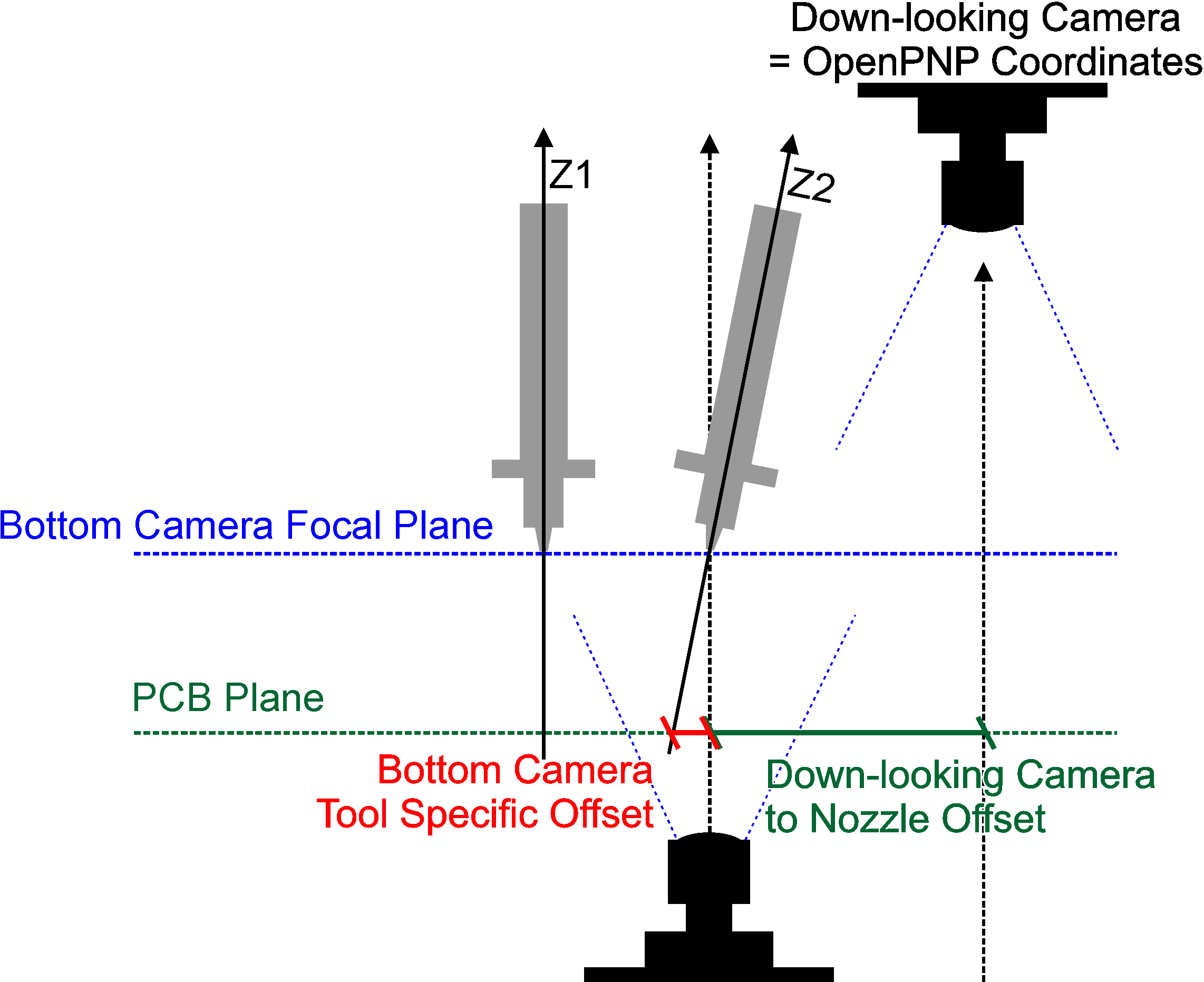
5) "Can you disentangle camera tilts from nozzle tilts? "
Tony probably could, but see (2) why this does not make much
sense, and see (4) for how we covered what really matters.
_Mark
tonyl...@gmail.com
mark maker
> We'd need to make sure that any necessary backlash compensation gets applied before any negative Z motion takes place. Mark - would that be difficult?
To unsubscribe from this group and stop receiving emails from it, send an email to openpnp+u...@googlegroups.com.
To view this discussion on the web visit https://groups.google.com/d/msgid/openpnp/0775eda0-62c0-44b7-9782-8ce37631c6c9n%40googlegroups.com.
tonyl...@gmail.com
mark maker
There is nothing as good as having a machine, where everything is
at the same Z (i.e. withing a few Millimeters). Everybody should
really try hard to achieve that.
_Mark
To view this discussion on the web visit https://groups.google.com/d/msgid/openpnp/ff3dceff-e77c-4242-bd25-8da89010c90an%40googlegroups.com.