
Primary Calibration Fiducial will not work

Philip Kristoffersen
I have gotten to the step in which i need to calibrate the printed fiducial in the Issues and Solutions. I have read all the documentation and seen the video .. several times now, to no avail :(
I simply get "Subject not found" in every run I make. I have played around with the camera settings, some got a little further than others, but I must admit I on deep water with this stuff. I'm not quite sure what it is I am tweaking and there seems to be no connection between succes / failures. Most of the time it stops on the second move and pops the error message.
Things to note:
Lens has succesfully been calibrated.
It seems settle at 2 or 2.1 works really well, but wont get me very far (move 5).


Like i said, deep water here - so please any tips / tricks, fire away!
If you need any specific data, do tell and I will update tomorrow :)
- Philip

mark maker
Hi Philip,
I'm assuming you have the latest test version:
Camera settling is not active in the Primary Calibration Fiducial
vision. Instead OpenPnP uses a very conservative built-in fixed
settling time of 600ms, assuming this is enough for any
(practically usable) camera.
Background: this is a chicken and egg situation. Issues &
Solutions can only perform the automatic Camera Settling
calibration once the Primary Calibration Fiducial calibration is
done. Hence it needs to improvise first.
Best set the camera settling back to FixedTime for the
automatic Camera Settling calibration to be proposed later.
Back to your problem: Please send the log at TRACE level and your machine.xml.
_Mark
--
You received this message because you are subscribed to the Google Groups "OpenPnP" group.
To unsubscribe from this group and stop receiving emails from it, send an email to openpnp+u...@googlegroups.com.
To view this discussion on the web visit https://groups.google.com/d/msgid/openpnp/77029d3e-a511-4171-8506-6a78eadde149n%40googlegroups.com.

tonyl...@gmail.com
Philip Kristoffersen
Thanks for taking your time to help :)
I am currently running: OpenPnP v2022-08-01_18_07_09.2a36a8d
Attached is the machine.xml and TRACE log file (with the TinyG v8 configuration inside).
And about the settle, I for sure get different results when I change change the settle time. If I put it to 0 I get "Subject not found" on second reading every time. At settle 2 It usually get 4-5 moves in before giving "Subject not found".
I played around with it for 4 hours, so I'm pretty confident in my observation.
- Philip
mark maker
Hi Philip,
You're on the develop branch, i.e. way behind the latest test versions. There have been many improvements, including camera calibration using the conservative 600ms fixed time camera settling I discussed.
I checked: branch test was last merged to develop on 2022-06-19. Since then a few commits have been cherry picked to develop, so it now shows the date 2022-08-01. The better camera settling was merged 2022-08-02. *)
In fact I've been bugged 🪳 by long-known bugs 🪳🪳 in develop too many times . I just now merged test version into develop, which I wanted to do for some time now. More info here:
https://github.com/openpnp/openpnp/pull/1520
You can now just upgrade your regular OpenPnP version, or you can change over to the test version for continued improvements (including when we find something specifically for your case).
Once you've upgraded, proceed as follows:
Primary calibration should now work. Otherwise please send log
and machine.xml again.
Then best set the camera settling back to FixedTime for the automatic Camera Settling calibration to be proposed. Then Issues & Solutions will automatically perform a camera settling test and propose settings for you. Watch the video:
_Mark
*)
https://github.com/openpnp/openpnp/pull/1462
https://github.com/openpnp/openpnp/pull/1462/commits/d0bcea04f1d5e1dac93b70a3ccc3a5009b43ae19#diff-904f2986348849aa62c8ef8f4e19286ab10038f121d9e40d74caa49a97f8f958_Mark
To view this discussion on the web visit https://groups.google.com/d/msgid/openpnp/b620f1c8-ecfd-4e3f-8007-faebf82b7322n%40googlegroups.com.
Philip Kristoffersen


Attached is machine.xml, TinyV8 config and TRACE log.
Philip Kristoffersen
Seems the log file extended further than I thought. Please refer to the section that starts at 14:52:08 timestamp until $$.
- Philip
mark maker
Hi Philip,
I don't see anything particular. I leave the TinyG $$ dump to
Tony to analyze 😅.
I&S laments "The camera light actuator LIGHT_TOP has no
ACTUATE_BOOLEAN_COMMAND assigned", but I guess you just have the
light on indefinitely for now, right?
In your $HOME/.openpnp2/org.openpnp.machine.reference.solutions.VisionSolutions/
directory you should find loc_*.png
files that you should be able to associate with the log timestamp
2023-02-13 14:54:33.779.
Please send a few of the .png from around this timestamp, there should be one with a red marker.
_Mark
To view this discussion on the web visit https://groups.google.com/d/msgid/openpnp/98925df3-04b5-4cc8-bc5e-b3b3107c6be1n%40googlegroups.com.
Philip Kristoffersen
Correct, light is currently just on all the time.


- Philip
mark maker
Doesn't make sense. Two big, one small. I guess the large ones
actually come from the Auto-Detect Next.
File dates are often not precise (seconds only). But because the
loc_*.png file name is built from
the "epoch" nanosecond-time, you can order the files by name, then
select the ones belonging together. Send them.
Just to be sure, there is no misunderstanding in the required
steps:
- To start, you have the fiducial in the cross-hairs.
- You then use the Auto-Detect Next to select the right
Feature diameter.
- When you do that, the green circle correctly hugs the printed
fiducial.
- What's the resulting diameter? (it is unfortunately not logged)
- Then you press Accept.

This video is a bit dated, some feature in OpenPnP improved since then, but maybe it can still help?
_Mark
To view this discussion on the web visit https://groups.google.com/d/msgid/openpnp/05647606-8ac5-4f77-bd7c-05eba9854ee1n%40googlegroups.com.

Jim Young

mark maker
> my primary homing fiducial was made using a section of 12mm SMD component tape that has a hole in the center.
I must advise against this. The fiducial should be entirely
planar. Remember, the calibration must move all around the
fiducial and look at it from different angles. A fiducial with
"3D" depth (such as a hole) is therefore not well suited. When
looked at from the side, a different edge higher up in Z will
suddenly define the contour of the fiducial, it will change from
circular to lenticular shape, and even a small difference in Z
will introduce a surprisingly large error in X/Y as shown in this
illustration (errors in red):

I just edited the Wiki on this:
https://github.com/openpnp/openpnp/wiki/Vision-Solutions#calibration-primary-fiducial
_Mark
To view this discussion on the web visit https://groups.google.com/d/msgid/openpnp/5e247387-707d-4cb3-9dfc-d1208e049a98n%40googlegroups.com.
Jim Young
mark maker
> I'm using a camera with an 8mm focal length, maybe that makes a difference.
Yes, that will diminish the error. And such a long lens is generally
better.
But note that the error will not be noticeable for a human being. It is symmetric and increasing (almost) smoothly all around, so you would hardly "see" it in the plot. At 8mm focal length you can probably ignore it.
I just hope others (especially those with short lenses) will not copy the idea. 😁
_Mark
To view this discussion on the web visit https://groups.google.com/d/msgid/openpnp/e85ddad8-cfa0-454d-a1c7-c87475156576n%40googlegroups.com.
Jim Young
mark maker
I guess it is often the paper, not the printer that affects the quality. Even the cheapest printer has ample resolution. But if the paper has coarse fibers, these will unevenly soak up the ink sideways on ink-jet printer, and create uneven specular reflections on laser printers, i.e., even when printed black, some very shiny fibers appear white under directly reflected LED light.
In both cases it helps a lot to use a photo quality matte paper.
Should be doable.
_Mark
To view this discussion on the web visit https://groups.google.com/d/msgid/openpnp/69d6af48-4391-4ee8-ab8c-5daf388c5da0n%40googlegroups.com.
tonyl...@gmail.com
tonyl...@gmail.com
Your value Should Be
[1tr] m1 travel per revolution 1.2500 mm 39.9286 mm (Needed to get the X-axis scaling correct)
[2sa] m2 step angle 1.800 deg 0.900 deg (Needed to get the Y-axis scaling correct)
[2tr] m2 travel per revolution 1.2500 mm 39.9514 mm (Needed to get the Y-axis scaling correct)
[3tr] m3 travel per revolution 1.2500 mm 8.0000 mm (Needed to get the Z-axis scaling correct)
[xtm] x travel maximum 150.000 mm 600.000 mm (Needed to allow X-axis homing from anywhere)
[ytm] y travel maximum 150.000 mm 400.000 mm (Needed to allow Y-axis homing from anywhere)
[zsn] z switch min 2 0 [0=off,1=homing,2=limit,3=limit+homing] (Needed for probing)
[asn] a switch min 1 0 [0=off,1=homing,2=limit,3=limit+homing] (No switch on rotation axis)
Jim Young
Philip Kristoffersen
Thank you all for taking the time to look into this. Tony found the issue, the calibration was succesfull immediatly after changing those settings :)
May I ask how you arrived at those numbers? I am a Computer Engineer student currently doing my internship in my 6th semester. We learn the general interactions and builds with computers of all sizes, but during my internship I am building a PnP machine from ground up, adding feeders, etc. (LitePlacer is just the starting point to understand the whole thing). However, this is leaning a lot into robotics / production technologies which I of course have had very limited amount of courses in, so some of these things are very very new to me. Correct me if I am wrong, but is it correctly understood that I simply just missed that the NEMA17 motors in the LitePlacer have a step of 0.9 degrees and I simply missed that when transitioning to the OpenPnP system and TinyG firmware update? If I had been smart enough to take an image of the firmware settings before updating, that would have been the settings on the LitePlacer as standard? And due to that, I have been working with the wrong coordinates and speeds?
Is there a "master" document for moving from LitePlacer to OpenPnP that I have missed? Cause I am digging through forum posts all the way back to 2017 to find solutions to my problems and information is very scattered. If there isnt, I would gladly supply one in a months time, given I have to make one for the company in case the TinyG V8 board dies and they have to reconfigure one from scratch. So it will include all the possible errors and mistakes I can find + solutions to them, focus being primarily on the TinyG V8 config.
- Philip
tonyl...@gmail.com
- As you are aware, the NEMA17 steppers used on the LitePlacer X and Y axes are 0.9 degree steppers, hence, the step angle settings. BTW, the rotary axis also uses a 0.9 degree stepper but the Z axis uses a 1.8 degree stepper.
- The travel per revolution settings for the X and Y axes are due to the 20 tooth cog pulleys used on the motor shaft along with the 2 mm/tooth belt pitch so that results in 20*2 = 40 mm of travel per motor revolution (I tweaked those values slightly so that the distance my machine moves matched a precision ruler - but that probably was not necessary).
- The travel per revolution setting for the Z axis comes from the thread pitch of the screw that drives the Z axis.
- The X and Y axes travel maximum settings are just basically related to the size of the machine table (they limit how far an axis will attempt to move during a homing cycle so they need to be at least as large as the length of the axis)
- The Z axis motor polarity needs to be reversed for OpenPnP (assuming it was wired per the LitePlacer instructions): [3po] m3 polarity 1 [0=normal,1=reverse]
- The wiring for the Z axis limit switches needs to be reversed - what was the min limit switch (the upper switch) needs to be wired to the max limit switch inputs of the TinyG and vice versa (AFAIK this is the only physical change)
- The Z axis switch min setting need to be changed to off in order for probing to work correctly in OpenPnP (for LitePlacer I think this was set to limit+homing): [zsn] z switch min 0 [0=off,1=homing,2=limit,3=limit+homing]
- The Z axis switch max setting needs to be changed to limit+homing since we are now homing in the positive direction (for LitePlacer I think this was set to limit): [zsx] z switch max 3 [0=off,1=homing,2=limit,3=limit+homing]
[xfr] x feedrate maximum 20000 mm/min
[xjm] x jerk maximum 540000 mm/min^3 * 1 million
[xjh] x jerk homing 540000 mm/min^3 * 1 million
[xjd] x junction deviation 0.5000 mm (larger is faster)
[yvm] y velocity maximum 20000 mm/min
[yfr] y feedrate maximum 20000 mm/min
[yjm] y jerk maximum 540000 mm/min^3 * 1 million
[yjh] y jerk homing 540000 mm/min^3 * 1 million
[yjd] y junction deviation 0.5000 mm (larger is faster)
[zvm] z velocity maximum 5000 mm/min
[zfr] z feedrate maximum 5000 mm/min
[zjm] z jerk maximum 5400 mm/min^3 * 1 million
[zjh] z jerk homing 20000 mm/min^3 * 1 million
[zjd] z junction deviation 0.5000 mm (larger is faster)
[avm] a velocity maximum 200000 deg/min
[afr] a feedrate maximum 200000 deg/min
[ajm] a jerk maximum 51840 deg/min^3 * 1 million
[ajd] a junction deviation 0.5000 deg (larger is faster)
Philip Kristoffersen
Adjusting the settings you sent certainly helped quite a bit with the speed. Is it possible to go faster?
I would also like to ask about the Calibration Rig with the 2 Fiducials. How often does this thing come into use? Is it only once while calibrating the machine or is it recommended you make a permanent rig? Should it be permanently attached to the work area in some way?
- Philip
mark maker
> I would also like to ask about the Calibration Rig with the 2 Fiducials. How often does this thing come into use? Is it only once while calibrating the machine or is it recommended you make a permanent rig? Should it be permanently attached to the work area in some way?
Ideal is to use a spare PCB and temporarily mount it on your PCB
holder.
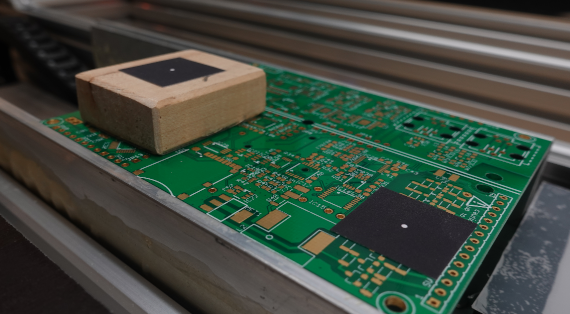
It is OK if its position varies for +/-1mm in X/Y, but the
surface Z needs to be precise, and it is very beneficial
if it matches the surface Z of the PCBs you want to assemble
later.
You will need it again sporadically, but not permanently.
https://github.com/openpnp/openpnp/wiki/Vision-Solutions#calibration-rig
_Mark
Philip Kristoffersen
Thank you for the quick answer!
I think I will 3D print a holder then in which you can socket a piece of PCB for the primary fiducial and then a platform for the second fiducial. That way it will be easy to replicate and reproduce in case you lose it :)
- Philip