
Windows Installer
184 views
Skip to first unread message

Ibrahim Abdelkader
Nov 10, 2014, 7:11:23 PM11/10/14
to
Hey, there's a Windows installer now attached with the latest release:
https://github.com/iabdalkader/openmv/releases/latest
This has been tested on a Windows 7 32/64 bit VM, It takes care of installing all the software, drivers and the IDE.
You'll need to update the firmware first, the installer includes the latest firmware image, located in "C:\Program Files/openmv/firmware/openmv.dfu"
Note: The IDE's built-in firmware updater does NOT support Windows to avoid any conflicts with other ST devices (like discovery boards), ST provides DFU drivers and a GUI util (DfuSe) for updating the firmware, it's really easy to install/use, you can find it here:
Remember it's not possible to brick the board, so don't worry about updating the firmware.

raman...@gmail.com
Nov 20, 2014, 5:02:56 AM11/20/14
to open...@googlegroups.com
Hi,
i upgraded the firmware and used the windows installer on my computers.
the win7 64 computer shows no com port for the pybord instead it's showing openmv under libusb-win32 in the device manager.
the win7 32 computer shows com port but when i press connect in the IDE, i get an error and the board stops working (no blinking).
how can it be fixed ?
Thanks
Roman
i upgraded the firmware and used the windows installer on my computers.
the win7 64 computer shows no com port for the pybord instead it's showing openmv under libusb-win32 in the device manager.
the win7 32 computer shows com port but when i press connect in the IDE, i get an error and the board stops working (no blinking).
how can it be fixed ?
Thanks
Roman
Ibrahim Abdelkader
Nov 20, 2014, 6:38:59 AM11/20/14
to open...@googlegroups.com
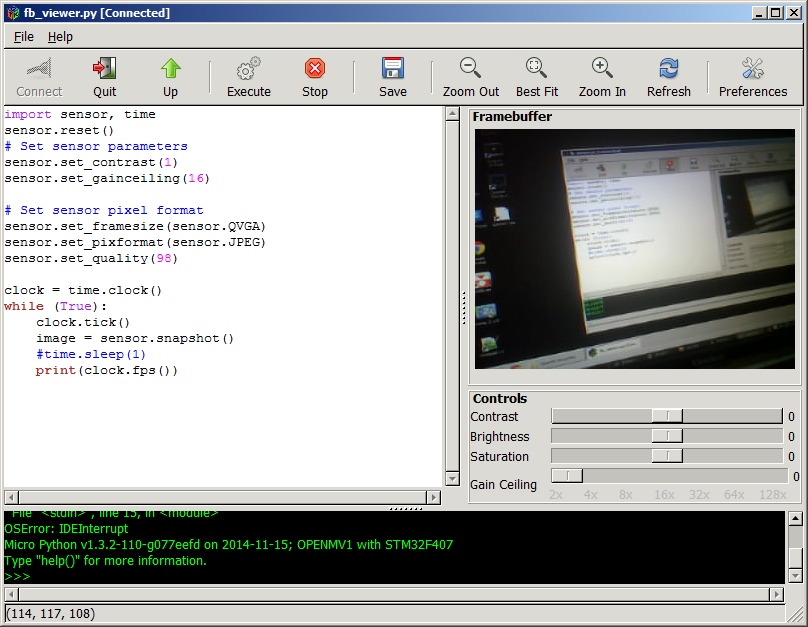
When the IDE is connected it interrupts the running script, so the LED should stop blinking, that's perfectly fine, if the camera is connected the window title should change to "[Connected]", something like this:
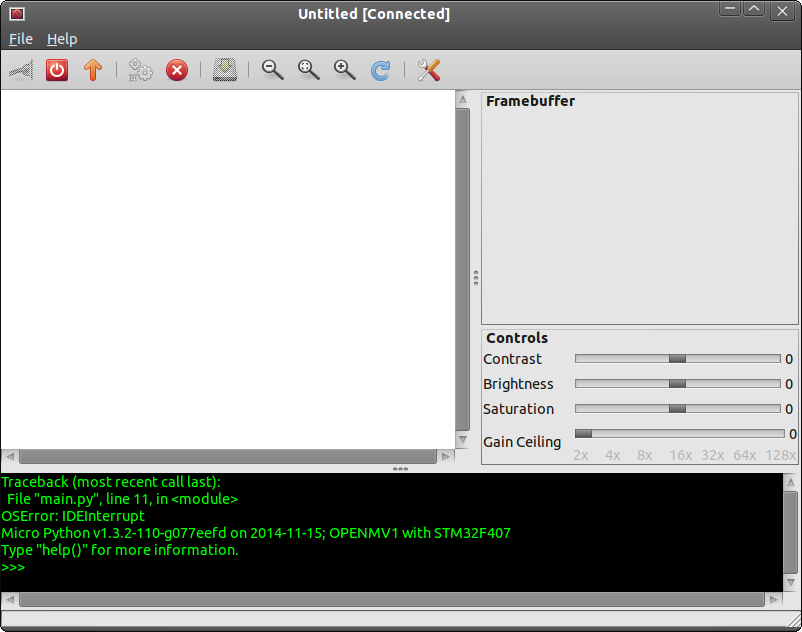
If that's what you're seeing then it's all good and you should try running a script from the Examples menu.
As for the 64-bit, I'm not sure what's the problem, could be an old driver, I updated the firmware and installer 5 days ago btw, make sure you're using that one.

Ruben Kertesz
Nov 24, 2014, 11:20:09 PM11/24/14
to open...@googlegroups.com
I had problems where the com port isn't shown if I don't run the app as administrator. If I run as admin, then the com port is shown but it won't connect when I click connect. On windows 8 it throws me a pop up msg box with a connect error, windows 7 doesn't show anything. They are both 64 bit. (BTW I was going to try python 3.4 but I gave up as there is no pygtk installed for 3.4 - again, that's another story from another thread)
Maybe I have to update my firmware? I tried a whole cadre of different drivers, from the one on the device drive directory, to the one installed by the installer, to one from the libusb wizard.
Ruben Kertesz
Nov 25, 2014, 1:14:45 AM11/25/14
to open...@googlegroups.com
I was able to install the updated firmware! which helped. I did so by jumpering Vout (some people are calling this VCC) and Boot0 (smudgey label). It is in the group of 6 headers.
What happened is that I was able to connect once or twice but the device would panic (red solid light...I assume is a panic) and then disconnect and reset (flash blue).
I tried this on both win 7 and win 8.
Then I went to win 8 and installed the VIC driver and followed the methodology here https://github.com/iabdalkader/openmv/wiki/Windows-Installation
I was able to get this message (attached image) when the device disconnected.
I'm not sure where to go from here.

Ruben Kertesz
Nov 25, 2014, 1:28:22 AM11/25/14
to open...@googlegroups.com
I was able to connect by opening an example and then pressing connect. about 1/2 the time I get an error. The other half I get something like...
Traceback (most recent call last):
File "main.py", line 11, in <module>
OSError: IDEInterrupt
Micro Python v1.3.2-110-g077eefd on 2014-11-15; OPENMV1 with STM32F407
Type "help()" for more information.
>>> Micro Python v1.3.2-110-g077eefd on 2014-11-15; OPENMV1 with STM32F407
Type "help()" for more information.
>>> Micro Python v1.3.2-110-g077eefd on 2014-11-15; OPENMV1 with STM32F407
Type "help()" for more information.
>>> Micro Python v1.3.2-110-g077eefd on 2014-11-15; OPENMV1 with STM32F407
Type "help()" for more information.
>>>
BTW I thought this was an OpenMV2. Is that a newer model you are working on?
Ibrahim Abdelkader
Nov 25, 2014, 2:02:18 AM11/25/14
to open...@googlegroups.com
The firmware must be updated, I changed the USB stuff a lot to make it work on windows, so the latest IDE is not compatible with the shipped firmware (there was no way around that) but I see you already updated the firmware.
This error is okay too:
OSError: IDEInterrupt
It's just an interrupt from the IDE, ignore it, if you press connect and it says connected, you're good, now open an example and press run, you should see something :)
What you have is OMV1 the very first camera, I'm going to test a new one with an external lens/180MHz micro, very soon, this is what we're going to use if we ever do a KS.
PS: I've only tested the SW on a 32/64 bit windows 7 VM I don't have access to a "real" windows machine.
Ruben Kertesz
Nov 25, 2014, 8:27:43 AM11/25/14
to open...@googlegroups.com
I see. Ok thank you very much. So that means that I got communication. What I didn't get is anything displaying on the computer screen after those messages. I'll try it again.
So is it true that I need to use the driver in the device drive for the com port and I should use the stm32 driver on "3" (when using the Python ide)? I think the drivers installed using the beta software are slightly different.
So is it true that I need to use the driver in the device drive for the com port and I should use the stm32 driver on "3" (when using the Python ide)? I think the drivers installed using the beta software are slightly different.
Ibrahim Abdelkader
Nov 25, 2014, 11:35:01 AM11/25/14
to open...@googlegroups.com
Yes the 3rd one is the debugging interface, the manual instructions are a bit outdated, I used libusbK-inf-wizard to generate an installer for the inf an driver in one package and then I run that from the main installer.
You can do the same if you want, generate a libusb driver, I used libusbK-3.0.7.0 or you could just extract the msi and find libusb driver installer.
Ruben Kertesz
Nov 25, 2014, 3:56:21 PM11/25/14
to open...@googlegroups.com
Oh I see. Thank you. Good news is that I am able to run the examples. I do get images up on the gui when using fb_viewer!!!
It works very very very ...very slowly. I get an image about every 10 seconds or maybe less. I also get a lot of gray images.
The debug window is below.
I am running this from the qt app. Any thoughts on why it may be slow like this? The script is vanilla.
Traceback (most recent call last):
File "main.py", line 5, in <module>
OSError: IDEInterrupt
Micro Python v1.3.2-110-g077eefd on 2014-11-15; OPENMV1 with STM32F407
Type "help()" for more information.
>>> Micro Python v1.3.2-110-g077eefd on 2014-11-15; OPENMV1 with STM32F407
Type "help()" for more information.
>>> True
True
True
True
True
23.25581
26.31579
27.27273
27.97203
28.40909
28.57143
28.80658
28.98551
29.03226
BTW to those thinking about using VMs - I was going to take the Linux route. I installed Ubuntu on a VM but then I realized that I couldn't pass through the usb device to Linux through hyper-V. It doesn't let you. If anyone knows better, please tell me what to do. Someone mentioned possibly using RDC but I'm not sure what I would have to enable to do this.
Ruben Kertesz
Nov 25, 2014, 3:59:09 PM11/25/14
to open...@googlegroups.com
One last thing...when I click disconnect, it puts a flood of numbers on the screen, like they've been queued up or something.


Michael Shimniok
Nov 25, 2014, 4:12:13 PM11/25/14
to open...@googlegroups.com
The gtk app is the one you want to use. Ibrahim built cross platform features into the gtk version and also we were seeing problems with the qt app so it didn't make sense to keep it.
Sent from my iPhone
--
You received this message because you are subscribed to the Google Groups "Openmvcam" group.
To unsubscribe from this group and stop receiving emails from it, send an email to openmvcam+...@googlegroups.com.
To post to this group, send email to open...@googlegroups.com.
Visit this group at http://groups.google.com/group/openmvcam.
To view this discussion on the web visit https://groups.google.com/d/msgid/openmvcam/df99bb25-8049-40a4-bd11-d0c666eacb07%40googlegroups.com.
For more options, visit https://groups.google.com/d/optout.
Ibrahim Abdelkader
Nov 26, 2014, 1:02:41 AM11/26/14
to open...@googlegroups.com
The QT IDE had a few problems, we didn't have the time to fix it so I removed it from the repo and it was never released, so you probably have an old git repo too, anyway you should really use the installer, if you're having problems with that, remove everything uninstall the drivers and then try it again.
Ruben Kertesz
Nov 30, 2014, 8:27:33 AM11/30/14
to open...@googlegroups.com
I'm not making any sense. You're right, I have been using the installer built using py2.exe here https://github.com/iabdalkader/openmv/releases/tag/v1.0.3-beta
So, while it appears to work about half of the time, once it stops working I have to close the program and open it again to work. It will just stop connecting unless I do that. On the very surface it appears to be a driver issue. I'll see what happens in the device manager when running the program to see if anything changes there. The reason I suspect something is because I sometimes hear a device disconnected system sound when clicking on connect
So, while it appears to work about half of the time, once it stops working I have to close the program and open it again to work. It will just stop connecting unless I do that. On the very surface it appears to be a driver issue. I'll see what happens in the device manager when running the program to see if anything changes there. The reason I suspect something is because I sometimes hear a device disconnected system sound when clicking on connect
Ibrahim Abdelkader
Nov 30, 2014, 10:15:11 AM11/30/14
to open...@googlegroups.com
That's okay too, the camera disconnects briefly to switches the USB config to debug, it's called a soft-disconnect, again this was the only solution that worked on both Windows and Linux.
Michael Shimniok
Nov 30, 2014, 3:13:42 PM11/30/14
to open...@googlegroups.com
ideally we can youse your experience on document what to expect. maybe we can chat over IM or google chat soon? or even do a hangout so I / we can watch your screen. It will probably go faster that way. I'm in mountain TZ so can do chat during lunch hour or after 5pm.
Sent from my iPhone
Sent from my iPhone
--
You received this message because you are subscribed to the Google Groups "Openmvcam" group.
To unsubscribe from this group and stop receiving emails from it, send an email to openmvcam+...@googlegroups.com.
To post to this group, send email to open...@googlegroups.com.
Visit this group at http://groups.google.com/group/openmvcam.
To view this discussion on the web visit https://groups.google.com/d/msgid/openmvcam/980d022e-b40a-454e-a75b-1532240a57fe%40googlegroups.com.
Ruben Kertesz
Jan 28, 2015, 10:56:41 PM1/28/15
to open...@googlegroups.com
I came home today and tried to see if this would install on windows 10.
It installed but I am getting an error running this... as follows
Traceback (most recent call last):
File "openmv-ide.py", line 258, in connect_clicked
File "openmv-ide.py", line 213, in connect
File "openmv.pyc", line 53, in init
File "usb\core.pyc", line 1199, in find
ValueError: No backend available
File "openmv-ide.py", line 213, in connect
File "openmv.pyc", line 53, in init
File "usb\core.pyc", line 1199, in find
ValueError: No backend available
Traceback (most recent call last):
File "openmv-ide.py", line 258, in connect_clicked
File "openmv-ide.py", line 213, in connect
File "openmv.pyc", line 53, in init
File "usb\core.pyc", line 1199, in find
ValueError: No backend available
File "openmv-ide.py", line 213, in connect
File "openmv.pyc", line 53, in init
File "usb\core.pyc", line 1199, in find
ValueError: No backend available
Also, this happens when I use Either of the following drivers (not sure which is better - you told me but I forgot)
OpenMV USB Comm Port
Pyboard USB Comm Port
I have tried running the program in all sorts of different compatibility modes and with admin permission etc, but nothing works, no matter how many times I click connect.
Let me know if you have any ideas.
I used the latest .exe installer
Michael Shimniok
Jan 29, 2015, 1:58:36 AM1/29/15
to open...@googlegroups.com
Ah, ok. That suggests to me that you
don't have usblib (or the correct one) installed or that Python
can't find it.
Try this, and let me know if that solves the 'backend' error:
sudo apt-get install libusb-1.0-0 libusb-1.0-0-dev
Michael
Try this, and let me know if that solves the 'backend' error:
sudo apt-get install libusb-1.0-0 libusb-1.0-0-dev
Michael
To view this discussion on the web visit https://groups.google.com/d/msgid/openmvcam/0ef2b83b-791e-4b4d-a145-46f0c799152c%40googlegroups.com.
For more options, visit https://groups.google.com/d/optout.
Ruben Kertesz
Jan 29, 2015, 4:07:28 PM1/29/15
to open...@googlegroups.com
This is on windows. Do you want me to get libusb for windows through this (http://www.libusb.org/wiki/windows_backend)?
The installer I used was here which says it is a port of 0.1 (http://sourceforge.net/projects/libusb-win32/files/).
Note that I am trying to run OpenMV on windows at home and linux at work.
Note that I am trying to run OpenMV on windows at home and linux at work.
Ibrahim Abdelkader
Jan 29, 2015, 5:06:01 PM1/29/15
to open...@googlegroups.com
No don't install anything manually, the installer should take care of installing everything needed (including libusb backend), you mentioned Windows 10 ? Again this was only tested on Windows 7 32/64 bit VM I have no idea if it works on Windows 10 or whatever, if you want to try again remove everything you installed first.
I'd focus on getting it working on Linux first should be easier, please let us know what happens exactly when you try on Linux, screenshots would be nice, also when you connect the camera give it a second or two first to mount the storage and then try the IDE.
I'd focus on getting it working on Linux first should be easier, please let us know what happens exactly when you try on Linux, screenshots would be nice, also when you connect the camera give it a second or two first to mount the storage and then try the IDE.
Michael Shimniok
Jan 29, 2015, 6:45:30 PM1/29/15
to open...@googlegroups.com
We spent some time on hangout in Linux.
Right now the most obvious problem is some errors in syslog that
suggest to me that ModemManager may be getting in the way. We ran
out of time before we could try much, but we'll try again.
Meanwhile -- Ruben, can you email me (directly) a copy of /var/log/syslog *after* you plug in the OpenMV Cam?
Michael
Meanwhile -- Ruben, can you email me (directly) a copy of /var/log/syslog *after* you plug in the OpenMV Cam?
Michael
To view this discussion on the web visit https://groups.google.com/d/msgid/openmvcam/f12795d5-6bbf-4146-ad9f-f1a4f3e610ed%40googlegroups.com.
For more options, visit https://groups.google.com/d/optout.
Ruben Kertesz
Jan 30, 2015, 10:53:11 AM1/30/15
to open...@googlegroups.com
A few updates
I got the other one I own to work in linux (not sure why the first one didn't work....except this. I remember that I updated one of the boards to a newer firmware by jumpering some pins and using a tool in windows. I thought it was the one I was testing but today I tried the old one and it worked in linux. Perhaps I got old and new confused but shouldn't both be able to connect in linux anyway? I posted some details and asked how to check firmware number from terminal or from IDE as well, all over in the linux thread (sorry about the cross posting)
As far as windows goes, this board connects for a few moments (usually 3 seconds) and then disconnects. Sometimes I get the STMF3207 showing up in the integrated terminal window at the bottom of the IDE. Most of the time it just connects and disconnects. I had this in windows 7 too but it would usually stay connected after I tried to connect about 7 times. I know win 10 isn't supported but it is curious that it should connect and then disconnect after a few seconds.
Reply all
Reply to author
Forward
0 new messages