
Problem with PHD2/Nexstar "PulseGuide Command to Mount Failed"

Brad Nolan
I am having a lot of trouble with my set up and getting it to guide. I can connect all my equipment in PHD2 however I continually get "Pulse Guide Command to Mount has Failed" and get no movement in my mount.
I can manually slew within PHD2/ASCOM/CPWI but I cannot get guide pulses to translate down to the mount. All drivers and firmware versions are current.
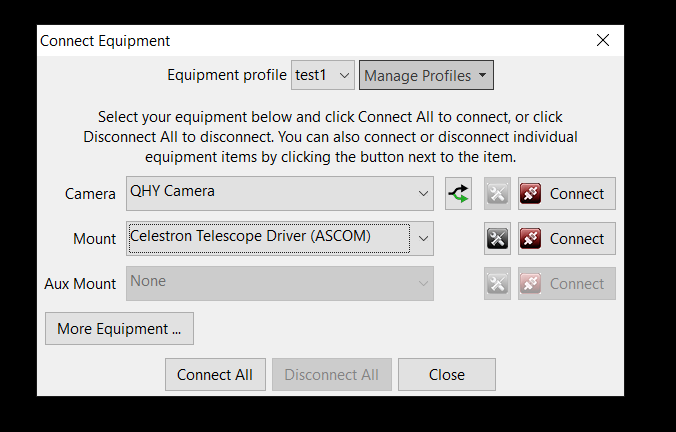
I have the ZWO ASI Camera selected for the Camera and for the Mount I have Celestron Telescope Driver (ASCOM). I tried to change up the configuration and switch to OnCamera for the mount reinstalling the st-4 wire and changing the AuxMount from None to Celestron Telescope Driver (ASCOM) but that was not working either.
Any advise would be appreciated!
Equipment: Nexstar 8SE, Celestron Wedge, Canon t3i, ZWO ASI120mm, William Optics 50mm Guidescope, Starsense HC/Camera, Celestron focuser
RaspberryPi4 -> VirtualHere Server -> Windows
BackyardEos, CPWI, PHD2

Bryan
Brad Nolan

bw_msgboard
The error that’s being returned by the driver is this:
ASCOM Scope: pulseguide command failed: (ASCOM.Celestron) The port is closed.
That suggests the ASCOM driver isn’t configured properly and isn’t using the correct serial port (COM port) for the mount. Have you configured that? It can’t be done automatically and the default value of COM1 is not likely to be correct. You should be able to use the Windows device manager to see what COM port number is connected to the mount. The driver needs to be told that value via its ‘properties’ dialog box.
Good luck,
Bruce
--
You received this message because you are subscribed to the Google Groups
"Open PHD Guiding" group.
To unsubscribe from this group and stop receiving emails from it, send an email
to open-phd-guidi...@googlegroups.com.
To view this discussion on the web visit https://groups.google.com/d/msgid/open-phd-guiding/019ba61a-0067-41b7-9852-e6997ebef1ebn%40googlegroups.com.
Brad Nolan
bw_msgboard
It sounds right but why are you using a device hub – just as a testing tool? If you’re using the device hub as a testing tool, you can probably sort this out in the daytime. Power up the mount, let it initialize, connect to the mount in the device hub, then see if the RA/Dec pointing/site location/tracking information is being displayed correctly. There should be a software version of a hand-controller in the device hub and it should include the pointing position info. You might get more specific answers if you ask on one of the Celestron-specific forums, I’m not familiar with the ins-and-outs of the Celestron mounts.
To view this discussion on the web visit https://groups.google.com/d/msgid/open-phd-guiding/a8221647-35ae-441f-a377-aaae5a6ef95en%40googlegroups.com.
Brad Nolan
Brad Nolan

John Deans
Brad Nolan

David Kerber
CPWI; CPWI is the ASCOM driver for most all Celestron mounts.
>
> *From:*open-phd...@googlegroups.com
> [mailto:open-phd...@googlegroups.com] *On Behalf Of
> *Brad Nolan
> *Sent:* Wednesday, March 10, 2021 11:50 AM
> *To:* Open PHD Guiding
> *Subject:* Re: [open-phd-guiding] Re: Problem with
>
> Thanks Bruce. The complexity of astrophotography
> continues to intrigue me. I opened the ASCOM device
> hub and have now configured the driver for the
> telescope and the focuser. Is this the correct
> location or should I be looking elsewhere?
>
> On Wednesday, March 10, 2021 at 2:43:06 PM UTC-5
> bw_m...@earthlink.net wrote:
>
> The error that’s being returned by the driver is this:
>
> ASCOM Scope: pulseguide command failed:
> (ASCOM.Celestron) The port is closed.
>
> That suggests the ASCOM driver isn’t configured
> properly and isn’t using the correct serial port
> (COM port) for the mount. Have you configured
> that? It can’t be done automatically and the
> default value of COM1 is not likely to be correct.
> You should be able to use the Windows device
> manager to see what COM port number is connected
> to the mount. The driver needs to be told that
> value via its ‘properties’ dialog box.
>
> Good luck,
>
> Bruce
>
>
> *From:*open-phd...@googlegroups.com
> [mailto:open-phd...@googlegroups.com] *On Behalf
> Of *Brad Nolan
> *Sent:* Wednesday, March 10, 2021 11:10 AM
> *To:* Open PHD Guiding
> *Subject:* [open-phd-guiding] Re: Problem with
> --
> You received this message because you are subscribed
> to the Google Groups "Open PHD Guiding" group.
> To unsubscribe from this group and stop receiving
> emails from it, send an email to
> open-phd-guidi...@googlegroups.com.
>
> To view this discussion on the web visit
> <https://groups.google.com/d/msgid/open-phd-guiding/a8221647-35ae-441f-a377-aaae5a6ef95en%40googlegroups.com?utm_medium=email&utm_source=footer>.
> --
> You received this message because you are subscribed to the Google
> Groups "Open PHD Guiding" group.
> To unsubscribe from this group and stop receiving emails from it, send
> an email to open-phd-guidi...@googlegroups.com
> <https://groups.google.com/d/msgid/open-phd-guiding/72572664-e916-42db-a02a-e2d516515033n%40googlegroups.com?utm_medium=email&utm_source=footer>.
Brad Nolan
John Deans
You received this message because you are subscribed to a topic in the Google Groups "Open PHD Guiding" group.
To unsubscribe from this topic, visit https://groups.google.com/d/topic/open-phd-guiding/DMnQcqePjAA/unsubscribe.
To unsubscribe from this group and all its topics, send an email to open-phd-guidi...@googlegroups.com.
To view this discussion on the web visit https://groups.google.com/d/msgid/open-phd-guiding/72572664-e916-42db-a02a-e2d516515033n%40googlegroups.com.
Brad Nolan
On Mar 15, 2021, at 7:09 PM, John Deans <john.d...@gmail.com> wrote:
To view this discussion on the web visit https://groups.google.com/d/msgid/open-phd-guiding/CA%2BnuKNtS%3DaWhwVokOvk7L5pFPoxJxmB%3D%3DWCyVf_1pi7VsnixkQ%40mail.gmail.com.
John Deans



To view this discussion on the web visit https://groups.google.com/d/msgid/open-phd-guiding/F7E7936F-7C95-42D8-AC12-C5203B8D0C26%40gmail.com.
Brad Nolan
John Deans
Good luck. This is a bit of a mystery.
To view this discussion on the web visit https://groups.google.com/d/msgid/open-phd-guiding/980f3dcb-7217-4079-a582-c8f93cf9bf30n%40googlegroups.com.

mj.w...@gmail.com
John Deans
| 1.20.20162 | July-2020 |
To view this discussion on the web visit https://groups.google.com/d/msgid/open-phd-guiding/6495dd62-6081-4dcf-a680-139fa1de20adn%40googlegroups.com.
John Deans


Brad Nolan
John Deans
To view this discussion on the web visit https://groups.google.com/d/msgid/open-phd-guiding/6675c0f6-b920-426b-8e46-f791ddf62a9an%40googlegroups.com.