
2 ASI Cameras Conflicting???
139 views
Skip to first unread message

Dale P
Apr 5, 2021, 11:11:35 AM4/5/21
to Open PHD Guiding
Hello,
I have something that I have been having issues with. Don't know if its a bug or maybe I have a setting wrong but I'm currently using an ZWO ASI294MC Pro for my imaging camera and a ZWO ASI290mm mini for my guide camera.
Prior to the 290mini I was using a Risingtech/Touptech (an off brand of the same 290 sensor) and it was easy to switch camera's setup different profiles for different equipment configurations.
Now with me having my new 290mini I can not have my main imaging camera (294MC Pro) plugged into my computer and I mean that literally otherwise PHD 2 automatically wants to use that camera as the guide camera and I can't get the software to load the correct 290mini profile that I have setup.
All of this actually came transpired by a post I created on Cloudy Nights about a different problem and in the end found out that this was the underlying issue. Here is the link to that post on CN: https://www.cloudynights.com/topic/764299-zwo-290mm-mini-guiding-issue/
After a few suggestions on that thread I was able to get my system up and running but as stated earlier I literally have to disconnect my ZWO ASI294MC Pro from my computer, then PHD 2 allows me to load my 290mini profile, calibrate and then guide. Once that is done then I can go back into SharpCap and start my imaging process.
I have attached my Log as of the lastnight I used my 290mini profile and I used this exact process described to connect my equipment and everything worked great. I just wouldn't think this is how it should have to be done as we all have different imaging configurations we use.
So with all this explained, has anyone had this or similar issue? If so what did you do to fix the issue? Or WHAT THE HECK AM I DOING WRONG? I always expect that I'm the problem.
More FYI, I have updated all my drivers and I have the latest SharpCap version 3.2.6480 and I'm using PHD2 v2.6.9dev4. I was using the prior stable versions to both of these with the same issue so at this point I don't think its a new version bug.
Any help or suggestions are greatly appreciated, and thank you to in advance!
Also thank you for this software!
Dale

Brian Valente
Apr 5, 2021, 11:15:29 AM4/5/21
to Open PHD Guiding
Hi Dale
Thousands of people use 2x ASI cameras, so it does work.
1. are you selecting the correct camera in the ASI ASCOM camera chooser in PHD2?
2. Have you tried using the ZWO native driver in PHD2?
--
You received this message because you are subscribed to the Google Groups "Open PHD Guiding" group.
To unsubscribe from this group and stop receiving emails from it, send an email to open-phd-guidi...@googlegroups.com.
To view this discussion on the web visit https://groups.google.com/d/msgid/open-phd-guiding/c02023b4-f713-42ef-8bd0-4294d9b15634n%40googlegroups.com.
Dale P
Apr 5, 2021, 11:23:30 AM4/5/21
to Open PHD Guiding
Hello Brian,
Yup I know many have this configuration types so thats why I'm figuring that I'm the problem.
Yes in PHD2 right now I have deleted ALL my past profiles so there is nothing in there except my new 290mm mini. When I go to PHD2 and open it up to load the profile if the 294 is plugged into my computer it says I have to create new darks library to use and I have no other options so I have to close out and disconnect my 294 then load, calibrate and guide with the 290 then I can go to SC and do my imaging.
I have installed the the newest ZWO native driver yes.
Dale
Brian Valente
Apr 5, 2021, 11:27:36 AM4/5/21
to Open PHD Guiding
Hi Dale

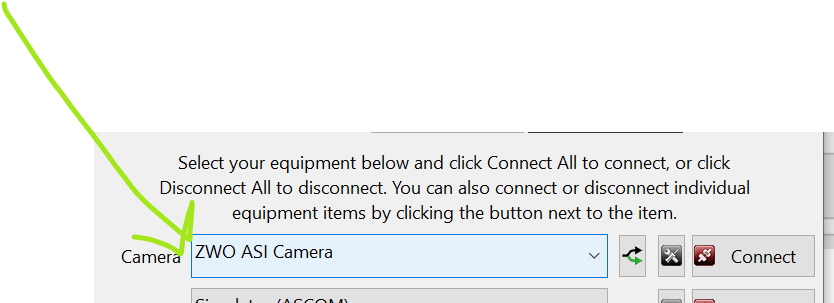
That's great
I'm not referring to the PHD profiles, i'm referring to the camera selection in the ASI driver
have you chosen the correct camera?
And regarding the native ZWO driver, i'm referring to the PHD native ZWO camera option:
To view this discussion on the web visit https://groups.google.com/d/msgid/open-phd-guiding/2c30ca75-6fb5-448d-90c8-211010efef50n%40googlegroups.com.
Dale P
Apr 5, 2021, 11:30:37 AM4/5/21
to Open PHD Guiding
I am currently using: ZWO ASI Camera
I have ASI Camera 1 & 2 (ASCOM) as options. Would this maybe be what I should be using instead of the ZWO native driver???
I didn't see that driver in there before.
Dale
Dale P
Apr 5, 2021, 11:35:46 AM4/5/21
to Open PHD Guiding

Dale P
Apr 5, 2021, 11:38:31 AM4/5/21
to Open PHD Guiding
So if I'm understanding correctly here, each ASI camera that is attached to PHD2 is designated as an ASI Camera 1,2,3 etc ASCOM?
Dale
Brian Valente
Apr 5, 2021, 11:51:07 AM4/5/21
to Open PHD Guiding
Dale

First you choose the driver, then choose which camera connects to it. Have you done that?
To view this discussion on the web visit https://groups.google.com/d/msgid/open-phd-guiding/9781deb2-0f51-4b42-a0da-0879c2beee9fn%40googlegroups.com.
Dale P
Apr 5, 2021, 11:57:32 AM4/5/21
to Open PHD Guiding
I believe so. It worked with the Risingtech/Touptech with no issues, however I'll need to go check out in the observatory here shortly and I'll reply back asap!
Thanks for this! This is one thing I haven't confirmed.
Dale
Dale P
Apr 5, 2021, 2:42:30 PM4/5/21
to Open PHD Guiding
Hi Brian,

Got it! That's exactly what the problem was! I feel so stupid here! Guess that's how I learn. I guess because the 1st guide camera was a different brand it just automatically connected to it because I never had an issue like this before. With 2 of the same where you actually need to specify between the 2 is where I missed it.
Again thanks for taking the time to help save a few strands of hair on my head!!! LOL
I attached my final reconfiguration and I just tested it in my observatory and it works fine now and I have both cameras plugged into the computer and accessed in all software just as I'd use them in an imaging session.
Thanks so much!
Dale
On Monday, April 5, 2021 at 11:51:07 AM UTC-4 bval...@gmail.com wrote:
Brian Valente
Apr 5, 2021, 2:44:18 PM4/5/21
to Open PHD Guiding
Good work Dale - you got it
To view this discussion on the web visit https://groups.google.com/d/msgid/open-phd-guiding/bc7efd11-f794-4c61-aae1-b4fb29381dben%40googlegroups.com.


Richard Beck
Apr 5, 2021, 4:04:04 PM4/5/21
to Open PHD Guiding
Brian,
Is the "ASI Camera (1) (ASCOM)" a "feature" of the ASI driver or a general issue with ASCOM? I love that INDI uses the camera model number in its driver descriptions.
Thanks!
Brian Valente
Apr 5, 2021, 4:22:04 PM4/5/21
to Open PHD Guiding
It's a "feature" of ZWO :)
To view this discussion on the web visit https://groups.google.com/d/msgid/open-phd-guiding/0b623647-d8ce-4daf-ab44-aaa449b0f718n%40googlegroups.com.
Dale P
Apr 5, 2021, 6:13:27 PM4/5/21
to Open PHD Guiding
Thanks again for all your help!
Reply all
Reply to author
Forward
0 new messages